That’s not what I’m seeing. It comes through time after time.
Erm, yeah, that’s the wonder of GitHub, lots of big brains writing code but no documentation. You have to read the source, Luke - particularly rak811.py in the rak811 folder - although the examples are the best place to start and the command line info at the bottom of the main readme gives some hints on what you can expect to be able to do.
That’s going to be a bit tricky to debug - after each send the library runs for a period to look for responses and puts them in to a list which returns the next one each time you get_downlink.
Can you put a print(lora.nb_downlinks) just above the while line so you can see how many messages it actually thinks have come in - the whole block should be immediately after the lora.send
If they really keep appearing, I’d look at putting a serial-USB lead on and doing a manual send to see what an uplink gets you as a set of downlinks.
That’s helpful, thank you. It’s knowing where to look that’s the big stumbling block! I’ve now been able to extract Port, RSSI, SNR and length as well as the data itself.
I don’t know if it’s relevant but I can see the downlink being sent in the TTN console for the gateway. It would appear as though TTN is sending it every time.
Does anyone know how to stop TTN from sending a downlink message again and again?
It doesn’t in my experience - as I said, ideally you need to wire the RAK811 up to a serial lead and use the RAK serial tool or something else similar to trigger an uplink and see what actually comes back.
Or perhaps cross-post to TTN with a screen shot and lots and lots and lots of detail, with a sprinkling of detail - they are all sharks sniffing for blood over there 
Thank you. Given that I can see in the TTN console that a downlink is being sent from TTN every time, is there anything further to be gained by doing what you suggest?
This screenshot shows three consecutive transactions, all showing a downlink being sent:
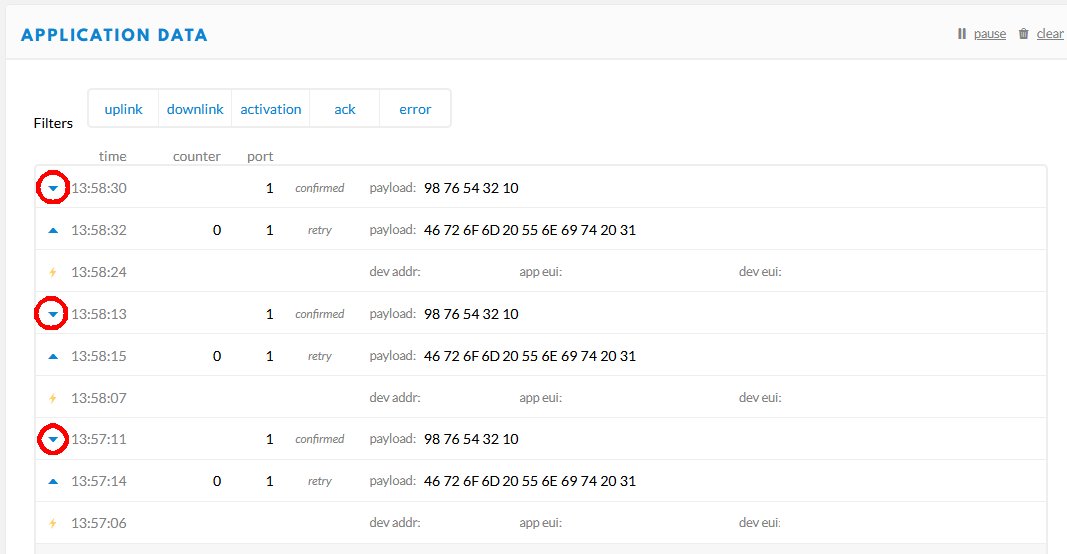
I haven’t scheduled a downlink message since early yesterday.
Bit distracted with a PCB layout here, but off the top of my head, it looks like you’ve got it joining every time, thereby reseting everything on the node? As it won’t have confirmed the downlink that was set to be confirmed (very bad think btw), it may well be in Groundhog Day.
Can you duplicate the lora.send('Hello World') line to see if sending something a few times enables the the confirmation to make it’s way up to TTN.
Ok, thanks. Sending a rak811 send "hi" from the command line seems to have cleared it. Crucially, I can see that a confirm/ack has now been sent:

This wasn’t being sent before.
You’re right, my code sends a join every time, because that’s what’s in the example code (in fact it does a hard reset every time too). I think I understand from what you’ve said that the downlink confirm/ack would normally be sent in the next uplink, but if you do a join (and/or a hard reset) before the next uplink is sent then you lose the flag in the node which says “send a confirm/ack”, the confirm/ack is not sent and the downlink comes down again. Is that about right?
I’m only sending a join and doing hard reset every time because that’s what was in the example code I downloaded. Clearly that code was for people only doing uplinks, something I hadn’t appreciated. How often is a join actually necessary?
Thanks again.
(No rush to reply, please finish your PCB layout!)
Yes
Once every battery change aka once every, ooh, three/four years?
Like many well meaning GitHub offerings, it’s not really documented as we’ve already observed and the example is mildly unhelpful at best and in this case, slightly obstructive. Really it should have had a loop with a 30 minute delay so you can see how it joins and then sits & sends every so often. There’s an implied assumption about knowing what an OTAA join is in the bigger picture.
Onwards & upwards!
Ah! I think I asked about this somewhere ages ago and was told “once per session”. I wasn’t really sure what a session was, so I just left the code alone!
I’m learning that!
I’ll rewrite my code at some point so that it doesn’t inhibit the downlink function.
Thanks again for your help!
There really isn’t anything for you to do - if you use LoRaWAN as intended, you’ll send uplinks and occasionally the library will tell you there is a downlink just after you’ve sent one of your uplinks.
It was the combination of join, send once, turn off that was causing the issue here. That is definitely not normal for a device.
That’s what I meant ie I’ll change the code so it doesn’t do a join for every uplink transmission.
For general testing under these circumstances, ABP is much preferable but you need to turn off the Frame Counter on the TTN web console (or preserve it in your code).
Something else for me to learn about 
At present, the list of things to add to my “Getting started” docs is growing rather than being reduced as I make notes
Off topic, someone else got caught by the DNS issue!
What does the “Confirmed” tickbox on the TTN page actually do? I’m guessing if you tick it then it continues to send it at every opportunity until it receives an ack from the node, and if you don’t it sends it once and once only. Is that about right?
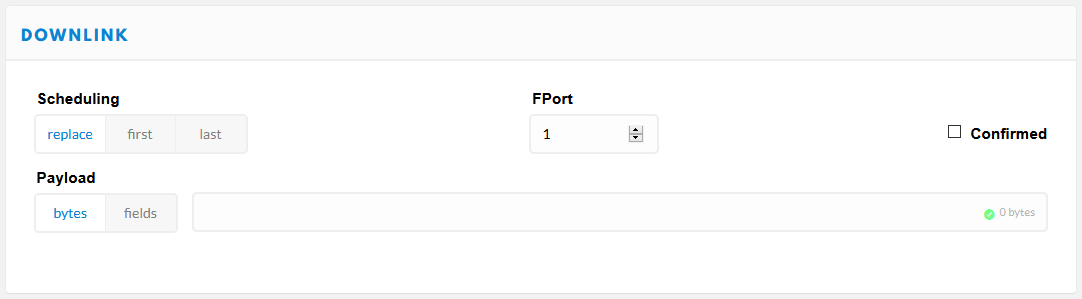
Yes, that is correct but as there is no delivery guarantee, you can get your device / gateway / application in to a tailspin and burn up device battery with the additional transmissions and general mucking about.
Much better to put an id byte in to a downlink that is sent back, preferably tacked on the end of a normal uplink, that lets the application know it’s been received. If the change can be implied, like a change in uplink frequency, then the app could just look for that.
The real culprit in all of this is confirmed uplinks which is implemented in some stacks and not in others - the primary issue is that the gateway has to transmit the ACK and any gateway transmitting is not able to hear anything whilst that is going on. So you potentially burn device battery and take all other devices off the network whilst listening for the ACK.
Much better to track Frame Counts at application level and if absolutely critical, create a downlink for a resend request. At which point I’ll explain why you need to step away from the LoRaWAN and go and play with GSM, NB-IOT, Satellite, carrier pigeon or some other technology - system critical isn’t what LoRaWAN is about and a flood of downlinks are a nightmare.
LoRa can be made to do system critical - as can any other transport mechanism. I use dual channel gateways for P2P - one chip is set to listen all the time with some Channel Activity Detect to cope with varying SF, the other chip can do so as well, but is available for transmission with a suitably socially-isolated antenna so it doesn’t blitz the first chip. Various levels of complicated code can then be invoked to manage transmission slots, counters, resend requests and so forth.
Thanks for this. I will need to study it carefully…