I read for other devices that holding down the “1” key puts it into configuration mode. I’m having no such luck here. I suspect the RUI SDK based firmware that I now have behaves differently.
You are using the updated FW so you are good on that aspect.
Hmm…
Did you update the FW in STM32CubeProg via STlink or via USB connection (USB-UART chip)?
Did you perform an erase in the STM32CubeProg when you updated your firmware? That can refresh the flash if something internally messes up.
Also, the RAK5205/RAK7205 will sleep most of the so when you input AT commands, you should expect a wake-up reply first before you can input any AT command.
On each AT command, you should also send a termination \r\n.
Did you update the FW in STM32CubeProg via STlink or via USB connection (USB-UART chip)?
USB-UART
Did you perform an erase in the STM32CubeProg when you updated your firmware? That can refresh the flash if something internally messes up.
Yes.
Also, the RAK5205/RAK7205 will sleep most of the so when you input AT commands, you should expect a wake-up reply first before you can input any AT command.
I see the wake up reply, just nothing output if I attempt to enter any AT command. Prior to the firmware upgrade, I did see output in relation to AT commands being entered (even though my input characters weren’t echoed back).
On each AT command, you should also send a termination \r\n.
I’m presuming that the screen command is doing that. Again, prior to this firmware upgrade, the AT commands were being received and acted on.
Hi @huntc ,
Your FW is functional because of the replies that you got when you restart the device and the wake up when you send a certain command.
When you use STM32CubeProg to update, did you upload the .hex or .bin?
What’s happening now is that your AT commands on the UART RX are not recognized properly.
Few things in my mind:
- no proper termination on command.
- baud rate is wrong.
- FW issues - bug?
- HW issue - USB-UART related, jumpers not set properly, etc.
If I am in your situation, I will try again to upload the FW but this time using the RAK DFU Tool. With the updated FW, you must now be able to use the RAK DFU Tool.
Btw, the wake up is triggered just by any rising edge on RX pin.
When you use STM32CubeProg to update, did you upload the .hex or .bin?
Hex - nothing would have worked with the bin!
- no proper termination on command.
It wasn’t a problem before. How can I verify?
- baud rate is wrong.
Then nothing would be output from the firmware, right?
- FW issues - bug?
Can you point me to other versions of the firmware in hex file form? I can then try that.
- HW issue - USB-UART related, jumpers not set properly, etc.
Nothing has changed from before.
If I am in your situation, I will try again to upload the FW but this time using the RAK DFU Tool. With the updated FW, you must now be able to use the RAK DFU Tool.
I was able to use the DFU tool. No difference.
Btw, the wake up is triggered just by any rising edge on RX pin.
Thanks. Any further ideas? I appreciate the dialogue.
Hi @huntc ,
You’ve done all the obvious stuff and sadly we can’t still figure it out.
If you have access to an oscilloscope or logic analyzer, I want to give it a try then check the RX pin of the RAK811 itself then decode the signal if something meaningful is really going into it, if the signal is ok and there is still no response the TX pin (by checking the TX pin too and you receive nothing in your PC), it could be a FW bug. But to confirm it, I will try to load again the old FW that you said working before. It is the 3.0.0.12. To do that, you need to upload the bootloader hex (https://downloads.rakwireless.com/LoRa/RAK7205-Tracker/Firmware/RUI_RAK5205_BOOT_Version3_0_2.rar) via STM32CubeProg then upload the FW (https://downloads.rakwireless.com/LoRa/RAK7205-Tracker/Firmware/) via LoRa Button tool - https://downloads.rakwireless.com/LoRa/RAK612-LoRaButton/Tools/RAK%20LoRaButton%20Upgrade%20Tool%20V1.0.zip
Thanks - do you have the hex file just as a zip and not a rar… I can’t decode rar on macOS without installing extra stuff. I appreciate the help, but it baffles me why you’re sending me Windows-based utilities when clearly this issue is about macOS. 
Hi @huntc ,
This might be a sad news but there is no LoRa button tools SW package for macOS.
It will be really helpful if you can try it to a windows PC. Also, we are not really sure if it is an specific macOS issue.
I’m reasonably confident that this not a macOS issue. I used screen for many types of device and all is well. I’ve now even tried a separate serial port program with no luck. There were no problems programming via AT commands with the older version of the firmware.
Shouldn’t I be able to flash RUI_RAK5205_V3.0.0.12.H.T1_Release.bin directly via STM32CubeProgrammer? This looks to me as though it’ll contain the bootloader given that it is about 128KiB in size… I’m trying this, but without success so far.
For macOS, I am using coolterm. I like it because of the auto-record with .txt output.
Sadly, v3.0.0.12 is only the application code. You need upload first the bootloader hex file then use the LoRa button tool to upload the application fw.
OK, but was does the LoRa button tool actually do? I would think it’d flash the application code to a specific location above the bootloader, no?
Yes that’s right.
The specific memory locations of the bootloader and the application code can be found here Low Level Development Reference | RAKwireless Documentation Center
OK, so the application binary should start at 0x8003000 and be of 116KiB in length, according to your documentation. However, the app binary you have supplied is way larger:
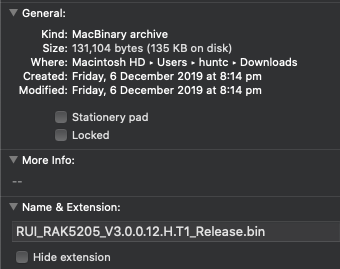
In fact, it is exactly 128KiB, which is the total size of the flash. Hence my impression that this binary contains the bootloader.
Thoughts?
I see your concern. However, we cannot exactly correlate the .hex size to the actual ROM usage. Because it is not the actual size uploaded to it. Hex files are in ASCII format. In theory, you’ll get twice the size of the actual ROM usage because each byte will be represented by 2 ASCII in the hex file.
Actually, if you open the FW V3.0.0.14 you’ll see that the size of the .hex file is 310 kilobytes. Way bigger because it has the bootloader code in it.
I was discussing the bin file, not the hex file. The bin file is a raw image of bytes, right? The RUI_RAK5205_V3.0.0.12.H.T1_Release.bin is 128KiB in size, hence my assertion that it must contain the bootloader as the flash itself is 128KiB in size.
Any more thoughts in relation to my response?
Hi @huntc ,
The V3.0.0.12 has no bootloader. It uses a different bootloader FW as I mentioned above. The bigger size is created because of some padding data. That size is fine 
Thanks for the reply. Sorry to keep pursuing this, but I need to get the device back to V3.0.0.12. “.14” isn’t working for me. I don’t have a Windows machine; just Unix. There must be a way… I’m able to flash and interact with many types of microcontrollers and, honestly, I can’t believe I’m having so much difficulty with this one. Anything you can do to help further is greatly appreciated.
Hi @huntc ,
Sadly, there is no work around on the old RAK LoRa Button tool since it only runs in Windows. The new RAK DFU Tool solves that issue so it runs now on different OS platform. But the FW was changed too to include the bootloader and application FW in one .hex file. The V3.0.0.12 bin file can only be uploaded via the RAK LoRA Button tool.
That’s unfortunate and surprising. This RAK device is of no use to me. I’ve appreciated your help, but I will not look at RAK for any more devices.