Excepting that you are transmitting on a teeny tiny antenna that’s being picked up by a honking great sensitive antenna which will then transmit at about the same power as your node, to be picked up by its teeny tiny antenna. So, just in case you’re sat in a Faraday cage, do this outside the car or any buildings and certainly away from the Bletchley RSGB shack with its many radio devices doing who knows what at any point in time. Also, you don’t know if the gateway is 100% - it could be transmitting on reduced power or on a laggy network that means it transmits the join acknowledge too late.
There’s not much more detail to be had from the TTN console join request - if it heard a valid one, it will send back the details. Ideally you want a gateway where you can see what it is doing - like receiving the join acknowledgement from TTN and transmitting that for the node to receive.
However, as you now have two nodes to try, I’d travel hopeful.
In the meanwhile, I now seem to have a use for about 200 PCB’s that ended up surplus to a project. I can make up a test-a-gateway node in a small box to help sanity check such situations …
Just a thought. On the TTN page for my device there is a button against the dev_eui, the app_eui and the app-key to change the endianness of the bytes (msbyte first or lsbyte first). This has made me wonder: in what order should should these bytes be put into the python code? In all three cases I have put the most significant byte on the left, least significant byte on the right, no spaces. Could that be relevant?
I’ve only once had to swap from the default msb to using lsb for a particular software setup - if you just copied using the little clipboard button you should be good to go.
Once you have got a setup that works, it will be easier!
Hi, I’ve been back again this morning with two units and a few different antennas. Without exception, the join_otaa command times out after five minutes without completing. This means that my code never moves on to attempt to send my message. Instead it bombs out with a timeout error.
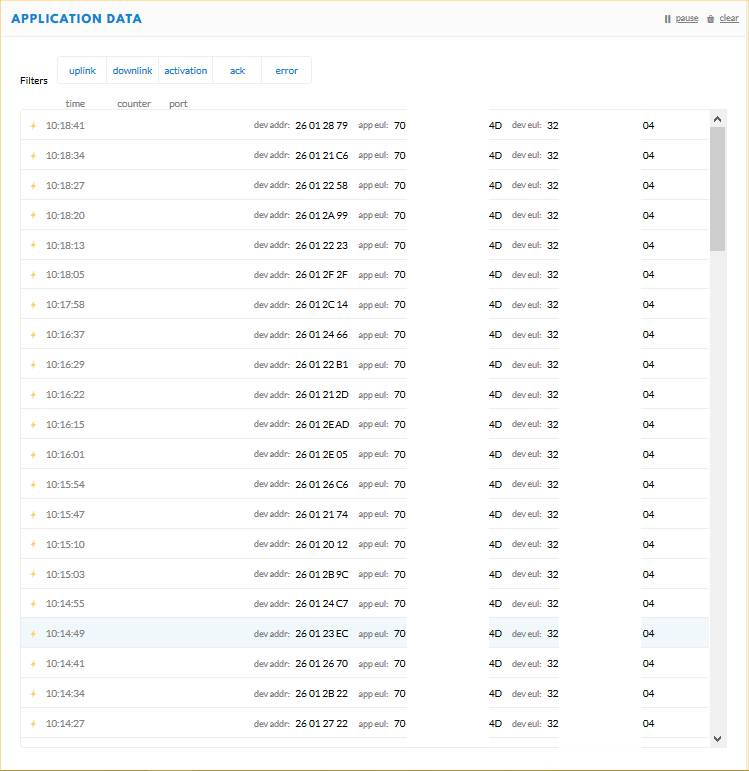
This screenshot shows (21 of) the 32 individual attempts to join.
All 32 of the individual attempts that form a join_otaa command are getting through to the gateway. -78dBm is a good strong RSSI, so there’s plenty of signal in hand (and there should be - I’m right by the gateway!).
I can only see two possibilities:
(a) the gateway is not responding
(b) the gateway is responding but my devices aren’t picking it up.
(b) seems unlikely because my transmissions are getting through so well. The path loss, antenna gains, tx power are same in the downlink direction as in the (succesful) uplink direction so I’m struggling to believe its a lack-of-signal issue. So that leaves me with (a). Can you see anything in the screenshot or the captured data that suggests what might be wrong?
Hello @aal7 did you ever manage to get this to work. I am the owner of the gateway that you are nearby and periodically google its id to see if it’s been used for anything interesting. Would be great to know if it has worked for you.
Hello @greglangford. Thank you for getting in touch. If you are the owner of the Newton Leys gateway then that’s fantastic because I’ve been hoping to talk to you! The short answer is no, I never got a message through that gateway. Monitoring my TTN account live while the join requests were happening, I could see the individual join requests, but it looked like they never suceeded because my device never moved on to send its “real” message. I tried twice at Newton Leys and the same thing happened both times. Subsequently I tried another gateway at Duston in Northampton, which was successful. If you have any thoughts as to what might be the isuue I’d love to hear from you. Best wishes.
I am actually not sure what could cause that, I have not tested it myself as another project came up since installing the gateway. At some point it has transmitted 282 messages randomly one weeked, I can’t remember what date but maybe that is when you were trying.
I just checked the configuration and it all looks valid according to the documentation on the things network website. I have also just updated the firmware so it might be worth another shot now?
I do periodically see traffic arriving mostly for other networks but the odd things network packets do arrive, mostly though they appear to be dropped with the message no brokers. I assume this is because whatever application has been configured for those devices is not responding correctly.
You are more than welcome to come and try the gateway again, id actually be really interested to see how far the range is on it as I have mounted it outdoors and up high on purpose to increase the range.
Hi @greglangford. Thank you for this. When I had little success with my pHat at NL, I decided to purchase a commercial LoRa device to try. That should be here soon. I plan to return to NL with that and my pHat at some point. It would be great if we could hook up (even if it’s only by phone) when I do that test. Do you think that would be possible? Strangely, my original intention was to find out the range, but I never got a message through when parked right on the doorstep (according to the TTN map, anyway) so I never really did any range trials! By the way I wasn’t there on a weekend, so those 282 messages you saw probably weren’t me.
@aal7 sure that would be great, i will send you my number so we can co-ordinate when you decide to try the gateway again. I can even login to the TTN console and show you what is being received by the gateway if that helps at all?
@aal7 actually it seems I can’t send a message on this platform, drop me an email on greg [at] langford.me, change the brackets and at with the correct symbol just obscured it on here to stop bots picking it up.
That would imply the gateway is not connected to a TTN network server which would do the responding. The application server would pass the message on to the destination setup for it. Neither the application server nor the end users destination would provide a response to an uplink but the end users systems may chose to send a response as a downlink message which would happen later on.
Mostly gateways are only connected to one network server.
Hello to all, i’ve played in the past with a rak5205 self contained module and im pretty much have some experience with the ttn, dev_eui, otaa etc.
In the meantime i’ve purchased a pHat on top of a Pi4B.
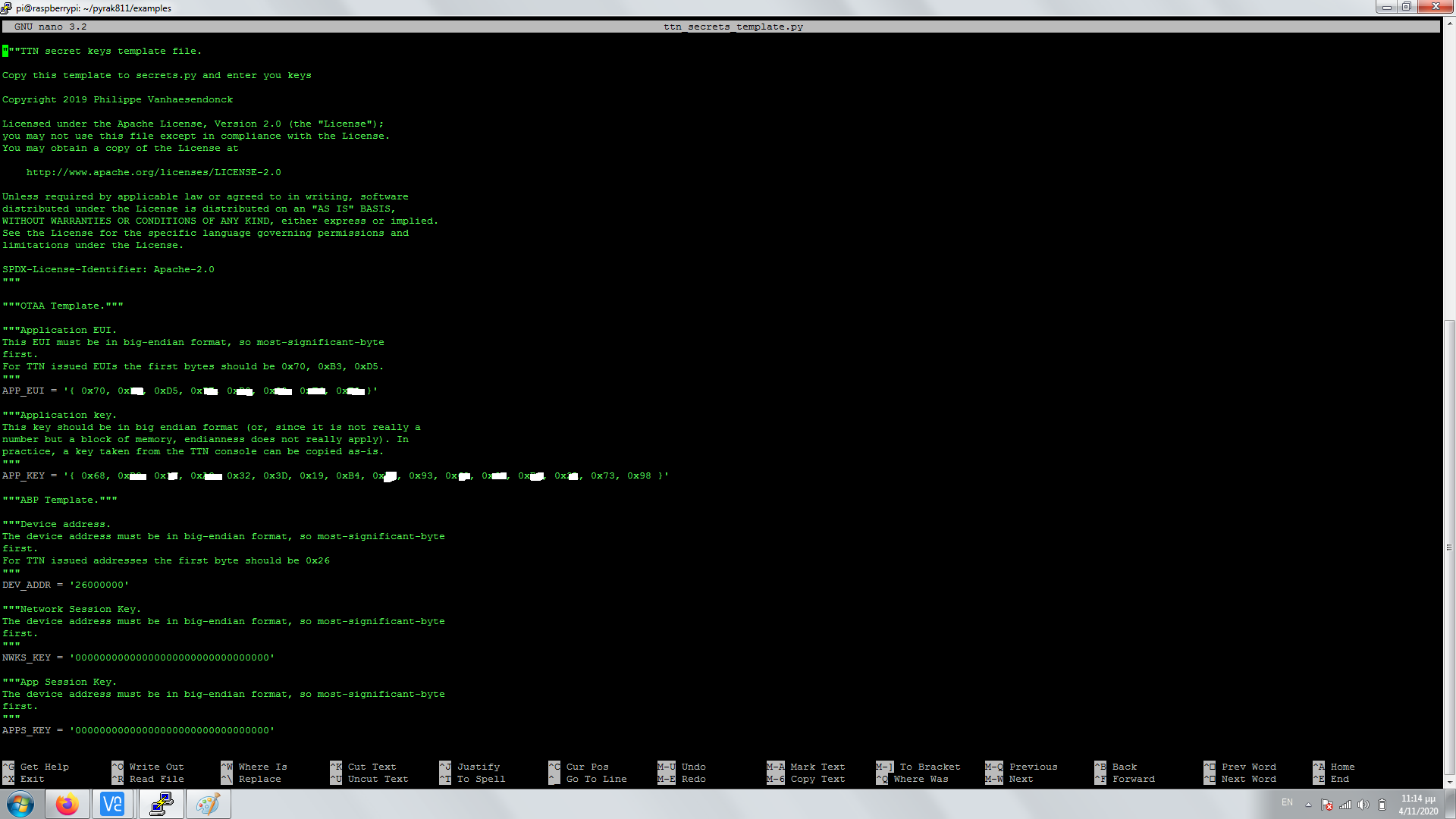
Already had made the hello world example and executed it with a SETUP responce to the console. Though my node never had seem a connection in TTN. Further down to the example i also installed the repo and added the keys in sudo nano ttn_secrets_template.py and the copied them to cp ttn_secrets_template.py ttn_secrets.py.
As im new to this approach, does the above screenshot in big endian format is a good input for quotes and brackets, seems legit? Also how the above is relevant to the Hello world example, there seems to add only plain numbers for eui and keys from TTN.
In the end when i execute the sudo python3 otaa.py
pi@raspberrypi:~/pyrak811/examples $ sudo python3 otaa.py
Setup
Traceback (most recent call last):
File “otaa.py”, line 34, in
lora.mode = Mode.LoRaWan
File “/usr/local/lib/python3.7/dist-packages/rak811/rak811.py”, line 289, in mode
self._send_command(‘mode={0}’.format(value))
File “/usr/local/lib/python3.7/dist-packages/rak811/rak811.py”, line 224, in _send_command
response = self._serial.get_response()
File “/usr/local/lib/python3.7/dist-packages/rak811/serial.py”, line 140, in get_response
‘Timeout while waiting for response’
rak811.serial.Rak811TimeoutError: Timeout while waiting for response
One last the sticker ontop the pcb has a different eui than what reports with the rak811 get-config dev_eui
Firmware OK2.0.3.0␍␊ under cutecom
It’s incredibly hard to read - if it’s text, why not copy & paste it here?
It does look like you’ve put in a hex array and my local dev copy just has it as a hex string - what was the format when you opened the original template file?
And how did you install it.
The GitHub repros for RAK811 Python support are way out of date even though they are appear to be up to date. The original AmedeeBulle and PiSupply developers must have some seriously old firmware and Amedee uploaded the AT command pdf from two years ago just this Sept.
Consequently the command being set on line 289 is no longer at+mode=0 but should be at+set_config=lora:work_mode:0.
Even with this change, other commands will probably need changing and if it’s like the RAK Arduino library, it will stop at this point whilst the module restarts.
Odd thing is, I’ve clearly run this on a Pi, I guess it was about a year back before the time of the Great Firmware Update.
“”“Application EUI.
This EUI must be in big-endian format, so most-significant-byte
first.
For TTN issued EUIs the first bytes should be 0x70, 0xB3, 0xD5.
“””
APP_EUI = ‘{ 0x70, 0xa3, 0xf5, 0x1E, 0xf0, 0x02, 0xF6, 0xE8 }’
“”“Application key.
This key should be in big endian format (or, since it is not really a
number but a block of memory, endianness does not really apply). In
practice, a key taken from the TTN console can be copied as-is.
“””
APP_KEY = ‘{ 0x78, 0xc3, 0x1F, 0xf3, 0x32, 0x3c, 0x19, 0xc4, 0xE6, 0x63, 0x62, 0x63, 0xB6, 0x2A, 0x73, 0x98 }’
Should be of this format in the section were you edit the ttn_secrets_template.py?
Should i update the firmware, got a responce in github of not doing so as it will break the code current firmware is based on.
I actually made it working with the following out of AmedeeBulle example and not pi supply one
rak811 -v reset lora
LoRa reset complete.
$ rak811 -v set-config app_eui=70B3D5xxxxxxxxxx app_key=xxxxxxxxxxxxxxxxxxxxxxxxxxxxxxxx
LoRaWan parameters set
$ rak811 -v join-otaa
Joined in OTAA mode

but i get a very slow response, i dunno if its an uart issue or a gpio re-config.
Not quite sure what this means, but as the current firmware requires a string of hex characters, not a string that would define an array of bytes in C and the template has it has a string of hex characters, I’m pretty sure 0x70, 0xa3, 0xf5, 0x1E, 0xf0, 0x02, 0xF6, 0xE8 should be 70a3f51Ef002F6E8. Just like you typed in to the command line.
The GitHub code would only work with firmware that’s a couple of years old, certainly not the v3 firmware commands. Seems odd to ask people to downgrade rather than have them make it v3 compatible… When did you get your module?
Seconds or minutes - slow is relative - an OTAA join will take around 10 seconds all told, assuming it all works first time.
Hello Nick, i just got the module brand new from Pi Supplies shipped 5 days ag to work on an edge project.
Just asked you for the ttn_secrets_template.py as it has this instruction for applying th app_eui.
“This key should be in big endian format (or, since it is not really a
number but a block of memory, endianness does not really apply). In
practice, a key taken from the TTN console can be copied as-is.”
Well if i run the sudo python3 otaa.py it takes minutes to execute, i dunno if anything has to do with the GPIO/Uart side
That block of text applies to the App Key, not the EUI. And that block of text is just copied from other unrelated libraries and is a bit misleading when it says it can be copied “as-is” - the TTN Console defaults to showing it as a hex string, not a C array. The PyRak library passes the value directly on to the module without any processing, so it has to be a hex string. Just as you do with the command line. The command line calls the same code to operate.
That is glacially slow - I’ll see if I’ve still got a PiSupply HAT in it’s box from some I bought last year and see if I can replicate the situation.
Well im going to update the hex values as the TTN implies, in the mean time im playing around with the GPIO subject to tell if thats the reason. Often the device gets busy in the console as it gets too much time to execute/ often with timeout errors. By the way in the TTN data i can see the activations everynow and then.
one update, running the instructions you mentioned about hex format of the App_eui and app_key in hex running an otaa.py
Gave me the following:
Setup
Joining
Sending packets every minute - Interrupt to cancel loop
You can send downlinks from the TTN console
Send packet
Send packet
Setup and joining was instant, to the last send packet responoce in console was in between 7± minutes.
at+ uart in cutecom within raspian in /ttyAMA0 gave 115200 8 0 0 0. Dont know if i can tweak something there.