Hello to all, i’ve played in the past with a rak5205 self contained module and im pretty much have some experience with the ttn, dev_eui, otaa etc.
In the meantime i’ve purchased a pHat on top of a Pi4B.
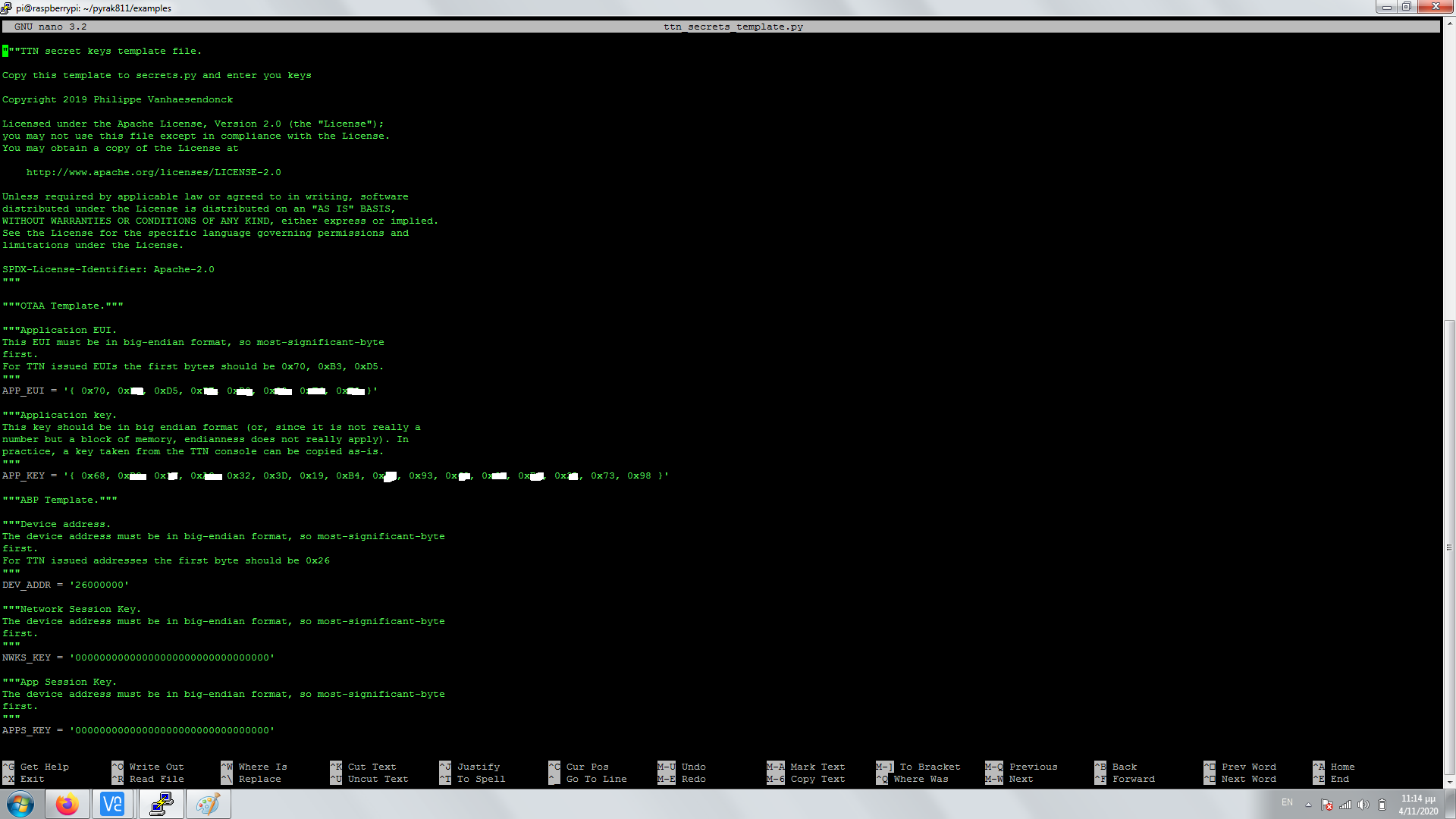
Already had made the hello world example and executed it with a SETUP responce to the console. Though my node never had seem a connection in TTN. Further down to the example i also installed the repo and added the keys in sudo nano ttn_secrets_template.py and the copied them to cp ttn_secrets_template.py ttn_secrets.py.
As im new to this approach, does the above screenshot in big endian format is a good input for quotes and brackets, seems legit? Also how the above is relevant to the Hello world example, there seems to add only plain numbers for eui and keys from TTN.
In the end when i execute the sudo python3 otaa.py
pi@raspberrypi:~/pyrak811/examples $ sudo python3 otaa.py
Setup
Traceback (most recent call last):
File “otaa.py”, line 34, in
lora.mode = Mode.LoRaWan
File “/usr/local/lib/python3.7/dist-packages/rak811/rak811.py”, line 289, in mode
self._send_command(‘mode={0}’.format(value))
File “/usr/local/lib/python3.7/dist-packages/rak811/rak811.py”, line 224, in _send_command
response = self._serial.get_response()
File “/usr/local/lib/python3.7/dist-packages/rak811/serial.py”, line 140, in get_response
‘Timeout while waiting for response’
rak811.serial.Rak811TimeoutError: Timeout while waiting for response
One last the sticker ontop the pcb has a different eui than what reports with the rak811 get-config dev_eui
Firmware OK2.0.3.0␍␊ under cutecom
It’s incredibly hard to read - if it’s text, why not copy & paste it here?
It does look like you’ve put in a hex array and my local dev copy just has it as a hex string - what was the format when you opened the original template file?
And how did you install it.
The GitHub repros for RAK811 Python support are way out of date even though they are appear to be up to date. The original AmedeeBulle and PiSupply developers must have some seriously old firmware and Amedee uploaded the AT command pdf from two years ago just this Sept.
Consequently the command being set on line 289 is no longer at+mode=0 but should be at+set_config=lora:work_mode:0.
Even with this change, other commands will probably need changing and if it’s like the RAK Arduino library, it will stop at this point whilst the module restarts.
Odd thing is, I’ve clearly run this on a Pi, I guess it was about a year back before the time of the Great Firmware Update.
“”“Application EUI.
This EUI must be in big-endian format, so most-significant-byte
first.
For TTN issued EUIs the first bytes should be 0x70, 0xB3, 0xD5.
“””
APP_EUI = ‘{ 0x70, 0xa3, 0xf5, 0x1E, 0xf0, 0x02, 0xF6, 0xE8 }’
“”“Application key.
This key should be in big endian format (or, since it is not really a
number but a block of memory, endianness does not really apply). In
practice, a key taken from the TTN console can be copied as-is.
“””
APP_KEY = ‘{ 0x78, 0xc3, 0x1F, 0xf3, 0x32, 0x3c, 0x19, 0xc4, 0xE6, 0x63, 0x62, 0x63, 0xB6, 0x2A, 0x73, 0x98 }’
Should be of this format in the section were you edit the ttn_secrets_template.py?
Should i update the firmware, got a responce in github of not doing so as it will break the code current firmware is based on.
I actually made it working with the following out of AmedeeBulle example and not pi supply one
rak811 -v reset lora
LoRa reset complete.
$ rak811 -v set-config app_eui=70B3D5xxxxxxxxxx app_key=xxxxxxxxxxxxxxxxxxxxxxxxxxxxxxxx
LoRaWan parameters set
$ rak811 -v join-otaa
Joined in OTAA mode

but i get a very slow response, i dunno if its an uart issue or a gpio re-config.
Not quite sure what this means, but as the current firmware requires a string of hex characters, not a string that would define an array of bytes in C and the template has it has a string of hex characters, I’m pretty sure 0x70, 0xa3, 0xf5, 0x1E, 0xf0, 0x02, 0xF6, 0xE8 should be 70a3f51Ef002F6E8. Just like you typed in to the command line.
The GitHub code would only work with firmware that’s a couple of years old, certainly not the v3 firmware commands. Seems odd to ask people to downgrade rather than have them make it v3 compatible… When did you get your module?
Seconds or minutes - slow is relative - an OTAA join will take around 10 seconds all told, assuming it all works first time.
Hello Nick, i just got the module brand new from Pi Supplies shipped 5 days ag to work on an edge project.
Just asked you for the ttn_secrets_template.py as it has this instruction for applying th app_eui.
“This key should be in big endian format (or, since it is not really a
number but a block of memory, endianness does not really apply). In
practice, a key taken from the TTN console can be copied as-is.”
Well if i run the sudo python3 otaa.py it takes minutes to execute, i dunno if anything has to do with the GPIO/Uart side
That block of text applies to the App Key, not the EUI. And that block of text is just copied from other unrelated libraries and is a bit misleading when it says it can be copied “as-is” - the TTN Console defaults to showing it as a hex string, not a C array. The PyRak library passes the value directly on to the module without any processing, so it has to be a hex string. Just as you do with the command line. The command line calls the same code to operate.
That is glacially slow - I’ll see if I’ve still got a PiSupply HAT in it’s box from some I bought last year and see if I can replicate the situation.
Well im going to update the hex values as the TTN implies, in the mean time im playing around with the GPIO subject to tell if thats the reason. Often the device gets busy in the console as it gets too much time to execute/ often with timeout errors. By the way in the TTN data i can see the activations everynow and then.
one update, running the instructions you mentioned about hex format of the App_eui and app_key in hex running an otaa.py
Gave me the following:
Setup
Joining
Sending packets every minute - Interrupt to cancel loop
You can send downlinks from the TTN console
Send packet
Send packet
Setup and joining was instant, to the last send packet responoce in console was in between 7± minutes.
at+ uart in cutecom within raspian in /ttyAMA0 gave 115200 8 0 0 0. Dont know if i can tweak something there.
Huh? TTN doesn’t imply anything. TTN provides a number of ways of copying the data depending on the destination format.
This part of the discussion was derived from copying the EUI’s & keys as C byte arrays and not as a hex string. The values at the command line were working, albeit slowly, just use them.
The example script uplinks once a minute - does the TTN Console show them arriving every 60 second, even if the console takes a little while to refresh?
The CuteCom result is per spec, I’d personally not ‘tweak’ anything there - the library assumes those settings.
Nope, not even close to 60 seconds, the activation was 20 mins ago ( by the way, not a reception issue i guess as i have and running a rak5205 in the same room)
That may be the problem - if the gateway and devices are too close together, they can overload each others input stages, particularly the gateway as the concentrator has 8 channels to listen on and you can end up with cross-talk between channels that confuse the whole chipset.
So, as it’s stupidly easy to do, can you put some distance (10m) or a brick wall between them.
OK, to be clear, ANY radio devices need some separation.
So your RAK811 HAT and the gateway should be 10m apart or in different rooms.
This is part of a range of standard answers and as it’s a really easy thing to try, please do. Sometimes it fixes the majority of the problems instantly, like this:
Gateway is about 3-4 km away, we gone out of focus i think. Is just the slow in console and execution and hence a result in TTN. Could a newer firmware might be a solution?
It’s becoming obvious from some reports on the TTN forum that there is some networking & processing issues. You may want to come back to this tomorrow to give TTI a chance to sort things out.
Hopefully a RAK staffer can confirm, but I suspect setting the config resets the uplink frame counter.
So the command line you tried, it used the last join info & frame counter, sent the message and all was good.
Your code snippet doesn’t have a loop, are you running it multiple times before you get data uploaded? If so, then as you are developing, I’d turn off frame counter checks. This will give you more info:
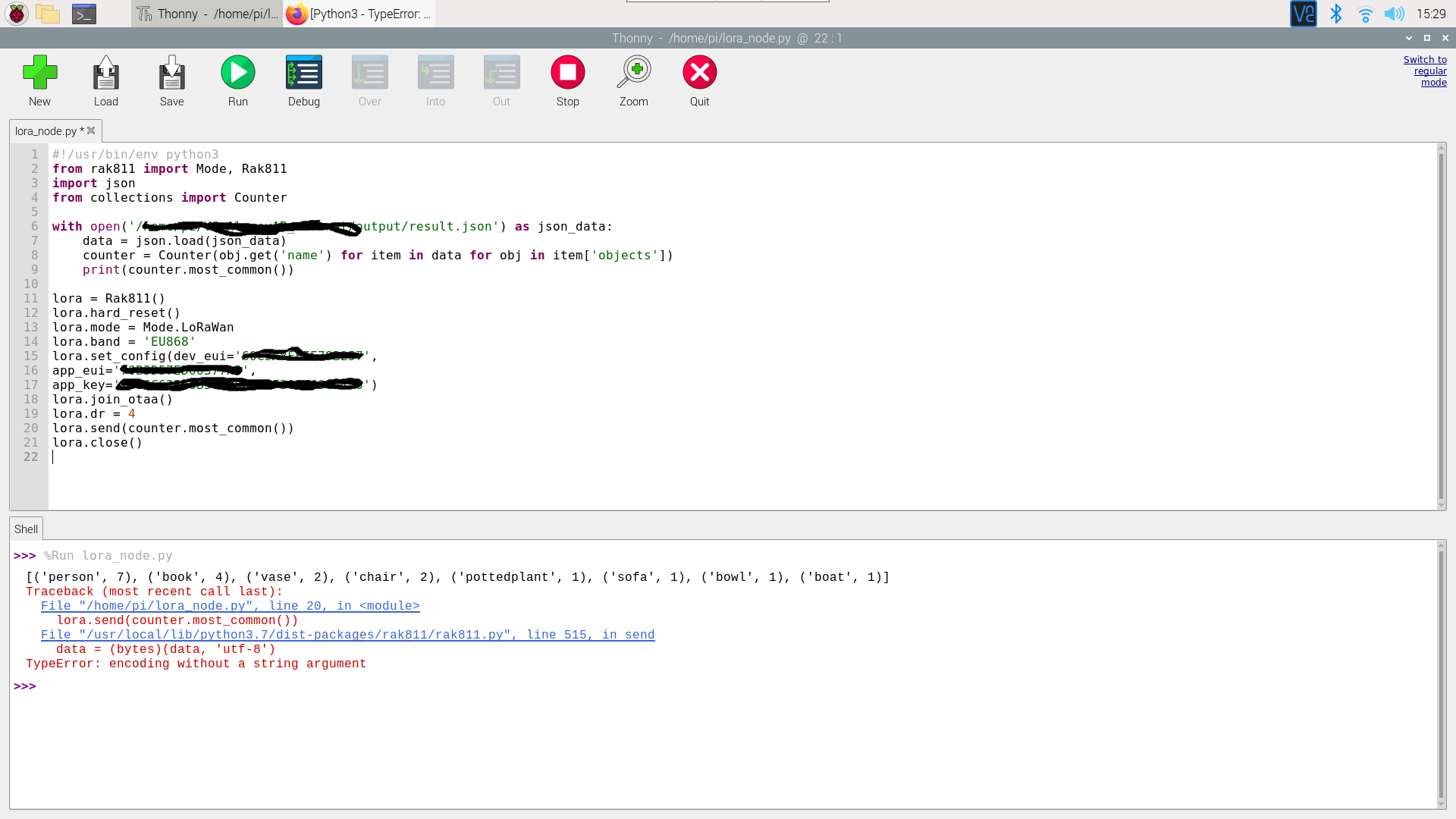
I finally overcome most of the problems as range/coverage ones. While my python knowledge isn’t top notch im trying to sent something parsed out of a JSON file. How is the correct syntax on having an uplink after a print variable?
On line 9 i have my print function were it prints the output of a JSON file narrowed to what i need. How will i convey this at lora.send without the error of line 20?