In fact, when you talk about LoRa transmission you need to analyze both directions: uplink and downlink.
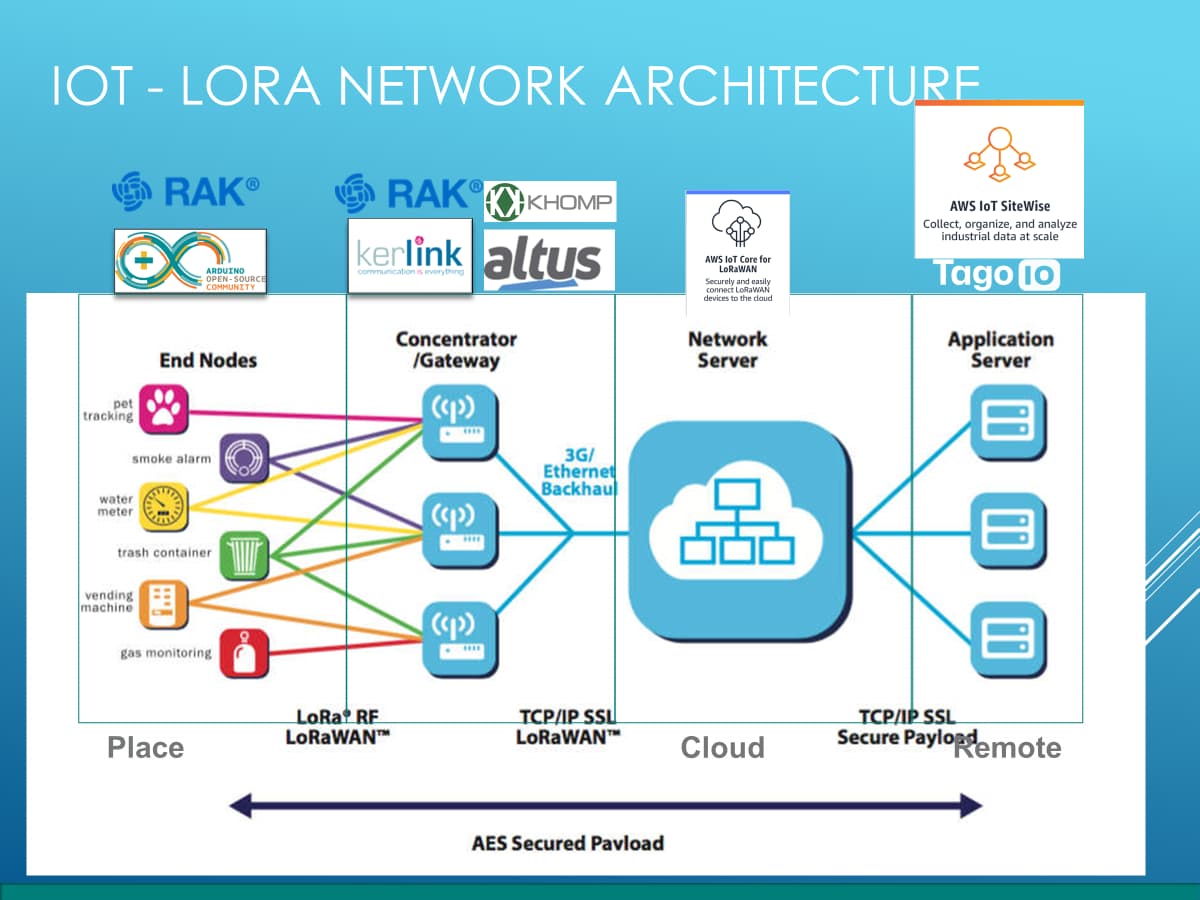
Uplink you will see in the LoRa Server (at least RSSI, SNR and SF) . What is your LoRa Network Server? AWS IoT Core for LoRaWAN or TTN…
Download you will see at your device the same parameters: RSSI, SNR and SF.
What is you LoRAWAN Gateway? How far it is from your device?
My LoRa server is AWS IoT Core. I don’t believe I know how to find the server-side RSSI and SNR on that platform. At my device, the RAK Sidewalk Starter Kit using PCB antennas, 3 meters from an Echo Show 5, my performance looks like this when I test from home:
The second test is done while parked approximately 80-100 meters from my house. I can confirm that both the Amazon Test Kit and the Nordic Dev Kit both successfully communicate with the server at this distance, but the RAK Module does not. At this distance I’ve also tried using an external antenna, but unfortunately that didn’t help.
Any help/guidance you could provide would be greatly appreciated!
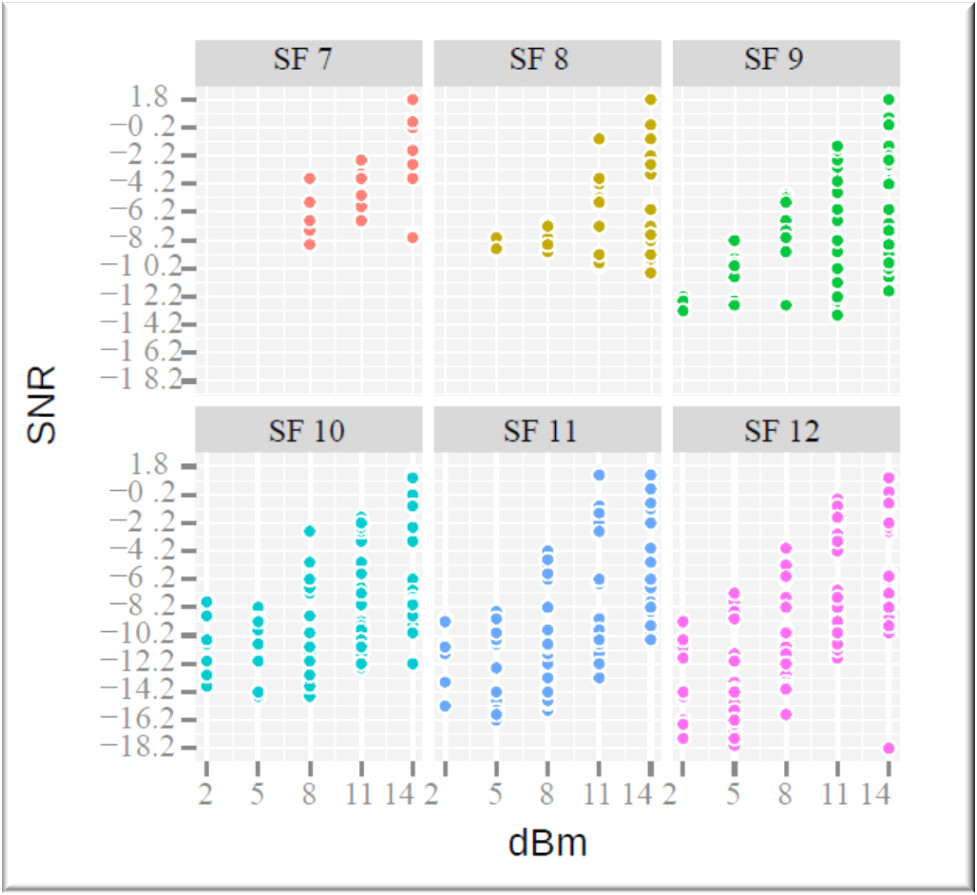
Let´s take a look how what kind of relationship that you can expect between SNR x RSSI. In many cases too much power can cause a lot of problems. The power (RSSI) should be what the device need to do the job based on applications requirements. In the end of the day, a good SNR is one of the key of your success.
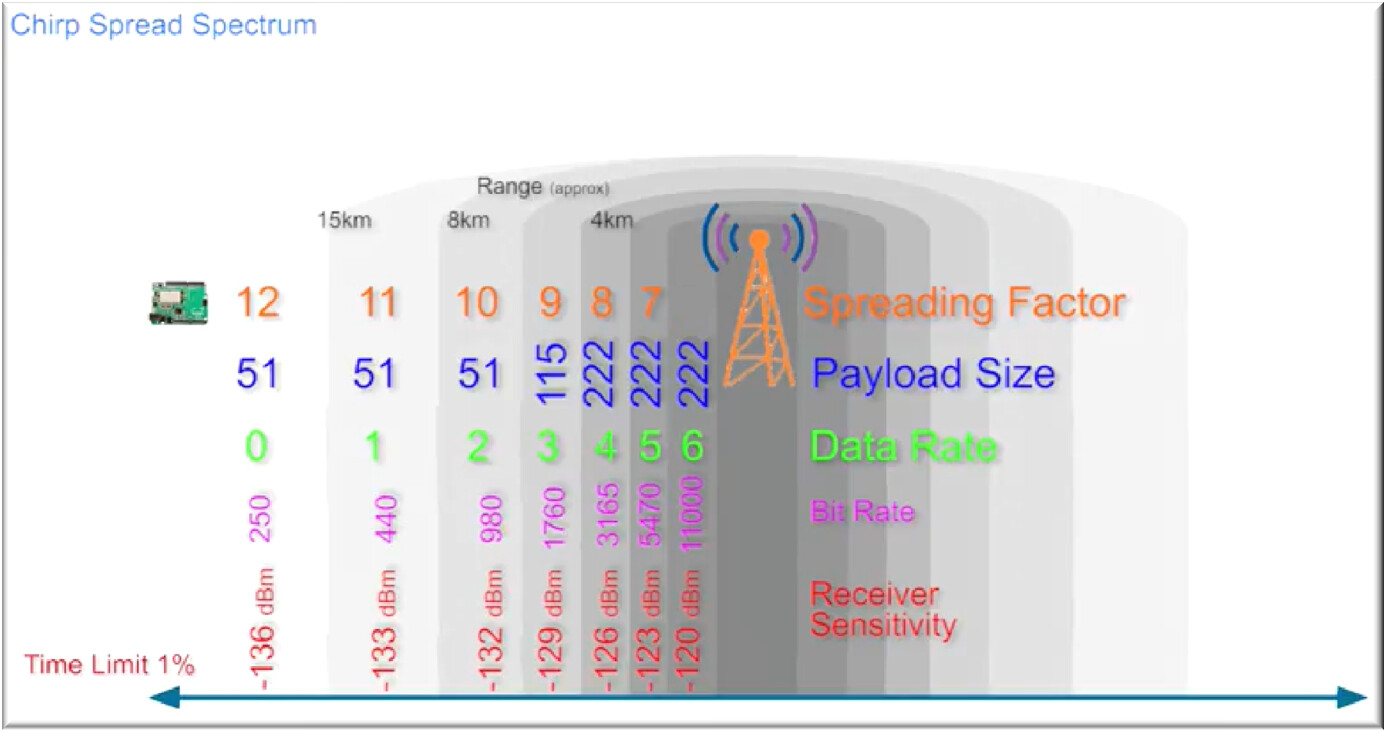
In the figure, each dot is a transmission with success. The SF means that 7 is the faster transmission and 12 is the slower. When you have the ADR (adaptive data rate), the device will adjust the SF for higher or lower data rate following the success or the failure in a transmission. For example, if your device try to do a transmission with SF7(faster) but a lot of packages was lost, the ADR will reduce the data rate, in other words, increase the spreading for the next transmission, for example do SF8. If the ADR is enable, the adjustment cycle will continue for all transmissions. The behavior can be good for mobile device, because the transmission scenario will change all the time, but for stationary device (no changes in the distance between the endnode and the gateway), if you see a continuous changes, you will need to analyze if you have problems in the connectors, cables and antennas. The ADR job you can see in the figure above .
@jose_ota At this point we were not able to pinpoint anything in the RAK that was causing it have the connection issues. What we did find is that by testing out some new antennas we were able to get a similar RSSI to that of the Nordic Dev kit. This is the antenna we are going with: Antenna. We bought a handful and most of them seemed to help improve the RSSI with this one seeming to be around the best. I would say order one of these and see how it works for you.
I also went as far as to order the RAK19007+RAK4631 starter kit to make sure it wasn’t just our board and I can confirm on the RAK starter kit the results are identical to the custom board we have made.
If you happen to find anything else that improves your range results let me know. Thanks.
It’s good to know that I need to reduce power if I’m close to the gateway. It’s worth noting that when I’m close to the gateway (3 meters) I don’t encounter any issues. I only encounter issues when I’m farther away (100 meters).
I only get RSSI and SNR values while successfully testing close to the gateway (3 meters). The values I get are RSSI -123 and SNR -18. When I’m testing from farther away (100 meters) I don’t get any values because it never connects, so the console doesn’t show any info. Unfortunately the SF is never shown in any of the console information as far as I can tell.
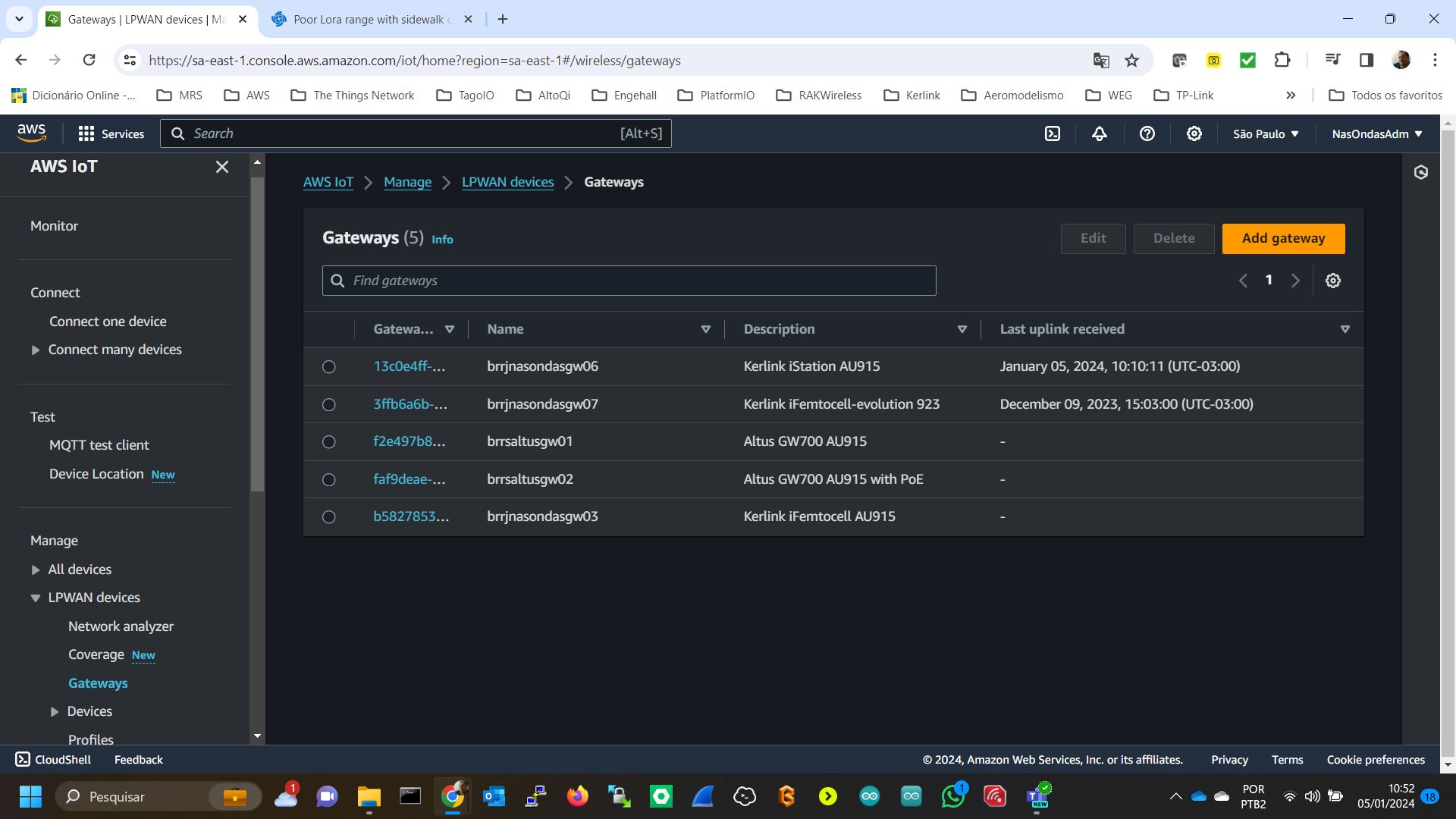
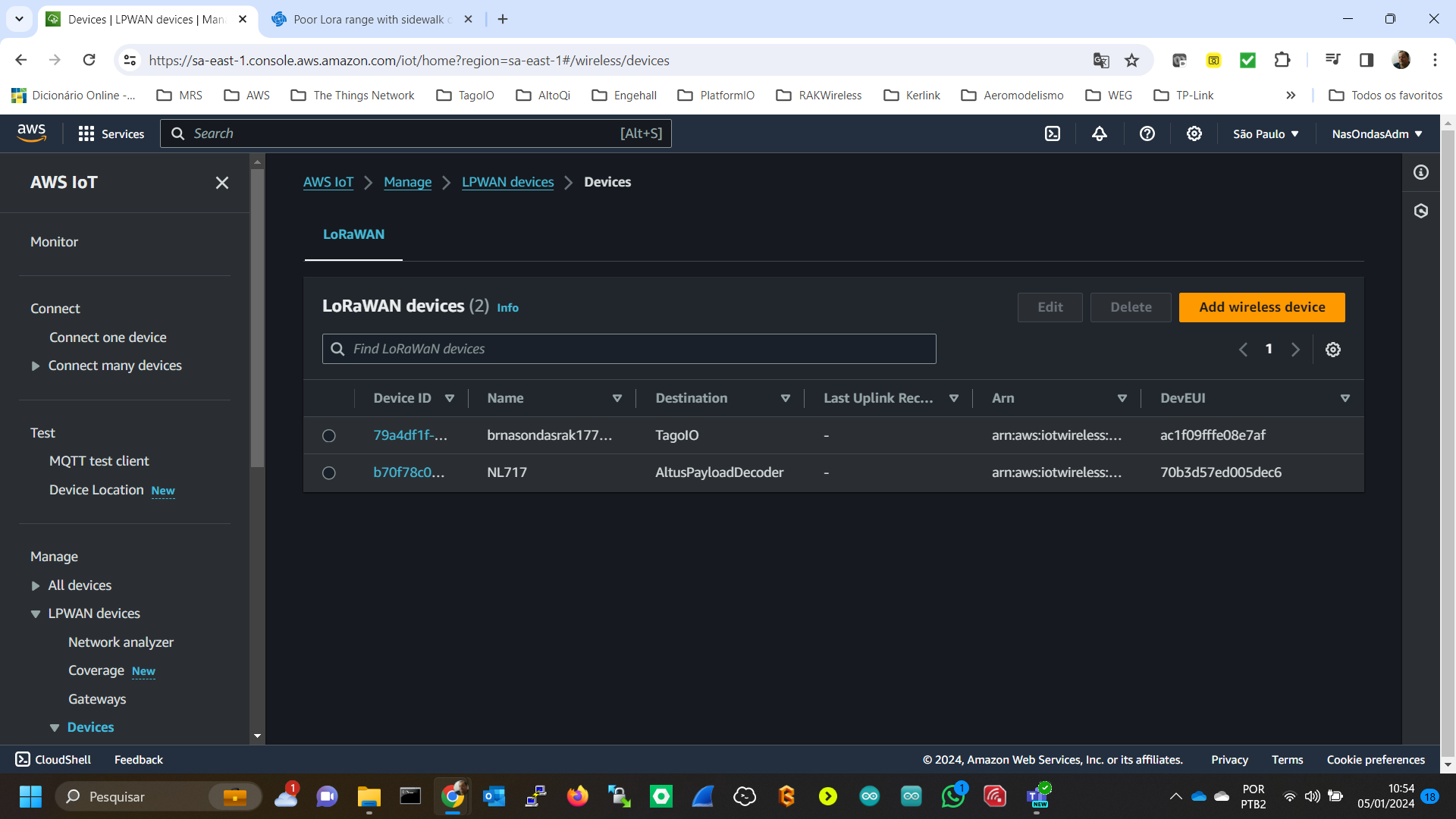
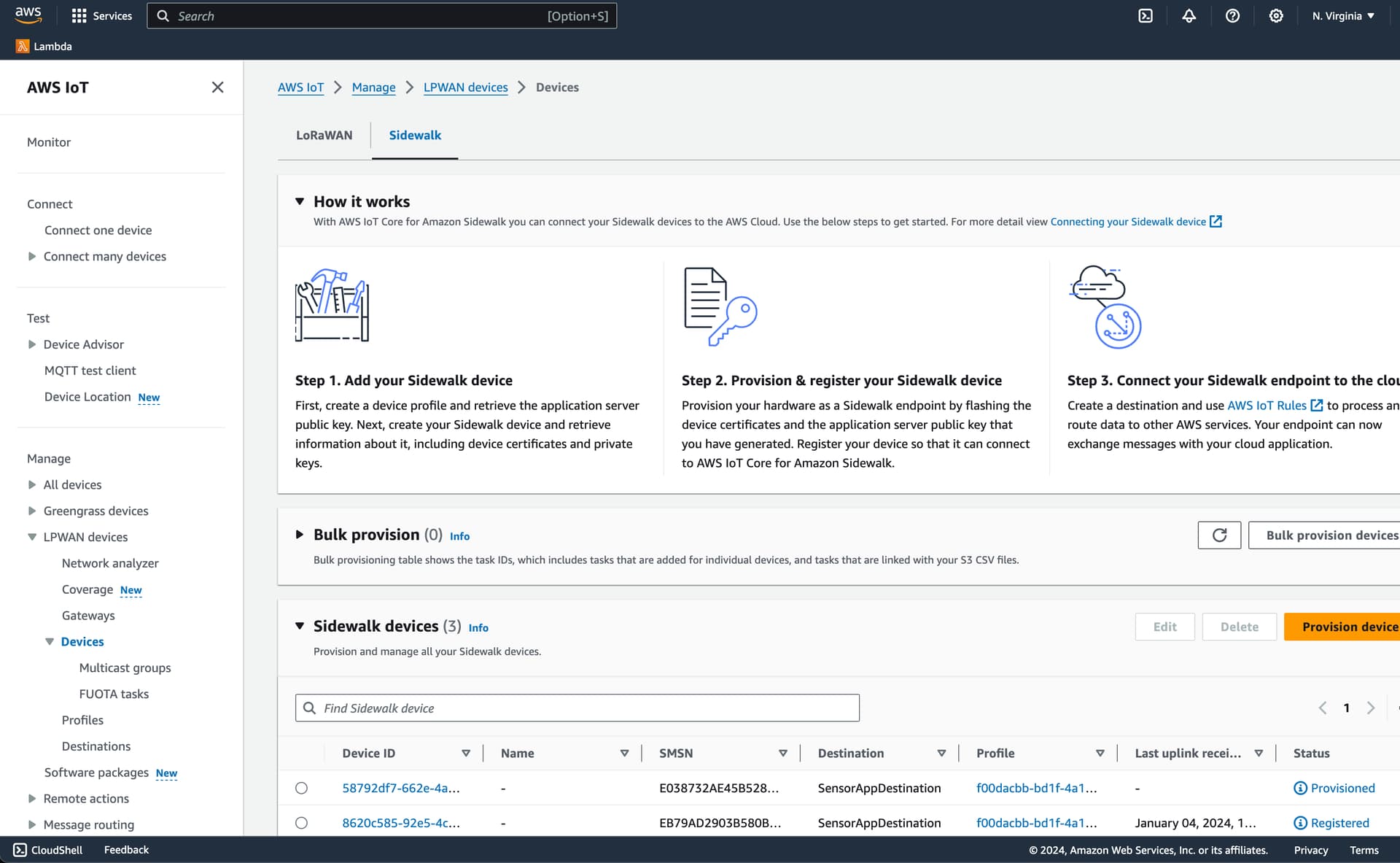
As for your questions around configuring AWS IoT Core for LoRaWAN, I haven’t configured this in the way your screenshots show. I believe I misspoke earlier when I said my LoRa server is AWS IoT core, what I really meant to say is that it’s AWS Sidewalk. I have configured the devices in the following way.
@lukevawkes thank you for the antenna recommendation! I’m glad you were able to find a suitable antenna. We went through four different options and didn’t see improved performance so I had lost hope. I’ll order the one you suggested and see how we do!
I have some updates regarding my experiments with ground planes that might be worth sharing. I did a small experiment using the RAK Sidewalk Starter kit hooked up to the RAK PCB antenna 3 meters from my Amazon Echo. Using this “stock” configuration I was getting an SNR of about -18. I then used two very short jumper cables to hook up the WisBlock’s two ground pins to the ground pins of a separate PCB that has a large ground plane. Immediately after doing this, the SNR improved to -9. I then swapped in the external antenna using the IPEX-SMA adapter and the SNR improved to -1! This felt like strong evidence that suggested that the RAK module did in fact need a larger ground plane.
With that in mind, I’ve begun designing our custom board (around the RAK4630) using a large ground pour in one of the layers (approximately 100mm x 50mm). We briefly considered going away from the RAK module and started looking at separate modules for the NRF and the Semtech. I found a device called the BMD-340 the incorporates the NRF. Page 26 of its data sheet suggests a ground plane of this size, which led me to believe that the RAK may also need a ground plane of this size.
The size is much too big for our final custom solution, but I’m moving forward with making the custom board for the purposes of experimentation. Did you find that the ground plane in your custom solution made a difference, or was it a non-factor?
First of all, the numbers that you are showing, the meaning is that you have a poor reception:
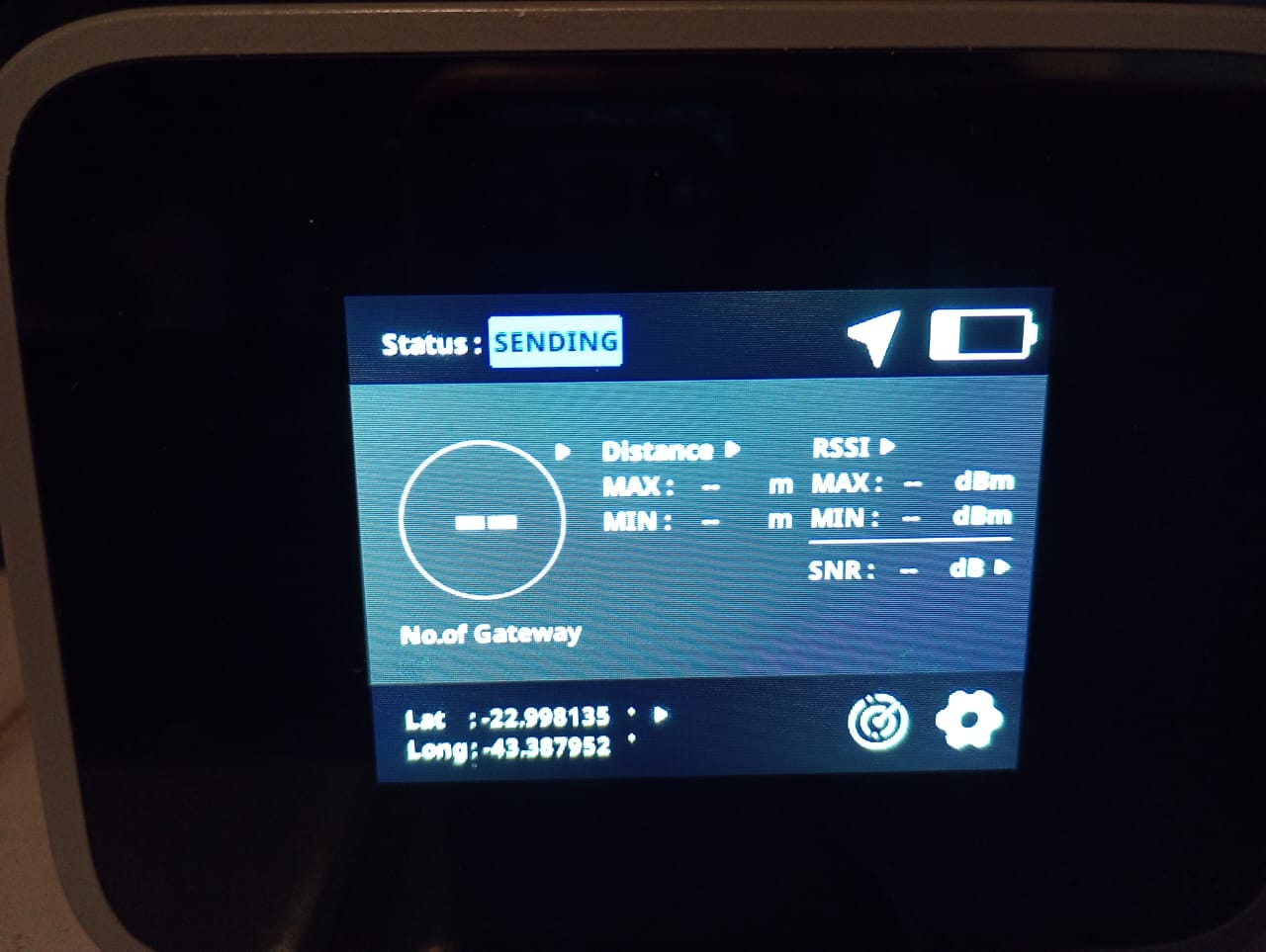
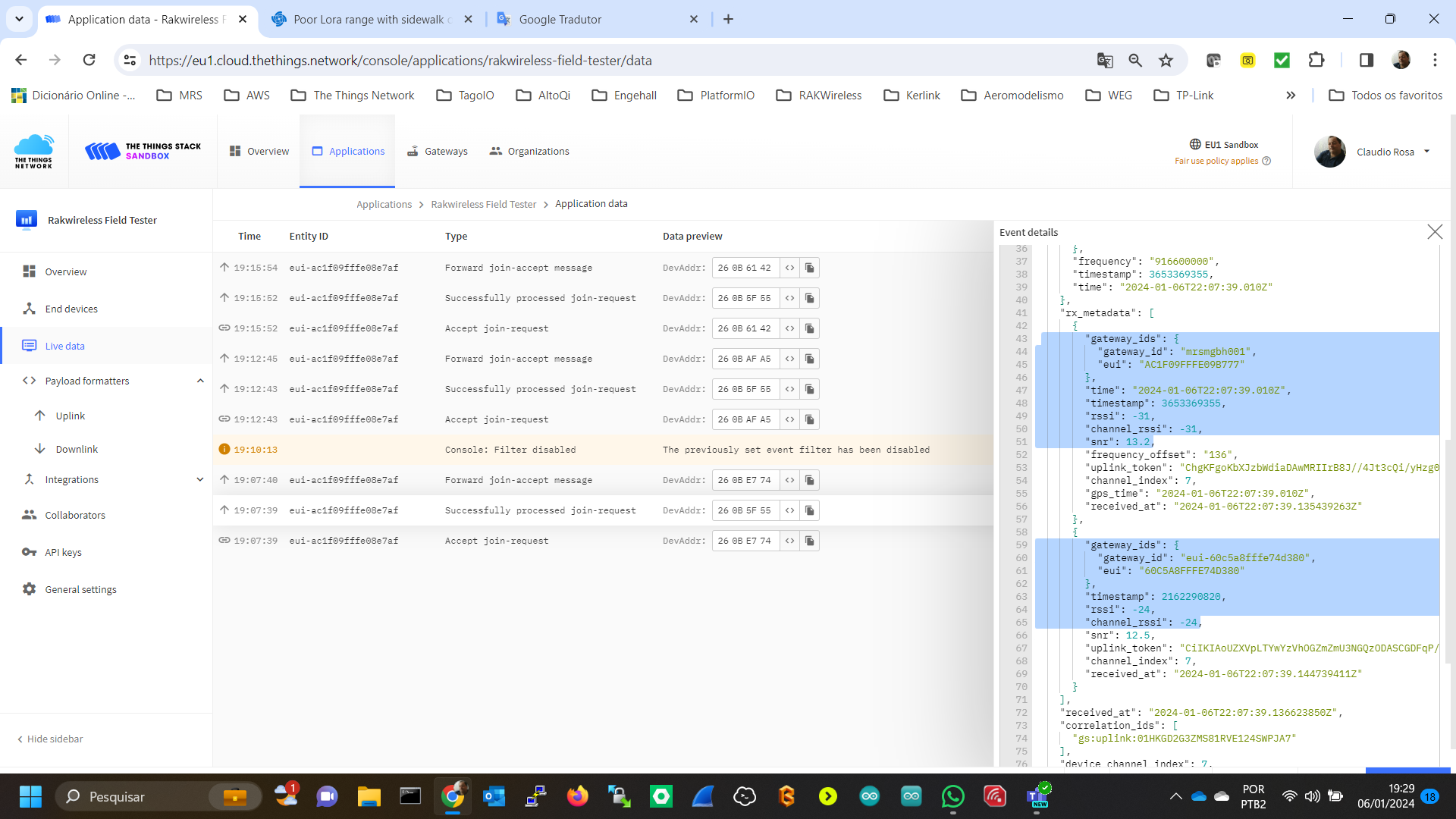
I have two LoRaWAN gateways 5 meters far from my Field Tester at home:
your device RSSI= -123dBm => my device at GW1 RSSI=-31 dBm , at GW2= -24 dBm => the ADR is disabled
your device SNR= -18 dB , my device at GW1=13.2 dB , at GW2= 12.5 dB
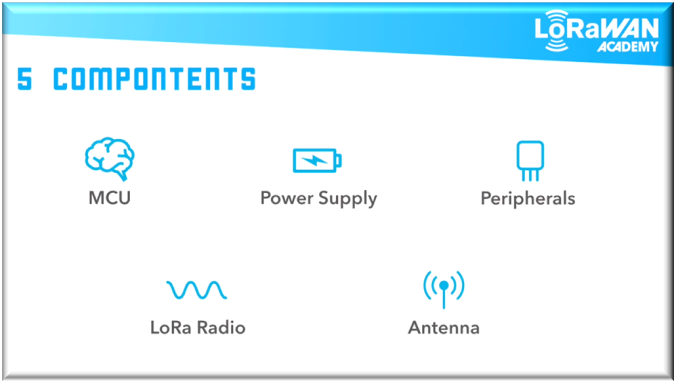
As we can see in the IoT concepts in a endnode we have 5 components, and for each one, requirements that they should be verified if they are in compliance with the requirements:
MCU: microcontroller unit
Power Supply: a battery or a kind of power supply
Peripherals(sensors/actuators): in my casa a GNSS/GPS sensor
LoRa Radio: our external interface for network connectivity
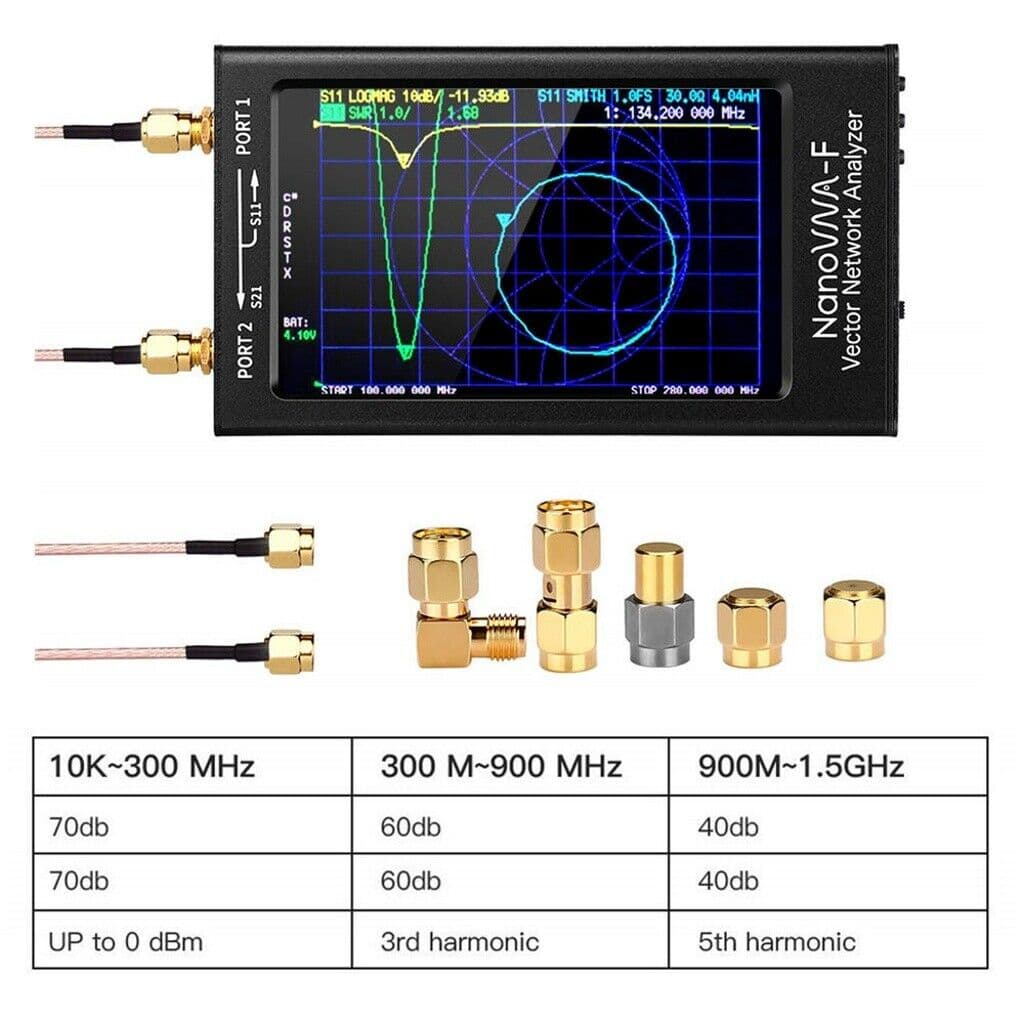
Antenna: it should be compliance with the frequency. In my case for Brazil AU915=915-928 MHz. In the case of VNA - Vector Network Analyzer, the “V” graphic should be how much is the attena reflection. I mean, the antenna should absorv as much as possible between 915-928 MHz. This graphic means the antenna project perform.
I did lots of antenna testing for LoRAWAN. The ideal scenario when testing across hardware is to use the same antenna. Ideally use a 6" whip antenna, similar to what the gateways use, the bottom half of that antenna acts as a ground plane which helps remove the ground plane differences of the module + PCB. Range testing should be done at the edge of the network, should be done on the same ADR, same TX Power and same channel. All those recommendations help remove lots of external factors when comparing across hardware. Random note: There will always be asymmetry between edge node and gateway when you are at the edge of the network so dont worry too much that you get -15 SNR but the gateway is at -5 SNR.
Another random comment, When I am too close to the gateway in LoRAWAN, I found that sometimes the center frequency shifts because its so powerful and too close that the gateway thinks its on another channel and you get weird artifacts like -120 RSSI and -12 SNR even though you are like 5 feet away.
@crmrosa I just want to thank you again for your very thorough answers. The information is incredibly helpful and I’m learning a lot!
I agree that there’s definitely something wrong and I have poor reception. I should definitely be seeing a much better SNR being so close to the gateway.
I’m wondering if something is wrong with the Amazon Echo Show device that I’m using and it’s not actually acting as an Amazon Sidewalk Gateway. I’m going to disconnect it and do some additional testing to try to better understand what might be happening.
Thank you for the breakdown of components for the endnode. I am using the RAK Starter Kit for Amazon Sidewalk, so I think the various components should be in compliance with the requirements.
I’m going to keep investigating based on the information you’ve provided to try to better understand what’s going and will share what I find.
I connect those whip antennas to the RAK Starter Kit for Amazon Sidewalk module using the following adapter:
Unfortunately since I’m working with the Amazon Sidewalk network, I’m not entirely sure how to go about identifying the edge of the network and TX power/channel of the gateway. I’m going to look into the Sidewalk API documentation to see if there’s a way to retrieve this information.
You also make a good point about being too close to a gateway. I have a feeling I may be encountering something of the sort because I’m seeing very weird behavior being 8 feet away from my Echo Show which is supposed to be the Amazon Sidewalk Gateway. I’m going to leverage the info you and @crmrosa have been so kind in providing to try to see if I can find the root cause of my issues!
I talked with RAK support, I made an Amazon Sidewalk certified device using the RAK4630 which will be debuted at CES. I asked RAK support to do a range test with my device to see if they get better or worse range. I have BLE disabled after successful join to Amazon and it uses only LoRA only after BLE is disabled. Hopefully next week I will get some answers to the range test comparison.
I thought there was no way on the AWS side to know the RSSI/SNR because they were trying to hide that info so people couldnt use it for geolocating and create a security risk. I might be wrong.
Also, every Elexa device is capped at 500MB so if you use that much in a month you will need to connect to another amazon sidewalk gateway. Dont think that is the issue, but food for thought!
@crmrosa@brolly759 Wanted to share a funny (and embarrassing) finding. The Echo Show I’ve been using was signed into my wife’s account, which originated in Mexico. As a result, the Sidewalk option didn’t even appear. It seemed weird that I never saw the option to disable it after checking multiple times, but I just assumed it was on and they simple removed the option to disable it. The reality was that it wasn’t acting as a Sidewalk gateway.
I’ve now restored it factory defaults and signed into my account. Lo and behold my average SNR values for my Nordic Dev Kit have gone from an average of -6 to an average of +4!
I’ll keep experimenting and share any other findings.
Hello @lukevawkes@jose_ota
We found a config is wrong on RAK4631 pin setting,
The antenna_enable pin setting is wrong and should be changed by following code.
The code is in app/rak4631_rak1901_demo/boards/rak4631_nrf52840.overlay



 Congratulations! The network is everything