RAK 4631 over the air update

I guessed that was the case. I use the ‘two bank’ mechanism on our Linux systems. There is a single atomic update on the boot sector to switch load sets- and you can always go back if you need to.
I assume the FUOTA supporting devices use the 2-bank mechanism?

Thank
Alan

This is something I’ve posted about a couple times. Any plans to update the bootloader to fix the issue and restore compatibility with latest versions of nRF Connect/DFU apps?

At the moment none of our modules support FUOTA, so we do not have the 2-bank implementation. Specially on MCU with small flash, like the RAK3172, the 2-bank implementation is not possible, there is not enough Flash available.

No, we don’t have plans to update the bootloader at the moment.

The bootloader is open source ==> WisBlock/bootloader/RAK4630 at master · RAKWireless/WisBlock · GitHub

Looking forward to merge your pull-request.

Submitted! :slight_smile:

Thanks @beegee

Thanks. Will check it.

@beegee Submitted this last week, appreciate if you could take a look when you get a chance. Thanks!

Checked when you submitted, looks ok.
But I have no free resources to build a test version.

Anyone here who can test a new bootloader with iOS, please contact me.
I tested on Android and it seems to work now.

I can test it.
Where do I find it?

Alan

@Alangward
I sent you a PM

I’ll try and test it tomorrow.

Thanks

Alan Ward
07508 935833

Hi Bernd

I tested it. It failed, unfortunately.

The 2 steps ‘Bootloader enabled’ and ‘DFU initialized’ worked OK.

The third step ‘Firmware upload’ started, but failed almost instantly.

Alan

Thanks for trying.
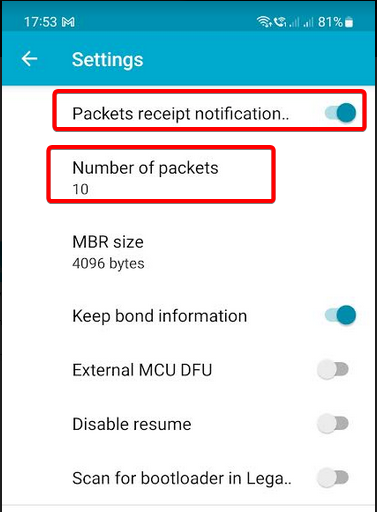
Two other testers on iOS found that you have to change the PRN settings on iOS:
a) enable PRN
b) set the number of packets to something like 10 or less

I don’t understand the reference to PRN settings and it doesn’t appear if I search for it?

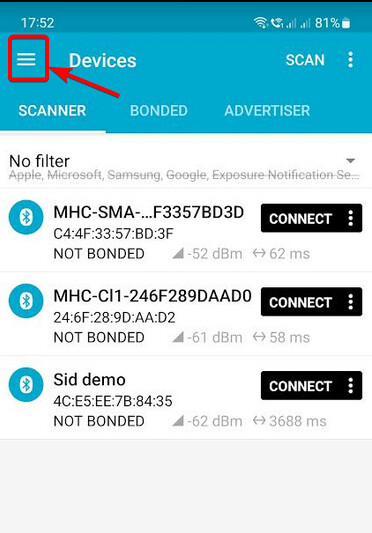
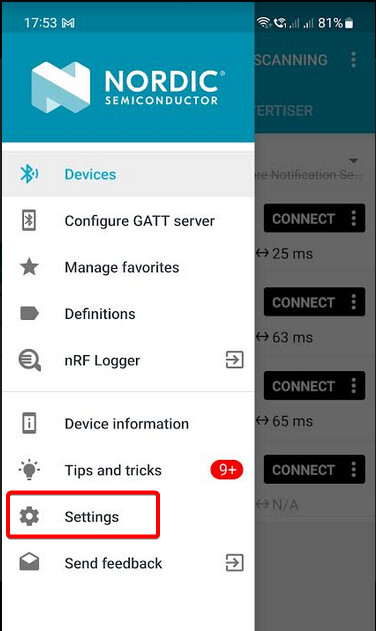
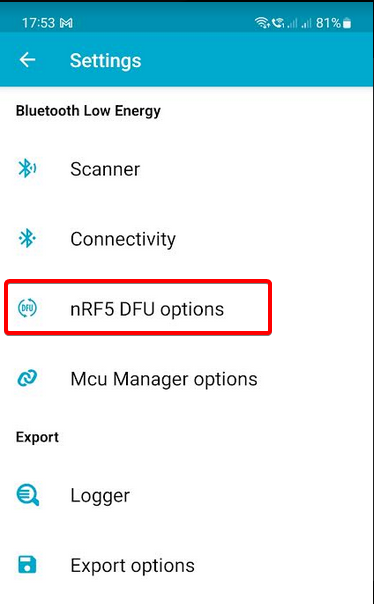
On Android nRF Connect
Menu bar on left ==> Settings ==> nRF5 DFU Options


Hi @Alangward ,

The nRF Connect in iOS seems not to allow you to change PRN settings. You should use nRF Device Firmware Update APP (you can change PRN settings here).

Hi @carlrowan

Yes, I’m already using that app and have found the setting.

Thanks

I now have it working after changing the PRN setting as advised. Thanks.
Presumably there will now be a formal release of this version?

Alan

Hi Alan,

We will release the new bootloader in our WisBlock repo and in our Download Center.
Update in production will take some time because of the existing stock.