Hi Bernd,
Thanks for the reply.
I am using the standalone DFU app.
It didn’t work on Android (as I reported above).
I found there is also a version for IOS, which I downloaded to my iPad.
That works.
My only concern is that if the update fails the device has to be reloaded over USB.
There is always a risk when you update through BLE, because the flash organization is single bank. That means as soon as you start the DFU, the existing firmware is erased and it starts to write the new firmware. If there is any problem during the update, the device ends up without firmware.
The only option would be to use a custom bootloader that supports dual bank flash organization. Then the new firmware would be written in the memory bank that is not in use and in case the update fails the nRF52 would continue the old firmware.
But our (Adafruits) bootloader does not support dual bank.
I guessed that was the case. I use the ‘two bank’ mechanism on our Linux systems. There is a single atomic update on the boot sector to switch load sets- and you can always go back if you need to.
I assume the FUOTA supporting devices use the 2-bank mechanism?
This is something I’ve posted about a couple times. Any plans to update the bootloader to fix the issue and restore compatibility with latest versions of nRF Connect/DFU apps?
At the moment none of our modules support FUOTA, so we do not have the 2-bank implementation. Specially on MCU with small flash, like the RAK3172, the 2-bank implementation is not possible, there is not enough Flash available.
Thanks for trying.
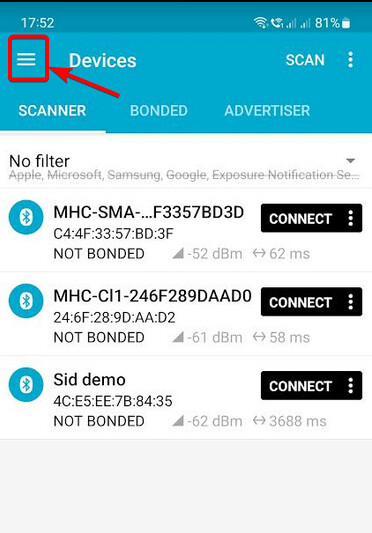
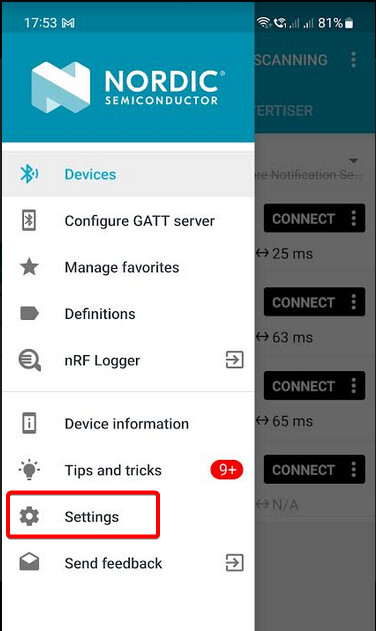
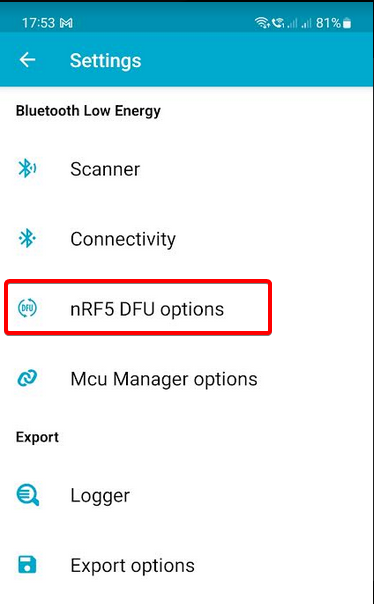
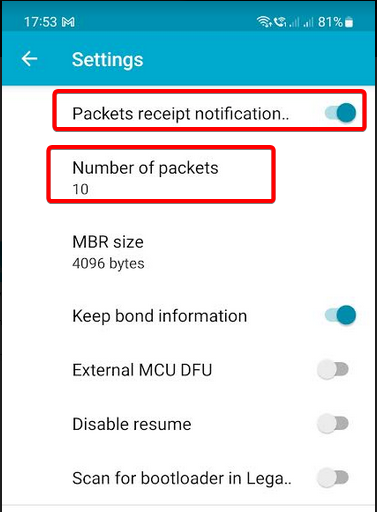
Two other testers on iOS found that you have to change the PRN settings on iOS:
a) enable PRN
b) set the number of packets to something like 10 or less
The nRF Connect in iOS seems not to allow you to change PRN settings. You should use nRF Device Firmware Update APP (you can change PRN settings here).