Receiving RAK7249 LoRaServer MQTT feed with Arduino

That’s a change of topic. The clients are the RAK7258’s network server which is publishing messages, and your PC software and Arduino software which are subscribed to them.

I feel that I have already done the this that you suggest.

What I suggested what that you use your PC MQTT software to publish mock messages back into the MQTT broker, and see if the Arduino gets them.

You could first try to exactly repeate the working messages. Then you could do things like send the payload of the non-working message but to the topic of the working one. Or the other way around.

And I also suggested you look into seeing if the Arduino MQTT software supports wildcards in the topic subscriptions the way standard MQTT client software does. So see if you can subscribe to “application/*”

Hi Chris - Thank you again, especially for your patience.

With regard to what you suggested re wildcard in the topic. It appears that a “+” works. On a “*” or a “#” the monitor goes round and round at hi speed telling me I’m attempting to connect. I’m connected. I’m attempting to connect. I’m connected … However with a “+” the topic becomes -

mqttClient.subscribe(“application/+/device/+/rx”);

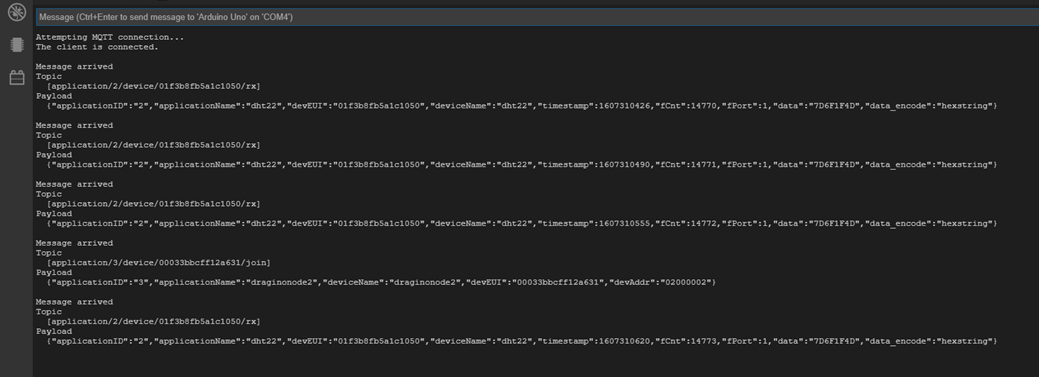
and I get the following screen shot -

image

You will see that I never go to any other application, eg application 3, in the subscribed topic

Thanks. Regards

Hi Chris. Progress I think.

I changed the topic to -

mqttClient.subscribe(“application/+/device/+/+”);

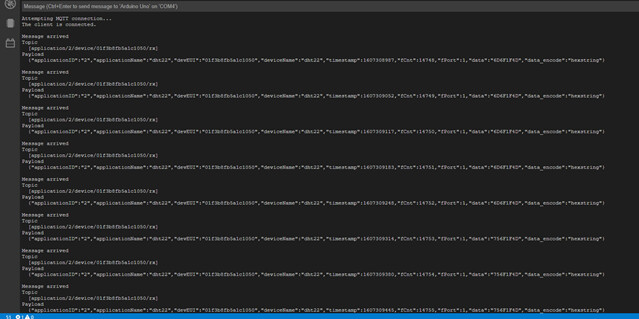
ie, the uplink, down link, join etc to a wildcard, and then I restarted the Arduino node and here is the screenshot -

You will notice that the second-to-bottom message is from “application 3” and you will see the topic ends with “join”.

So it appears that that node is attempting to join but there is no subsequent uplink.

How di I fix that, please?

You’d have to figure out why it is failing.

Are join accepts being generated, eg in the gateway screen do you see it transmitting replies?

Often this is a timing problem on the node, but it can be a configuration problem, etc. Really debugging it can require digging deep into node firmware.

Hi Chris. I cld not work out why messages from that particular node cld not be seen. Did a lot of research and finally decided maybe I’ll set up a brand new node. different code, different message. I did that and the Arduino MQTT Client now works perfectly. Very happy about that. Many thanks for all your help. Best wishes for 2021. Kind regards.

Hello, again. Same topic, slightly different problem.

I am using RAK7249/4240 with in-build LoRa server. I have built an Arduino MQTT client, and connected it to the 7249. I have a couple of nodes working, one sending DHT22 temp/humidity information, the other sending “Hello, Ryan”. The Arduino MQTT client is subscribed to messages from these two nodes. I have managed to get this configuration working perfectly. I can re-set the nodes individually, see the “join” messages and the “Rx” messages thereafter on both the Arduino MQTT and the Laptop MQTT.fx. And I can see the payloads. Very happy.

I also have MQTT.fx running on a laptop, also connected to the 7249 and I can see the same messages/payloads on the laptop screen. So all good.

On the weekend I upgraded to RAK7249 firmware to the latest version. I must also point out that while trying to remove the ethernet RJ45 plug a couple of weeks ago, the RJ45 pcb-mounted socket came off in my hand. While I await a replacement, I tried to connect via RAK7249 access point. This has been the subject of a separate thread in that I could not get the 7249 to establish a client relationship with my Linksys LAPAC access point so that I could keep my applications running. Thanks to Todor’s very generous assistance in a middle-of-the-night intervention, I now have that client relationship working fine

The problem now is that while I can see the “join” requests and the “Rx” responses and payloads from my 2 nodes on the laptop MQTT.fx, I can only see the “join” request and not the “Rx” responses on my Arduino MQTT client nor the payloads.

There has been no change to the Arduino hardware, The IP address of the server is the only software change, and I am messaged that the Arduino has connected, and I do get the “join” message.

The only real change is the firmware upgrade to the 7249.

Any suggestions, please.

Use your PC-based subscription to figure out what’s different about the feed, particularly between what you receive there and not at the Arduino, and adjust your Arduino sketch accordingly.

Look at things like topic, encoding (formats or funny characters) and even overall length

Hello again. I’ve got it going. The problem was the buffer size. Changed it from default 256 to 512 and it burst into life. This has taken me months of researching, reading trying. One of the reasons that I didn’t tumble to this earlier was that I read the buffer size in the .h file as the maximum ALLOWED, when in fact it was just any old arbitrary number that the author chose at write time, ie 256. Changed to to 512 and all so good. I know it sounds trivial, but, boy, have I learned lot about LMIC and PubSubClient libraries over the past few months. Many many thanks for all your help earlier on. Most appreciated. Regards.

1 Like

Hello. My next issue in this project is decoding the DHT22 environment data from the payload. at the Arduino MQTT Client

Here is the output of the compiler -

Using board ‘mega’ from platform in folder: C:\Users\johno\AppData\Local\Arduino15\packages\arduino\hardware\avr\1.8.3
Using core ‘arduino’ from platform in folder: C:\Users\johno\AppData\Local\Arduino15\packages\arduino\hardware\avr\1.8.3
Detecting libraries used…
“C:\Users\johno\AppData\Local\Arduino15\packages\arduino\tools\avr-gcc\7.3.0-atmel3.6.1-arduino7/bin/avr-g++” -c -g -Os -w -std=gnu++11 -fpermissive -fno-exceptions -ffunction-sections -fdata-sections -fno-threadsafe-statics -Wno-error=narrowing -flto -w -x c++ -E -CC -mmcu=atmega2560 -DF_CPU=16000000L -DARDUINO=10607 -DARDUINO_AVR_MEGA2560 -DARDUINO_ARCH_AVR “-IC:\Users\johno\AppData\Local\Arduino15\packages\arduino\hardware\avr\1.8.3\cores\arduino” “-IC:\Users\johno\AppData\Local\Arduino15\packages\arduino\hardware\avr\1.8.3\variants\mega” “C:\Users\johno\AppData\Local\Temp\arduino-sketch-AAB4E1EA55727EB640A0AF04A530CE7B\sketch\sketch_apr5_v9.0.ino.cpp” -o nul
Alternatives for LMIC.h: []
ResolveLibrary(LMIC.h)
→ candidates: []
Compilation error: Error: 2 UNKNOWN: exit status 1

Here is my code (hope I’ve presented it in the right way.).

The issue is the decoding loop in the callback area. It just doesn’t work.

*

Arduino MQTT Client v9.0
Extracting DHT22 data from payload.

Arduino Mega + genuine Arduino Ethernet Shield2
Subscribes to topic “application/+/device/+/+”
IPaddress RAK7249 in-built server 192.168.1.227 (Barn) or 192.168.1.250
(Network Room) Arduino ethernet shield MAC address is A8:61:0A:AE:6A:0B

Arduino PubSubClient - MQTT Client Library Encyclopedia

*/

//#include <Adafruit_Sensor.h>
//#include “DHT.h”
#include <LMIC.h>
#include <Ethernet.h>
#include <PubSubClient.h>
#include <SPI.h>
#include <string.h>

// float temperature;
// float humidity;
int data[5];
int dataStart;
int dataEnd;
float rawTemp;
float rawHumid;
int i;

byte mac[] = {0xA8, 0x61, 0x0A, 0xAE, 0x6A, 0x0B}; // MAC address Arduino Ethernet Shield MQTT client
IPAddress ip(192, 168, 1, 51); // Static IP address Arduino MQTT client
IPAddress server(192, 168, 1, 227); // Static IP address RAK7249 built-in LoRa server Barn

void callback(char *topic, byte *payload, unsigned int length)
{
Serial.print("\nMessage arrived\nTopic\n [");
Serial.print(topic); // Print topic
Serial.print("]\n");
Serial.print(“Payload\n “);
for (int i = 0; i < length; i++)
{
Serial.print((char)payload[i]); // Print payload
}
Serial.print(”\n”);

if (strstr(payload, “01f3b8fb5a1c1050”)) // DTH22 environment message? Search for devEUI.
{
dataStart = int(strchr(payload, ‘data":"’)); // point to the start of the environment data
dataEnd = int(strchr(payload, ‘data_encode’) - 14); // point to the end of the environment data
for (i = dataStart; i < dataEnd; i++)
{
data[i] = payload[i]; // extract the environment data to a new string
}

// isolate temperature
rawTemp = data[0] + data[1] * 256;  
// float -> int: this uses the sflt16 datum (https://github.com/mcci-catena/arduino-lmic#sflt16)
uint16_t payloadTemp = f2sflt16(rawTemp) * 100;    //alt code: temperature = sflt162f(rawTemp) * 100;
// isolate humidity
rawHumid = data[2] + data[3] * 256;                          
uint16_t payloadHumid = f2sflt16(rawHumid)* 100;        

//humidity = sflt162f(rawHumid) * 100;

Serial.print("\n    Environment:  ");
Serial.print("Temperature: ");
Serial.print(payloadTemp);
Serial.print("° C");
Serial.print("  Humidity: ");
Serial.print(payloadHumid);
Serial.print("% rH");

}
}

EthernetClient ethClient;
PubSubClient mqttClient(ethClient);

void reconnect()
{
while (!mqttClient.connected()) // Loop until we’re reconnected
{
Serial.print("\nAttempting MQTT connection…");

if (mqttClient.connect("arduinoClient9"))                 // Attempt to connect
{                        
  Serial.print("\nThe client is connected.");
  mqttClient.subscribe("application/+/device/+/+");
  }
  else 
  {
  Serial.print("\nFailed, rc = ");
  Serial.print(mqttClient.state());
  Serial.print("\nTry again in 5 seconds.");
  delay(5000);}                                                          // Wait 5 seconds before retrying

}
}

void setup()
{
Serial.begin(115200);
Ethernet.begin(mac, ip);
delay(5000); // Allow the hardware to sort itself out
mqttClient.setServer(server, 1883);
mqttClient.setCallback(callback);
}

void loop()
{
if (!mqttClient.connected())
{
reconnect();
}
mqttClient.loop();
}

I’m hoping that some one can point out where I’m going wrong. Thank you. Regards
I’ll get the right yet.

Here’s the code that is not working -

void callback(char *topic, byte *payload, unsigned int length)

{

Serial.print("\nMessage arrived\nTopic\n [");

Serial.print(topic); // Print topic

Serial.print("]\n");

Serial.print("Payload\n ");

for (int i = 0; i < length; i++)

{

Serial.print((char)payload[i]);                               // Print payload

}

Serial.print("\n");

if (strstr(payload, “01f3b8fb5a1c1050”)) // DTH22 environment message? Search for devEUI.

{

dataStart = int(strchr(payload, 'data":"'));                  // point to the start of the environment data

dataEnd = int(strchr(payload, 'data_encode') - 14);           // point to the end of the environment data

for (i = dataStart; i < dataEnd; i++) 

{

  data[i] = payload[i];                                       // extract the environment data to a new string

}

// isolate temperature

rawTemp = data[0] + data[1] * 256;  

// float -> int: this uses the sflt16 datum (https://github.com/mcci-catena/arduino-lmic#sflt16)

uint16_t payloadTemp = LMIC_f2sflt16(rawTemp) * 100;         //alt code: temperature = sflt162f(rawTemp) * 100;

// isolate humidity

rawHumid = data[2] + data[3] * 256;                          

uint16_t payloadHumid = LMIC_f2sflt16(rawHumid)* 100;        //humidity = sflt162f(rawHumid) * 100;


Serial.print("\n    Environment:  ");

Serial.print("Temperature: ");

Serial.print(payloadTemp);

Serial.print("° C");

Serial.print("  Humidity: ");

Serial.print(payloadHumid);

Serial.print("% rH");

}

}

What is the purpose of including LMiC in the sketch.

What device is sending the DHT22 data?

If you coded the device payload format, then you just reverse the process on the Arduino when you an incoming MQTT uplink message.

Hi Nick. Thank you for your reply. I mucked-up presenting the code in my post. However you will see in the final piece that I sent -

Unit16_t payloadTemp = LMIC_f2sflt16(rawHumid) * 100

You need the LMIC library for this.

I am using an Arduino UNO + Dragino LoRa shield + DHT22 to do the sending. That part is working very well. The code comes from the RAK4260 GitHub page.

I think my problem is not using compatible data types.

Regards

Most likely. Mostly we’d not transmit a float as it gets messy turning the byte array back in to a float in a variety of languages. And loading LMiC for just that function is a proverbial sledgehammer to crack a nut.

When you take a reading that is a float, multiple by 10’s for the precision you need and send that. Then divide appropriately at the other end.

So humidity reading of 45.2% gets x 10 and sent as an integer of 452 - very easy to decode in JavaScript, PHP, Python as well as C, and you just divide by 10 to get back to the original value.

The RAK4260 doesn’t do any form of Arduino as it’s all Microchip with ASF and MLS - which repro are you thinking of?

Not sure which which example you are thinking of - bit confused as that’s not a RAK4260 repro, although someone has pointed out that the 4260 can do a sort of LoRaWAN on Arduino using Bestwan.

I’m using this one -

I am using an Arduino Mega + Dragino LoRa shield. I have had a lot of difficulty getting a node to work on AU915, however, recently I have been successful. In the meantime, I discovered this RAK/Demo code. I trust anything RAK, so set it up and it worked first time. I have since used this code as the basis for other sensor applications. Making great progress.

As I have been discussing, I’m using an Arduino Mega + Arduino Ethernet Shield v2 for the MQTT client connected to a RAK7249 gateway. I’v managed to get that going perfectly. The problem there was the size of the buffer.

Now I’m trying to decode the payload and have pretty much got that going as well.

I really appreciate all your advice and help. Regards.

Can I use ArduinoJson.h to decode the payload in my Ardunio MQTT Client?

Yes, I had the same issue whether to directly interface with the 7249 MQTT-bridge or whether to go through the MQTT.fx RPi MQTT and then to the Arduino application. But then I got assistance from Reliance electric motor and it was really helpful for me. Hope it can too be useful for you.
Thanks.

flt16 is a portable, compact floating point format well suited to LoRaWan for uses where the magnitude of numbers can vary to a degree that challenges integer/fixed point, hence why it’s in MCCI LMiC.

You are right however that it’s probably not useful for humidity. Especially given how inexact humidity sensors typically are, a single byte with half percent is probably fine.

A post was merged into an existing topic: Help to send data to thingspeak using MQTT and Arduino+Draginoshield v 1.4 through RAK 7249