I was just about to get on here and say I realized what y’all were saying! Ok got it, thank you for your help everyone. I will let you know if anything else comes up. Your team has been very helpful, thank you!
Can we reset the device via a down link? I have noticed when I power the device back up that sometime it has trouble connecting and I have to restart the device a few times. If this was in a place that was not physically accessible, is there a way to restart it remotely?
Hi @a1projects ,
What do you mean with power the device back up?
When it comes to reset, the reset pin of the RAK4631 WisBlock Core is not connected physically to any IO pin so it is impossible to do that without doing some soldering then add a with tiny mosfet to reset the pin. If you want to try software reset, you can use generic reset for ARM MCUs. Just add this line whenever you want a reset, NVIC_SystemReset();. This will make RAK4631 reset.
Btw, if you are going to reset because you can’t join. That is ok. But please note that in LoRaWAN architecture, the end-device should try to have only one join request in its lifetime (ideally) unless the device is moving to another network or LoRaWAN network server. This is to ensure the scalability of the IoT network since each join request will result to a join accept downlink.
If you want to reset the device via downlink, that is possible. You just need to get the downlink message which depends on you. You can just send 1 character via downlink and if that is what the end-device receives, then it will initiate software reset or hw if you implemented one.
If your node cannot connect to the server, how would you send a “reset” command to it? Remote reset from the LoRaWAN server does not work when you node is not connected to the server.
As Carl said, an option is to use MCU reset command to restart the device if it cannot join.
To what value did you set join retrials? Look in the code for
#define JOINREQ_NBTRIALS 3
that is how often the node retries to join if it fails. You can try to put a higher number there, e.g. 10.
And you can use the static void lorawan_join_failed_handler(void) callback to retry to join or use the MCU reset command to start from scratch.
Could I connect it to a raspberry pi for power and disconnect/reconnect that port to power cycle it?
Sure you can use a RPi.
But the correct solution would be to find out why your WisBlock has sometimes problems to join. Here are some reasons I can think of:
- Gateway too far away
- Gateway too close (sound strange, but happened before)
- Antenna inside an enclosure is too close to metal parts, hidden under the battery, wrong type)
- Communication lag between LoRaWAN server and gateway (cellular connection for example)
I am doing a lot of applications for WisBlock and there are no problems with the join process.
How close is too close? Is 10-20 feet too close or are you talking about within a foot of the hotspot? I have a node in the apartment here but the device also connects to another node a few blocks down so I don’t know if that is the issue. Also could I setup the wind speed project to run with the environment monitoring project on the same device, at the same time? https://github.com/RAKWireless/WisBlock/tree/master/examples/RAK4630/solutions/Wind_Speed_Monitoring
3m should be ok. I got strange reactions when I had the node laying on my table 1m below the gateway on the wall.
The wind speed project and the environment project can be combined, but the payload might get quite large. You might need to set a fixed data rate to be able a large payload.
See our payload/region/datarate tables here: RAK811 Module AT Command Manual | RAKwireless Documentation Center
Ok so I have been unable to connect to the helium network in a week. I have restarted the example project and the board just fails to join over and over. How do I use the mcu reset command? Anything else I can try?
Also, when the device “shuts off” from me unplugging it, does the dev board keep a memory of it trying to join earlier? We are trying to problem solve what could be going on here
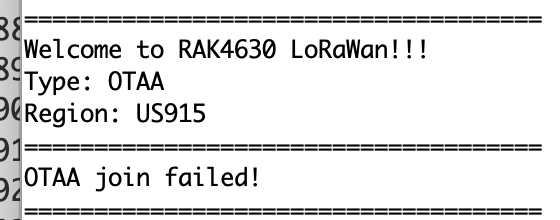
I tried it on a brand new 4630 I haven’t even used yet, so I can confirm it’s not a hardware issue. It also can’t be a rejoin issue because it’s never join? I even retried a fresh example and only updated the keys and the region and still got this again on the new board. I have also tried to connect around a different hotspot, and can confirm this is also not the issue. I don’t know what else to do to even problem solve this at this point
=====================================
Welcome to RAK4630 LoRaWan!!!
Type: OTAA
Region: US915
OTAA join failed!
Hi @a1projects ,
For SW reset, just add this on the line where you want to reset NVIC_SystemReset();
When the device shutdown or reset, it has no idea on the join attempts it previously did.
If you are failing on joining, we need to figure out where is the issue. Is it on the device (HW or SW)? Are the EUIs and KEY confirmed? Can you generate a new KEY and try to join again? Is it a gateway issue? Is the gateway really online? If it is Helium, do you have a device that connects to the helium network via that hotspot to confirm that the hotspot really transmits LoRa packets? Do you have control over the gateway or hotspot? Does your device reach the hotspot? Is it too far? Or too near? Are the antenna both on the device and gateway/hotspot secured?
Just from my experience when I setup my Helium Hotspot.
If the Hotspot is in sync mode, it does not transmit any packets including Join requests.
Even if the Helium explorer or the Helium app says it is synced, it might not be fully synced. I had to use this link https://explorer.helium.com/blocks/latest to see the number of blocks and then the diagnostics of the Helium app to see that there are still blocks to be synced.
I would strongly suggest to test the Join request first on a “normal” gateway and a “normal” LoRaWAN server before trying to connect it to Helium.
Another thing to check is the region that the Helium Hotspot is using. My Hotspot is a US915 hotspot, but because I am in the Philippines, the hotspot decided to use AS923-3 instead.
You can find the list of Regions per country for Helium here: Frequencies on the Helium Network | Helium Documentation
Turns out it was actually an issue on the blockchain side, and appears it has been resolved. I was able to connect today! Also I am using US915, it is the correct region. Another question I have is related to the gas readings. So the sensor reads gas in hms, but I can barely find anything about the unit hms on the internet. It does stand for Hydrogen Monitoring System correct? Is there any way to convert this to AQI or something so that we can accurately show the air quality percentage?
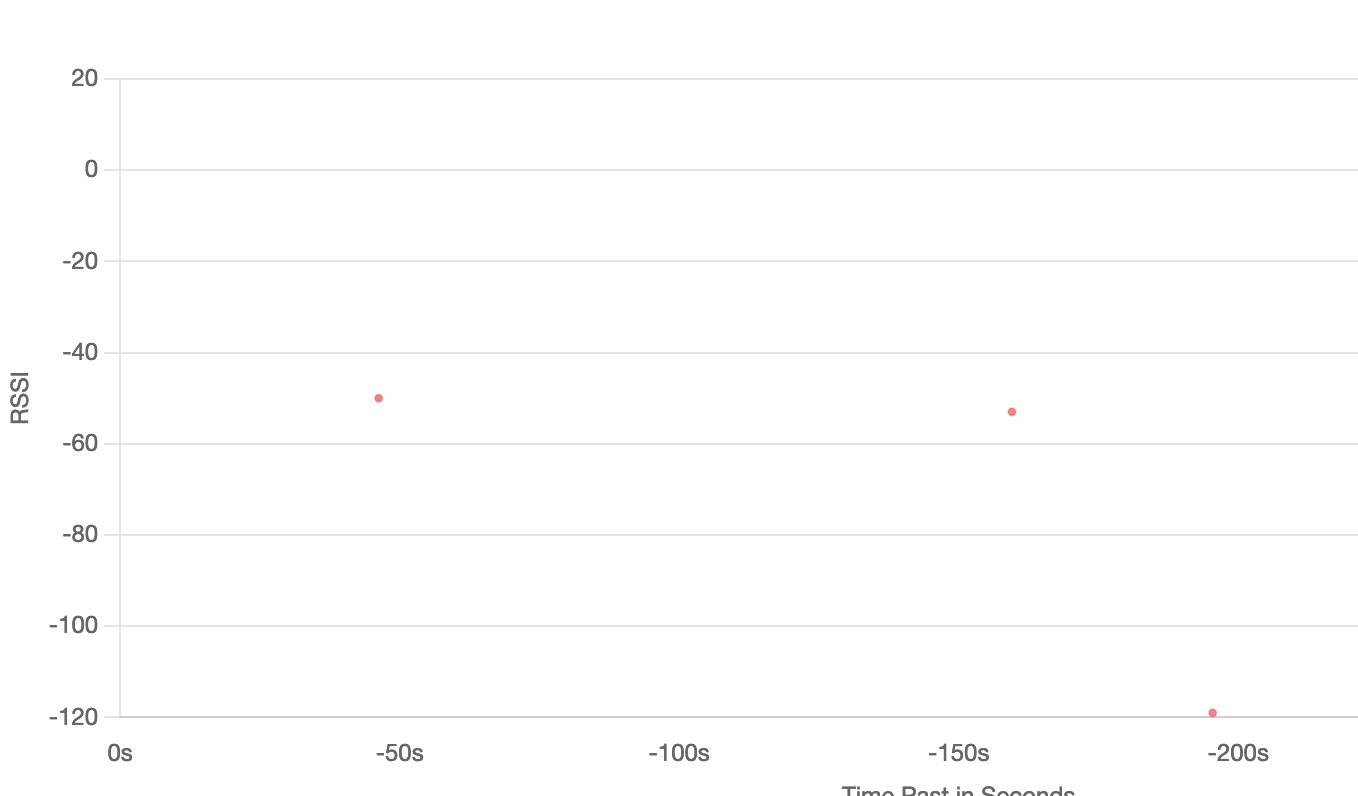
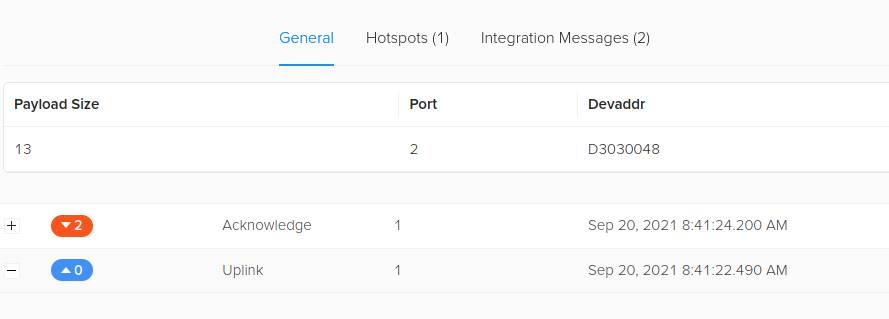
I still do get this issue where I have to keep power cycling it though to send a packet. As you can see, the first two dots that are close together were my first attempt, and the second one spaced out was the second. I have to unplug it and plug it back in to do anything. Usually after a couple tries it will work, but as of lately it hasn’t stayed connected long. I do think this is an issue the blockchain has been having though
Welcome to RAK4630 LoRaWan!!!
Type: OTAA
Region: US915
OTAA Mode, Network Joined!
Sending frame now…
result: Tem:24.54C Hum:65.12% Pres:1000.89KPa Gas:5826Ohms
lmh_send ok count 1
Sending frame now…
result: Tem:24.31C Hum:64.96% Pres:1000.89KPa Gas:5226Ohms
lmh_send fail count 1
Hi,
What data-rate did you set on the WisBlock?
For the environment payload I would recommend at least DR3 or DR4 and set ADR to off.
This looks more like a problem I saw before with US915, DR0 and a packet size that is close to the allowed payload size for DR0.
Here is an overview of max payload size per data-rate and region: RAK811 Module AT Command Manual | RAKwireless Documentation Center
I am using DR 3 and ADR set to off already. Should I bump up to DR 4? Another question I have is related to the gas readings. So the sensor reads gas in hms, but I can barely find anything about the unit hms on the internet. It does stand for Hydrogen Monitoring System correct? Is there any way to convert this to AQI or something so that we can accurately show the air quality percentage?
What is your payload size? I can tell you the data rate (or you check by yourself in the link I gave you). But without knowing the payload size I cannot say if DR 3 or DR5 or ??? is required.
For the BME680, the algorithm to calculate AQI is Bosch proprietary calculations. You have to use the Bosch BSEC library (linkable library, not open source).
We have right now no example how to use the Bosch library, but there are some information on the internet about it.