Dear Jeangui ,
Please input command:ifconfig
I have set an Static IP and a router IP.
Please send me configure content.
Best regards!
Dear Jeangui ,
Please input command:ifconfig
I have set an Static IP and a router IP.
Please send me configure content.
Best regards!
Hi @Nicholas
Thanks.
Here is the output of the ifconfig
eth0: flags=4163<UP,BROADCAST,RUNNING,MULTICAST>  mtu 1500
    inet 192.168.10.10  netmask 255.255.255.0  broadcast 192.168.10.255
    inet6 fe80::a745:c1d8:9c15:87c7  prefixlen 64  scopeid 0x20<link>
    inet6 2a01:e0a:58b:f9c0:fa6e:7d8b:3fcb:206a  prefixlen 64  scopeid 0x0<global>
    ether dc:a6:32:6a:af:4b  txqueuelen 1000  (Ethernet)
    RX packets 919  bytes 120151 (117.3 KiB)
    RX errors 0  dropped 0  overruns 0  frame 0
    TX packets 522  bytes 36521 (35.6 KiB)
    TX errors 0  dropped 0 overruns 0  carrier 0  collisions 0
lo: flags=73<UP,LOOPBACK,RUNNING>  mtu 65536
    inet 127.0.0.1  netmask 255.0.0.0
    inet6 ::1  prefixlen 128  scopeid 0x10<host>
    loop  txqueuelen 1000  (Local Loopback)
    RX packets 450  bytes 94978 (92.7 KiB)
    RX errors 0  dropped 0  overruns 0  frame 0
    TX packets 450  bytes 94978 (92.7 KiB)
    TX errors 0  dropped 0 overruns 0  carrier 0  collisions 0
wlan0: flags=4163<UP,BROADCAST,RUNNING,MULTICAST>  mtu 1500
    inet 192.168.230.1  netmask 255.255.255.0  broadcast 192.168.230.255
    inet6 fe80::b14e:b1a3:f18a:f2cb  prefixlen 64  scopeid 0x20<link>
    ether dc:a6:32:6a:af:4c  txqueuelen 1000  (Ethernet)
    RX packets 0  bytes 0 (0.0 B)
    RX errors 0  dropped 0  overruns 0  frame 0
    TX packets 59  bytes 14786 (14.4 KiB)
    TX errors 0  dropped 0 overruns 0  carrier 0  collisions 0
regards
Dear Jeangui,
It doesn’t seem to have configured successfully!
what should I do ?
Sudo gateway-config again ?
regards
Dear Jeangui,
Can you share your configure file content?Maybe I can help you check it!
{
"SX1301_conf": {
    "lorawan_public": true,
    "clksrc": 1,
    "antenna_gain": 0,
    "radio_0": {
        "enable": true,
        "type": "SX1257",
        "freq": 867500000,
        "rssi_offset": -166.0,
        "tx_enable": true,
        "tx_freq_min": 863000000,
        "tx_freq_max": 870000000
    },
    "radio_1": {
        "enable": true,
        "type": "SX1257",
        "freq": 868500000,
        "rssi_offset": -166.0,
        "tx_enable": false
    },
    "chan_multiSF_0": {
        "enable": true,
        "radio": 1,
        "if": -400000
    },
    "chan_multiSF_1": {
        "enable": true,
        "radio": 1,
        "if": -200000
    },
    "chan_multiSF_2": {
        "enable": true,
        "radio": 1,
        "if": 0
    },
    "chan_multiSF_3": {
        "enable": true,
        "radio": 0,
        "if": -400000
    },
    "chan_multiSF_4": {
        "enable": true,
        "radio": 0,
        "if": -200000
    },
    "chan_multiSF_5": {
        "enable": true,
        "radio": 0,
        "if": 0
    },
    "chan_multiSF_6": {
        "enable": true,
        "radio": 0,
        "if": 200000
    },
    "chan_multiSF_7": {
        "enable": true,
        "radio": 0,
        "if": 400000
    },
    "chan_Lora_std": {
        "enable": true,
        "radio": 1,
        "if": -200000,
        "bandwidth": 250000,
        "spread_factor": 7
    },
    "chan_FSK": {
        "enable": true,
        "radio": 1,
        "if": 300000,
        "bandwidth": 125000,
        "datarate": 50000
    },
    "tx_lut_0": {
        "pa_gain": 0,
        "mix_gain": 9,
        "rf_power": -6,
        "dig_gain": 0
    },
    "tx_lut_1": {
        "pa_gain": 0,
        "mix_gain": 12,
        "rf_power": -3,
        "dig_gain": 0
    },
    "tx_lut_2": {
        "pa_gain": 0,
        "mix_gain": 15,
        "rf_power": 0,
        "dig_gain": 0
    },
    "tx_lut_3": {
        "pa_gain": 1,
        "mix_gain": 8,
        "rf_power": 3,
        "dig_gain": 1
    },
    "tx_lut_4": {
        "pa_gain": 1,
        "mix_gain": 9,
        "rf_power": 6,
        "dig_gain": 0
    },
    "tx_lut_5": {
        "pa_gain": 1,
        "mix_gain": 11,
        "rf_power": 10,
        "dig_gain": 0
    },
    "tx_lut_6": {
        "pa_gain": 1,
        "mix_gain": 12,
        "rf_power": 11,
        "dig_gain": 1
    },
    "tx_lut_7": {
        "pa_gain": 1,
        "mix_gain": 12,
        "rf_power": 12,
        "dig_gain": 0
    },
    "tx_lut_8": {
        "pa_gain": 2,
        "mix_gain": 11,
        "rf_power": 13,
        "dig_gain": 1
    },
    "tx_lut_9": {
        "pa_gain": 2,
        "mix_gain": 11,
        "rf_power": 14,
        "dig_gain": 0
    },
    "tx_lut_10": {
        "pa_gain": 3,
        "mix_gain": 8,
        "rf_power": 16,
       "dig_gain": 1
    },
    "tx_lut_11": {
        "pa_gain": 3,
        "mix_gain": 8,
        "rf_power": 20,
        "dig_gain": 0
    },
    "tx_lut_12": {
            "desc": "TX gain table, index 12",
            "pa_gain": 3,
            "mix_gain": 12,
            "rf_power": 23,
            "dig_gain": 1
    },
    "tx_lut_13": {
            "desc": "TX gain table, index 13",
            "pa_gain": 3,
            "mix_gain": 13,
            "rf_power": 25,
            "dig_gain": 0
    },
    "tx_lut_14": {
            "desc": "TX gain table, index 14",
            "pa_gain": 3,
            "mix_gain": 13,
            "rf_power": 26,
            "dig_gain": 0
    },
    "tx_lut_15": {
            "desc": "TX gain table, index 15",
            "pa_gain": 3,
            "mix_gain": 13,
            "rf_power": 27,
            "dig_gain": 0
    }
},
    "gateway_conf": {
            "gateway_ID": "0000000000000000",
            /* change with default server address/ports, or overwrite in local_conf.json */
            "server_address": "router.eu.thethings.network",
            "serv_port_up": 1700,
            "serv_port_down": 1700,
            /* adjust the following parameters for your network */
            "keepalive_interval": 10,
            "stat_interval": 30,
            "push_timeout_ms": 100,
            /* forward only valid packets */
            "forward_crc_valid": true,
            "forward_crc_error": false,
            "forward_crc_disabled": false,
            /* gps enable */
            "gps_tty_path": "/dev/ttyAMA0",
            "fake_gps": false,
            "ref_latitude": 10,
            "ref_longitude": 20,
            "ref_altitude": -1,
            "autoquit_threshold": 20
    }
}
{
    "lora_server":
    {
“server_plan”:“1”,
“lora_server_ip”:“127.0.0.1”,
“up_port”:“1700”,
“down_port”:“1700”,
“loraserver_adr”:“2”,
“freq”:“5”
},
“wifi”:
{
“wifi_mode”:“1”,
“wifi_ip”:"",
“wifi_gw”:"",
“ap_ssid”:“Rakwireless_AF4C”,
“ap_pwd”:“XXXXXXXXXXXX”
},
“lan”:
{
“lan_ip”:“192.168.10.10”,
“lan_gw”:“192.168.10.1”
},
“apn”:
{
“apn_name”:“HOLOGRAM”,
“apn_baud”:“115200”
},
“time”:
{
“sync_time”:0
},
“active_lora_server”:“2”,
“install_img”:“1”,
“install_chirpstack”:“1”,
“install_lte”:“0”,
“lte_mode”:“2”
}
hello
do you need more ?
regards
Dear Jeangui,
Please modify this configuration file:

here is the content of the file dhcpcd.conf
# WARNING:Do not delete or modify the following 5 lines!!!
# RAK_eth0_IP
interface eth0
static ip_address=192.168.10.10
static routers=192.168.10.1it seems ok…
Why does it not work ?
Jeangui I have the same problem on rak7244, Is your gateway connected to TNN?
Try add a dns server
Hello @DylanSaenz
thank you for your help.
I have tested and put a new line in the dhcpcd.conf file with google DNS server.
But I still don’t see the gw connected into the TTN console. This gateway was connected with the ttn console some days ago when I was using WIFI client mode with my iphone as WIFI rooter (I wanted to go to ethernet cable solution).
I don’t understand.
Is there any logs to look at ?
@Nicholas any idea ?
Regards
Seems OK isn’t very scientific …
Adding a domain name server would be good!
Dear Jeangui ,
Sorry to reply you later!
When you connect over Ethernet, DHCP has been fixed to 192.168.10.10 and you need to take the initiative to modify it.
Best regards!
Dear @Nicholas
Thank you for your response.
I am not sure to understand what you mean.
Do you mean that I have to disable dhcp feature on the gateway ?
Or do you mean I have to change the static IP that it is in the good range for my local LAN ?
Here are the logs of my gateway logs-ttn-rak7244.txt
Best regards
Nope
Possibly
But overall best to remove the entries for static addressing so the DHCP server can give you a network setup that works properly - a Google for Raspberry Pi network setup should suffice.
Hello @nmcc
I have changed the dhcpcd.conf file in order that the rak has a IP adress in my local LAN range IP.
I am behind a router (internet provider box acting as router).
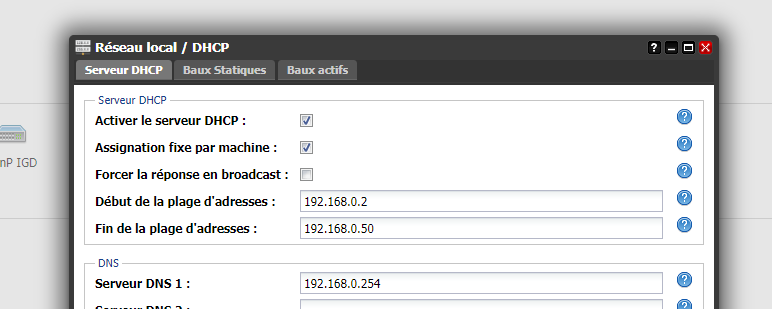
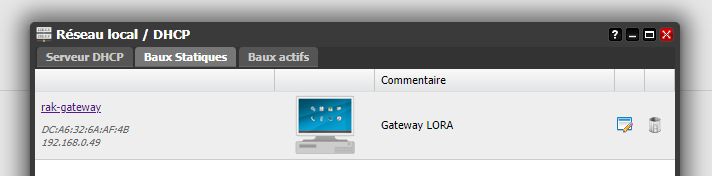
The router provide dynamic IP on a range : 192.168.0.2 to 192.168.0.50
I reserved on this router the IP adress 192.168.0.49 for my rak.
then on the rak I have configured the /etc/dhcpcd.conf file as following

after I reboot the rak and I can connect from my PC directly with ssd to the 192.168.0.49 adress.
I have looked at the journalctl -f and I don’t see any errors
Since I don’t see my gateway on TTN console.
regards
The point of DHCP is that YOU don’t set a static address on the device, the router tells it what the settings should be. It’s unlikely, but there may be a clash with you using 0.49 and the router allocating it to something else.
Can you ping router.eu.thethings.network? The log you provided shows that the gateway is receiving uplinks and, whilst it stops just where the action is, doesn’t appear to error on the upload.
So the next question is, what exactly do you mean when you say you don’t see your gateway on the TTN console - have you added it, if so, have you checked the traffic tab, when your device(s) transmit, do you see the payload on the application/device pages?