A newest software based on Raspbian OS for RAK2245 and RAK831 + RPi!

Thanks for answering, now I can see the log file!
I encounter another problem. After looking into the log file, I observe that CRC_FAIL: 100%.
I am not sure if it is a problem of gateway or node
Gateway hardware: RAK831 + Raspberry Pi
Node hardware: Dragino LoRa shield + Arduino Due / UNO (I tried both)
Node software: the Arduino-lmic

frequency: 868EU

Sometimes (Just rarely), the packet can be uploaded to TTN. I found that the RSSI is pretty low but two devices are close to each other. Is there any method to know what the problem is?

Hi, a new image was publish * RAK2245&RAK831_based_on_Raspbian_OS_V2.3R_20190404.img.zip but i dont find the changelog and nothing on github. Where can i found change ?

Any help with this id is not generated ?

What image are you using ?
Is this the local or global config file.
Did you do any configuration beforehand ?

Maybe you can get the gateway ID from file /opt/ttn-gateway/packet_forwarder/lora_pkt_fwd/local_conf.json

Thanks, I spoke to him, we resolved the issue :slight_smile:

Hi, @Hobo

I’m sorry for it. This information is old now, in fact, we’ve released another version software for RAK831 & RAK2245 + RPi last week. I’ll write a new tutorial document this week and delete this topic.

BTW, i’ve removed the image based on LoRa Gateway OS from our website, so i need to remove all information about it from our forum too. There will be only one topic about LoRa Gateway OS on RAK forum.

Thank you!

thanks for the great tutorials. Could you please give us a link where the new images are located?

Hi, @danielperez

Please download the image from RAK website:
https://www.rakwireless.com/en/download/LoRa/RAK2245-Pi-HAT#Firmware

Thank Fomi: I have the same problem with Gateway ID,
I downloaded the image from the image from RAK website:[https://www.rakwireless.com/en/download/LoRa/RAK2245-Pi-HAT#Firmware ] I have a Lora 2245 with a PI3
Then I setup the gateway with sudo gateway-config
Then I setup Lora concentrator as …Server is Lora Server
Setup Ip 192.168.1.110
result is… The packet forward has been restarted
then when I try to edit packet forward I found that gateway ID is 00000000000…
do I am missing something ??

thanks

Hi @danielperez,

image

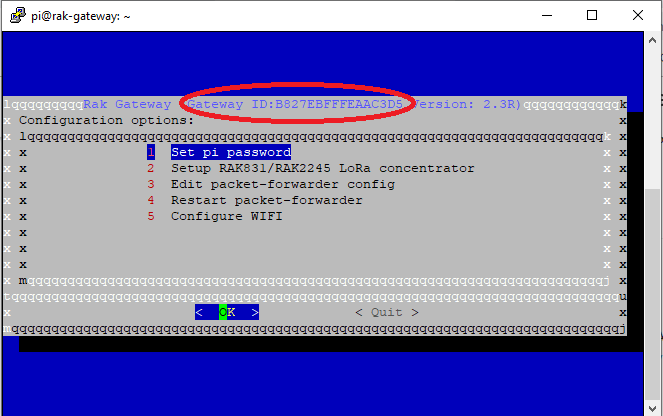
Please refer to the image. You should see the Gateway ID at the top of the Configuration box (area circled in red in the image).

Regards
Vladislav

Hi, @danielperez

As @Hobo said, you can get the gateway ID from that UI directly.
In another way, you can also type the command to get the gateway ID as the following picture shows:
image

1 Like

Thanks.
Using the same installation I can´t open the Lora Application Server web interface. is application server already installed in this version?

Hi, @danielperez

Are you using the 2.3R version image which download from here?
https://www.rakwireless.com/en/download/LoRa/RAK2245-Pi-HAT#Firmware

If you are, i think you need to download the 2.4R version image from the same link. Because only 2.4R version image has a built-in loraserver. You can look the names of them, there is “with_loraserver” string included in the correct image name.

Just download and try again. :slight_smile:

Thanks again: Is it possible that a fixed ip was done in dhcp config. That´s because I can´t connect to wlan 0, if I type ifconfig, wlan0 don´t have ips

…

pi@rak-gateway:~ $ ifconfig

eth0: flags=4163<UP,BROADCAST,RUNNING,MULTICAST> mtu 1500

inet 169.254.46.208 netmask 255.255.0.0 broadcast 169.254.255.255

inet6 fe80::5c46:1a3:4614:4a5c prefixlen 64 scopeid 0x20

ether b8:27:eb:3a:b0:05 txqueuelen 1000 (Ethernet)

RX packets 136 bytes 16832 (16.4 KiB)

RX errors 0 dropped 4 overruns 0 frame 0

TX packets 78 bytes 11198 (10.9 KiB)

TX errors 0 dropped 0 overruns 0 carrier 0 collisions 0

lo: flags=73<UP,LOOPBACK,RUNNING> mtu 65536

inet 127.0.0.1 netmask 255.0.0.0

inet6 ::1 prefixlen 128 scopeid 0x10

loop txqueuelen 1000 (Local Loopback)

RX packets 686 bytes 147768 (144.3 KiB)

RX errors 0 dropped 0 overruns 0 frame 0

TX packets 686 bytes 147768 (144.3 KiB)

TX errors 0 dropped 0 overruns 0 carrier 0 collisions 0

wlan0: flags=4099<UP,BROADCAST,MULTICAST> mtu 1500

ether b8:27:eb:6f:e5:50 txqueuelen 1000 (Ethernet)

RX packets 0 bytes 0 (0.0 B)

RX errors 0 dropped 0 overruns 0 frame 0

TX packets 0 bytes 0 (0.0 B)

TX errors 0 dropped 0 overruns 0 carrier 0 collisions 0
Hello,
I got yesterday the RAK7243.
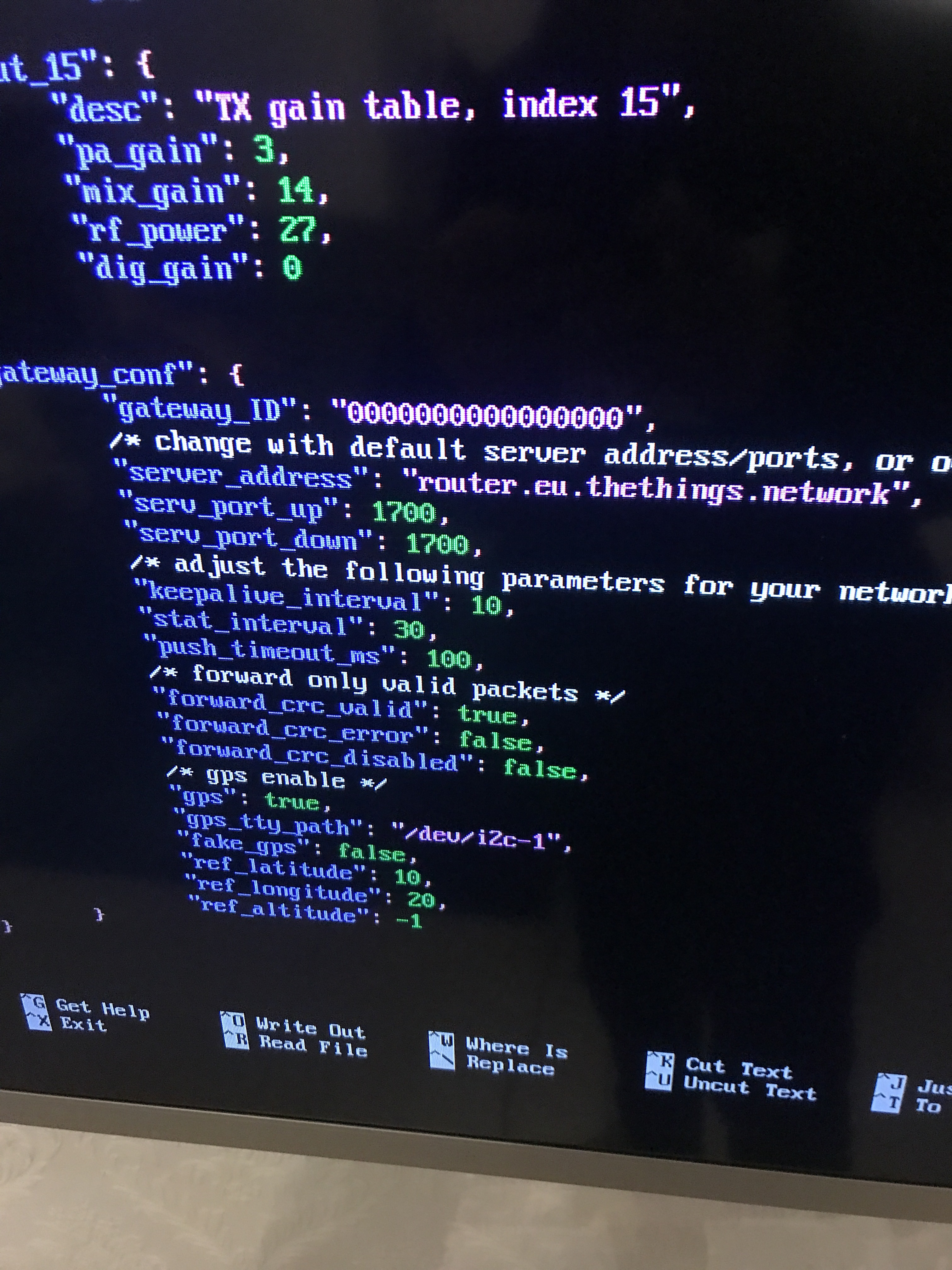
After setup with the latest Raspbeery Image I found an error with Gateway Id in json-File.

Looks ok:
pi@rak-gateway:~ $ rak-version
Gateway ID:B827EBFFFExxxxD8
rakwireless gateway 2245 version 2.4R
pi@rak-gateway:~ $

But when:
pi@rak-gateway:~ $ sudo gateway-config
2) Setup RAK831/RAK2245…
3) Edit packet forwarder
Doesn’t write Gateway ID in /opt/ttn-gateway/packet_forwarder/lora_pkt_fwd/global_conf.json
It shows -->
“gateway_conf”: {
“gateway_ID”: “0000000000000000”,

I had to insert manualy :frowning:
Could you please check that.
Afterwards RAK Gateway is running.
Thanks
qrstu

Hi, @qrstu

In the latest firmware, you can find the gateway ID which will generate automatically in the file </opt/ttn-gateway/packet_forwarder/lora_pkt_fwd/local_conf.json>. It doesn’t matter if the gateway_ID of global_conf.json is 0000000000000.

Hi, does this work for raspberry pi 4? I tried booting the image but I get blank screen. Thanks!

Hi @Fomi I found this latest image for RPI3, https://downloads.rakwireless.com/en/LoRa/RAK2245-Pi-HAT/Firmware/RAK2245%26RAK831_based_on_Raspbian_OS_for_RPI3_V4.1.0_20191202.zip
Is this image built-in with chirpstack server?.

TIA

Hi @asprakash,

Yes, in this image, the built-in server is ChirpStack.