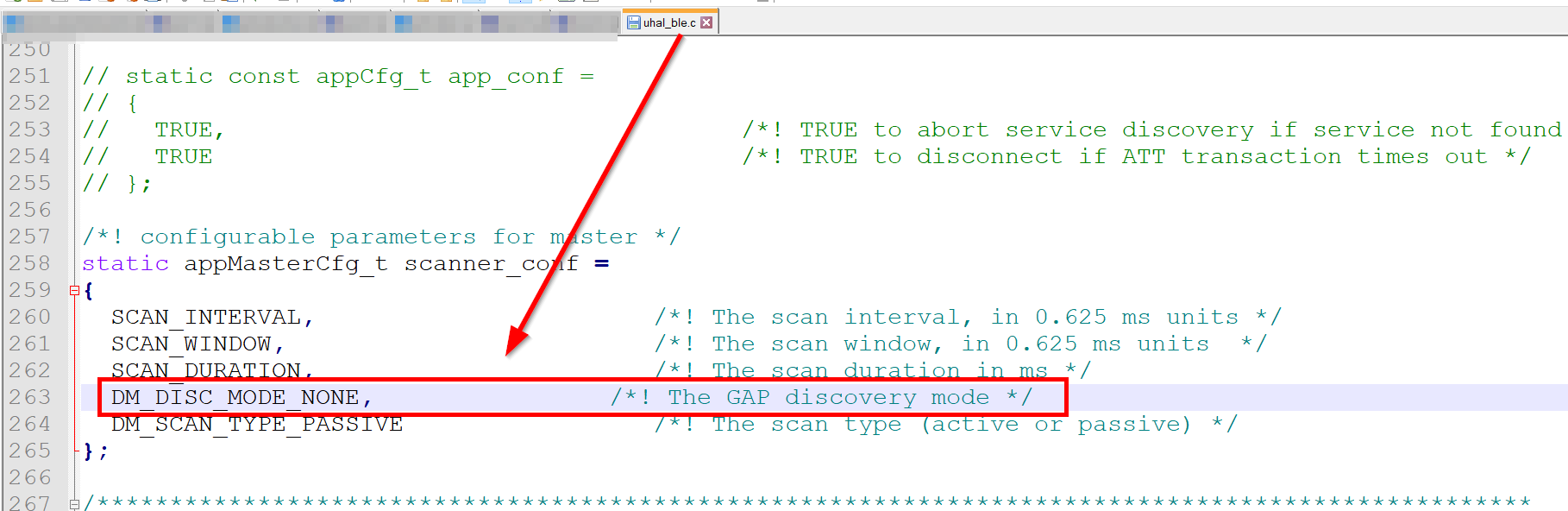
I’ve setup the RAK11720 to continuously scan for BLE Beacons. I’m using the BLE Scanner example as per below (snipped). I start the scanning indefinitely, removed the interval section.
This works for Teltonika Eye Beacons. I’m unable to detect Mikrotik Ble Beacons…using the TG-BT5-OUT.
I’ve tried configurating them as iBeacons, Eddystone, also changed their advertising interval from 20mS to 2seconds.
Using Android device I can see that the Mikrotik is advertising, just the RAK11720 never detects this.
Hello, I’m using the default Example called “BLE_Scanner”. Even with the below section commented out, there is no change…ie it never detects MikroTik BLE tag.
if (!(ret = api.ble.scanner.setInterval(1000, 500))) {
Serial.printf(“BLE Configuration - set broadcast name is incorrect! \r\n”);
return;
}
/***
 *
 *  This example will scan the Bluetooth signal around the device.
 *
***/


void string2hexString(char *input, char *output, uint16_t data_len)
{
    int loop;
    int i;
    i = 0;
    loop = 0;

    while (loop < data_len) {
        sprintf((char *) (output + i), "%02X ", input[loop]);
        loop += 1;
        i += 3;
    }
    output[i++] = '\0';
}

void scan_callback(int8_t rssi_value, uint8_t * device_mac,
		   uint8_t * scan_data, uint16_t data_len)
{
    char mac_addr[64] = { 0 };
    int hextostr_length = (data_len * 2) + data_len;
    char hex_str[hextostr_length];
    string2hexString((char *) scan_data, hex_str, data_len);
    sprintf(mac_addr, "%02x:%02x:%02x:%02x:%02x:%02x",
        device_mac[5], device_mac[4], device_mac[3],
        device_mac[2], device_mac[1], device_mac[0]);
    Serial.println("\r\n____________________________________________________________________");
    Serial.print(mac_addr);
    Serial.print("\t");
    Serial.print(rssi_value);;
    Serial.print("\t");
    for (int i = 0; i < hextostr_length; i += 3) {
        if (i % 30 == 0 && i != 0) {
            Serial.print("\r\n");
            Serial.print("\t");
            Serial.print("\t");
            Serial.print("\t");
            Serial.print("\t");
            Serial.print(hex_str[i]);
            if (i + 1 <= hextostr_length)
                Serial.print(hex_str[i + 1]);
            if (i + 2 <= hextostr_length)
                Serial.print(hex_str[i + 2]);
        } else {
            Serial.print(hex_str[i]);
            if (i + 1 <= hextostr_length)
                Serial.print(hex_str[i + 1]);
            if (i + 2 <= hextostr_length)
                Serial.print(hex_str[i + 2]);
        }
    }
}

void setup()
{
    bool ret;
    Serial.begin(115200);
    delay(2000);

    Serial.println("RAKwireless BLE Scanner Example");
    Serial.println("------------------------------------------------------");
    api.ble.scanner.start(0);
    if (!(ret = api.ble.scanner.setInterval(1000, 500))) {
        Serial.printf("BLE Configuration - set broadcast name is incorrect! \r\n");
        return;
    }
    api.ble.scanner.setScannerCallback(scan_callback);
    Serial.println("\r\n==== Example : BLE Scanner ====");
    Serial.print("MAC Address");
    Serial.print("\t");
    Serial.print("\t");
    Serial.print("RSSI");
    Serial.print("\t");
    Serial.print("RAW Data\r\n");
}

void loop()
{
}
...
Can I somehow enable more data of BLE devices to be shown? Currently using BLE Scanner example. Perhaps there is another mode that displays raw data on the BLE channel or something?
I can’t exactly remember the power consumption ; sleep current was low around 2-3uA ( basically as advertised ). The BLE scan current was too high…around 30mA while it was scanning.
I’ve moved to the RAK4630, sleep current is more ( ± 30uA )…but the ble scan current is much better, around 5mA.
For me the RAK4630 is a better device, much more stable.
Thank you very much @ebenlouw
Those values are similar to the ones I’m getting with a nrf52840 (around 6 mA scanning with a long interval and short window).
I will give RAK4630 a try although its price and the RAK3172 pin compatibility of RAK11720 are very appealing.
Kind regards
Dear @evenlouw,
Did you solve the problem with Mikrotik beacons?
I’m using NanoBeacon IN100 beacons (in Eddystone, iBeacon nor Custom mode) that are not detected by Ble_Scanner example running on RAK11720 although my Android phone can detect them properly.
Kind regards
Thanks for answering @ebenlouw,
I have found that for the the BLE scanner example to detect the IN100 beacons it has to be configured as DM_DISC_MODE_NONE, because these beacons don’t send any flag.