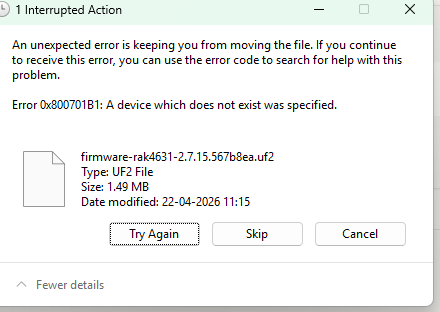
HI everyone, I am having trouble uploading my code with RAK4630 using Arduino IDE when checking the error code it led to uploading the bootloader file using meshtastic web flasher website but why trying to paste the UF2 file the DFU mode automatically closes and the process is interrupted. I need to know is there any other way to upload the file or what is the mistake that i am currently doing i have attached the Arduino error code and the DFU error below.
Arduino error:
Sketch uses 307416 bytes (55%) of program storage space. Maximum is 557056 bytes.
Global variables use 76688 bytes (37%) of dynamic memory, leaving 129760 bytes for local variables. Maximum is 206448 bytes.
2026-04-22 11:18:45,581 Using board at serial port: COM18
2026-04-22 11:18:45,584 Sending Application image.
2026-04-22 11:18:49,151 No trigger interface found for device with serial number: 494CB2B70B34AA75, Product ID: 0x0029 and Vendor ID: 0x239A
2026-04-22 11:18:49,151 Serial: Waiting 500 ms for device to enter bootloader 1/10 time
2026-04-22 11:18:49,666 Serial: Waiting 500 ms for device to enter bootloader 2/10 time
2026-04-22 11:18:50,179 Serial: Waiting 500 ms for device to enter bootloader 3/10 time
2026-04-22 11:18:50,694 Serial: Waiting 500 ms for device to enter bootloader 4/10 time
2026-04-22 11:18:51,204 Serial: Waiting 500 ms for device to enter bootloader 5/10 time
2026-04-22 11:18:51,712 Serial: Waiting 500 ms for device to enter bootloader 6/10 time
2026-04-22 11:18:52,222 Serial: Waiting 500 ms for device to enter bootloader 7/10 time
2026-04-22 11:18:52,734 Serial: Waiting 500 ms for device to enter bootloader 8/10 time
2026-04-22 11:18:53,245 Serial: Waiting 500 ms for device to enter bootloader 9/10 time
2026-04-22 11:18:53,757 Serial: Waiting 500 ms for device to enter bootloader 10/10 time
2026-04-22 11:18:54,268 Serial: Device is either not in bootloader mode, or using an unsupported bootloader.
2026-04-22 11:18:55,286 Serial: No ping response
2026-04-22 11:18:56,292 Serial: No ping response
2026-04-22 11:18:57,299 Serial: No ping response
2026-04-22 11:18:58,306 Serial: No ping response
2026-04-22 11:18:59,316 Serial: No ping response
2026-04-22 11:19:00,326 Serial: No ping response
2026-04-22 11:19:01,332 Serial: No ping response
2026-04-22 11:19:02,340 Serial: No ping response
2026-04-22 11:19:03,348 Serial: No ping response
2026-04-22 11:19:04,356 Serial: No ping response
2026-04-22 11:19:05,362 Serial: No ping response
2026-04-22 11:19:06,371 Serial: No ping response
2026-04-22 11:19:07,381 Serial: No ping response
2026-04-22 11:19:08,391 Serial: No ping response
2026-04-22 11:19:09,399 Serial: No ping response
2026-04-22 11:19:10,405 Serial: No ping response
2026-04-22 11:19:11,415 Serial: No ping response
2026-04-22 11:19:12,423 Serial: No ping response
2026-04-22 11:19:13,431 Serial: No ping response
2026-04-22 11:19:14,440 Serial: No ping response
2026-04-22 11:19:15,447 Serial: No ping response
2026-04-22 11:19:16,462 Serial: No ping response
2026-04-22 11:19:17,467 Serial: No ping response
2026-04-22 11:19:18,471 Serial: No ping response
2026-04-22 11:19:19,484 Serial: No ping response
2026-04-22 11:19:20,490 Serial: No ping response
2026-04-22 11:19:21,500 Serial: No ping response
2026-04-22 11:19:22,509 Serial: No ping response
2026-04-22 11:19:23,509 Serial: No ping response
2026-04-22 11:19:24,517 Serial: No ping response
Traceback (most recent call last):
File “nordicsemi_main_.py”, line 1545, in
File “click\core.py”, line 1137, in call
File “click\core.py”, line 1062, in main
File “click\core.py”, line 1668, in invoke
File “click\core.py”, line 1668, in invoke
File “click\core.py”, line 1404, in invoke
File “click\core.py”, line 763, in invoke
File “nordicsemi_main_.py”, line 1063, in serial
File “nordicsemi_main_.py”, line 980, in do_serial
File “nordicsemi\dfu\dfu.py”, line 127, in dfu_send_images
File “nordicsemi\dfu\dfu.py”, line 88, in _dfu_send_image
File “nordicsemi\dfu\dfu_transport_serial.py”, line 214, in open
pc_ble_driver_py.exceptions.NordicSemiException: No ping response after opening COM port
[17428] Failed to execute script ‘main’ due to unhandled exception!
CompletedProcess(args=[‘C:\Users\admin\AppData\Local\Arduino15\packages\rak_rui\tools\pc-nrfutil\v6.1.7/nrfutil’, ‘-v’, ‘-v’, ‘-v’, ‘dfu’, ‘serial’, ‘–package’, ‘C:\Users\admin\AppData\Local\arduino\sketches\825AC44DCC0911CE239F2823016A22AE/sketch_apr22a.ino.zip’, ‘-p’, ‘COM18’, ‘-b’, ‘115200’], returncode=1)
DFU error: