Fomi
(Fomi Tong)
February 28, 2019, 7:22am
7
#!/bin/sh
cd /sys/class/gpio/
echo 5 > export
echo 6 > export
echo 13 > export
echo 18 > export
echo 19 > export
echo 21 > export
echo 26 > export
echo out > gpio5/direction
echo out > gpio6/direction
echo out > gpio13/direction
echo out > gpio18/direction
echo out > gpio19/direction
echo in > gpio21/direction
echo out > gpio26/direction
echo 0 > gpio5/value
echo 0 > gpio6/value
echo 0 > gpio13/value
echo 0 > gpio19/value
echo 0 > gpio26/value
echo 1 > gpio18/value
sleep 1
echo 0 > gpio18/value
sleep 1
echo 1 > gpio18/value
donald28
(lele)
February 28, 2019, 9:13pm
8
now a get this :
pi@rak-gateway:~ $ sudo pppd call gprs
pppd options in effect:
debug # (from /etc/ppp/peers/gprs)
nodetach # (from /etc/ppp/peers/gprs)
dump # (from /etc/ppp/peers/gprs)
noauth # (from /etc/ppp/peers/gprs)
remotename 3gppp # (from /etc/ppp/peers/gprs)
/dev/ttyAMA0 # (from /etc/ppp/peers/gprs)
115200 # (from /etc/ppp/peers/gprs)
lock # (from /etc/ppp/peers/gprs)
connect chat -s -v -f /etc/chatscripts/quectel-chat-connect -T mmsbouygtel # (from /etc/ppp/peers/gprs)
disconnect chat -s -v -f /etc/chatscripts/quectel-chat-disconnect # (from /etc/ppp/peers/gprs)
nocrtscts # (from /etc/ppp/peers/gprs)
modem # (from /etc/ppp/peers/gprs)
asyncmap 0 # (from /etc/ppp/options)
lcp-echo-failure 4 # (from /etc/ppp/options)
lcp-echo-interval 30 # (from /etc/ppp/options)
hide-password # (from /etc/ppp/peers/gprs)
novj # (from /etc/ppp/peers/gprs)
novjccomp # (from /etc/ppp/peers/gprs)
ipcp-accept-local # (from /etc/ppp/peers/gprs)
ipcp-accept-remote # (from /etc/ppp/peers/gprs)
ipparam 3gppp # (from /etc/ppp/peers/gprs)
noipdefault # (from /etc/ppp/peers/gprs)
ipcp-max-failure 30 # (from /etc/ppp/peers/gprs)
defaultroute # (from /etc/ppp/peers/gprs)
usepeerdns # (from /etc/ppp/peers/gprs)
noccp # (from /etc/ppp/peers/gprs)
noipx # (from /etc/ppp/options)
abort on (BUSY)
abort on (NO CARRIER)
abort on (NO DIALTONE)
abort on (ERROR)
abort on (NO ANSWER)
timeout set to 30 seconds
send (AT^M)
expect (OK)
^M
OK
– got it
send (ATE0^M)
expect (OK)
^M
^M
OK
– got it
send (ATI;+CSUB;+CSQ;+COPS?;+CGREG?;&D2^M)
expect (OK)
^M
^M
Quectel^M
EG95^M
Revision: EG95EFBR06A05M4G^M
^M
SubEdition: V01^M
^M
+CSQ: 20,99^M
^M
+COPS: 0^M
^M
+CGREG: 0,2^M
^M
OK
– got it
send (AT+CGDCONT=1,“IP”,“mmsbouygtel”,0,0^M)
expect (OK)
^M
^M
OK
– got it
send (ATD*99#^M)
expect (CONNECT)
^M
^M
CONNECT
– got it
Script chat -s -v -f /etc/chatscripts/quectel-chat-connect -T mmsbouygtel finished (pid 907), status = 0x0
Serial connection established.
using channel 4
Using interface ppp0
Connect: ppp0 <–> /dev/ttyAMA0
sent [LCP ConfReq id=0x1 <asyncmap 0x0> <magic 0xe6a28b1e> ]
rcvd [LCP ConfReq id=0x9 <asyncmap 0x0> <magic 0xd126d265> ]
No auth is possible
sent [LCP ConfRej id=0x9 ]
rcvd [LCP ConfAck id=0x1 <asyncmap 0x0> <magic 0xe6a28b1e> ]
rcvd [LCP ConfReq id=0xa <asyncmap 0x0> <magic 0xd126d265> ]
sent [LCP ConfAck id=0xa <asyncmap 0x0> <magic 0xd126d265> ]
sent [LCP EchoReq id=0x0 magic=0xe6a28b1e]
sent [IPCP ConfReq id=0x1 <addr 0.0.0.0> <ms-dns1 0.0.0.0> <ms-dns2 0.0.0.0>]
rcvd [LCP DiscReq id=0xb magic=0xd126d265]
rcvd [LCP EchoRep id=0x0 magic=0xd126d265 e6 a2 8b 1e]
sent [IPCP ConfReq id=0x1 <addr 0.0.0.0> <ms-dns1 0.0.0.0> <ms-dns2 0.0.0.0>]
sent [LCP EchoReq id=0x1 magic=0xe6a28b1e]
IPCP: timeout sending Config-Requests
sent [LCP TermReq id=0x2 “No network protocols running”]
sent [LCP TermReq id=0x3 “No network protocols running”]
Connection terminated.
abort on (ERROR)
abort on (NO DIALTONE)
unterminated quote (line 4)
Script chat -s -v -f /etc/chatscripts/quectel-chat-disconnect finished (pid 916), status = 0x1
disconnect script failed
Modem hangup
ZhuQI
(ZhuQI)
March 1, 2019, 7:15am
9
1.Can you send the prints of the 4) and 5) steps?
2.Can you send the contents of file “/etc/ppp/peers/gprs”?
donald28
(lele)
March 18, 2019, 8:26pm
10
hello, it work fine when a disconnet the wifi and reboot. thank for your help I really appreciate
sri
(Sri)
April 27, 2019, 6:05pm
11
@Fomi
I’m stuck here. Any help would be very helpful.
I’m not even able to give AT commands, the window is stuck after
“minicom -D /dev/ttyAMA0 -b 115200”
command.
Fomi
(Fomi Tong)
April 28, 2019, 1:22am
12
Hi, @sri
I think maybe you can use the latest firmware for RAK7243 with LTE:
https://www.rakwireless.com/en/download/LoRa/Pilot-Gateway-Pro-RAK7243#Firmware
Please download the one named “RAK7243_LTE_…” .
In the latest firmware, we’ve added a configuration UI, so you can configure it easily now.
sri
(Sri)
April 28, 2019, 6:06am
13
Thanks @Fomi now I can see all the 3 LEDs light up but connect script failed error.
The Cellular Module doesn’t connect to the internet. Any thoughts?
Fomi
(Fomi Tong)
April 28, 2019, 9:47am
14
Hi, @sri
Can you execute the following command?
sudo minicom -D /dev/ttyAMA0 -b 115200
and type:
ATI
Then give me the log picture.
Thank you!
sri
(Sri)
April 28, 2019, 10:27am
15
@Fomi
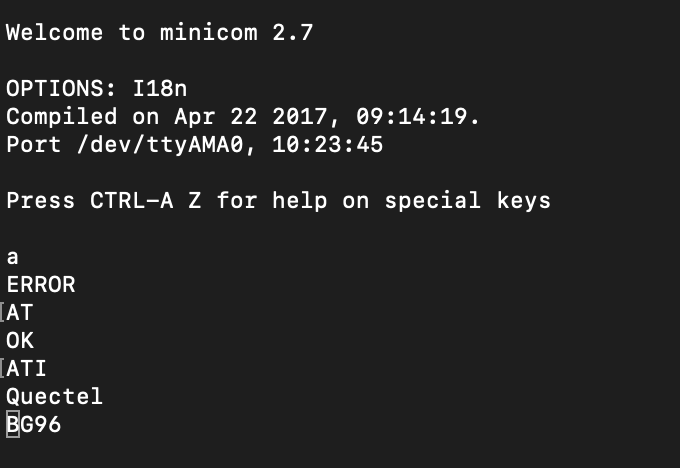
Please find the result.
Hardly the cmd prompt is interactive if I enter the minicom cmd.
Thank you.
sri
(Sri)
April 28, 2019, 10:28am
16
Revision info came after I hit another key stroke:
Quectel
BG96
Revision: BG96MAR02A07M1G
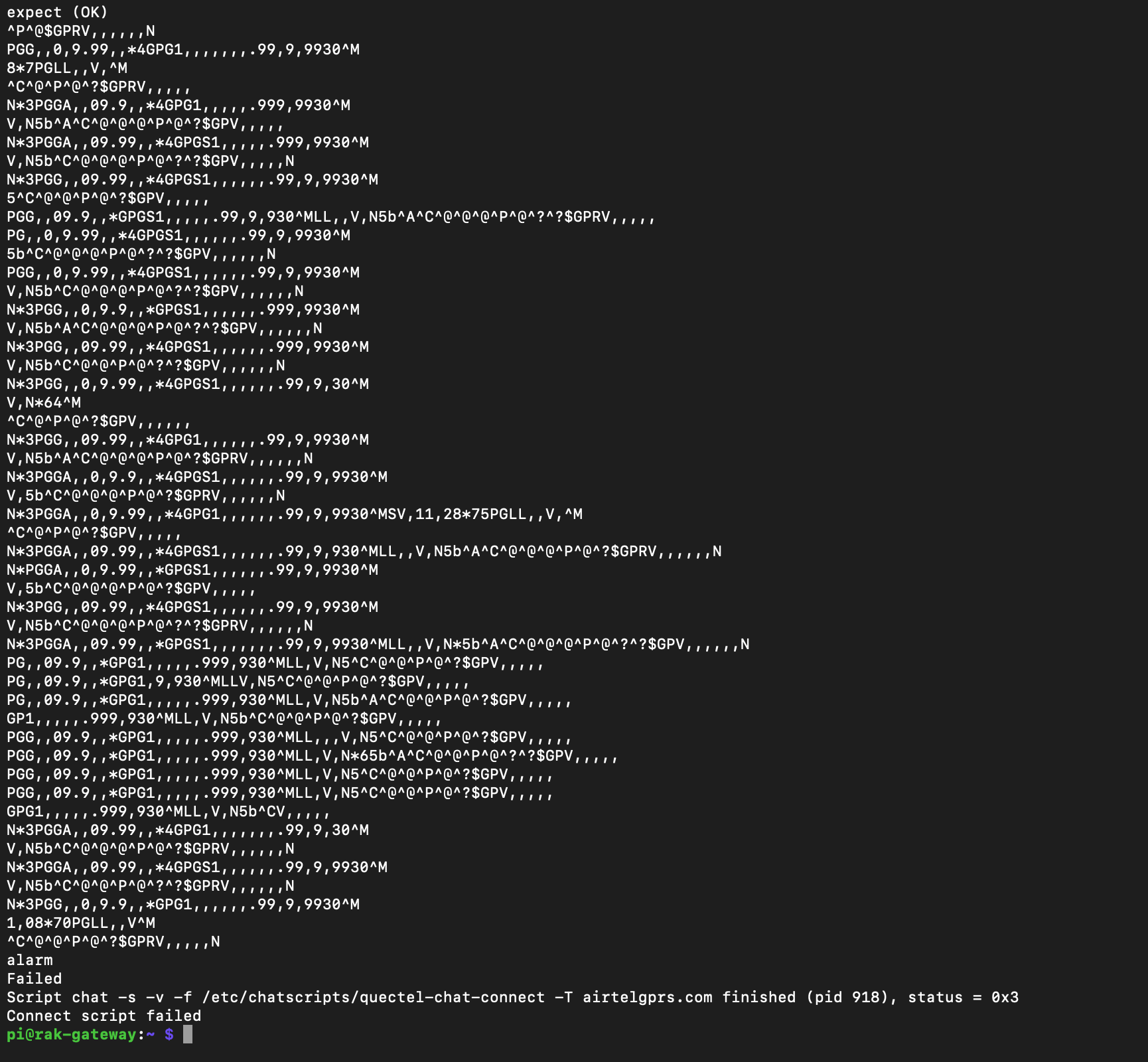
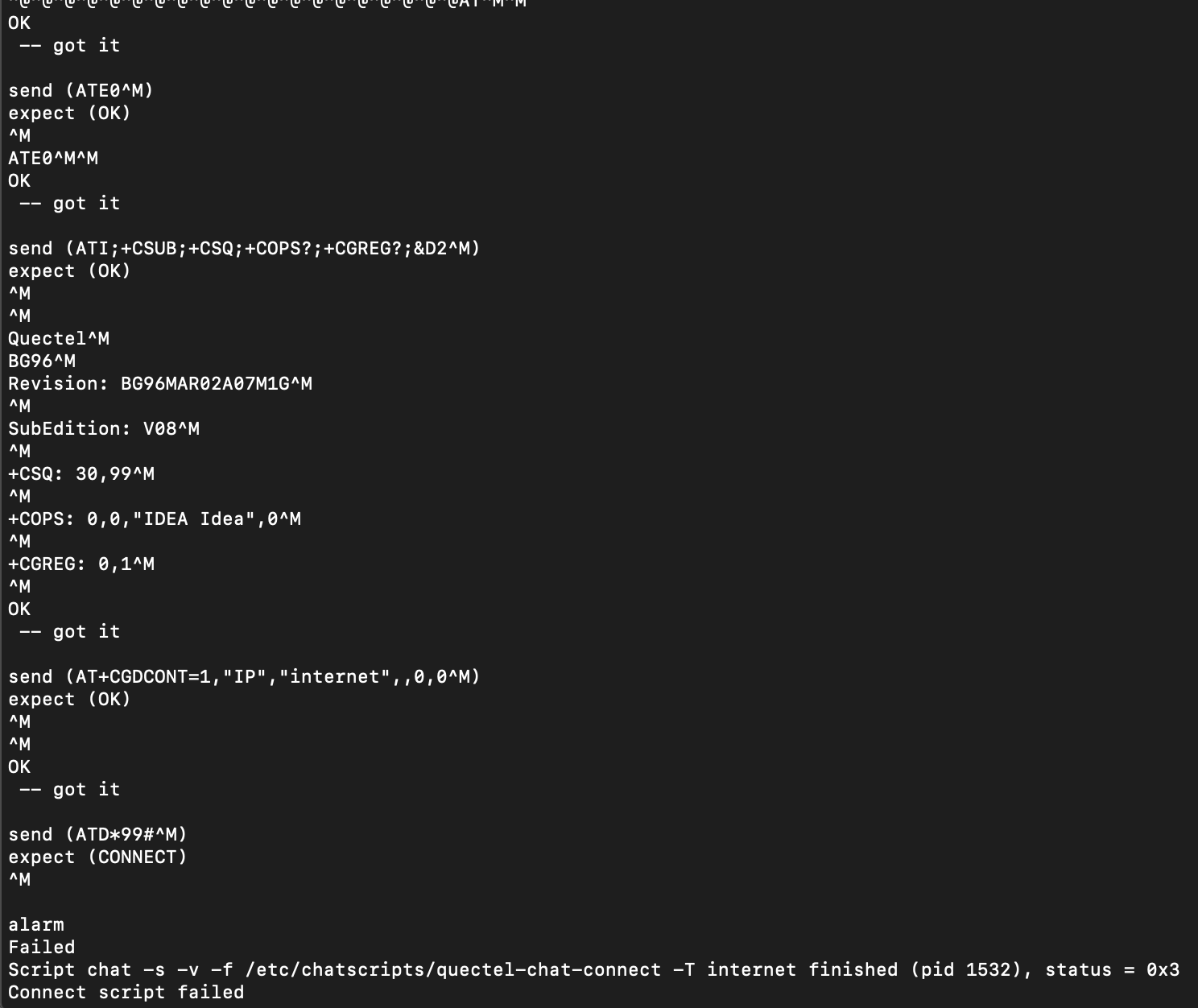
When I hit “sudo pppd call gprs”
It fails like this:
Fomi
(Fomi Tong)
April 28, 2019, 10:58am
17
Hi, @sri
You can type “at+cops=?” to get a network operator information, for example, i can get the following information in China:
2,“CHN-CT”,“CT”,“46011”,7
I think you can get some information like this too.
If it is, please type “at+cops=1,0,xxx,yyy” to set your network operator. “xxx” is the one you get in the last step, like “CHN-CT”, and “yyy” is the one like “7” according to my example.
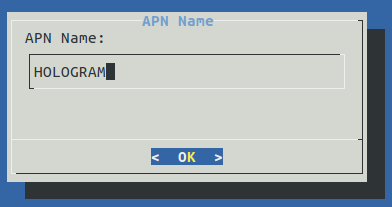
When you complete these step correctly, you can set APN name on the UI, then restart the device.
Please try again.
sri
(Sri)
April 28, 2019, 11:03am
18
Hi, @Fomi
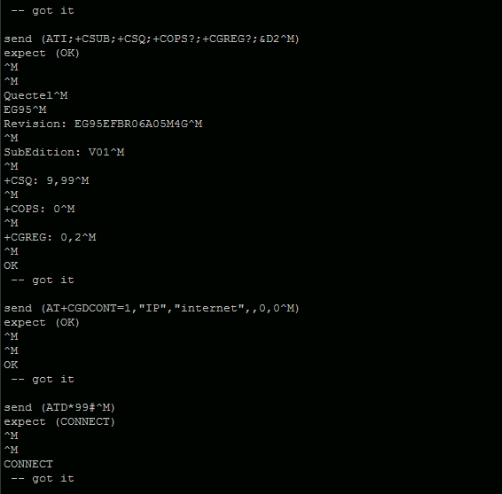
This is the error I get.
Fomi
(Fomi Tong)
April 28, 2019, 11:08am
19
Can you try to use another Network operator? For example, IDEA.
sri
(Sri)
April 28, 2019, 11:09am
20
Sure, let me insert the SIM and let you know. Even if LTE is not connecting it should latch on to EGSM on 900 band.
sri
(Sri)
April 28, 2019, 11:40am
21
@Fomi I got OK with Idea, but no connectivity.
Executed “sudo pppd call gprs” and I get OK OK and fail this time too.
The Gateway is going up when on WiFi but on cellular ‘No’.
ZhuQI
(ZhuQI)
April 29, 2019, 1:39am
22
sri:
on
Yesterday you have used the at command to configure IDEA successfully.
Can you try the following steps?
1.reboot gateway
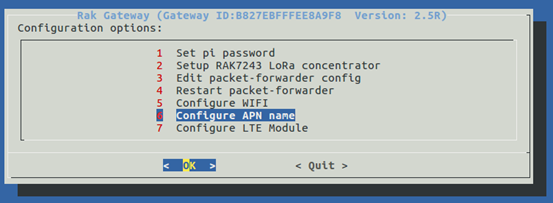
2.Use “sudo gateway-config”,choose “Configure LTE module”, choose “Disable LTE…”
3.Choose “Configure LTE module”, choose “Active LTE module”
4.Use “sudo gateway-config”,choose “Configure APN name”,reset the APN name “IDEA”
5.reboot gateway
6.Use “sudo gateway-config”,Choose “Configure LTE module”, choose “Active LTE module”
7.Use “sudo pppd call gprs”,Can it be successful?
sri
(Sri)
April 29, 2019, 4:36am
23
@ZhuQI thanks for your reply ZhuQI,
Yes, I have been trying since 3 days various steps, in-fact the above steps as well, but they yielded no result.
Do you know anyone from India who was able to successfully use gprs? any help is appreciated.
Thank you much.
Sri
vikram
(vikram kadian)
May 17, 2019, 8:07am
24
I am trying same thing but not working , here is my pppd call gprs output :
and ends with
sent [IPCP ConfReq id=0x1 <addr 0.0.0.0> <ms-dns1 0.0.0.0> <ms-dns2 0.0.0.0>]
sent [LCP EchoReq id=0x1 magic=0xe30aeae7]
IPCP: timeout sending Config-Requests
sent [LCP TermReq id=0x2 “No network protocols running”]
sent [LCP TermReq id=0x3 “No network protocols running”]
Connection terminated.
abort on (ERROR)
abort on (NO DIALTONE)
unterminated quote (line 4)
Script chat -s -v -f /etc/chatscripts/quectel-chat-disconnect finished (pid 1070), status = 0x1
disconnect script failed
Modem hangup
how can i proceed on it
EHR11
(Emiliano Rojas)
May 17, 2019, 11:15am
26
I’m reaching CGREG Ok, but when trying to Connect:
send (AT+CGDCONT=1,"IP","gprs.movistar.com.ar",,0,0^M)
expect (OK)
^M
^M
ERROR
-- FAILED
Failed (ERROR)
Script chat -s -v -f /etc/chatscripts/quectel-chat-connect -T gprs.movistar.com.ar finished (pid 997), status = 0x7
Connect script failed
Does anyone have an idea of what may be happening?
Thanks in advance
ZhuQI
(ZhuQI)
May 27, 2019, 3:39am
27
I am sorry to see your post so late.
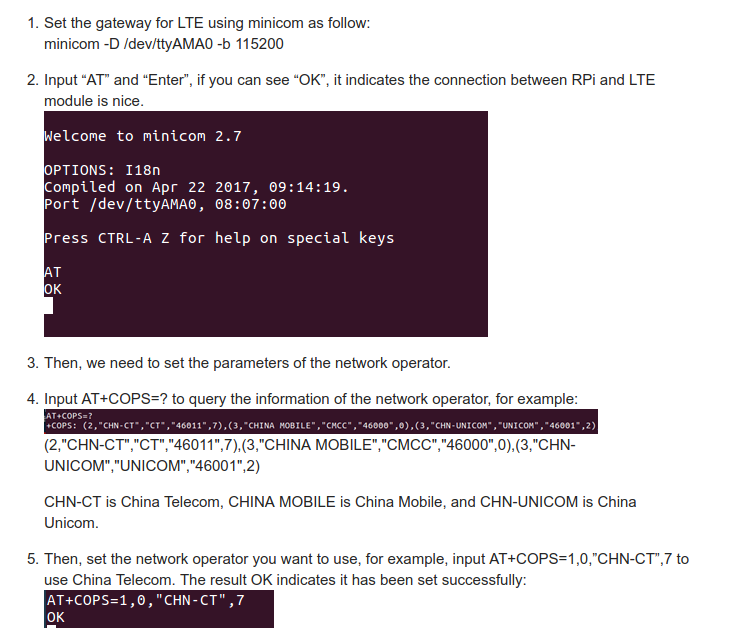
Can you post the print of “at+cops=?”?