For some other users planning to use Qingping devices and also for Rak staffs for improvement of the device:
→ why Device EUI, Application Key and Application EUI are not printed on packaging or on a sticker inside ?
→ mobile app that is only in chinese in Play Store !
→ why the hell do I need to register to use a configuration app ??? it’s insane such intrusive app !
→ LoRa infos (Dev EUI, App Key and App EUI can’t be copy/pasted from app, so poor design
→ Impossible to change the configuration of date and time on display (sorry but US format doesn’t interest me !).
→ Impossible to read the battery level through LoRa (it’s either 100% or 0) and same on display
My first points after few minutes playing with the device…
Thank you for the feedback. This is important for product improvement. I will raise the concern to our hardware partner Qingping.
→ why Device EUI, Application Key and Application EUI are not printed on packaging or on a sticker inside ? The parameters are configurable so even there is a sticker, customer might still change it to their own. But I understand user convenience if the default OTAA parameters are in a card/sticker
→ mobile app that is only in chinese in Play Store ! I cannot recall if use the APK or App store but my Qingping IoT app is in English
→ why the hell do I need to register to use a configuration app ??? it’s insane such intrusive app ! Maybe you can just select login via SMS. If you do this, you won’t need to put any password or extra details in login, you just need to send the verification code via SMS. They have your mobile number but no other details.
→ LoRa infos (Dev EUI, App Key and App EUI can’t be copy/pasted from app, so poor design DEVEUI cannot be copy/paste but APPEUI and APPKEY should be. You have to click these parameters on the app so you can copy or modify it.
→ Impossible to change the configuration of date and time on display (sorry but US format doesn’t interest me !). I am not sure what is the US format time.
→ Impossible to read the battery level through LoRa (it’s either 100% or 0) and same on display I have to check this one.
Sorry I mean description of app in Play store, it should be at least in english
Sorry again but no, I shouldn’t have to share an email or a phone number to configure a device through bluetooth, it’s not acceptable in term of confidentiality and personal data intrusion ! There is absolutely no reason for that out of company collecting datas for whatever use
Oki, got it for copy/paste Although if you can change LoRa identifiers why only AppEUI can be edited ? the other ones are not editable
what is named also military format in US but it’s not important as for an unknown reason device displays time and date only when it’s connected in Bluetooth with the app, when it’s not these fields disappear !
I confirm that it’s not reporting battery status properly
Also it would be nice to be able to connect at device through the USB port to change settings ike it’s the case for example with the WisNode 4K Button
The Qingping IoT APP is not something we develop. But regarding your concerns related to it, the description on App store should now be in English but screenshots are still in Chinese. The option on creation of account is still there (as workaround probably creating dummy email and using burner SIM).
DEVEUI is the only parameter that is not configurable since Qingping uses the DEVEUI of the RAK module when they receive it. APPEUI and APPKEY should be reconfigurable via APP. If this is still not the case, it will be helpful if you can send me some screenshots of the APP.
The time is sync and collected from the smartphone via the APP so when it boots up and not connected to app, there will be no reference for the time. This is not a bug but a limitation on the device.
We are still checking about the battery level. I will get back to you about this. Btw, do you have the temp-humidity or the CO2 variant?
Thanks for your update and please find below my answers.
well it’s even worse on that point ! Now you can’t anymore configure LoRa device without account !! I tried to register with my french cellphone number but it doesn’t work (app states number is invalid…). Looks like each update of app just makes it worse
As I can’t access configuration of devices through app, I can’t answer you on this
Then it should not display it at all as Co2/temp/rh displays time all the time but completely offset so it’s totally useles !
I have both of these devices but for sure I’ll never buy some again, going to post a review about it on my blog so other users don’t make same mistake as me to buy them !
Is the number already used before? If not, then it can be a bug. I tried to test +330123456789 and it seems to work. This is supposed to be a valid France number.
I will share a screencapture in a while so you can see how I can modify the APPEUI and APPKEY.
I do not understand this. Unless the device is configured in France then will be shipped to a different timezone without further reconfiguration once it arrived on a different location, then the offset will retain but if it will be reconfigured again, then it will sync there without wrong offset. This is a minor limitation if I understand correctly what you mean.
Just let me add my two cents.
I had no problem registering in the app, and I got the thing working.
It is true that the product does not feel very polished but it does work.
About the battery level, I am not looking to the screen, so not sure about that, but the info received through lora shows a new value each 2-3-4% so, it is jumpy but kind of continuos. for my needs is acceptable.
Things I do find needs to improve:
App key cannot be changed in 1.3.4
I have watched the video but in my device I only see this:
As you can see only allows to modify Application EUI
This force us to add the devices in advance using devEUI and a single application key per device on each gateway instead of just using appkey + appEUI.
My question:
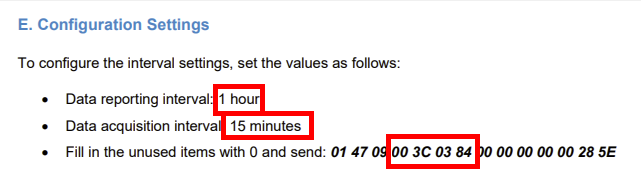
Is there any documentation about downlinks to reconfigure intervals? I have checked the user manual
But it does not seem complete or valid for the CO2 device…
I went around by using a disposable email but now I can’t anymore access settings for Lora devices in the app. See screenshot below (in the past they were listed in an advanced menu but it doesn’t exist anymore. It’s version 2.8.4 on Android. I even uninstalled/erinstalled app but same.
All good now with that decoder, so it was just an issue of the decoder not up to date
2.8.4 and can’t do anything with device now as they are no more supported in the moblie app I checked in Play Store but there are no other quinqping app for these devices !
Thanks for your help and it’s strange as I had souvenir it was the Qingping+ app in the past that I had used. I have been able to update the fw of the Qingping device.
I have also noticed the default Javascript decoder on TTN is wrong for Qingping device (perhaps tell Qingping to update it), I used for now the one you linked in previous post.
Battery is all good too and clock works fine now too
So far looks all good now out of the terrible mobile app