Hi @nmcminn ,
You have a very strange issue since AT commands work and you are only trying the basic OTAA code.
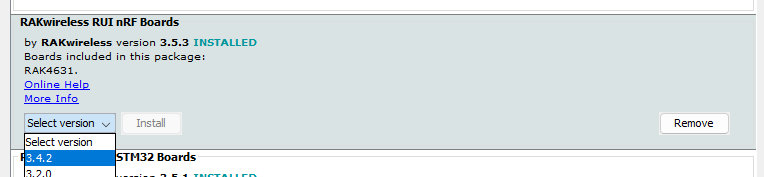
Maybe you can try to use a lower RAK4631-R BSP (3.4.2) and see if the behavior will be the same?

Hi @nmcminn ,
You have a very strange issue since AT commands work and you are only trying the basic OTAA code.
Maybe you can try to use a lower RAK4631-R BSP (3.4.2) and see if the behavior will be the same?
Hi @carlrowan we’ve checked this with RUI 3.5.3, 3.4.2 and 3.2.0, and we see the same behavior across all three versions of RUI3.
What does the message “JOIN_FAILED_TX_TIMEOUT” code actually mean? Does it mean the LoRaWAN radio is busy? Something else?
Hi @nmcminn ,
Really confusing issue 
On AT command, it is working as you said in the earlier message.
This means that the Gateway and LNS (LoRaWAN Network Server) are ok. Also means the RF path are ok (I am not sure though what RSSI and SNR levels you get on AT command test).
On the other hand, if firmware related, it should be repeatable (ideally). Unless there is prior sequence happened on the module that could potential cause the issue. If possible, you can also attempt to upload a completely new firmware (bootloader+application code) using RAKDAP1 or Jlink. Also, do you have other modules to test? Are they doing the same behavior?
I have to check what exactly JOIN_FAILED_TX_TIMEOUT means. I can only assume that it is still on the process of sending uplink. I’ll ask the software team about it.
Hi @carlrowan
This is an easily repeatable issue, we have two prototype PCBs here, both of which exhibit the same behavior. I was also getting the same result with a Wisblock 4631 module, until I flashed the bootloader to rui3_nrf52840_bootloader_latest, and also applied rui3_rak4631_latest, both found here:
Once we reflashed the 4631 test device with the new bootloader, it worked.
I realize that this is the bootloader for 3.4.2. I performed the same procedure on our custom PCB, and it is now also successfully joining and sending data via LoRaWAN. Here’s the current output from AT+VER:
AT+VER=3.4.2-rui3_22q1_update.112
I’m a bit nervous, as I don’t know exactly why this worked, but it appears that a full downgrade to 3.4.2 in the BSP, and flashing the device via BLE OTA, has fixed this particular issue.
I’m also trying to figure out what has changed from 3.4.2 to 3.5.3, but according to the Github releases 3.4.2 is the latest:
Is there a changelog from 3.4.2 → 3.5.3 that I’m missing?
Hi @nmcminn ,
As for the change logs, you can find more details here - https://downloads.rakwireless.com/RUI/RUI3/Image/CHANGELOG.md
For the BSP, this is the correct link - GitHub - RAKWireless/RAKwireless-Arduino-BSP-Index: RAKwireless BSP Support for the Arduino Board Manager
To view the changes on different versions on BSP, you can also look the staging and check the particular version GitHub - RAKWireless/RAKwireless-Arduino-BSP-Index at staging
Soon we will release 3.5.4 (doing final verification) then a major one 4.0.0. These are more stable versions. I will try and verify what you experience. Btw, for the update of firmware, all you use is nrfutil correct? You do not use any external tools like jlink or rakdap1?
@carlrowan, it looks like that change log link is dead, but the BSP staging link you sent is fine.
I’ve done some further testing with 3.4.2, and it looks like it only works very intermittently, and even then only for a short time.
I’ve built LoRaWAN firmware for many different devices, including ESP32’s with a LoRa radio on the board, the Murata Type ABZ module, Pycom devices, and a few others. In every case I have looked at, the sub band within the region is set before the join is initiated. This is also true of joining the network with that AT command example that I provided in the opening of this thread.
However, in the code example you posted, the channel mask is only set after the join is successful. Could this be the cause of this problem? I’ve tried moving the line of code that sets the mask to before the join is initiated, but setting the mask there returns an error.
EDIT: As a test, I moved the setting of the channel mask to before the first join call, with no change in results. Every time we try to get this thing to join, we get the same +EVT:JOIN_FAILED_TX_TIMEOUT
error message.
Is there any additional debug output we can turn on, or anything to further help troubleshoot this issue? We’ve been struggling with this for weeks.
Hi @nmcminn ,
You are correct that the mask should be set first before joining. Could be that the mask is already configured on my test.
For the changelog, you can check this temporarily - Dropbox - CHANGELOG.md - Simplify your life
Can you give me more details on the module?
Btw, for the +EVT:JOIN_FAILED_TX_TIMEOUT, R&D informed me the following reason.
- The LoRa module is sleeping
- User do abnormal operation while device try to JOIN
- The RAK4631 interrupt is abnormal
Still not directly useful list since it is very generic.
I will replicate all your steps and see if I can get same result.
It might be worth noting that we used these modules for our CE / FCC testing procedures. Our test lab used several of the test modes built into the default firmware to perform these tests (continuous wave, LoRaWAN certification, tone test, etc. Could one of those modes have left the module in a state that could cause this problem?
Is there a way to fully reset the module back to factory, removing all configuration and any state stored in the device?
@ @nmcminn
Answering here both (your post here and your email)
AT+ZATR will reset the device to factory defaults.
Inside RUI3, the AT command AT+JOIN and the API call api.lorawan.join() are the same code on a lower level.
What is AT+JOIN=? returning? If automatic join is enabled through AT command (first two parameters == 1), try to disable it with AT+JOIN=0:0 and check whether the API call from you code works different.
If you set automatic joining with AT command (AT+JOIN=1:1) and remove the API call api.lorawan.join() from your code, is it able to join?
I am asking this, because using AT+JOIN=1:1 and calling api.lorawan.join() from the code could lead to a runtime situation. I still have to check, but I am guessing that the device would try to automatically join on startup (because of AT+JOIN=1:1), but when you call api.lorawan.join() from your code an ongoing join sequence would be cancelled and the join would be restarted.
If you do not have a specific reason to call api.lorawan.join() from your code, using AT+JOIN=1:1 should be the better solution. You can check the status of the join request with api.lorawan.njs.get():
    while (api.lorawan.njs.get() == 0)
    {
      Serial.print("Waiting for Lorawan join...");
      delay(10000);
    }
@beegee, still no luck here. It looks like AT+Z is not a valid command. ATZ (without the +) will reset the MCU, but doesn’t change any settings. According to the AT command set docs ATR is the command to restore factory defaults. There are a few commands listed in the firmware AT? output that aren’t in the docs, but that’s a separate issue.
Here are the steps I went through (Using RUI 3.5.3 BSP).
Once that was done, I loaded the sketch that should join the LoRaWAN network, a very slightly modified version of the code @carlrowan provided above.
When that code starts up, we saw the same result (join failure, with EVT:JOIN_FAILED_TX_TIMEOUT). If I run the AT+JOIN=? command again, while the LoRaWAN sketch is running, we get a result of AT+JOIN=1:0:8:0, which should mean that the device is trying to join, is not set up for automatic join on power on, 8 seconds between join retries, and zero retries.
Next, I loaded the “empty” sketch again so that I could reconfigure the device’s join behavior using only AT commands:
I removed all of the api.lorawan.join() calls from our LoRaWAN sketch, but left in the calls to do things like set the channel mask, etc. When we do this, the first call to set up the LoRaWAN settings (a call to set the app EUI) fails. I’m assuming that this is because the device is already joining due to the join on power up behavior, and things like EUIs cannot be changed while the device is attempting to join.
Next, I decided to test and see if the join with only AT commands still works. I used nrfconnect to flash the factory RUI 3.5.3 firmware package (RUI_3.5.3_RAK4631_dfu_package.zip). I ran ATR to reset to defaults, and then used the exact same EUIs and keys we used the first time, and the same commands and sequence defined in the opening message of this thread. Now the module will not join at all, even using just the AT command set. Here’s the console output.
09:03:37.126 → +EVT:JOIN_FAILED_TX_TIMEOUT
09:03:57.308 → +EVT:JOIN_FAILED_TX_TIMEOUT
09:04:09.316 → +EVT:JOIN_FAILED_TX_TIMEOUT
09:04:21.303 → +EVT:JOIN_FAILED_TX_TIMEOUT
09:04:33.320 → +EVT:JOIN_FAILED_TX_TIMEOUT
I did a little hunting around on Github, and found a DFU package for 3.5.4 (RUI_3.5.4_RAK4631_dfu_package.zip) and decided to give it a try. I flashed it to the device using nrfconnect, then ran ATR to restore factory defaults. Then I used the same AT commands to set up the LoRaWAN connection. I was able to get it to join twice, but when I tried to reproduce the results it was back to the timeout error
To summarize we have gotten the device to join the network via code once or twice, and via the AT commands once or twice, but very inconsistently.
What other options do we have here?
Hi Nathan,
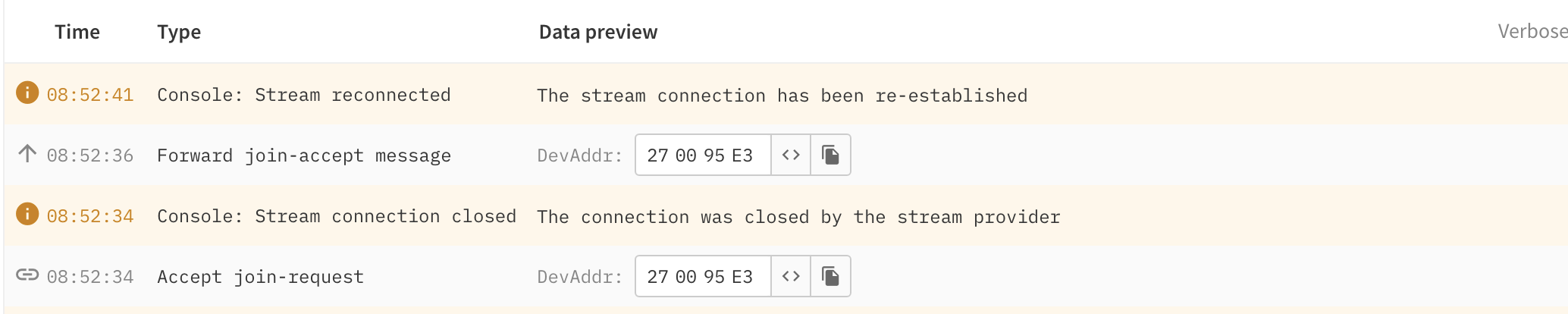
From your screenshot, I guess you are using TTN as LoRaWAN server.
do you see any other messages after the two join-request and join-accept in the log?
Not sure if I asked already, but do you see Join Request messages in the gateways packet log screen when it fails to join?
Good morning @beegee.
When we see the +EVT:JOIN_FAILED_TX_TIMEOUT on the device, we do not see any messages received by the gateway, or by the LoRaWAN server. This error is preventing the device from transmitting anything, as best I can tell.
This is definitely a problem on the device itself.
I tried earlier today to connect a RAK4631 with RUI3 (V3.5.4, same as you) to my US915 Chirpstack server (on a VPN in Germany) and I didn’t have any serious problems, beside of 1 or two failed retries.
It worked with both AT command and API call to join.
Your problem is really strange.
Our R&D team is out on Chinese New Year holidays already, so I will not get any help from them for a week.
Would you be willing to run a test against my US915 server?
I can definitely do that, yes! I have a gateway here that I can set up to point to whatever endpoint you think would work. However, I don’t think we will see different results as I don’t see any messages ever hitting the gateway at all.
@beegee and @carlrowan I think I figured it out. Here’s what happened:
I was doing some further testing this morning. I flashed RUI 3.4.2 to the device using nrfconnect. Here’s the output from AT+VER:
AT+VER=3.4.2-rui3_22q1_update.112
Once the device restarted, I ran the same AT commands, and the device was able to join the network:
Next, I reset the device with ATZ, and asked it to join again. This time, it failed to join with the same error message, +EVT:JOIN_FAILED_TX_TIMEOUT
If I first run ATR to restore factory settings, then ATZ to restart the MCU, then flash 3.4.2-rui3_22q1_update.112 to the device using nrfconnect and then finally run the join sequence AT commands, it will usually join, and be able to join again after powering the device off and then back on.
This was encouraging, so I ran a few additional tests. The first one was to load the default 3.5.3 firmware using nrfconnect. Then, I configured the device to join using the AT commands. The device failed to join. I powered the device off, and then back on, and waited a few minutes before issuing the join command. This time, it worked. Curious. I played around a little with waiting different intervals before issuing the LoRaWAN AT commands to join the network, and found after 30-60 seconds it would work consistently. This is the same amount of time that the BLE radio is on when the device first starts up, as confirmed by using a Bluetooth scanner. I added the following two lines of code to the setup() function of the test sketch:
  // turn off BLE UART
  api.ble.uart.stop();
  // turn off BLE advertising
  api.ble.advertise.stop();
With these two lines included in the code, the LoRaWAN join and subsequent message sends work exactly as expected.
It looks like the LoRaWAN radio can’t be used until the Bluetooth is shut off. Is there some kind of software interlock to prevent the two radios from being used at the same time? Or, since the R&D team said that this could be interrupt related, could the BLE radio be driving some interrupts that knock out the LoRaWAN radio?
Hi Nathan,
I am not disabling BLE on my device and don’t have this problem. The BLE and LoRa drivers are independent and there should be no interlock between the two.
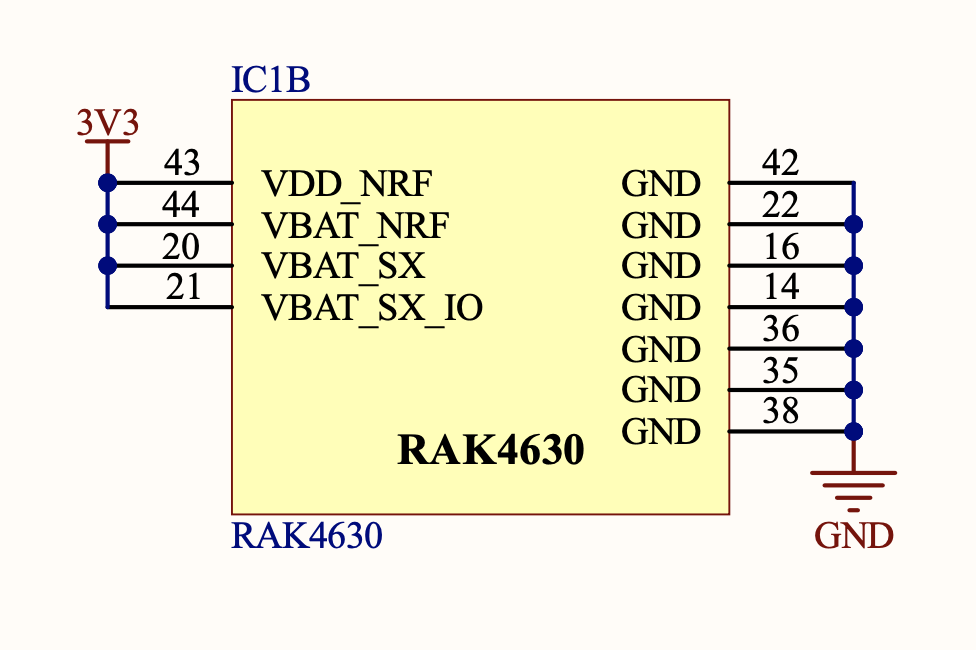
The RAK4630 is on a custom PCB? If yes, can you show me the power-supply connections of the RAK4630 module?
On our WisBlock RAK4631 Core module the power supply is like this:
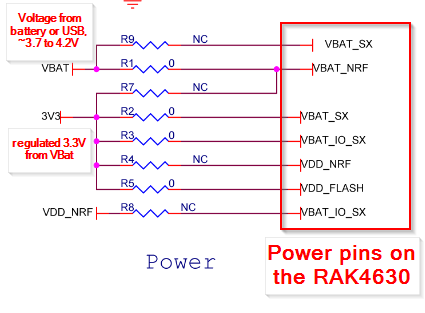
There could be the problem here.
The RAK4630 is internally designed to use VBAT_NRF to generate its own GPIO supply. Therefor VBAT_NRF should be higher than 3.3V. As you can see in the schematic part I posted, we have VBAT_NRF connected to VBAT which is between 3.7V and 4.2V.
I am not sure whether this could cause a supply problem while BLE is active that could influence the SX1262 transceiver.
I have no setup to test your supply configuration, but I will forward this to our R&D team. They are in Chinese New Year, so an answer might not be back before beginning of February.
On your custom PCB, do you have an option to connect VBAT_NRF to another voltage than the 3.3V?
Hi @beegee!
We do have that option. We are actually making a new PCB revision right now to deal with a couple other issues that came up during testing. I’m passing this info along to our PCB designer right now.
I’ll let you know what he says, surely other people building products based on the 4630 might find this useful!
– Nathan
Hi Nathan,
Usually we use the Breakout Boards for the WisDuo modules as reference schematics.
Unfortunately for the RAK4630 we never made such Breakout Board.
I will check with our Documentation team if we can add a reference schematic with these details.