
You need to configure LTE APN and try to use it to connect to other networks normally.

APN is configured right.
LTE is currently the only connection and I can reach the web-gui ofter the vpn connection

In chirpstack the gateway is shown as offline
frequency band is configured to 868 and lora log shows incoming messages.
Have you else sever to make gateway connect it?
It’s currently the only system the gateway has access to.
Is there a need of adding / modifying the firewall rules to use the UDP forwarder over VPN / LTE ?

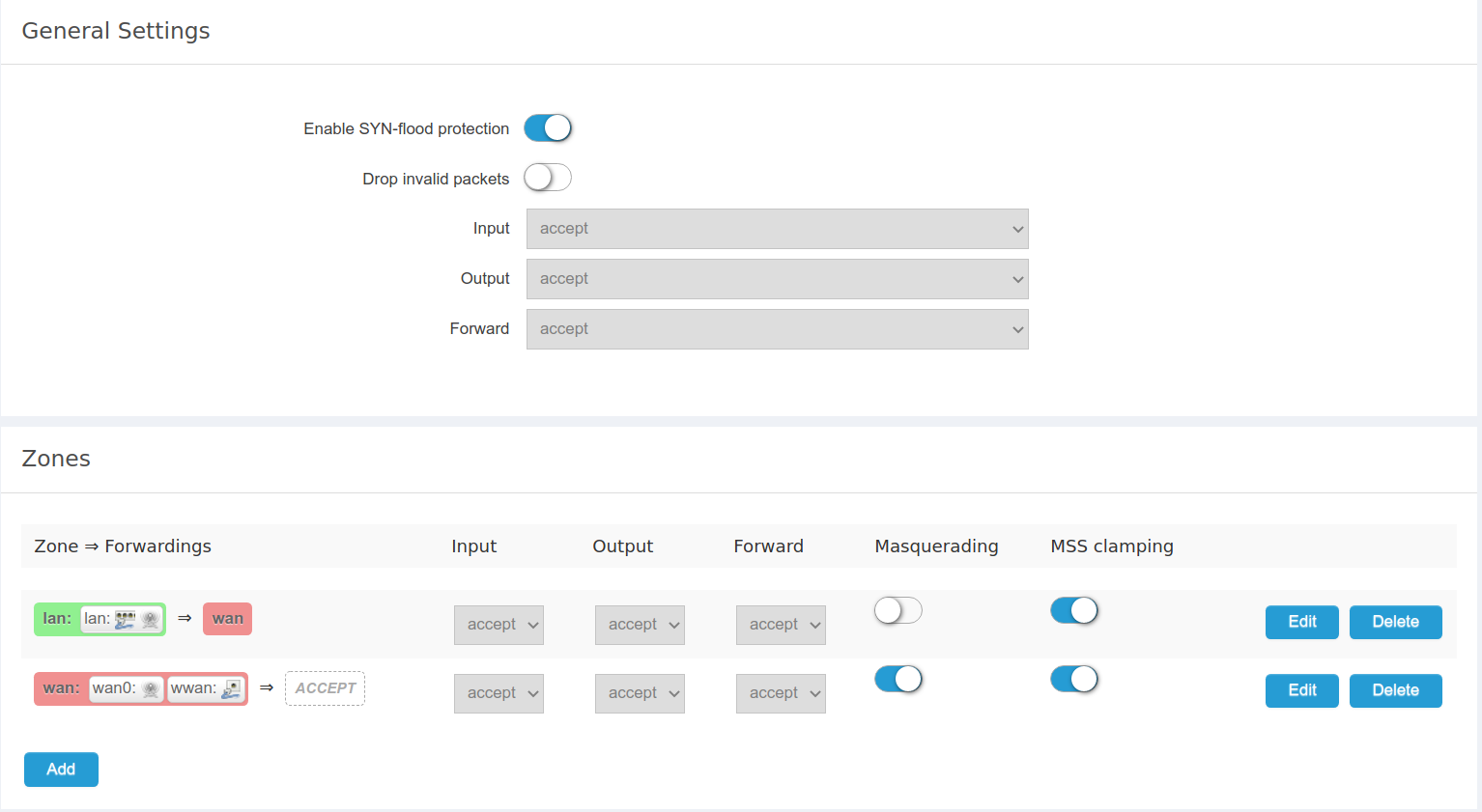
Maybe you can try connecting to TTN to rule out the problem with your server.
I setup connection to TTN:
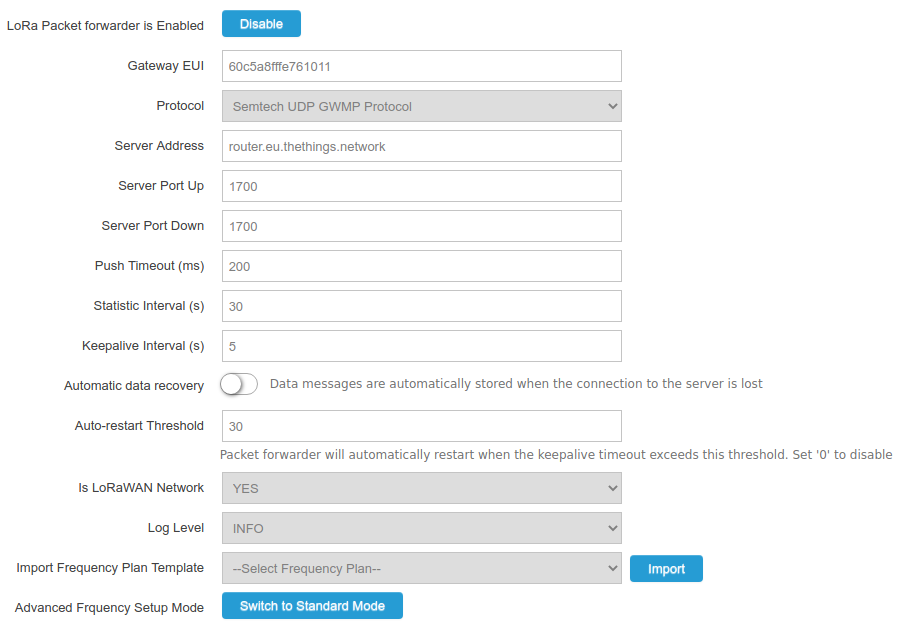
But same issue no acks:
Wed Jul  1 11:38:52 2020 user.notice lora_pkt_fwd[27404]: # PUSH_DATA datagrams sent: 1 (175 bytes)
Wed Jul  1 11:38:52 2020 user.notice lora_pkt_fwd[27404]: # PUSH_DATA acknowledged: 0.00
Wed Jul  1 11:38:52 2020 user.notice lora_pkt_fwd[27404]: ### [DOWNSTREAM] ###
Wed Jul  1 11:38:52 2020 user.notice lora_pkt_fwd[27404]: # PULL_DATA sent: 6 (0.00 acknowledged)
Wed Jul  1 11:38:52 2020 user.notice lora_pkt_fwd[27404]: # PULL_RESP(onse) datagrams received: 0 (0 bytes)
Wed Jul  1 11:38:52 2020 user.notice lora_pkt_fwd[27404]: # RF packets sent to concentrator: 0 (0 bytes)
Attached is what I tested by now:
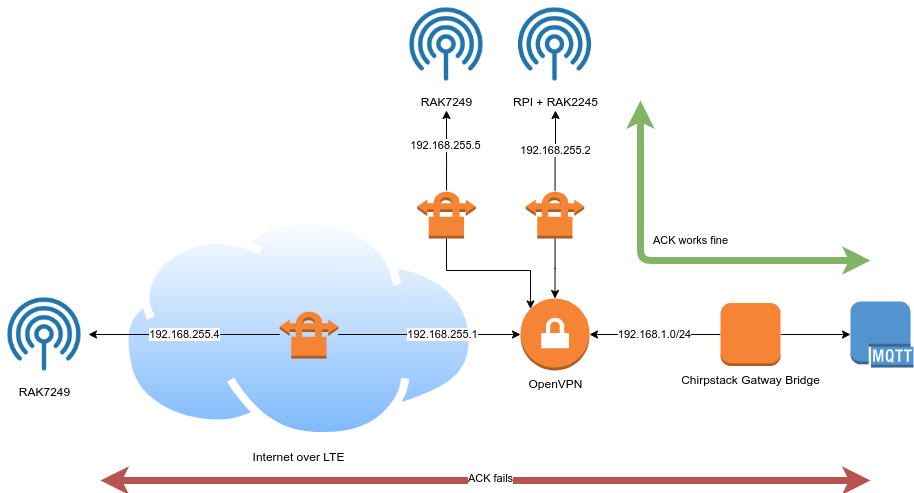
So the issue must be placed with within the connection of VPN over LTE
Can you also see the gateway connection status when you connect to TTN?
If so, be sure to check your LTE connection, as he may not have access to the outside network, or switch to an LTE card.
I tested the 2 scenarios:
new firewall setting + LTE only + TTN = success
new firewall settings + LTE + OpenVPN + TTN = failed
So issue must be within routing of udp over LTE + VPN
I am experiencing the same problem with a RAK7258. Gateway not showing as alive in chirpstack
Running on ethernet at the moment for testing
Could rak provide a config example and firewall rule settings if different from default
here is my openvpn config setting on the gateway.
I am using pritunl free version as the openvpn server
Notice I have tried adding “local xxx.xxx.xxx.xxx” with the gateway local ip and commented nobind as suggested in another post in this forum but no luck. Gateway not showing as alive in chirpstack
Also not that it runs on firmware 1.1.0062_Release r202 which i downloaded from the forum because 0061 does not allow to upload a config file.
setenv UV_ID xxxx
setenv UV_NAME xxxxx
local 192.168.1.13
client
dev tun
dev-type tun
remote xxx.xxx.xxx.xxx 15954 udp
#nobind
persist-tun
cipher AES-128-CBC
auth SHA1
verb 2
mute 3
push-peer-info
ping 10
ping-restart 60
hand-window 70
server-poll-timeout 4
reneg-sec 2592000
sndbuf 393216
rcvbuf 393216
#max-routes 1000
remote-cert-tls server
comp-lzo no
key-direction 1Hi @geeks-r-us
I am hoping we can get to the end of this.
In my case the gateway is connected with ethernet, I tried with wifi also and get the same issue.
I don’t believe it is because of the LTE connection. I see from your diagram above that you got it working with two gateways not on LTE. Can you please confirm that please?
Can you please share your client openvpn config on the gateway that is working?
Did you find a way to test the upd traffic? I tried a few commands from terminal in the gateway to test access to the udp port of the chirpstack server but can’t get anything to work. Relying just on the status of the gateway on chirpstack.
Please refer this document:
Thanks Nicholas but I have been through it before and it is not explaining why udp packets are not getting to the server but the rest is. Again I am using pritunl because it is much easier to set up and manage and it is built with openvpn .
Are you also using an external server? Is everything normal when you’re not using OpenVPN?
Yes I have around 10 gateways on that server. I manage the server so have root access to it. It is running chirpstak. I have tried with 2 different RAK7258 and I get the same issue. The vpn connection works so I can get to the admin interface but no udp packets seem to go to the server.
Wifi or ethernet connection on the gateway does not make any difference.
Can you show pictures to make the problem clear? 
Can you send me your email in a private message and I will show you my settings?