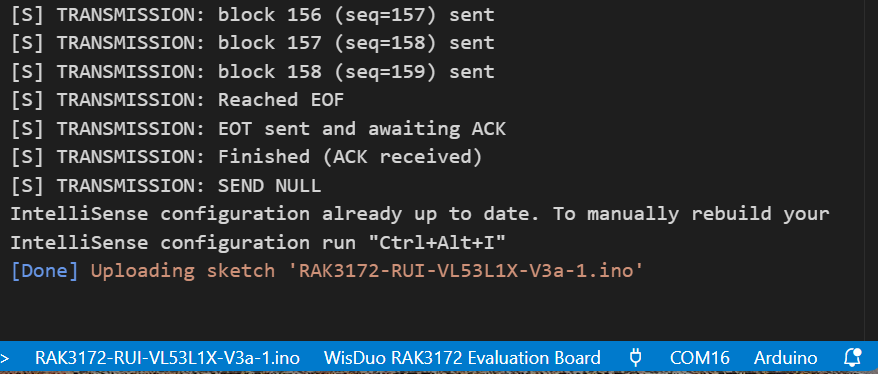
One of my RAK3172 based LoRaWAN nodes has developed the problem of forgetting all of it’s LoRaWAN settings when I upload a new version of its application. (Windows 11, RUI V4.2.1, VS Code in Arduino mode). The LoRaWAN parameters are retained fine with just a reset or power cycle, but lost with a new program upload (e.g. DEVEUI and APPKEY both become all “0000”). I have to reload all the LoRaWAN parameters after a program upload, via PUTTY using AT commands. This particular RAK3172 became apparently “bricked” and I recall going through a STM32CubeProgrammer exercise to restore RUI 4.2.1 which may be related to the current issue. My application setup for the RAK3172 is very similar to the @beegee “best practices” GitHub example and the application and LoRaWAN communications with Chirpstack are fine once I restore the LoRaWAN settings. It is just inconvenient to have to reload all the LoRaWAN settings. Any suggestions to troubleshoot on why the parameters are retained with power cycles but not program uploads is appreciated. Following outlines my steps to reinstall RUI to the RAK3172:
Recovering a Bricked RAK3172
Used STM32CubeProgrammer to recover boot loader and app using ST-Link mini V3 (wires to RAK3172 pins for SWCLK and SWDIO
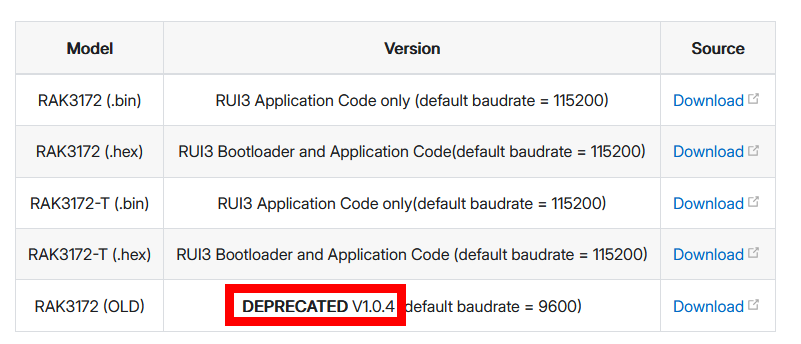
• RAK3172_v1.0.4_Boot+App_20220218.hex likely a very old version??
Once Cube Programmer indicated success, after several attempts was able to use RAK Device Firmware Upgrade Tool v1.4.exe to upgrade RUI3
• Note, first attempts seem to need 9600 baud?
This is very strange, I am using VSC/ArduinoCLI all the time to upload firmware and it never lost its settings.
As you have used STM32CubeProgrammer (at least once) and I guess you used it with chip erase, can you try the following?
Setup the devices credentials (DevEUI, AppEUI, AppKey, LoRaWAN region, …) with AT commands.
Then issue
AT+FACTORY
to store this settings as the factory defaults.
Then upload another application through VSC/ArduinoCLI (not STM32CubeProgrammer) and check if it has kept the settings.
The WisDuo modules have two sets of settings:
Factory settings, written by our factory before delivering, they are the default
User settings, these are identical with the Factory settings until you change settings with AT commands or API calls.
Both Factory and User settings are in the flash memory and should not be erased when you just upload a new firmware through UART2 or USB (if it is a WisBlock).
Both Factory and User settings are erased when you are using STM32CubeProgrammer with chip erase.
@beegee Unfortunately, after issuing the AT+FACTORY command, the LoRaWAN settings were still zeroed out upon the next program upload. I tried entering the settings and then issuing AT+FACTORY before uploading a program. I also tried entering an ATZ command after entering the settings/AT+FACTORY before uploading a program. I think your thought about “clearing memory” with CubeProgrammer is likely correct as the root cause. Perhaps I need to restore again with CubeProgrammer but with a newer file than “RAK3172_v1.0.4_Boot+App_20220218.hex” if one is available?
I upload Program code with the VS Code Arduino ICON. I will review my notes and reply separately on the instructions I followed on CubeProgrammer restore of the RAK3172 RUI boot loader.
Uploading over UART2 with VisualStudioCode/ArduinoCLI or ArduinoIDE does not delete the LoRaWAN credentials or any other settings saved in flash unless you changed the uploader command.
Using STM32CubeProgrammer does erase all settings and factory settings.
But you can set them once with AT commands, they will be saved as user settings.
To save these user settings as factory default, you save them with AT+FACTORY.
@beegee Hi Bernd. My dozens of other RAK3172 do behave as you explain in terms of the LoRaWAN settings being saved and still present with any program upload. Unfortunately, I have one RAK3172 that after the Cube Programmer restoring exercise
(using file RAK3172_v1.0.4_Boot+App_20220218.hex likely with erase memory selected in CubeProgrammer?!)
, refuses to retain the LoRaWAN settings upon any program upload. I have to re-enter the settings after any program upload with PUTTY. I tried the AT+FACTORY command after re-setting the LoRaWAN settings, but the settings were still wiped out at the next program upload. I am unclear on what troubleshooting to attempt next?
@beegee Bernd, after restoring the boot loader, and noticing the old RUI version, I did immediately use the upgrade tool to also restore RUI V 4.2.1. Then proceeded with program uploading and running into the LoRaWAN save issue. Is there a more current boot loader hex file available?
from your link of the RAK3172 Quick Start guide. When I use this file with CubeProgrammer to restore the boot loader, all seems to restore properly. I’ve tried AT+FACTORY many times (after uploading Arduino Program, then restoring LoRaWAN settings via PUTTY connection, the AT+FACTORY via PUTTY connection, both with and without following up this with an ATZ). Partial CubeProgrammer listing here:
6:21:35 : UR connection mode is defined with the HWrst reset mode
16:21:35 : RTS low
16:21:35 : DTR low
16:21:35 : Serial Port COM7 is successfully opened.
16:21:35 : Port configuration: parity = even, baudrate = 115200, data-bit = 8, stop-bit = 1.0, flow-control = off
16:21:35 : Activating device: OK
16:21:35 : Board : –
16:21:35 : Chip ID: 0x497
16:21:35 : BootLoader protocol version: 3.3
16:21:37 : UPLOADING OPTION BYTES DATA …
16:21:37 : Bank : 0x00
16:21:37 : Address : 0x1fff7800
16:21:37 : Size : 104 Bytes
16:21:37 : UPLOADING …
16:21:37 : Size : 1024 Bytes
16:21:37 : Address : 0x8000000
16:21:37 : Read progress:
16:21:38 : Data read successfully
16:21:38 : Time elapsed during the read operation is: 00:00:01.133
16:26:19 : Opening and parsing file: RAK3172-E_latest_final (3).hex
16:26:19 : Memory Programming …
16:26:19 : File : RAK3172-E_latest_final (3).hex
16:26:19 : Size : 195.16 KB
16:26:19 : Address : 0x08000000
16:26:19 : Erasing memory corresponding to sector 0:
16:26:19 : Erasing internal memory sectors [0 6]
16:26:19 : Erasing memory corresponding to sector 0:
16:26:19 : Erasing internal memory sector 8
16:26:19 : Erasing memory corresponding to sector 0:
16:26:19 : Erasing internal memory sector 10
16:26:19 : Erasing memory corresponding to sector 0:
16:26:19 : Erasing internal memory sectors [12 103]
16:26:21 : Download in Progress:
16:26:48 : File download complete
16:26:48 : Time elapsed during download operation: 00:00:29.046
16:26:48 : Verifying …
16:26:48 : Read progress:
16:27:12 : Download verified successfully
May I ask why you flash you application with STM32CubeIDE and not directly from Arduino?
I never saw this problem before and I can only guess it has to do with how you setup STM32CubeIDE.
(1) Do you have the same problem when you flash you application directly from ArduinoIDE or VSC with Arduino Extension
@Bernd I am only using CubeProgrammer to restore the bootloader, via the Quick Start guide “RUI3 Bootloader and Application Code(default baudrate = 115200)” link to
“RAK3172-E_latest_final.hex file.”
This is because I think the boot loader is only available as a .hex file and The RAK Device Firmware Upgrade tool only works with .bin files?
I am using the
“RAK Device Firmware Upgrade Tool v1.4.exe”
tool to update RUI to V4.2.0 (although RUI V4.2.0 also is installed by CubeProgrammer from the .hex file along with the boot loader).
I use PUTTY to define the LoRaWAN parameters and confirm their settings. I then use VS Code or Arduino to upload the application. The application works at this point.
However, upon the next application upload (using VS Code or Arduino IDE) after any tweak (or even with no change) to the application, I find the LoRaWAN settings all zero’d out (as confirmed with AT Commands) and have to use PUTTY to reenter the LoRaWAN parameters. Then the application works fine again, with the Arduino upload installing RUI V4.2.1 even.
I’ve tried entering AT+FACTORY via PUTTY after using PUTTY to set the LoRaWAN parameters.
Note, if I power cycle, reset, or just ATZ command the RAK3172, it remembers the LoRaWAN parameters fine, so I don’t think anything in wrong with the RAK3172 setup code of the application that would delete the LoRaWAN settings.
@beegee Success. The RAK3172 again started remembering the LoRaWAN settings through an application upload cycle.
The following process was repeated a few times to achieve success. I used STM32CubeProgrammer to restore the bootloader with the latest
“RAK3172-E_latest_final.hex”
file, upgraded to RUI V4.2.1 with the RAK Device Firmware Upgrade Tool, set the LoRaWAN parameters with PUTTY, uploaded and ran my application, and used PUTTY for AT+FACTORY command to the RAK3172, then uploaded the slightly modified application again.
I suspect the key step was using a more current version of the .hex file of the bootloader + application.