Hi James,
Thanks for this explanation.
I am still not able to reproduce the problem, I am using the same firmware version than you.
I will push this issue to our R&D team for further investigation.
Hi James,
Thanks for this explanation.
I am still not able to reproduce the problem, I am using the same firmware version than you.
I will push this issue to our R&D team for further investigation.
Little update.
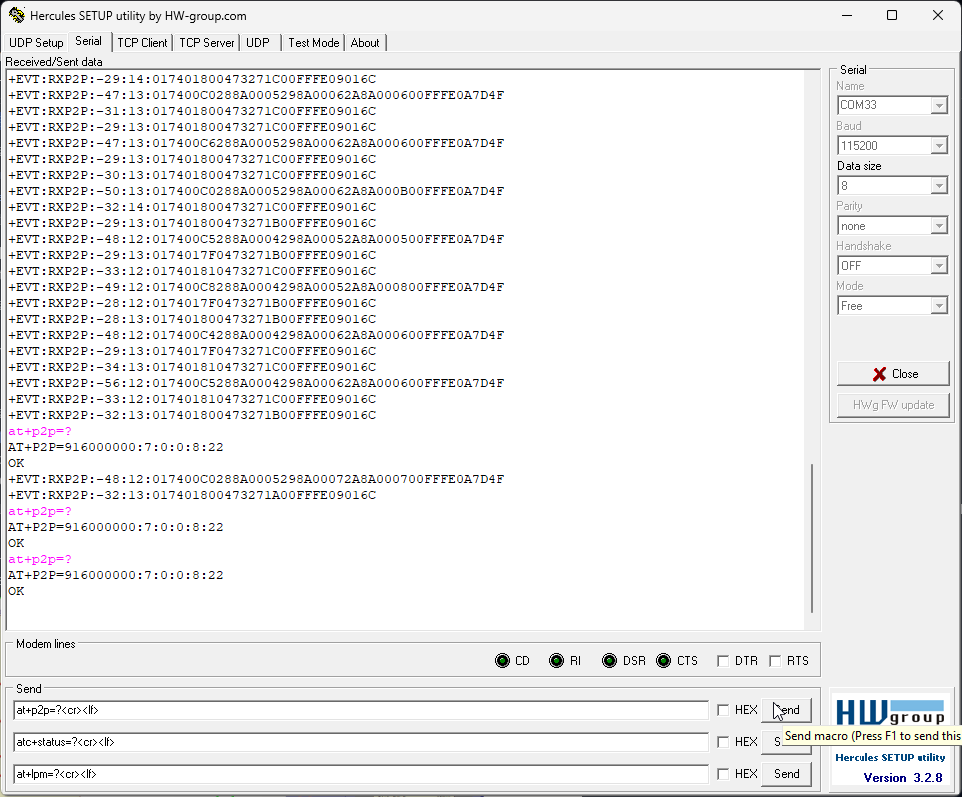
After hours of receiving LoRa P2P packets, I still cannot reproduce your problem. I even switched to the same terminal app you are using:
One question, as we were talking about RUI3 API functions before, are you running the AT command firmware or are you using a custom code made with the RUI3 API when you see that problem?
We are just running the AT command firmware, no custom code at all, we are just using the module as a receiver. We think this is a weird bug, because in your case, you can recover by sending CR/LF when your module stop responding to AT commands. For us, when the module stop responding to AT commands, we cannot recover by sending it CR/LF like you did.
Thanks for pushing it to the dev team. Like I said, the timing for this issue to happens is random at times.
Running it now since 4 hours. Still no problem with the AT commands.
But my test environment might be different, because I am using WisBlock with the RAK3372, which is a RAK3172 on a PCB with a UART-USB chip on it.
I am guessing you are using an external UART-USB adapter. When the module stops to respond, did you try to disconnect the UART-USB adapter and reconnect it?
Yup we did, this is the first thing we wanted to eliminate, we even simply disconnect the one adapter and connect the the module to another UART-USB adapter while keeping the 3172 module power on, the module remain unresponsive to any AT commands.
We used the same UART-USB adapter on other 3172 module for another product with custom code using the STM SDK not RUI, the UART2 operates fine.
Our team also just confirmed that the module we order recently last month also have the same issue, this also ruled out the modules we bought one year ago.
We are going to obtain a few more UART to USB dongle but with a different FTDI chip variant to see if our the dongle we current have is the issue. Will update ASAP.
Did you upgrade these “old” modules to RUI3 V4.0.5 as well?
Had my setup running over night and still cannot reproduce it.
Yes, we also upgrade these “old” modules as well, we are investigating if it is our UART to USB dongles, it is good that since you cannot reproduce the issue, we are getting new dongles and hopefully that is the culprit. We are receiving the new dongles tomorrow and will test. Hopefully it is the dongles, this way we can send all our our modules we purchased last year and this year to the fab house to be use.
good news, looks like you are right, our UART to USB dongles might have causes the no response issue. We are running test with the new UART to USB dongles we just received, so far no timeout. This is great, we can produce some prototype pcb and test.
Thanks,
James
Hi James,
Good news indeed.
May I ask the difference between the two dongles? What USB/UART chips are used on them.
As reference, my setup is using a CH340 chip.
Ah, I believe CH340G is the same design as the FTDI FT232R, but Chinese version
So interestingly, the chips that we can constantly reproduce the issue are:
The new one we recently obtain that is working so far is the FTDI FT232RL. This is interesting because FTDI cost more vs Silabs, we are going to PCB them both and see.
We choose the CH430 because it is available in a small package. On our WisBlock Core modules we do not have much PCB space.
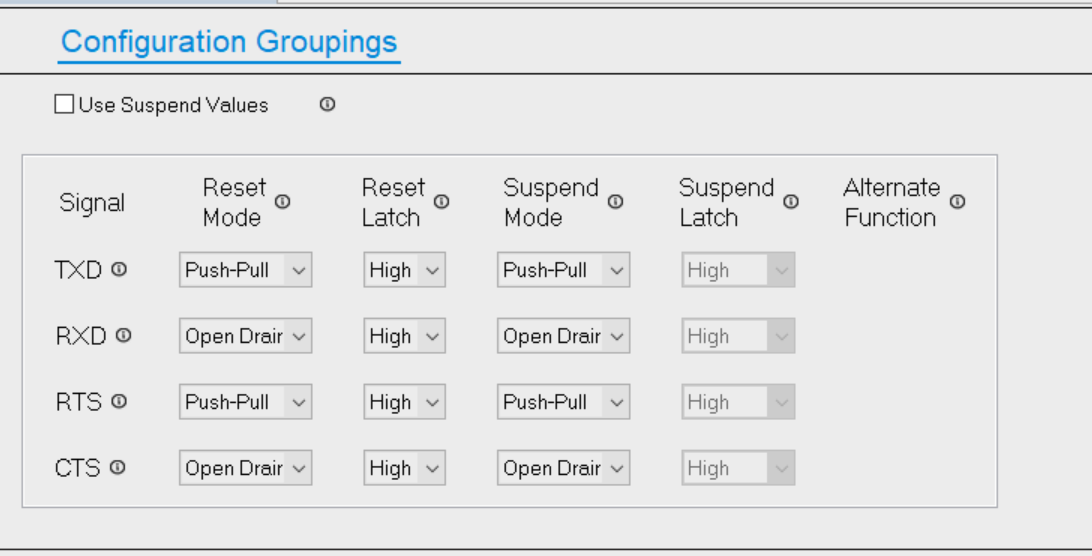
Yes, we chose Silabs chip because of its size as well, is it possible if you can find out the RX line on the 3172 module prefer Push-Pull or Open Drain from the TXT side (the USB to UART chip), because we know that these pins can be configured and they are usually configure different from chip to chip and manufacturer to manufacturer, for example for our Silabs CP2102, we can configure it as shown below and program it to the chip.
Checking with our engineering staff.
in the (english version) of the CH340E I found only
Data transfer pins contain: TXD and RXD pin. RXD keeps high when UART reception is idle.
For CH340G/C/T/R chip, If R232 pin is driven high, assistant RS232 function will be enabled, an
internal inverter will automatically insert to the RXD pin , and the pin becomes low by default. When
UART transmission is idle, the TXD pin of CH340G/C/B/T keeps high, while CH340R keeps low.
Which suggests there is just an internal pull-up on the RXD, but it doesn’t say anything whether it is push-pull or open-drain.
TX of CH340E( which connect RX of MCU ) is Push-Pull
RX of CH340E( which connect TX of MCU ) is input with 60K built in pull up resisistor.
Thank you, we have made the changes to the CP2102 chip and started the testing, so far our new dongle is doing great no issue.
Again thank you for the information, we like to stay with the CP2102 chip, cost less than the FTDI. 
Hello James
We are using the CP2102 USB-Serial Bridge in our designs at 115200 baud
When connecting to a PC serial terminal with a USB connection we do get random character on some transmits.
If we monitor the data at the serial TTL input to the CP2102 USB-Serial Bridge there is never any random characters
You mentioned that you made changes to the CP2102
Could you please share the changes you made
Thank You
Paul Humphreys
@dingoxx, will do, we do see random character as well, however, super rare, and for our application it is not a concern. I will check with our engineering team and update you on this after the weekend.
James
This topic was automatically closed 2 days after the last reply. New replies are no longer allowed.