Please include the following information, in order for us to help you as effectively as possible.
What product do you wish to discuss? RAK4631, RAK13010
What firmware are you using? Arduino BSP
What firmware version? Can it be obtained with AT+VER=? 4.2.3
Computer OS? ( Windows 10)
What Computer OS version? Latest updates for extended security updates.
How often does the problem happen? The problem is that the examples for 4631 and RAK13010 SDI-12 are no longer working with my Arduino BSP V2.10. I am not familiar enough with RUI3 to abandon Arduino.
How can we replicate the problem?I would appreciate obtaining a circuit schematic for the RAK13010, because I have parallel water potential sensors (address 0 & 1) that work well with Arduino MEGA2560 R3 and Dragino LA66 Shield. I tried using a RAK2560 with ProbeIO, but that firmware also doesn’t support SDI-12 sensors yet. So my low power choice is RAK4631+RAK13010. Try as I might, only the LoRaWAN +OTAA+ABP sketch works perfectly to connect to TTN.
However, I cannot merge the sketch for 13010 SDI-12 and get it to compile such that I read my water potential sensors, pack the data I parsed, join TTN, send and decode the sensor payload.
I believe the clue I need is in the 13010 SDI-12 board schematic. Also, it would benefit me to stay with Arduino IDE versus RUI3 as I’ve never used the latter.
Again, my goal is to reduce MEGA+LoRaWAN Shield power consumption by moving to the 4630, etc.
If a schematic can be provided along with compatible Arduino IDE SDI-12 example with suitable libraries, I would appreciate your assistance.
Provide source code if custom firmware is used or link to example if RAKwireless example code is used. RAKwireless libraries for 4631 and RAK13010 SDI-12 library.
I can compile the code, load it to my RAK4631 on a RAK19007 base with the RAK13010 SDI-12 attached to my METER TEROS22 sensor which complies with SDI-12 V1.3.
I have tried both the internal 12IN and an external 12EXT as sensor excitation with a single sensor attached to the RAK13010 per directions in the linked document, RAK13010 WisBlock SDI-12 Module Datasheet.
I know the sensor addresses are correct because I implemented the same setup using the power-hungry Arduino MEGA2560+LoRaWAN Shield (to join with TTN and decode the data payload successfully). (I also used an Apogee AC421 USB-to-SDI-12 dongle to do the same.)
The linked document I assumed is the latest. I requested a link to any updated documents - specifically the RAK13010 in case there’s been any updates. (GIT shows RUI3 updates and example updates within the last year (5-6 months), but most examples for the 4631 in my Arduino IDE linked to an obsolete library - not the newer RAKwireless_SDI-12 library. (Tech support confirmed the latter library, V1.0.1 is the latest.)
AS I mentioned, my Arduino IDE V2.10 compiles RAK4631 with the Vx.3 bootloader UF2 - not Vx.4 for RUI3. Something is amiss because I never observe my sensor responding to what appears to be a normal SDI-12 request on W-IO2.
Finally, I’ve reseated the 13010 on the 19007. The fact that the 4631 is indeed sending a data request to W-IO2 that I observe on an o-scope, makes me suspicious of the 13010 board. But I checked a separate assembly using separate modules and observed the same result. I still have two more 4631, etc., boards to assemble and test. If you have any suggestion about what the good W-IO2 waveform should look like on the 13010 Data terminal, I’d appreciate seeing that, because it doesn’t current seem to be getting through.
The datasheet is the latest, there has been no hardware changes on the RAK13010 since it was released.
Same for the examples, there has been no changes or updates.
I do not have any SDI-12 sensors at hand, but I know there are other topics here in the forum about SDI-12. Maybe you can find help there.
WB_IO2 is not used for any communication, it is to enable/disable the power supply of the RAK13010. Communication is done over WB_IO5 and WB_IO6.
Thank you for confirming that the link to the referenced documents is up to date. I appreciate that very much.
Anyway, I still have not succeeded in obtaining any sensor readings through the RAK4631 SDI-12 example.
The step I just finished was to upgrade my Arduino FW bootloader 4.2.3 to RUI3 FW 4.2.3 using a 'bootloader." The double reset no long brings up a USB type device with UF2 file.
I loaded the relevant libraries for RUI3 and ran the LoRaWan_OTAA.ino example for each core. Now when I connect to the core using USB from WisToolBox for Desktop, the settings populate.
However, I noted that the DevID has changed on TTN compared to what was originally entered via WisToolBox. Is this normal? Is this now a dynamic DevID?
I will now try the SDI-12 sketch. Crossing my fingers, because RUI3 with Arduino added CRC (never used), and took a long time with lots of warnings during the compile. But the compile worked okay.
If joining with the OTAA method, the DevID changes on every network JOIN for every device, it is not a fixed value. It is created by the LoRaWAN server, in your case by TTN.
For post-processing you need to use the DevEUI, which stays the same on the device.
Thanks again. I’m still amazed at the number of warnings I receive during compile. I’m waiting for RAK13010_SDI_12_Basci_Data_Request to try to read my METER TEROS22 water potential sensor. Again, this is so different than my previous sketches using the same devices, but on Arduino MEGA256. However, the schematic you confirmed was okay for the RAK13010 showed me a lot of details to help me troubleshoot. I noted that the IO pins I thought were relevant are different in the sketch that I just finished verifying a good compile. Now to upload it. (
I did review the example you have developed for multiple sensors. I don’t use any of those listed, but I’ll purchase them in one of the education kits. Which kit would you suggest for a new RUI3 user?
Personally I found it easier to select exactly the sensor or interface modules I need for a specific project and get them from the store.
The example firmware for multiple sensors was an approach to pre-load our WisBlock Core modules with a firmware that supports as many modules as possible. But it is quite heavy and not easy to understand for someone who is new to the WisBlock modular system.
You are correct about struggling to understand the differences between Arduino (cpp) and RUI3.
Here is a question: I compiled the example: RAK12010_SDI_12_Basic_Data_Request for my known sensor with address ‘2’. The Serial.begin(115200,RAK_CUSTOM_MODE); line has been un-commented for RUI3.
There is an existing Serial.begin(115200); right after the above line.
However, despite lines like: Serial.println(“Opening SDI-12 bus.”); Or: Serial.println(“Waiting for input:”);
None of these lines printed.
I’m wondering if this stripped down version has stripped out essential Arduino IDE tasks for the Serial Monitor by not including and Arduino-specific libraries.
I can tell you that there is no TX or RX signals on my scope. But there is a steady 12V for the sensor that is powered by the on-board step-up converter built into the 13010. The jumper is correct to power the sensor with 12V. Everything looks good, but I no longer see any signal being sent, but those come after the Serial.println statements I posted above.
Thoughts on what to look for? In the meantime, I’m going back to run more examples for RUI3. Maybe that’s what I’m missing versus trying to just finish this part of my project.
Thanks in advance for your excellent response, beegee!
Sorry for jumping the gun. I ran the sketch System_General.ino. It compiled okay, but spent a lot of time indexing 351 of something. It prints using the Serial commands to the serial monitor without any issue. This gives me a clue what to look for.
I spent the last 24 hours reading through the RUI API documentation. I think I understand where I am getting off track and I hope you may correct me.
I look at the RAK4631 core and see that it contains the RAK4630. When I am reading through the different documents that discuss examples for 4630 and 4631, what is the actual documentation that I ought to be paying closest attention to, 4630 or 4631.
Then, when I see reference to 4631 examples, and read about 4631-R examples, which documentation should I follow? It appears that both use the 4630 chip, but the RUI3 version 4…2.3 is also the same version of FW on the 4631 Arduino BSP. However, the 4631 Arduino version 4.2.3 would reveal a folder that contained UF2 bootloader by double-clicking the base reset button. After performing the upgrade to the 4631 to FW version RUI3 4.2.3, that double-click no longer works, but AT-commands do work (at least through the WisToolBox console(…
As I continue to read API and 4631 details, it appears there is another FW version - RUI3 version 4.2.4. I am noting that this version number shows up in the compile for the SDI-12 RAK13010 example which I still cannot get to work despite successfully compiling it.
Would the online compiler maybe make a difference? What are the differences between the two 4.3. FW versions (Arduino versus RUI3) and 4.2.4 which I understand is what is on the device model 4631-R? I seem to be mixing up the three versions with respect to what I purchased; and what I upgraded via WisToolBox (RUI3 4.2.3) versus what I am now being suggested to upgrade again to version 4.2.4.
If you might clarify the differences, I would greatly appreciate learning about each. Then I can focus on a path using the correct examples that ought to work for my SDI-12 RAK13010 sensor interface.
RAK4631 (Arduino) and RAK4631-R (RUI3) are exactly the same hardware there is no difference.
RAK4631 (Arduino) has a bootloader which supports firmware update with UF2 files, that’s why a double push on RESET connects the device as an external drive.
RAK4631 (RUI3) has a different bootloader, which does not support UF2 files.
For WisBlock Core modules, follow the RAK4631 or RAK4631-R documentation, depending which version you are using.
For example codes most (90%) examples from the WisBlock Github repo that does not use BLE or LoRaWAN can work on both versions of the RAK4631.
For RAK4631-R (and other RUI3 based modules) we have examples in the RUI3-Best-Practice Github repo.
There is no online compiler for RUI3 or for Arduino that supports any version of the RAK4631.
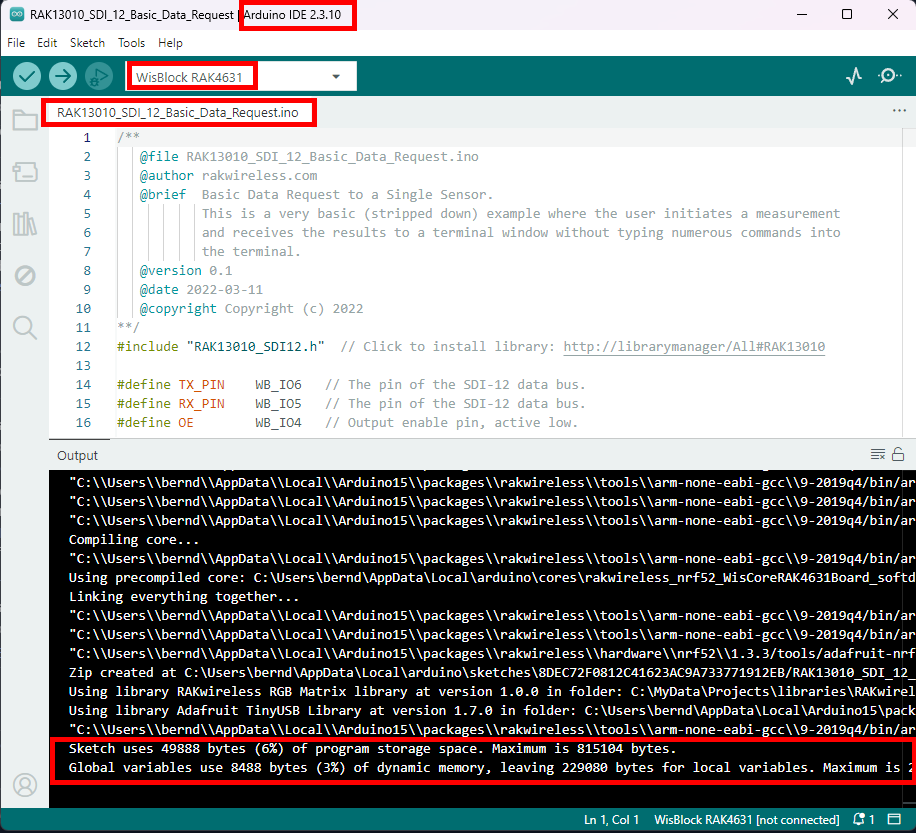
I tried to load an RUI3 example to my RAK4631 board. The setup is RAK4631 core, 19007 base board with the single RAK13010 SDI-12 IO module and no sensors.
First of all, I did confirm that I had RUI3 4.23(4.24) FW installed using WisToolBox for Desktop.
I believe I setup the example SDI-12 sketch correctly. It had compiled okay, but as soon as it loaded, the USB port connection (i.e. Port 18) stopped working. I still connect to it - or to the other two boards I repeated loading this example. It does not work and I haven’t figured out why. So, I need help figuring out what is going on.
To that end, I’m enclosing the Output compile results and load result (successful).
I also attached a zip file with actual sketch, the associated RAK13010_SDI12.h file it used, along with the compiler output file.
Whatever is occurring, it is clearly repeatable.
I hope you may find an explanation.
Finally, I have ordered a RAKDAP1 USB to salvage the cores along with some spares. As noted by beegee, I believe I used the best examples I could locate to try. I also know the water potential sensors work but not using the example and the RAK4631 + SDI-12 setup I have.
Thanks in advance for reviewing the example and output. I look forward to finally deploying the METER TEROS22 sensors using the RAK4631. (The LoRaWAN network server connection works flawlessly!)
Respectfully,
Michael Overeem
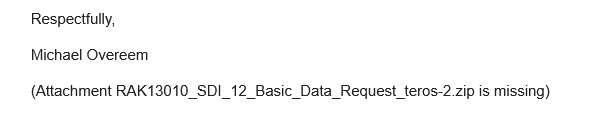
(Attachment RAK13010_SDI_12_Basic_Data_Request_teros-2.zip is missing)
I have attached the correct formatted files that I tried sending zipped. My original zip file was rejected. Lesson learned:
RAKwireless Forum[email protected]
You
Unfortunately some attachments in your email message to [“[email protected]”] (titled Re: [RAKwireless Forum] [WisBlock] RAK4631+RAK13010 SDI-12 On Arduino BSP) were rejected.
Details:
RAK13010_SDI_12_Basic_Data_Request_teros-2.zip: Sorry, the file you are trying to upload is not authorized (authorized extensions: jpg, jpeg, png, gif, heic, webp, heif, bin, rwi, hex, log, tgz, ino, cpp, h, docx, xlsx).