RAK5010 basic AT commands problems

HI @JozsiKa ,

It seems you have the latest FW. Regarding your issue, I am not sure if it is a bug. It will be helpful if you can recall the sequences/steps you did before it went to send an empty packet. If you do the automatic transmissions, do you still receive the sensor data? Did you try setting the interval more than 150000?

Hi,

I’ve tried a lot of settings, I can’t really recall them all.
However, there were not many settings after the upgrade (DFU).
Will the update delete my settings and restore the factory settings on the BG96 as well?
Does the AT&F command reset the BG96 to factory settings?

Yes I tried a (1: 180000) setting and it works.
Sensor data is included in the message.

I tried e.g. that i can send a message with the at + send = cellular: XXX command.
Before that I set the required data:
AT+QICSGP=1,1,“hologram”,“”,“”,1
AT+QIACT=1 (for this e.g. there was not always an OK answer)
AT+QIOPEN=1,0,“TCP”,“cloudsocket.hologram.io”,9999,0,1
na after that i tried in many different ways because the message could not be sent. By sending only this:AT+QISEND=0,38
Then when he came back> then the: {“k”:“XXXXXXXX”,“d”:“Test”,“t”:“TOPIC1”}
I also tried this:
AT+QISEND=0,38{“k”:“XXXXXXXX”,“d”:“Test”,“t”:“TOPIC1”}
unfortunately no message was saved. ERROR

I also tried to set up the BG96:
at+set_config=cellular:(AT+QCFG=“band”,F,80084,80084)
at+set_config=cellular:(AT+QCFG=“iotopmode”,2)
at+set_config=cellular:(AT+QCFG=“nwscanseq”,020301)
at+set_config=cellular:(AT+QCFG=“nwscanmode”,3)

It didn’t work either. After that, it had to be reset because the factory program didn’t work either.

An example:


| ___ / _ \ | | / / | | | () | |
| |
/ / /\ | |/ / | | | | _ __ | | ___ ___ ___
| /| _ || \ | |/| | | '
/ _ \ |/ _ / __/ __|
| |\ | | | || |\ \ \ /\ / | | | __/ | /_ _ \
_| __| |
/_| _/ / /||| _|_|_||//


RAK5010 Version:3.0.0.15


========================================================

at+version
at+version
Firmware Version: RUI v3.0.0.15
OK
at+set_config=cellular:(AT+QCFG=“band”,F,80084,80084)
AT+QCFG=“band”,F,80084,80084
OK>>at+set_config=cellular:(AT+QCFG=“iotopmode”,2)
AT+QCFG=“iotopmode”,2

OK>>at+set_config=cellular:(AT+QCFG=“nwscanseq”,020301)
AT+QCFG=“nwscanseq”,020301

OKStart scanning…

at+set_config=cellular:(AT+QCFG=“nwscanmode”,3)
AT+QCFG=“nwscanmode”,3

OK>>at+set_config=cellular:(AT+COPS=?)
AT+COPS=?

at+set_config=cellular:(AT+COPS=?)
AT+COPS=?AT+COPS=?
+COPS: (1,“Telenor HU”,“TelenorH”,“21601”,8),(2,“Telekom HU”,“THU”,“21630”,8),(1,“Telekom HU”,“THU”,“21630”,9),(1,“vodafone HU”,“voda HU”,“21670”,9),(0,1,2,3,4),(0,1,2)

OK>>at+set_config=cellular:(AT+QNWINFO)
AT+QNWINFO

+COPS: (1,“Telekom HU”,“THU”,“21630”,9),(1,“vodafone HU”,“voda HU”,“21670”,9),(0,1,2,3,4),(0,1,2)

OK>>at+set_config=cellular:(AT+QICSGP=1,1,“hologram”,“”,“”,1)
AT+QICSGP=1,1,“hologram”,“”,“”,1

OK>>at+set_config=cellular:(AT+QIACT=1)
AT+QIACT=1

OK>>at+set_config=cellular:(AT+QIOPEN=1,0,“TCP”,“cloudsocket.hologram.io”,9999,0,1)
AT+QIOPEN=1,0,“TCP”,“cloudsocket.hologram.io”,9999,0,1

OK

+QIOPEN: 0,0

at+set_config=cellular:(AT+QISEND=0,43)
AT+QISEND=0,45
+QIURC: “recv”,0,2
ok

+QIURC: “closed”,0

at+set_config=cellular:({“k”:“XXXXXXXX”,“d”:“HelloUzi”,“t”:“Proba”})
{“k”:“XXXXXXXX”,“d”:“HelloUzi”,“t”:“Proba”}
ERROR

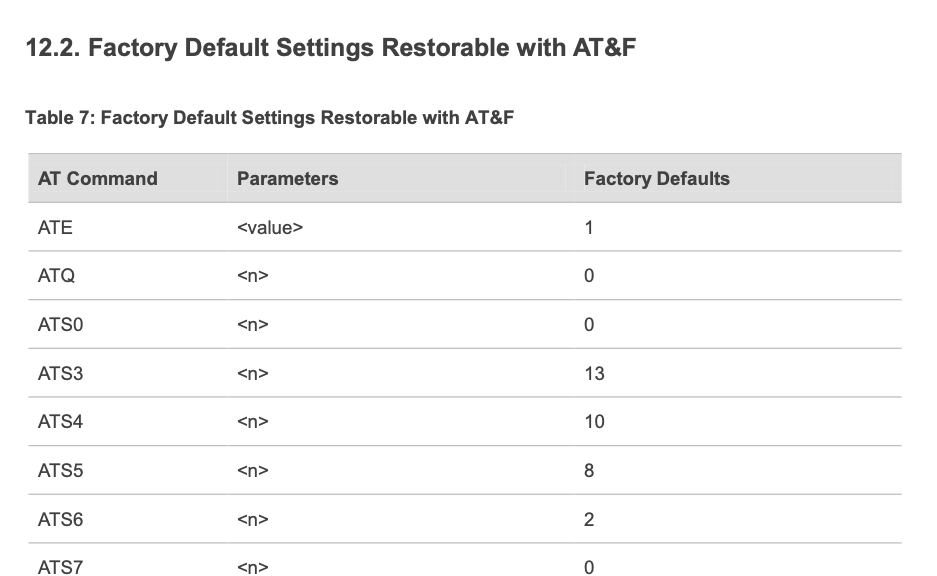
The AT&F command will setup certain parameters but not all. The list is in BG96 AT Command Manual. It has a long list but it starts with this.

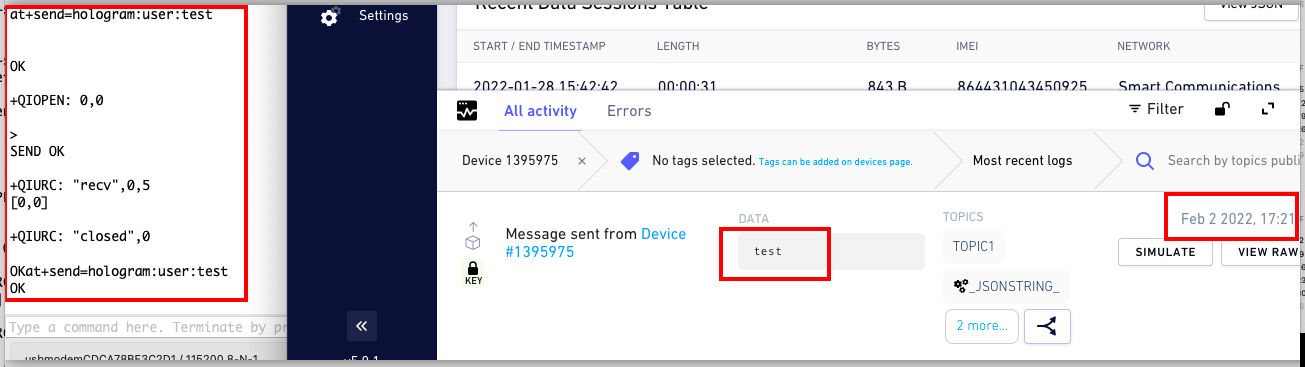
You and I have different ways on setting up the connection in hologram. Our AT Commands will execute the necessary commands. You just have to connect to your local cellular provider and input the Hologram device key then you should be able so send data directly.

The sequence of commands I use.

  • at+scan=cellular
  • at+set_config=cellular:(AT+COPS=0,0,“Globe Telecom-PH”,0)
  • at+set_config=cellular:(AT+QICSGP=1,1,“hologram”,"","",0)
  • at+set_config=hologram:s8zLgWat
  • at+send=hologram:user:test

Then I will see test on the payload.

Hello

Was the message tested successfully?
I tried another (virgin) motherboard this is a RAK5010-M.
Here again, the situation is that you omit the message entered in place of XXX in the generated message.

message entered:
at+send=hologram:user:HOPP

generated message queue:
AT+QISEND=0,36{“k”: “********”, “d”: “”, “t”: “TOPIC1”}

so an empty message goes away.

Thk.
JozsiKa

Hi @JozsiKa ,

Can you try the sequence above?

sorry, of course i will try in this order.
Unfortunately, the result is the same:

| ___ / _ \ | | / / | | | () | |
| |
/ / /\ | |/ / | | | | _ __ | | ___ ___ ___
| /| _ || \ | |/| | | '
/ _ \ |/ _ / __/ __|
| |\ | | | || |\ \ \ /\ / | | | __/ | /_ _ \
_| __| |
/_| _/ / /||| _|_|_||//


RAK5010 Version:3.0.0.15


========================================================
Start scanning…
AT+COPS=?AT+COPS=?
+COPS: (1,“Telenor HU”,“TelenorH”,“21601”,0),(1,“Telekom HU”,“THU”,“21630”,0),(1,“vodafone HU”,“voda HU”,“21670”,0),(1,“Telenor HU”,“TelenorH”,“21601”,8),(2,“Telekom HU”,“THU”,“21630”,8),(1,“Telekom HU”,“THU”,“21630”,9),(1,“vodafone HU”,“voda HU”,“21670”,9),(0,1,2,3,4),(0,1,2)

OKAT+COPS=0,0"Telekom HU",0

+COPS: (1,“Telenor HU”,“TelenorH”,“21601”,8),(1,“vodafone HU”,“voda HU”,“21670”,0),(1,“Telenor HU”,“TelenorH”,“21601”,0),(2,“Telekom HU”,“THU”,“21630”,8),(1,“Telekom HU”,“THU”,“21630”,0),(1,“Telekom HU”,“THU”,“21630”,9),(1,“vodafone HU”,“voda HU”,“21670”,9),(0,1,2,3,4),(0,1,2)

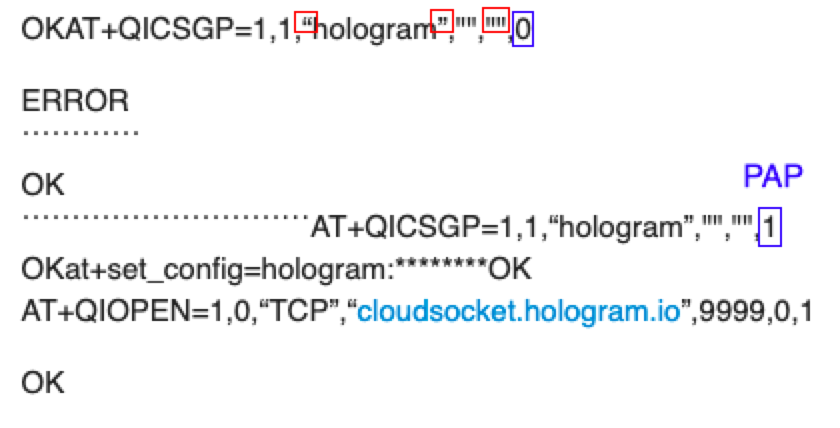
OKAT+QICSGP=1,1,“hologram”,“”,“”,0

ERROR
˙˙˙˙˙˙˙˙˙˙˙˙
OK
˙˙˙˙˙˙˙˙˙˙˙˙˙˙˙˙˙˙˙˙˙˙˙˙˙˙˙˙˙AT+QICSGP=1,1,“hologram”,“”,“”,1
OKat+set_config=hologram:********OK
AT+QIOPEN=1,0,“TCP”,“cloudsocket.hologram.io”,9999,0,1

OK

+QIOPEN: 0,0
AT+QISEND=0,36{“k”:“********”,“d”:“”,“t”:“TOPIC1”}

SEND OK

+QIURC: “recv”,0,5
[0,0]

+QIURC: “closed”,0
AT+QICLOSE=0,30000
OKat+send=hologram:user:testOK

The message goes and arrives at the hologram server, only empty.
As you see here, I can send it successfully.

I got some +QIOPEN: 0,561 errors earlier but it was solve by reuploading the FW via DFU BLE and changing the network provider. The automatic mode (at+set_config=cellular:send_interval:0:180000) is disabled right?

yes automatic mode is disabled.

it is clear that during automatic commands
a message leaves the (data) line blank.
+QIOPEN: 0,0
AT+QISEND=0,36{“k”:"********",“d”:"",“t”:“TOPIC1”}
This is what it should look like:
AT+QISEND=0,40{“k”:“xxxxxxxx”,“d”:“test”,“t”:“TOPIC1”}

I am still not sure why you are having issues. If you activated the automatic mode, this is the payload that you must have. Same with hologram:sensor command.

Errors on my side before was gone when I reuploaded the FW via BLE DFU. Then enabled-disabled the auto mode. Do you have success transmitting on auto mode? Or same situation with manual mode that the received payload is empty?

Other things I noticed.

  1. The quotation marks. This sometimes causes errors depending on the encoding of the serial terminal tool.
  2. You uses PAP authentication, I am not sure if that is needed.

I did the DFU firmware update again.
After that, I set up interval sending and successfully sent the sensor data. Then I deleted the interval command.
I tried to send the manual data again, but unfortunately the message goes blank.

I can see it working on your terminal.
Although the message details are not visible in the serial communication:
AT + QISEND = 0, etc. ?
Reconcile the differences in serial communication.
What I use:
RAK SERIAL PORT TOOL
USD-RAKDAPT1-UART-RAK5010

i tried the same with a new RAK5010-M motherboard where it also omits the (data) text from the message. I didn’t set anything on it except the required cellular settings. There was no DFU firmware replacement on it either.

yes the authentication is set to 1 because as you can see if it is set to 0 an error is returned.

cellular network information:
AT+COPS?

+COPS: 1,0,“Telekom HU Hologram”,8

OKAT+QNWINFO

+QNWINFO: “CAT-M1”,“21630”,“LTE BAND 20”,6350

Hi,

did you manage to review this issue?
We may not get ahead with this problem, it works for you, but unfortunately it doesn’t work for me. If you could send me the (at + send = hologram: user: XXX) command settings in the RUI v3.0.0.15 firmware, I can test them with manually entered commands.
Alternatively, you could send a manual command sequence to send the message to the hologram server.
e.g.:
at + send = cellular: XXX and at + set_config = cellular: (XXX)
and settings for the hologram server.

Thanks

Hi @JozsiKa ,

Here is the hologram:user routine and the full code is in this repo.

     if(strstr(cmd,"at+send=hologram:user")!= NULL)
     {
         ptr = NULL;
         memset(gsm_cmd,0,100);
         memset(gsm_rsp,0,256);
         memset(send_data,0,256);   
         memset(hologram_cmd,0,256);      
         index = 0;
         //get ip
         ptr = strstr(cmd,"user");
         for(index;index<5;index++)
         {
            ptr++;
         }
         index = 0;
         for(ptr;*ptr !='\r';ptr++)
         {
            send_data[index++] = *ptr;
         }
         hologram_cmd_packet(g_rui_cfg_t.g_cellular_cfg_t.hologram_card_num,send_data);
         //open tcp client with remote server
         rui_cellular_send("AT+QIOPEN=1,0,\"TCP\",\"cloudsocket.hologram.io\",9999,0,1");
         rui_cellular_response(gsm_rsp, 256, 500 * 2);
         memset(gsm_rsp,0,256);
         rui_cellular_response(gsm_rsp, 256, 500 * 10);       
         //send data
         memset(gsm_cmd,0,100);
         sprintf(gsm_cmd,"AT+QISEND=0,%d",strlen(hologram_cmd));
         rui_cellular_send(gsm_cmd);
         rui_delay_ms(10);
         rui_cellular_send(hologram_cmd);
         memset(gsm_rsp,0,256);
         rui_cellular_response(gsm_rsp, 256, 500 * 30);
         memset(gsm_rsp,0,256);
         rui_cellular_response(gsm_rsp, 256, 500 * 30);
         //close socket
         rui_cellular_send("AT+QICLOSE=0,30000");
         memset(gsm_rsp,0,256);
         rui_cellular_response(gsm_rsp, 256, 500 * 60);
         memset(at_rsp,0,1536);
         sprintf(at_rsp,"%s",cmd);
         rui_at_response(true, at_rsp, RAK_OK);
        return;
     }

Hello,

unfortunately I didn’t find anything in the code that could cause me a problem. Maybe I’m in the wrong place.
I would try to read the serial communications on the debug interface port. This requires TP1 TP2.
Could you send me the PCB drawing showing the part markings and dots?
If I still can’t get ahead here, I’ll try to use the BG96’s USB interface and send AT commands through it.
To do this, you also need to adjust a few things on the PCB, if I see it right, relocating the R30-R33 is the solution.
Please send me both sides of the PCB part drawing,
so I can find the connection points.

Thanks in advance.

Hi @JozsiKa ,

These are the details that you need.