Hello @JeroenKl,
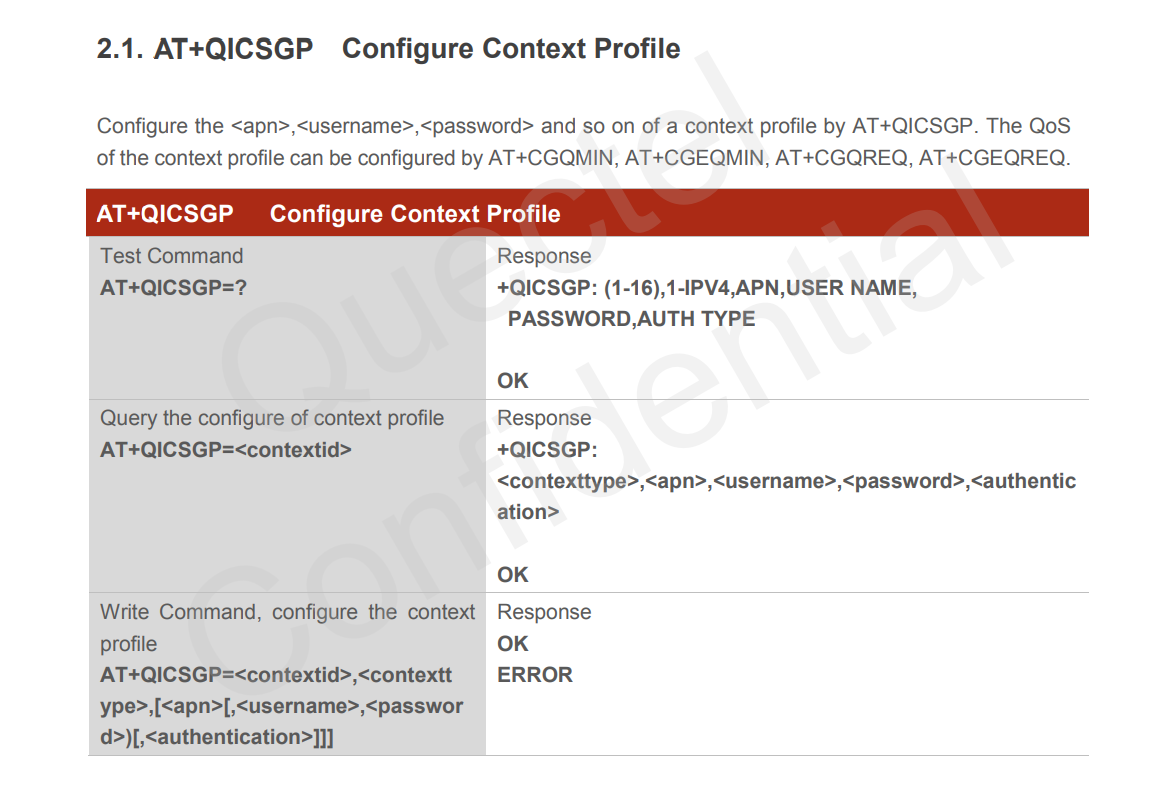
I can’t found the at command AT+QICSGP to configure APN
For example: Using hologram sim card
Hello @JeroenKl,
I can’t found the at command AT+QICSGP to configure APN
“apn_name”, username, password
Set the APN to “hologram” with no username or password.
AT+QICSGP=1,1,"hologram","","",1
Then Activate the PDP context.
AT+QIACT=1
If ok you then you can establish the TCP connection and send AT+QPING
Hi @marcio,
It looks like ‘Hologram’ isn’t the correct way in order to set the APN for KPN provider in the Netherlands. I made progress with:
AT+CGDCONT=1,“IP”,“kpnthings.iot” and AT+CGACT=1,1
Now I’m getting an IP address but still not able to ping the WAN network:
21:42:46.685 → AT+CGATT=1
21:42:46.685 → OK21:42:51.196 → AT+CGDCONT=1,“IP”,“kpnthings.iot”
21:42:51.196 → OK21:42:55.716 → AT+CGACT=1,1
21:42:55.716 → OK21:43:00.194 → AT+CGPADDR=1
21:43:00.194 → +CGPADDR: 1,10.11.1.231
21:43:00.194 → OK21:43:04.706 → AT+QNWINFO
21:43:04.706 → +QNWINFO: “eMTC”,“20408”,“LTE BAND 20”,6400
21:43:04.706 → OK21:43:09.180 → AT+QCSQ
21:43:09.180 → +QCSQ: “eMTC”,-83,-111,117,-12
21:43:09.180 → OK21:43:13.694 → AT+CSQ
21:43:13.694 → +CSQ: 15,99
21:43:13.694 → OK21:43:18.205 → AT+QIACT=1
21:43:18.205 → OK21:43:22.202 → Begin receive packet from www.kpn.nl!
21:43:31.945 → AT+QPING=1,”8.8.8.8”21:43:31.945 → ERROR
21:43:31.945 →
21:43:32.976 → Begin receive packet from www.kpn.nl!
Why can I not ping to WAN (yet)?
BR,
Jeroen
Hi @JeroenKl,
Can you try “internet” as the APN? Where did you find “kpnthings.iot” as the APN for KPN?
This APN is provided by KPN together with 2 test LTE-M sims I received.
I see. It seems if you will use their standard cellular connection (2G, 3G, LTE), you can use “internet” but you got an IoT sim for LTE-M that’s why you need to use kpnthings.iot. That’s how I understand it, I might be wrong.
Also, on your screenshot, you have multiple RDY replies from module. That can be an indicator that the module doesn’t not have a good power source.
Hello @JeroenKl,
Hologram is global sim card.
(Hologram
KPNThings has another APN.
Have you tested kpn sim card on cell phone?
For hologram sim card you need to activate it before using.
I do not have Hologram SIM, but I have KPN LTE-M Sims with KPN APN which I need to use according KPN.
It is activated, I get a connection and IP address but cannot ping (error message)
You are right, this is the case
I’m using the Cellular_ping INO which requires a terminal connection. So the device is hooked up to my laptop.
I can change the setting so the device will run without a serial connection but then I cannot see if the ping is working.
I think it is time to provide a ‘example, solution’ script (INO)
Hi @carlrowan,
Could you please check if the LTE-M (CAT-M1) functionality is tested thoroughly and confirmed it should work according specs?
BR,
Jeroen
Hi @JeroenKl,
Marcio already tested it on his hologram sim and it works. Quectel forum is a good reference as well if a user from Netherlands successfully used KPN LTE-M1 connection using BG77.
Hi @carlrowan,
Thanks, of course I will not rest to have the KPN fixed so I’ll investigate further and keep you updated.
Any topic on Quectel forum you can pinpoint me regarding KPN LTE-M1?
Br,
Jeroen
@JeroenKl
The error message does not help much. You can add AT+CMEE=2 command to get more error details.
I also used the command AT+CFUN=1,0 before activate the PDP context.
Hi @marcio ,
I’m sorry to inform but it didn’t help.
I’ll ask KPN forum for assistance to check if something is wrong on their site, because I do have a good connection, good level and an IP address.
Blockquote
17:36:22.162 → AT+CGDCONT=1,“IP”,“kpnthings.iot”17:36:22.162 → OK
17:36:22.162 →
17:36:23.469 → AT+CFUN=1,017:36:23.469 → OK
17:36:23.469 →
17:36:24.781 → AT+CGACT=1,117:36:24.781 → OK
17:36:24.781 →
17:36:26.097 → AT+CGPADDR=117:36:26.097 → +CGPADDR: 1,10.11.1.156
17:36:26.097 →
17:36:26.097 → OK
17:36:26.097 →
17:36:27.408 → AT+QNWINFO17:36:27.408 → +QNWINFO: “eMTC”,“20408”,“LTE BAND 20”,6400
17:36:27.408 →
17:36:27.408 → OK17:36:28.719 → AT+QCSQ
17:36:28.719 → +QCSQ: “eMTC”,-80,-106,121,-12
17:36:28.719 →
17:36:28.719 → OK
17:36:28.719 →
17:36:29.983 → AT+CSQ17:36:29.983 → +CSQ: 17,99
17:36:29.983 →
17:36:29.983 → OK
17:36:29.983 →
17:36:31.295 → AT+QIACT=117:36:31.295 → OK
17:36:31.295 →
17:36:32.604 → AT+CMEE=217:36:32.604 → OK
17:36:32.604 →
17:36:43.376 → AT+QPING=1,”1.1.1.1”,15,417:36:43.376 → ERROR
17:36:43.376 →
17:36:44.691 → AT+QPING=1,”1.1.1.1”,15,417:36:44.691 → ERROR
Hello @JeroenKl,
Check your Quectel revision using ATI command.
Mine is Revision: BG77LAR02A02.
Another attempt is to try to open TCP connection AT+QIOPEN even if the ping does not work.
Blockquote
21:50:29.857 → BG77 AT CMD TEST!
21:50:43.816 → BG77 power up!
21:50:43.816 →
21:50:43.816 → RDY
21:50:43.816 → AT+CMEE=2
21:50:43.816 → OK
21:50:43.816 →
21:50:43.816 → APP RDY
21:50:43.816 → AT+CFUN=1,0
21:50:43.816 → OK
21:50:43.816 → AT+QICSGP=1,1,“hologram”,“”,“”,1
21:50:43.816 → OK
21:50:48.681 → AT+QCFG=“iotopmode”,0,1
21:50:48.681 → OK
21:50:48.681 →
21:51:04.325 → ATI
21:51:04.325 → Quectel
21:51:04.325 → BG77
21:51:04.325 → Revision: BG77LAR02A02
21:51:04.325 →
21:51:04.325 → OK
21:52:58.266 → AT+QPING=1,“1.1.1.1”,15,4
21:52:58.266 → OK
21:52:58.920 →
21:52:58.920 → +QPING: 0,“1.1.1.1”,32,757,255
21:52:59.515 →
21:52:59.515 → +QPING: 0,“1.1.1.1”,32,508,255
21:52:59.987 →
21:52:59.987 → +QPING: 0,“1.1.1.1”,32,527,255
21:53:00.582 →
21:53:00.582 → +QPING: 0,“1.1.1.1”,32,561,255
21:53:00.582 →
21:53:00.582 → +QPING: 0,4,4,0,508,757,588
Hi @marcio,
Same revision:
09:31:50.585 → RAK4630 Cellular TEST With KPN NL LTE-M sim card!
09:31:54.597 → BG77 power up!
09:31:54.876 →
09:31:54.876 → RDY
09:31:54.876 → ATI09:31:54.876 → Quectel
09:31:54.876 → BG77
09:31:54.876 → Revision: BG77LAR02A02
I’ll test with AT+QIOPEN and let you know.
thxs, Jeroen
Hello @JeroenKl
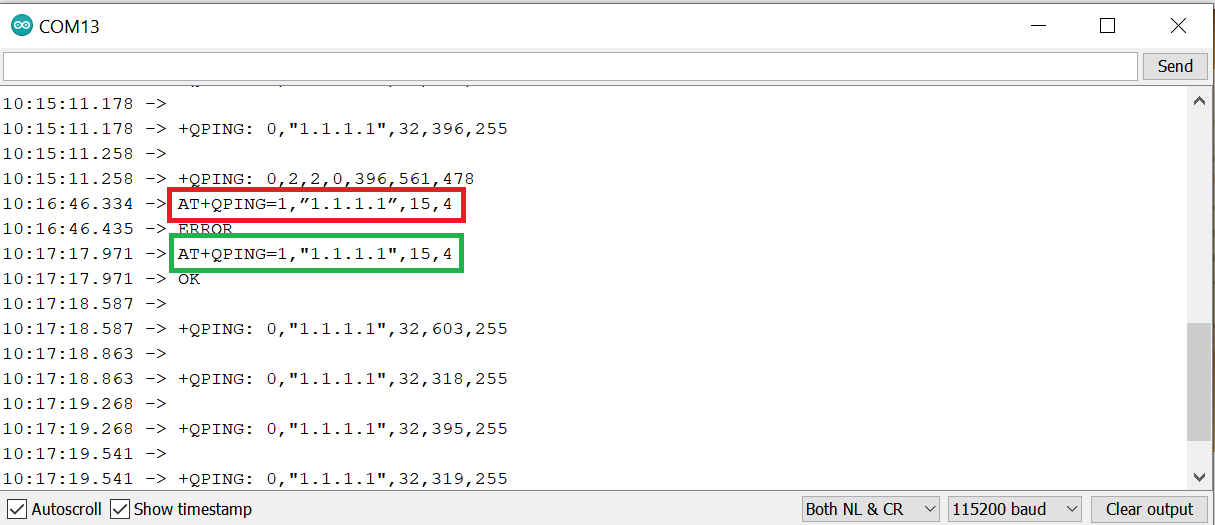
If you look closely, your ping has an slanted quotation mark; The correct ping must have a vertical quotation mark.
I think you should replace all the slanted quotation mark on AT commands.
Yessssssssssssss. thanks @marcio!
16:46:26.865 → AT+QPING=1,“1.1.1.1”,15,4
16:46:26.865 → OK
16:46:26.865 →
16:46:26.865 → +QPING: 561
the output is little bit different, but no error more.
Thanks!, going to next phase 
gr,
Jeroen
Hello @JeroenKl,
Good news 
There is no error number 561 on documentation.
Initial part of the ping reply was lost.