What its the gnss message? Longitude/Latitudes… ? We are going round and around dear friends. We have no gps coordinates from this WisBlock Devices ! Shame of you gurus to spend our time and money for nothing !
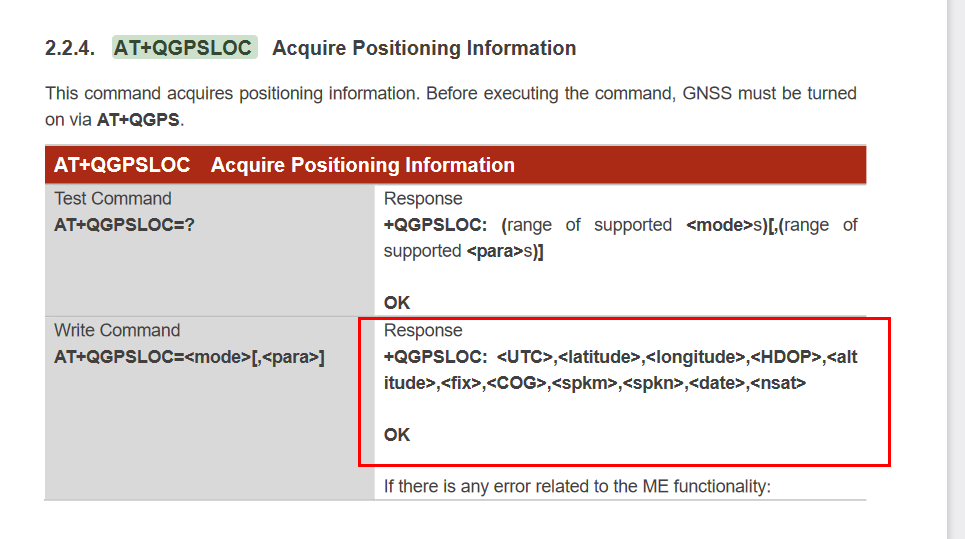
Yep. I sended To You Sir the link to this documentation. Do You remember ?
How many times i should repeat to you guys? Who even buy WISBLOCK5860 are losers like me! Are you not listening ?
The RAK5860 WisBlock Module are expensive. For what we, can’t afford to be cheated by companies like RakWireless !
Hi. Goood News !!!
Finally I got GPS Data after ~2 months of messaging.
The following sequence of code from Bernd solved this issue !
#define BG77_GPS_ENABLE 34 into the sketch.
and
  pinMode(BG77_GPS_ENABLE, OUTPUT);
  digitalWrite(BG77_GPS_ENABLE, 1);
Thank You
Zoltan
1 Like
I think my 5860 is broken… no respons anymore.
I used also the sketch from Bernd but unfortunately no serial port data in return
16:29:56.580 → RAK11200 Cellular TEST With Hologram sim card!
16:30:04.575 → BG77 power up!
16:30:05.047 →
16:30:07.541 →
16:30:10.036 →
16:30:12.569 →
16:30:15.057 →
16:30:20.009 →
16:30:26.885 →
16:30:28.865 → Send test data to Hologram via TCP!
16:30:29.859 →
On 5860 module: Green LED is flashing partly and Blue LED is ON
any advise?
BR, Jeroen
Blue LED => BG77 is powered up.
Green LED flashing => no connection or trying to connect.
But no response from the Chip is strange.
Any other modules plugged into RAK5005-O base board?
Did you try to unplug the RAk5860 from the RAK5005-O and reconnect it?
Hi Bernd,
No other modules are plugged into the base board and yes I already reseat, reinstalled the RAK5860 module.
Hmm, still investigating but I’m little bit scared the module is broken, do you think?
BR,
Jeroen
I don’t have a RAK5860 to test, but if you connect your PC to the USB connector on the RAK5860, can you get any output from there? You should be able to see some output and send AT commands from a Serial Terminal on your computer.
Nope, there isn’t either a serial COM port available when connecting to the RAK5860 USB port.
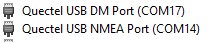
When power it up via de baseport and connectng te USB also to the RAK5860 directly I got:
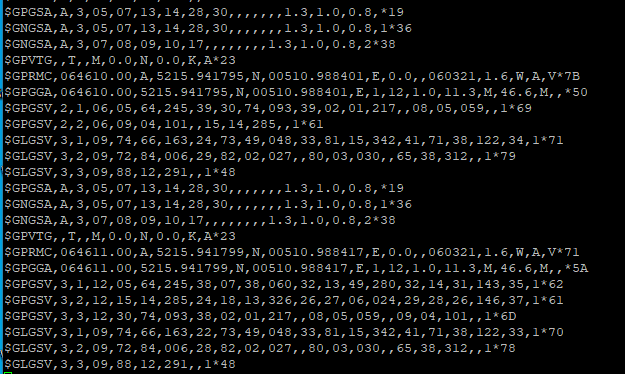
When conecting a terminal to NMEA port I see very nice correct GPS data:
When connecting to the DM port, no data seen on the terminal port.
Looks like it is not passing back to the mainboard?
Hi there.
Same issue here. Same code/same hardware for ~4÷5days worked well and suddenly they stopped to work.
…
I made experience with 2 more brand new module with different sim cards (Vodafone/Spark/Hologram) and same result I got. What happenning?
…
On the Com17/Com14 I have same result at my side what Jeroen got in nl.
…
Another question. What is the WisBlock acceleration interrupt port ? Clearly not 21 !
…
Zoltan
I don’t understand. Are you joking Sir with us Sir ?
Zoltan
@magdoz59
I explained several times, there is no NB-IoT available in my country. I cannot test anything even if I had the module.
@JeroenKl
I guess you do not have a second RAK5005-O base board to test?
Yes, You explained to us. Thanks.
Are you kind to point us to another RAKwireless person who is competent to give real technical advices/solutions in short time ?
You have to split WisBlock forum section into LoraWan and Cellular related questions, I think  You are good with LoraWan but need someone else to manage the Cellular section of the WisBlock modules…
Thanks in advance
Zoltan
Hi Bernd,
Yes I have and I tested it with my spare RAK5005-O and RAK4630.
Unfortunatley experiencing the same problem:
No serial data from RAK5830 board:
13:32:35.167 → BG77 power up!
13:32:35.682 →
13:32:38.159 →
13:32:40.640 →
13:32:43.163 →
13:32:45.645 →
13:32:50.135 →
13:32:52.675 →
13:32:55.157 →
13:32:57.638 →
13:33:00.123 →
13:33:02.649 →
13:33:05.128 →
13:33:07.654 →
13:33:10.135 →
13:33:15.093 →
13:33:17.384 →
13:33:18.697 →
13:33:20.004 →
13:33:25.896 →
13:33:27.858 → Send test data to Hologram via TCP!
13:33:28.888 →
Unfortunately with my ‘old’ sketch also no serial data anymore.
A pity a don’t have a spare RAK5860 to check.
BR,
Jeroen
Too much time to solve the current issues !
I applied for trade back my WisBlock devices to something else from RAKwireless range…
Maybe, after some time, the WisBlock modules will be bug free, and we can invest our money and time to buy them.
Shame of RAK wireless sw guru team/ Ken Yu/ Telle/… and all you people from your company to not pay attention to this issues.for so many time, or maybe they are not so clever after all… and have no solution !
I requested a GPS parsing code from the SW team. You can try this updated code.
I haven’t tried it to connect hologram since NB-IoT is not available to me. But you can if there is a network on your location. GPS is working to me. And this is my logs on serial monitor.
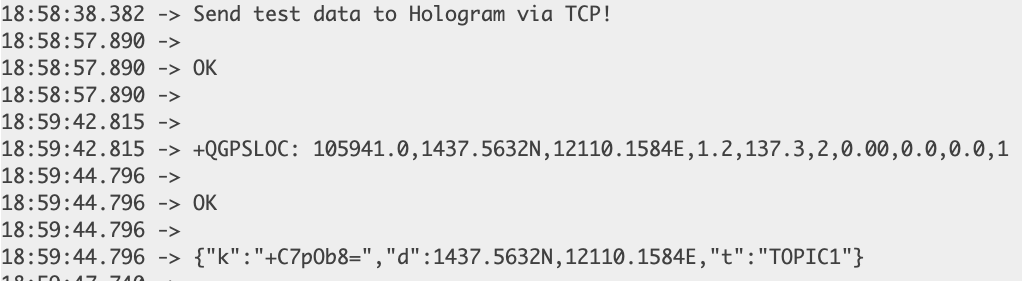
The GPS format of BG77 is DDMM.MMMM so you might need to convert it first depending on your application. Please be patient on GPS fix. It can be a minute or few more minutes. Also ensure you are powered by battery and only by the USB port. I hope it helps 
Thank You. I will try at morning. 12.27am here…
The GPS working now but no more Hologram/Vodafone/Spark connection we have…
maybe enabling the BG77 GNSS functionality we have to stop that ? not only AT+QGPSEND but something more ?