Product = Rak7268v2
Firmware-version = 2.18
Connection = Ethernet cable to my router, with a solid connection to The Internet
Access = Ubuntu-22, Chrome-browser
So far, I have never ever ever been successful at updating this firmware. I experienced the exact same failure a year ago with another gateway (Rak7268cv2, at version 2.20).
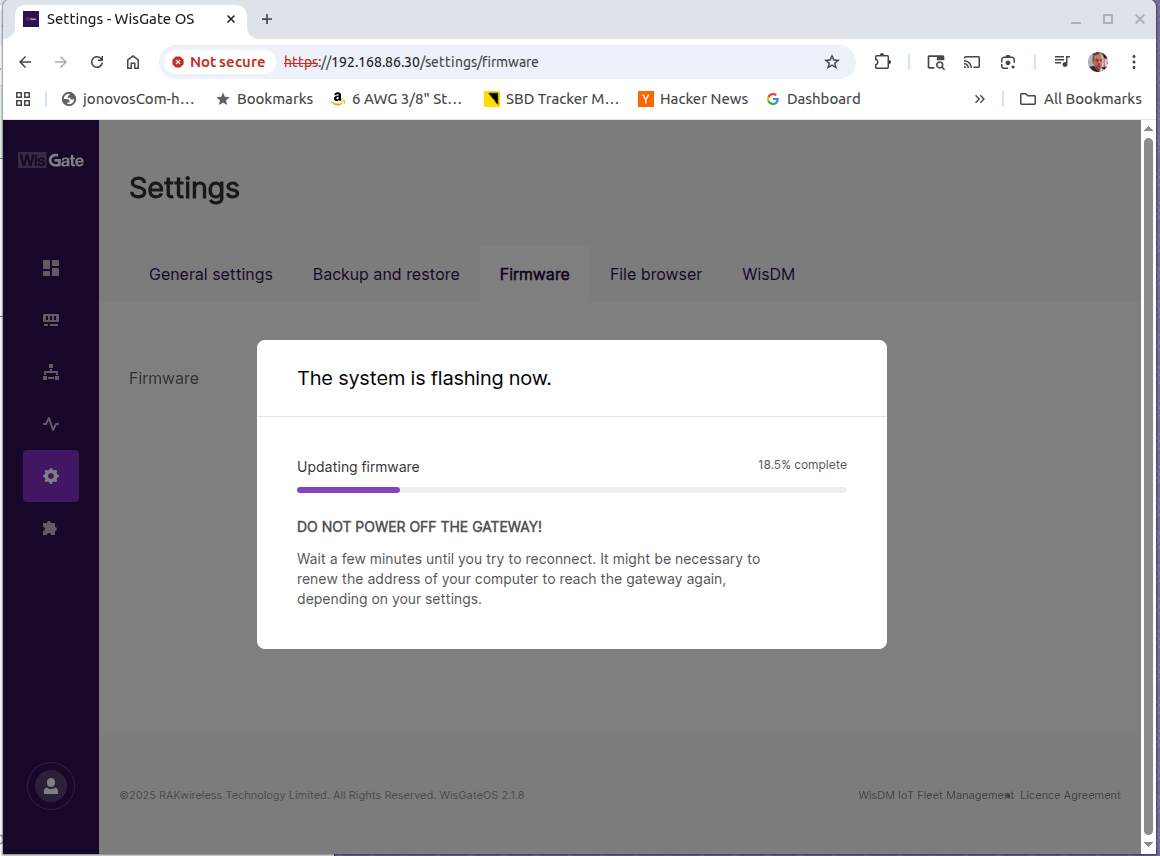
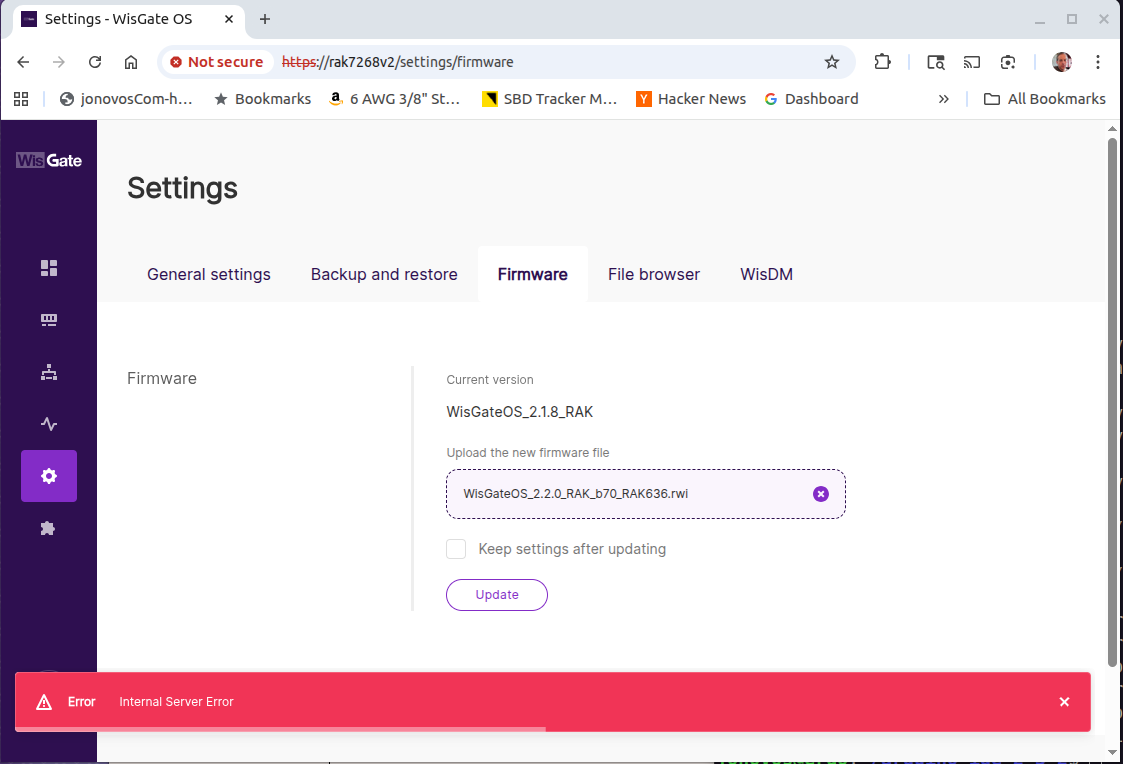
The progress bar advances to a point and red stripe at the bottom of the page displays “Error” and “Internal Server Error”
The progress bar abruptly stops upon reaching any of the following random completions: 18%, OR, 27%, OR, 32%. I have never observed the progress reach further than 32%.
Additionally, from the gateway, I can “ping” various external Internet servers such as google.com and rakwireless.com . (Diagnostics) >> (Network utilities) >> [Ping].
Additionally, in order to avoid any login timeouts from interrupting these sessions, I always ensure that I initiate these failed firmware updates, immediately after gateway Login.
Additionally, I performed a gateway factory-reset, and subsequently rebooted, and initiating another firmware update immediately after Login. The failure was exactly the same.
I tried several things, and the update was more successful when I accessed the web UI using a static IP address connected via ethernet than when I connected to the gateway’s AP interface, 192.168.230.1.
Could you please share what messages are displayed on the USB serial console during the update?
If [e] and [w] are displayed alternately, the update is progressing normally. If the following screen appears after the update, the update is complete.
Appending jffs2 data from /tmp/sysupgrade.tgz to firmware..
.
Writing from <stdin> to firmware ...
Thu Nov 20 02:44:14 UTC 2025 upgrade: Upgrade completed
Thu Nov 20 02:44:15 UTC 2025 upgrade: Rebooting system...
umount: can't unmount[ 1277.962892] reboot: Restarting system
 /dev: Resource busy
umount: can't unmount /tmp: Resource busy
[05000C0A][05000C09]
DDR Calibration DQS reg = 00008889


U-Boot 1.1.3 (May 24 2022 - 09:19:12)

Board: Ralink APSoC DRAM:
 Return MAX size!! 0x80000000
...
...
...
my Internet is healthy with 1-gbit of service from my ISP
I am NOT using the built-in rak7268v2 wifi access point (AP)
I am accessing the rak7268v2 through a chrome browser in Ubuntu.
Ethernet has always been more reliable than wifi. In fact, I have frequently experienced poor responsiveness through the built-in wifi access point
After I click on [Update], the progress bar slowly increases. Eventually, when it reaches approximately 25%, it immediately vanishes, and a red error message appears at the bottom of the screen.
USB-Console – Nothing appears on the console during this process. It never shows any event. It never shows any error. It remains unchanged. I wonder if there is a log file I should check?
Snip from /tmp/log/20251120141032.log soon after this error:
Thu Nov 20 14:13:43 2025 user.debug restify: firmware copy from:/mnt/mmcblk0p1/tmpbin/tmpdct0r3zk.bin
Thu Nov 20 14:13:43 2025 user.debug restify: firmware copy to: /tmp/rak_rwi_fhw954pp.bin
Thu Nov 20 14:13:46 2025 user.debug "/usr/lib/python3.8/site-packages/flask/app.py", line 1950, in full_dispatch_request   File "/usr/lib/python3.8/site-packages/flask/app.py", line 1936, in dispatch_request   File "/usr/bin/restify/authuser/helper.py", line 64, in do_authentication     return func(*args, **kwargs)   File "/usr/bin/restify/system/views.py", line 78, in upgrade_firmware     raise ex   File "/usr/bin/restify/system/views.py", line 60, in upgrade_firmware     announcement, tmp_file = model.firmware_check(filename)   File "/usr/bin/restify/system/model.py", line 164, in firmware_check     status = _firmware_check_status(filename)   File "/usr/bin/restify/system/model.py", line 212, in _firmware_check_status     return _get_error_code()   File "/usr/bin/restify/system/model.py", line 224, in _get_error_code     content = f.read()
Thu Nov 20 14:13:46 2025 user.debug restify: UnsupportedOperation: not readable
Thu Nov 20 14:13:46 2025 user.info restify: 127.0.0.1 - - [20/Nov/2025 14:13:46] "POST /sys/firmware HTTP/1.0" 500 -