That is so strange, not normal behavior at all. If you receive an accept you should be good. Got to think about it. Will get back on you.
you might send “at+get_config=ch_mask”,Check to see if the open channel is correct.
Here is the ch_mask setting:
# SEND ASCII>
at+get_config=ch_mask

# RECV ASCII>
OK
0,0007
Tried the ch_list also:
at+get_config=ch_list

# RECV ASCII>
OK
0,on,868100000,0,5;1,on,868300000,0,5;2,on,868500000,0,5;3,off;4,off;5,off;6,off;7,off;8,off;9,off;10,off;11,off;12,off;13,off;14,off;15,off
Are you sure the antenna connected to the gateway and node is 868 band? And he is that kind of model, is it convenient to take photos?
Are there any barriers between the gateway and the nodes?
I bought the EU868 RAK Wireless Gateway Discover Kit that included everything I use (https://bit.ly/2YFrY70).
So I believe that everything is operating at the right band. The gateway:
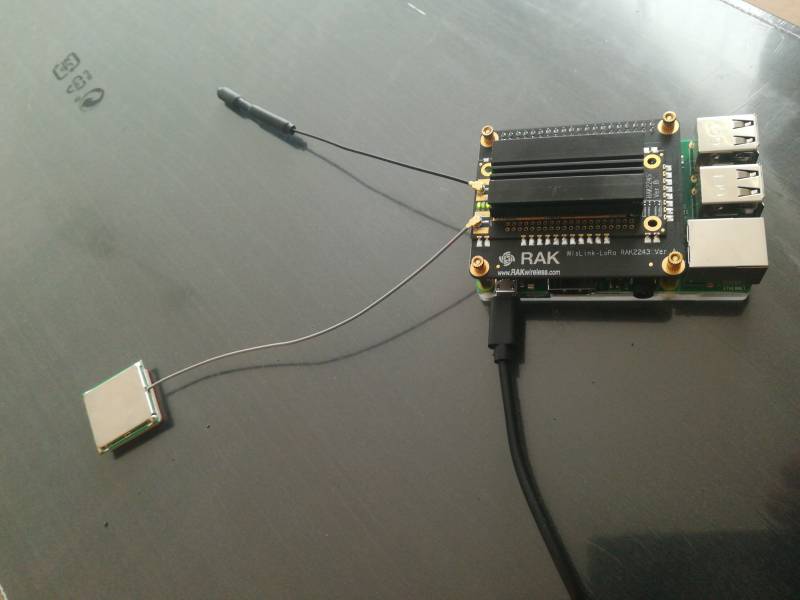
Is it ok to use it like this?
The node is equivalently used at its default config (its included antenna has a sticker writing 868 Mhz) as in the product picture.
I am testing inside a building and sure there are walls and doors, but building materials are normal concrete/bricks; it should work at a range of 30-50 meters right?
Hi @steven1,
It should indeed work through the walls, even outside a couple of hundred meters outside of the building at least. I Believe the issue is not in the hardware as you get the join accept, right ?
Have you tried ABP, or TTN, just so we know if the issue is only in the case of LoRa Server OTTA?
Regards
Vladislav
Yes, you said earlier that you did connect successfully. Can you connect the information sent by the server at the moment of your successful connection?
董巷
Mobile: +86 18146804729|E-mail:[email protected]| QQ1165798730
深圳市瑞科慧联科技有限公司 Shenzhen RAKwireless Technology Co.,Ltd.
深圳市南山区桃源街道平山一路新视艺创客公园B栋506室
Website: www.rakwireless.com | 微信公众号/官方微博:RAK瑞科慧联
Twitter: @RAKwireless | YouTube:RAK YouTube Channel
I managed to find something in the logs (at 22:41). That is the only instance where a successful negotiation has been established, but I don’t quite remember what I was doing at that moment.
May 23 22:40:06 gw lora-gateway-bridge[541]: time="2019-05-23T22:40:06+01:00" level=info msg="integration/mqtt: publishing event" event=stats qos=0 topic=gateway/b827XXXXXXXXXXXX/event/stats
May 23 22:40:06 gw loraserver[537]: time="2019-05-23T22:40:06+01:00" level=info msg="gateway/mqtt: gateway stats packet received" gateway_id=b827XXXXXXXXXXXX
May 23 22:40:06 gw loraserver[537]: time="2019-05-23T22:40:06+01:00" level=info msg="gateway updated" gateway_id=b827XXXXXXXXXXXX
May 23 22:40:06 gw loraserver[537]: time="2019-05-23T22:40:06+01:00" level=info msg="metrics saved" aggregation="[MINUTE HOUR DAY MONTH]" name="gw:b827XXXXXXXXXXXX"
May 23 22:40:29 gw loraserver[537]: time="2019-05-23T22:40:29+01:00" level=info msg="finished unary call with code OK" grpc.code=OK grpc.method=GetDevice grpc.service=ns.NetworkServerService grpc.start_time="2019-05-23T22:40:29+01:00" grpc.time_ms=2.645 peer.address="[::1]:48496" span.kind=server system=grpc
May 23 22:40:29 gw loraserver[537]: time="2019-05-23T22:40:29+01:00" level=info msg="finished unary call with code OK" grpc.code=OK grpc.method=GetDeviceProfile grpc.service=ns.NetworkServerService grpc.start_time="2019-05-23T22:40:29+01:00" grpc.time_ms=1.93 peer.address="[::1]:48496" span.kind=server system=grpc
May 23 22:40:36 gw lora-gateway-bridge[541]: time="2019-05-23T22:40:36+01:00" level=info msg="integration/mqtt: publishing event" event=stats qos=0 topic=gateway/b827XXXXXXXXXXXX/event/stats
May 23 22:40:36 gw loraserver[537]: time="2019-05-23T22:40:36+01:00" level=info msg="gateway/mqtt: gateway stats packet received" gateway_id=b827XXXXXXXXXXXX
May 23 22:40:36 gw loraserver[537]: time="2019-05-23T22:40:36+01:00" level=info msg="gateway updated" gateway_id=b827XXXXXXXXXXXX
May 23 22:40:36 gw loraserver[537]: time="2019-05-23T22:40:36+01:00" level=info msg="metrics saved" aggregation="[MINUTE HOUR DAY MONTH]" name="gw:b827XXXXXXXXXXXX"
May 23 22:40:53 gw lora-gateway-bridge[541]: time="2019-05-23T22:40:53+01:00" level=info msg="integration/mqtt: publishing event" event=up qos=0 topic=gateway/b827XXXXXXXXXXXX/event/up
May 23 22:40:53 gw lora-gateway-bridge[541]: time="2019-05-23T22:40:53+01:00" level=info msg="integration/mqtt: publishing event" event=up qos=0 topic=gateway/b827XXXXXXXXXXXX/event/up
May 23 22:40:53 gw loraserver[537]: time="2019-05-23T22:40:53+01:00" level=info msg="gateway/mqtt: uplink frame received"
May 23 22:40:53 gw loraserver[537]: time="2019-05-23T22:40:53+01:00" level=info msg="gateway/mqtt: uplink frame received"
May 23 22:40:53 gw loraserver[537]: time="2019-05-23T22:40:53+01:00" level=info msg="finished streaming call with code OK" grpc.code=OK grpc.method=StreamFrameLogsForDevice grpc.service=ns.NetworkServerService grpc.start_time="2019-05-23T22:36:34+01:00" grpc.time_ms=258956.6 peer.address="[::1]:48496" span.kind=server system=grpc
May 23 22:40:53 gw loraserver[537]: time="2019-05-23T22:40:53+01:00" level=warning msg="creating insecure application-server client" server="localhost:8001"
May 23 22:40:53 gw loraserver[537]: time="2019-05-23T22:40:53+01:00" level=info msg="rx info sent to network-controller" dev_eui=3238YYYYYYYYYYYY
May 23 22:40:53 gw loraserver[537]: time="2019-05-23T22:40:53+01:00" level=info msg="device gateway rx-info meta-data saved" dev_eui=3238YYYYYYYYYYYY
May 23 22:40:53 gw loraserver[537]: time="2019-05-23T22:40:53+01:00" level=info msg="device-session saved" dev_addr=0063xxxx dev_eui=3238YYYYYYYYYYYY
May 23 22:40:53 gw loraserver[537]: time="2019-05-23T22:40:53+01:00" level=info msg="finished client unary call" grpc.code=OK grpc.method=HandleUplinkData grpc.service=as.ApplicationServerService grpc.time_ms=56.542 span.kind=client system=grpc
May 23 22:40:53 gw loraserver[537]: time="2019-05-23T22:40:53+01:00" level=info msg="adr request added to mac-command queue" dev_eui=3238YYYYYYYYYYYY dr=0 nb_trans=1 req_dr=0 req_nb_trans=1 req_tx_power_idx=7 tx_power=0
May 23 22:40:53 gw loraserver[537]: time="2019-05-23T22:40:53+01:00" level=info msg="pending mac-command block set" cid=LinkADRReq commands=1 dev_eui=3238YYYYYYYYYYYY
May 23 22:40:53 gw loraserver[537]: time="2019-05-23T22:40:53+01:00" level=info msg="gateway/mqtt: publishing gateway command" command=down gateway_id=b827XXXXXXXXXXXX qos=0 topic=gateway/b827XXXXXXXXXXXX/command/down
May 23 22:40:53 gw lora-gateway-bridge[541]: time="2019-05-23T22:40:53+01:00" level=info msg="integration/mqtt: downlink frame received" topic=gateway/b827XXXXXXXXXXXX/command/down
May 23 22:40:53 gw lora-gateway-bridge[541]: time="2019-05-23T22:40:53+01:00" level=info msg="integration/mqtt: publishing event" event=ack qos=0 topic=gateway/b827XXXXXXXXXXXX/event/ack
May 23 22:40:53 gw loraserver[537]: time="2019-05-23T22:40:53+01:00" level=info msg="device-session saved" dev_addr=0063xxxx dev_eui=3238YYYYYYYYYYYY
May 23 22:40:53 gw loraserver[537]: time="2019-05-23T22:40:53+01:00" level=info msg="backend/gateway: downlink tx acknowledgement received" gateway_id=b827XXXXXXXXXXXX
May 23 22:40:53 gw loraserver[537]: time="2019-05-23T22:40:53+01:00" level=info msg="downlink-frames saved" dev_eui=3238YYYYYYYYYYYY token=37190
A larger log, with more context can be found here:
https://drive.google.com/open?id=1Qg6O8HLHeH8Xqmkeq82I38L3aENS56ly
If you have any further ideas, I’d be glad to try. Thank you.
Hi @steven1,
What about logs for the unsuccessful ones.
By the way have you verified all of the LoRa Server Setings, The gateway and device profiles. LoRaWAN 1.0.2, Class A, etc.
Can you post your configuration parameters for both the LoRa Server and Node in detail?
Thank you.
Regards
Vladislav
If you have modified the configuration as shown in the figure, and you can see from the logo that you have successfully connected, then do you try to send data through the node?

I have done minor modifications on the default configs of loraserver 3, but I just reverted all configs to defaults. Still the same problem, join request/accept loop.
Can someone at least confirm the firmware and Wisnode versions that are known to work? As I already wrote Wisnode is v1.2 and its loaded firmware: v2.0.3.4.
Should I try to load another firmware?
Is there some sort of delay I should add to the loraserver to make it work?
Is there any documentation at all on what a successful negotiation looks like? A sample log of the kit working properly?
Yes, I have something like this on this page: localhost:8000
I had it as 127.0.0.1 also, same behavior.
Hi @steven1
I can indeed confirm. I have tested both Wisnode RAK811 V1.1, V.2 since your opened the thread. Firmware v2.0.3.4 . I am able to join via OTAA, no problem, I see both the join and accpet, no repetitive requests. Also I am able to send packets afterwards, again no problems. I just did the following steps, and they worked right away. (Note no app_eui as it is not required for the LoRa Server Built-in the RAK7258 I am using)
at+get_config=dev_eui
at+get_config=app_key
at+get_config=app_eui
at+join=otta
at+send=0,1,010101
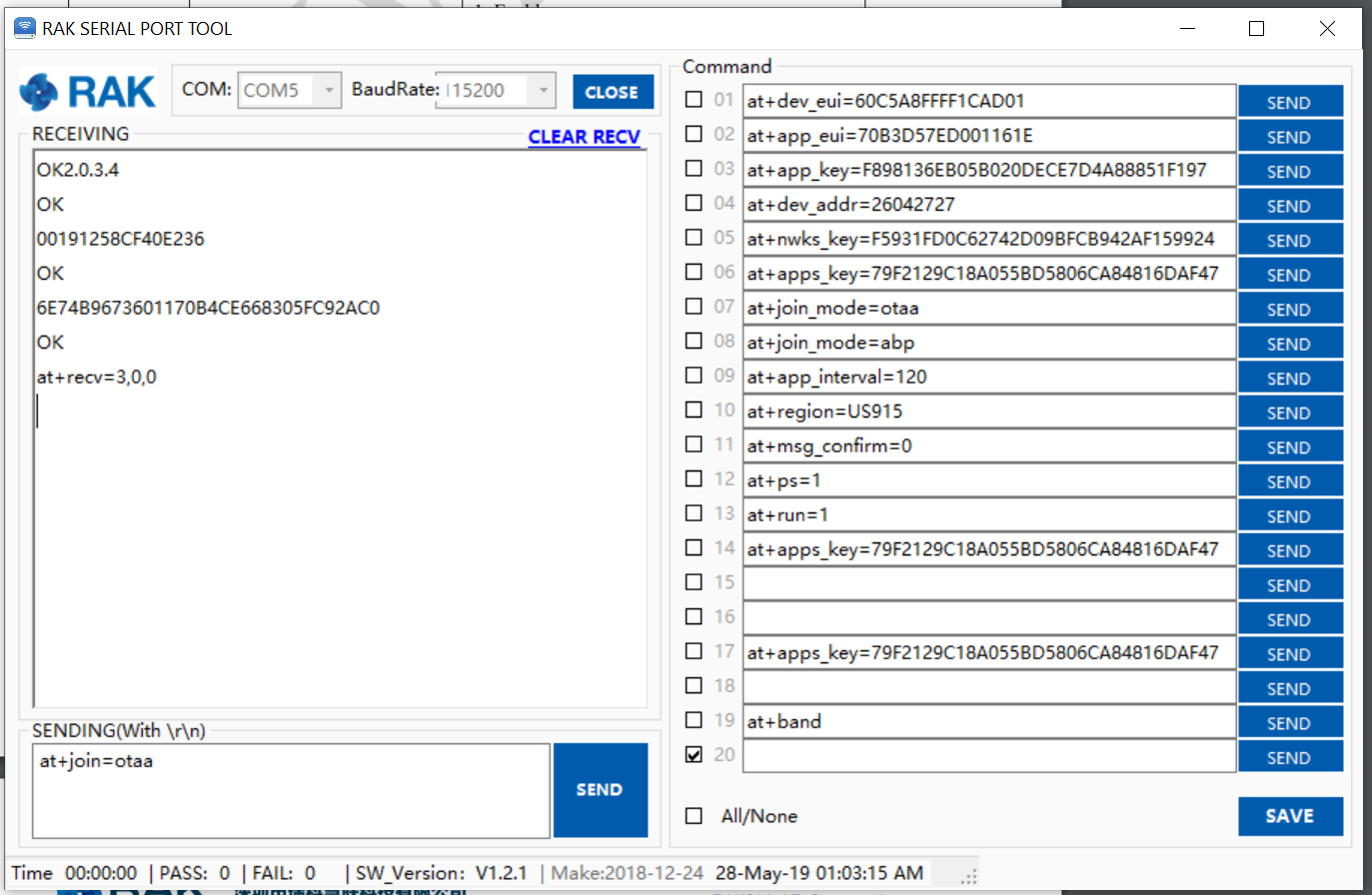
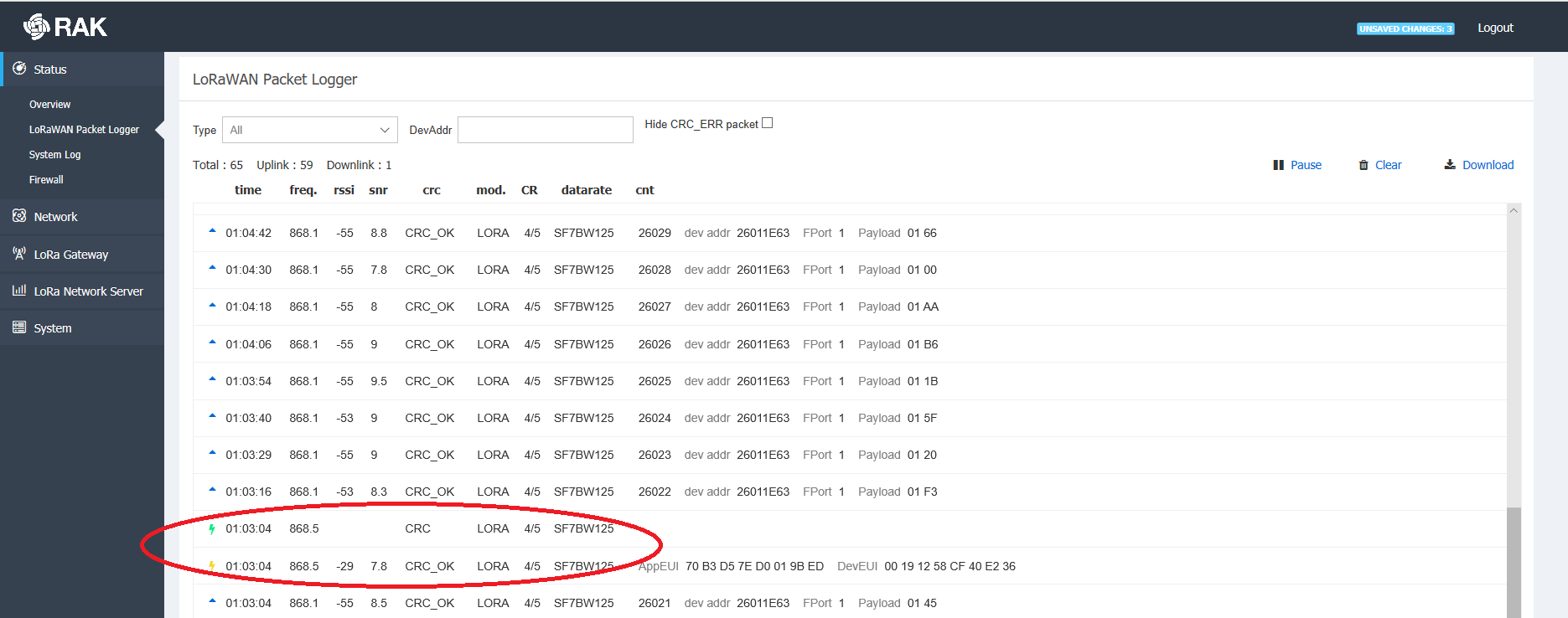
I believe the issue might be with your configuration of the LoRa Server. As I said can you post the exact configuration settings for both the node and the LoRa Server (Gateway+Application/Device)
That’s very useful, thank you. Unfortunately, I do the same steps, but I never receive the last “at_recv=3,0,0”. As I said instead I get after a long time a timeout response: “at_recv=6,0,0”
Here are my configs:
I also included a packet forwarder log, where radio 1 seems to be disabled. Shouldn’t it be, like radio 0, also enabled?
thank you for taking the time.
Hi @steven1,
You mentioned you have a RAK2245 Gateway. As there is no such thing in existence :), this being a concentrator can you tell me more about your setup. I am assuming you have it hooked to an RPi that you obtained separately and it is running the Raspbian based firmware from RAK. Can you tell me what the version is? Where is the LoRa server hosted.
Thank you.
Hi @steven1,
I took a look at the files, seems the are extra channels enabled in the loraserver file. Did you do this on purpose, as the configuration file needs also have those set. There is a mismatch. This is one thing I noticed. However I will wait for your reply with the requested parameters and will reply to you upon further examination.
Why is the log file called TTN-gateway, you are using LoRa Server ??
Regards
Vladislav
I have the rak2245 concentrator on a RPi, as in the picture of comment 13: Rak811 node in JoinAccept/JoinRequest loop
I have the Raspberry Pi HAT Edition as you can see, which is part of the kit: https://bit.ly/2YFrY70. All hardware was exclusively included in the kit, so I was assuming it should work out of the box.
I downloaded the RAK wireless raspbian gateway OS (but I don’t remember the link).
# gateway-version
Gateway ID:B827XXXXXXXXXXXX
rakwireless gateway 2245 version 2.8R
In turn, I upgraded the loraserver to v3.x (but I had the same exact problems with v2.x) using repo:
deb https://artifacts.loraserver.io/packages/3.x/deb stable main
And here are my version:
# lora-gateway-bridge version
3.0.0
# lora-app-server version
3.0.0
# loraserver version
3.0.1
I just created the file manually, the log goes into /var/log/daemon.log through the syslog facility of the system. It corresponds to the ttn-gateway service of the customized OS which seems to start the packet forwarder and is called ttn-gateway (although I do use LoRa Server). Is that right, or this service shouldn’t be started at all in my case? (systemctl start ttn-gateway)
I commented out the extra channels. I think it may have been through my hundreds of trials they have been left in there. Same behavior.
So which image are you using for the RAK2245, and are you installing the loraserver manually ?