Trouble trying to recover a failed Bluetooth OTA

Double check the connections between the DAPLink and the RAK4631 module.
Make sure GND has a good connection on both sides.

On my older RAK4631’s the contacts for the SWD interface are usually slightly corroded. Need to clean them before I can connect with JLink or DAPLink.

Should I just solder on a 4pin jst-xh connector on those to ensure the pins for the Daplink are solid?

That’s on option.

I am using a clip with “gold” pogo pins and clean the copper of the pins on the module from corrosion.

That looks like something I can 3d print. Got a model handy? :smiley:

also, should I remove the Rak4630 from the 19007 board to try this method?

Matt

No, the RAK4630 needs two power supplies. It will not work if you supply only 3.3V from the DAPLink.

Right. Still running into the above errors. If I telnet to the COM port, I don’t get a connection. Any thoughts?

I got a bit farther but still the board flashes the red led at a low power.

C:\WisBlock>pyocd flash -t nrf52840 wiscore_rak4631_board_bootloader-0.4.3.hex
0001811 I Loading C:\WisBlock\wiscore_rak4631_board_bootloader-0.4.3.hex [load_cmd]
[==================================================] 100%
0004025 I Erased 1024 bytes (1 sector), programmed 1024 bytes (1 page), skipped 36864 bytes (9 pages) at 16.88 kB/s [loader]

Forget about the red LED. It is just connected to the charger chip and says nothing about your MCU running or not.

If you have flashed the bootloader successfully, the device should now show up as external drive when connected to your computer.

It’s hit or miss on this. I can get it mounted for about 5 seconds as an external and then it drops. It doesn’t stay connected long enough to get a firmware dropped onto it.

Then a DAPlink or a JLink is the last thing you can try to recover the device

Which I have and it doesn’t seem to work with the commands that I can find in these forums.

What do I need to do to get this board reflashed and working. I am under warranty and don’t want to return this if I don’t have to. I bought the DAPLINK, connected via the above method in the original post but it is a crap shoot on getting the DAPLINK and commands to work.

Please don’t assume any tone in the above message. I am simply asking for help so I can use this device again. :slight_smile:

I did find this article, RAK4630 No ACK Knowledge, that I will try the suggestions the @beegee had listed there this evening.

I’ll report back my findings. :smiley:

Tried all those troubleshooting steps with no resolution. What am I doing wrong or is this board beyond repair?

I found a difference when using DAPlink between specifying chip type nrf52 (only) and nrf52840. Not sure why, with nrf52 the device doesn’t boot up.

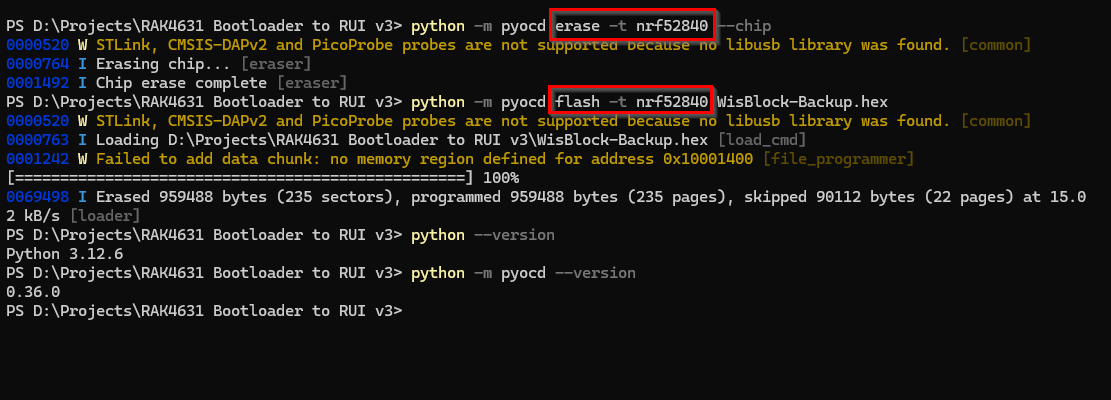
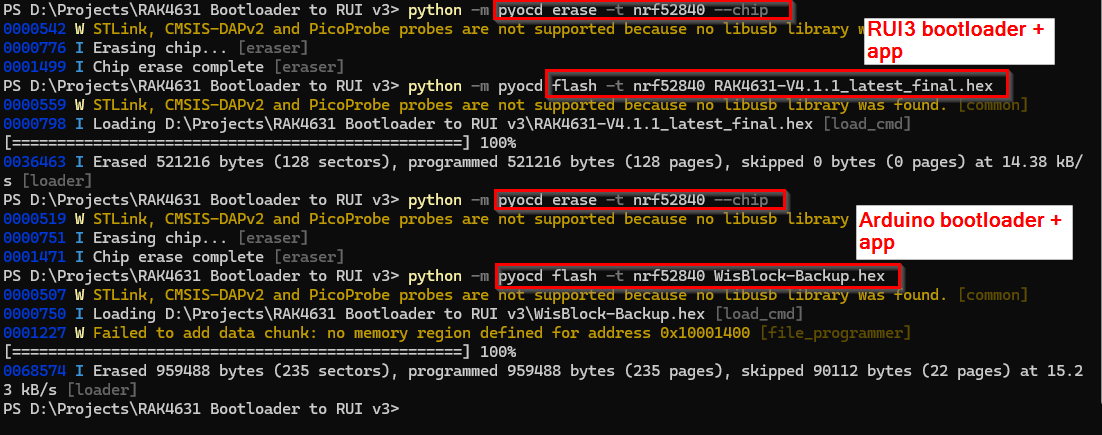
When I use nrf52840, I can recover a device that was chip-erased before:

This is the HEX file I used for recovery:
WisBlock-Backup.hex (2.4 MB)

Can you check the versions of Python and PyOCD?

Python version 3.12.6
PyOCD version 0.36.0

I can switch between Arduino bootloader and RUI3 bootloader as well without problems.

Sorry for the late reply.
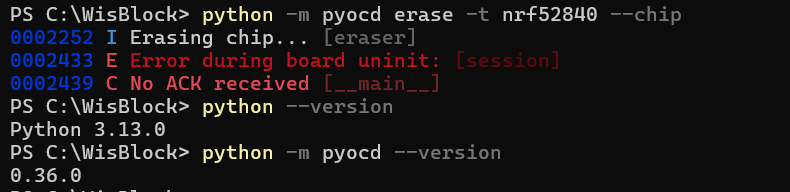
Here is what I get when I try those commands:

This is with the RAK powered by a seperate USB power source and the 3v rail not plugged in on the RAK side.

Actually got a little further this time.

It appears to erase the chip but when I attempt the flash, it fails at 20%.

That sounds to me like a bad connection between the DAPlink and the device. I am getting sometimes errors while flashing a firmware with DAPlink and pyocd, not sure why. That’s why I prefer JLink. It works more stable.

Only thing I can propose here is, check the DAPlink connections again and retry until it works.

You don’t know how many times I have tried this. At least 30+ since this last post.

Do you think an Arduino Uno could act as an interface for this RAK board? I’ve seen other products that could be connected to the Uno and flashed with specific firmwares when they weren’t working properly.

Never heard of a solution where the Arduino UNO could replace a JLink or DAPlink with a Nordic MCU.