How close is too close? Is 10-20 feet too close or are you talking about within a foot of the hotspot? I have a node in the apartment here but the device also connects to another node a few blocks down so I don’t know if that is the issue. Also could I setup the wind speed project to run with the environment monitoring project on the same device, at the same time? https://github.com/RAKWireless/WisBlock/tree/master/examples/RAK4630/solutions/Wind_Speed_Monitoring
3m should be ok. I got strange reactions when I had the node laying on my table 1m below the gateway on the wall.
The wind speed project and the environment project can be combined, but the payload might get quite large. You might need to set a fixed data rate to be able a large payload.
See our payload/region/datarate tables here: RAK811 Module AT Command Manual | RAKwireless Documentation Center
Ok so I have been unable to connect to the helium network in a week. I have restarted the example project and the board just fails to join over and over. How do I use the mcu reset command? Anything else I can try?
Also, when the device “shuts off” from me unplugging it, does the dev board keep a memory of it trying to join earlier? We are trying to problem solve what could be going on here
I tried it on a brand new 4630 I haven’t even used yet, so I can confirm it’s not a hardware issue. It also can’t be a rejoin issue because it’s never join? I even retried a fresh example and only updated the keys and the region and still got this again on the new board. I have also tried to connect around a different hotspot, and can confirm this is also not the issue. I don’t know what else to do to even problem solve this at this point
=====================================
Welcome to RAK4630 LoRaWan!!!
Type: OTAA
Region: US915
OTAA join failed!
Hi @a1projects ,
For SW reset, just add this on the line where you want to reset NVIC_SystemReset();
When the device shutdown or reset, it has no idea on the join attempts it previously did.
If you are failing on joining, we need to figure out where is the issue. Is it on the device (HW or SW)? Are the EUIs and KEY confirmed? Can you generate a new KEY and try to join again? Is it a gateway issue? Is the gateway really online? If it is Helium, do you have a device that connects to the helium network via that hotspot to confirm that the hotspot really transmits LoRa packets? Do you have control over the gateway or hotspot? Does your device reach the hotspot? Is it too far? Or too near? Are the antenna both on the device and gateway/hotspot secured?
Just from my experience when I setup my Helium Hotspot.
If the Hotspot is in sync mode, it does not transmit any packets including Join requests.
Even if the Helium explorer or the Helium app says it is synced, it might not be fully synced. I had to use this link https://explorer.helium.com/blocks/latest to see the number of blocks and then the diagnostics of the Helium app to see that there are still blocks to be synced.
I would strongly suggest to test the Join request first on a “normal” gateway and a “normal” LoRaWAN server before trying to connect it to Helium.
Another thing to check is the region that the Helium Hotspot is using. My Hotspot is a US915 hotspot, but because I am in the Philippines, the hotspot decided to use AS923-3 instead.
You can find the list of Regions per country for Helium here: Frequencies on the Helium Network | Helium Documentation
Turns out it was actually an issue on the blockchain side, and appears it has been resolved. I was able to connect today! Also I am using US915, it is the correct region. Another question I have is related to the gas readings. So the sensor reads gas in hms, but I can barely find anything about the unit hms on the internet. It does stand for Hydrogen Monitoring System correct? Is there any way to convert this to AQI or something so that we can accurately show the air quality percentage?
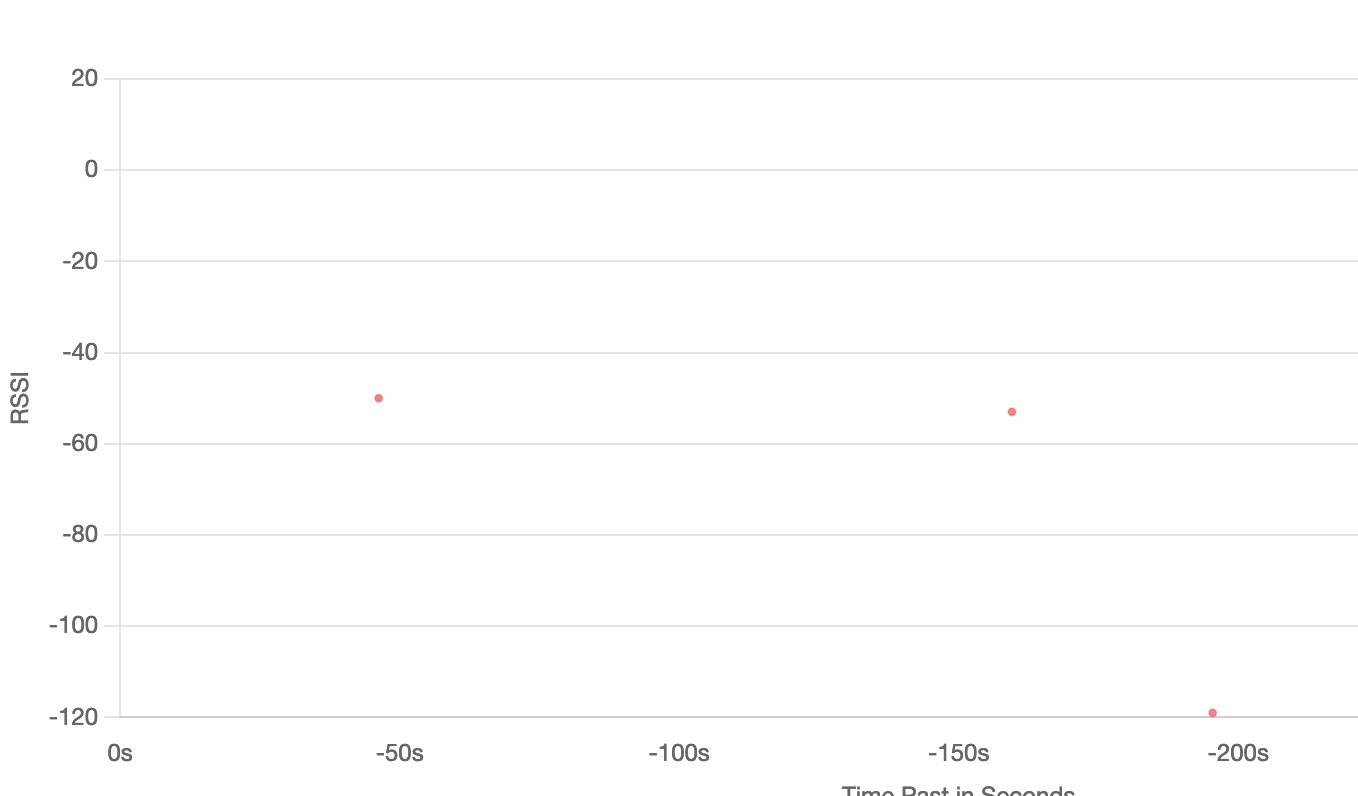
I still do get this issue where I have to keep power cycling it though to send a packet. As you can see, the first two dots that are close together were my first attempt, and the second one spaced out was the second. I have to unplug it and plug it back in to do anything. Usually after a couple tries it will work, but as of lately it hasn’t stayed connected long. I do think this is an issue the blockchain has been having though
Welcome to RAK4630 LoRaWan!!!
Type: OTAA
Region: US915
OTAA Mode, Network Joined!
Sending frame now…
result: Tem:24.54C Hum:65.12% Pres:1000.89KPa Gas:5826Ohms
lmh_send ok count 1
Sending frame now…
result: Tem:24.31C Hum:64.96% Pres:1000.89KPa Gas:5226Ohms
lmh_send fail count 1
Hi,
What data-rate did you set on the WisBlock?
For the environment payload I would recommend at least DR3 or DR4 and set ADR to off.
This looks more like a problem I saw before with US915, DR0 and a packet size that is close to the allowed payload size for DR0.
Here is an overview of max payload size per data-rate and region: RAK811 Module AT Command Manual | RAKwireless Documentation Center
I am using DR 3 and ADR set to off already. Should I bump up to DR 4? Another question I have is related to the gas readings. So the sensor reads gas in hms, but I can barely find anything about the unit hms on the internet. It does stand for Hydrogen Monitoring System correct? Is there any way to convert this to AQI or something so that we can accurately show the air quality percentage?
What is your payload size? I can tell you the data rate (or you check by yourself in the link I gave you). But without knowing the payload size I cannot say if DR 3 or DR5 or ??? is required.
For the BME680, the algorithm to calculate AQI is Bosch proprietary calculations. You have to use the Bosch BSEC library (linkable library, not open source).
We have right now no example how to use the Bosch library, but there are some information on the internet about it.
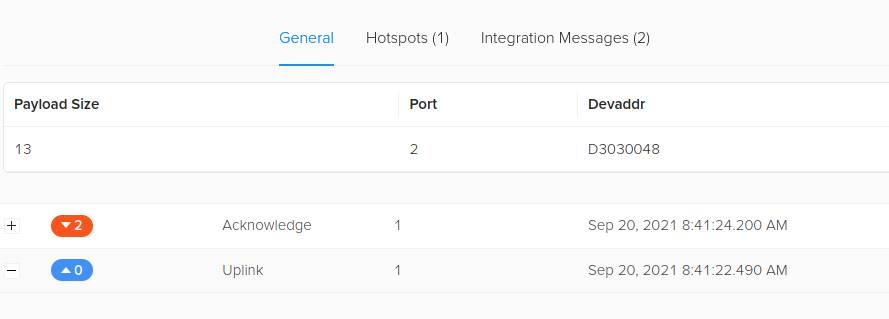
In this case DR1 or DR2 should be enough if using US915 region.
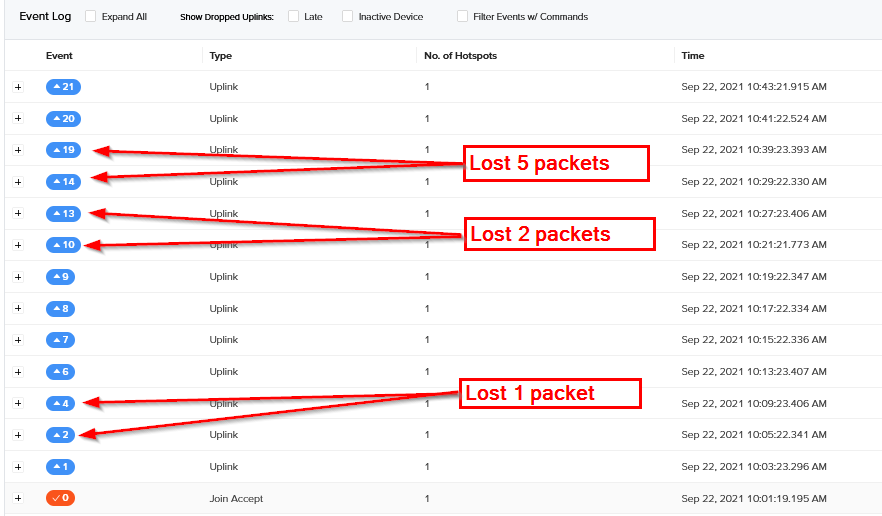
I have a Helium Hotspot Miner V2 and a RAK7258 Edge gateway. My environment node (WisBlock + BME680) was running for weeks without packet loss when connected to the RAK7258 and my private Chirpstack server. Using the exact same code, but connecting to Helium, I see severe packet loss. Both gateways are in same distance to the node, both are using same region, both show similar RSSI of the packets (quite good, ~50 dBi).
I don’t want to push the problem to Helium, but I have no explanation for your problem. Do you have the possibility to test with a normal gateway that is connected to TTN or another LoRaWAN server?
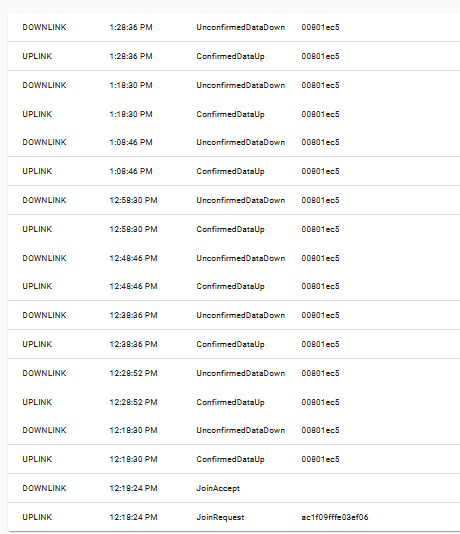
Continued some testing and changed the packet to confirmed message (node waits for ACK from server and repeats to send the packet if no ACK from server arrives).
On Helium Console I see many repeated packets, which means the WisBlock didn’t receive the ACK:
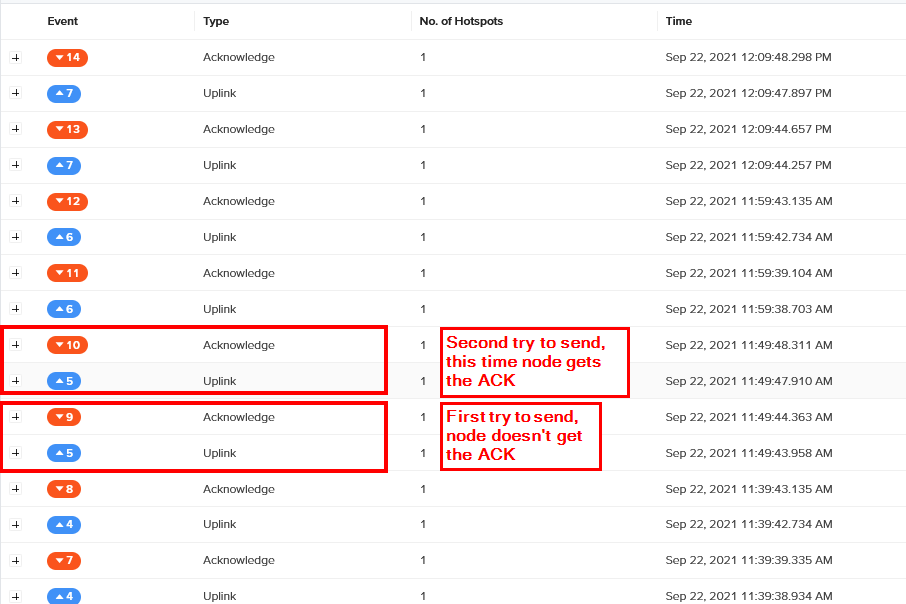
Same node, now connected to RAK7258 and Chirpstack server. There is not a single failure to send on the first try (check the time-stamps, all 10 minutes from each other)
Hi @a1projects ,
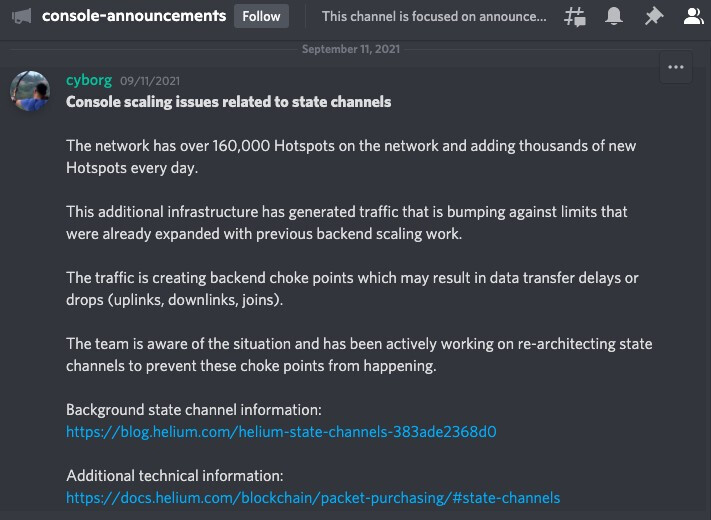
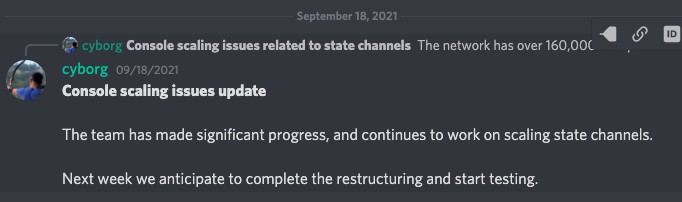
Helium is having some scaling issues now. Even my data-only hotspot is behaving erratically.
I suggest for you to check Helium updates in its official discord. In case you are not there yet Official Helium Community
I’ll screenshot and share here some Helium Console issue announcement. Hopefully they solve it soon.
Ok, I saw something related to that. Good to know Carl! Beegee I will try switching to dr 2 and see if I get any better results. Ok so would the best thing to do is buy a top extension piece for my raspberry pi to create a lora gateway?
Also side issue… so the wind speed monitoring example you guys gave had this link to buy the wind monitor device, and it’s all in Japanese. Even if we could translate it, I’m not sure if they will even take US dollar or ship to the US. Is there any US vendor for one of these, or a similar product that you can recommend that will work just as well as an alternative?
As you can see, this is all Japanese here http://jxiotcity.com/zdcs/zdcs204.html
Having a standard LoRaWAN gateway will be good because you can isolate if the issue is in the device or in the Helium network. As the Helium network grows, it will experience unstable operation unless the blockchain are now in the validators and not in the hotspot miners.
Regarding the sensor, you can try to get the Wind sensor from LCSC - Ubibot | Ubibot JXBS-3001-FS | Specialized Sensors - LCSC.COM
Ok, I noticed there is what seems to be an aux at the end of the wind monitoring device cable. Do I just cut the end off that wire and use red and black in the rak module? Also, I beleive beegee mentioned something about having to split the payload if I combine this with the environment example. How do I go about splitting payloads, or even combining the arduino codes? https://github.com/RAKWireless/WisBlock/tree/master/examples/RAK4630/solutions/Wind_Speed_Monitoring combined with Environment Monitoring. I decided to take your advice beegee. Will this top piece for the RPI work ok for my purposes? I just ordered it! https://www.amazon.com/dp/B07VS47RQZ/ref=cm_sw_r_apan_glt_fabc_PKC754S9G902Q00PN3MA?_encoding=UTF8&psc=1
Ok, you nearly lost me here with too many different things in one message.
About the Wind monitoring device, I do not know that device and how to connect it.
About merging the two applications, you need
- read the values from the wind speed device
- read the values from the BME680
- create a payload that includes all sensor values
For the payload:
count the bytes, check your region and maximum payload size, check if there is a data rate that allows to send your payload in one packet
If the payload is too large, you have to create two data packets and send them one after the other. Keep in mind, that lmh_send is giving the packet to the LoRaWAN library, but it does not wait for the packet to be sent. You can send the second packet only after the first packet TX has finished. You can use the TX finished callbacks as explained in the SX126x-Arduino documentation.
For the RPi Hat, I have no idea what you want to do with it. The link goes to a LoRa transceiver, I do not understand how this helps with your questions.