Trying to setup MQTT Server for RAK 4630 Weather Station

Ok, you nearly lost me here with too many different things in one message.

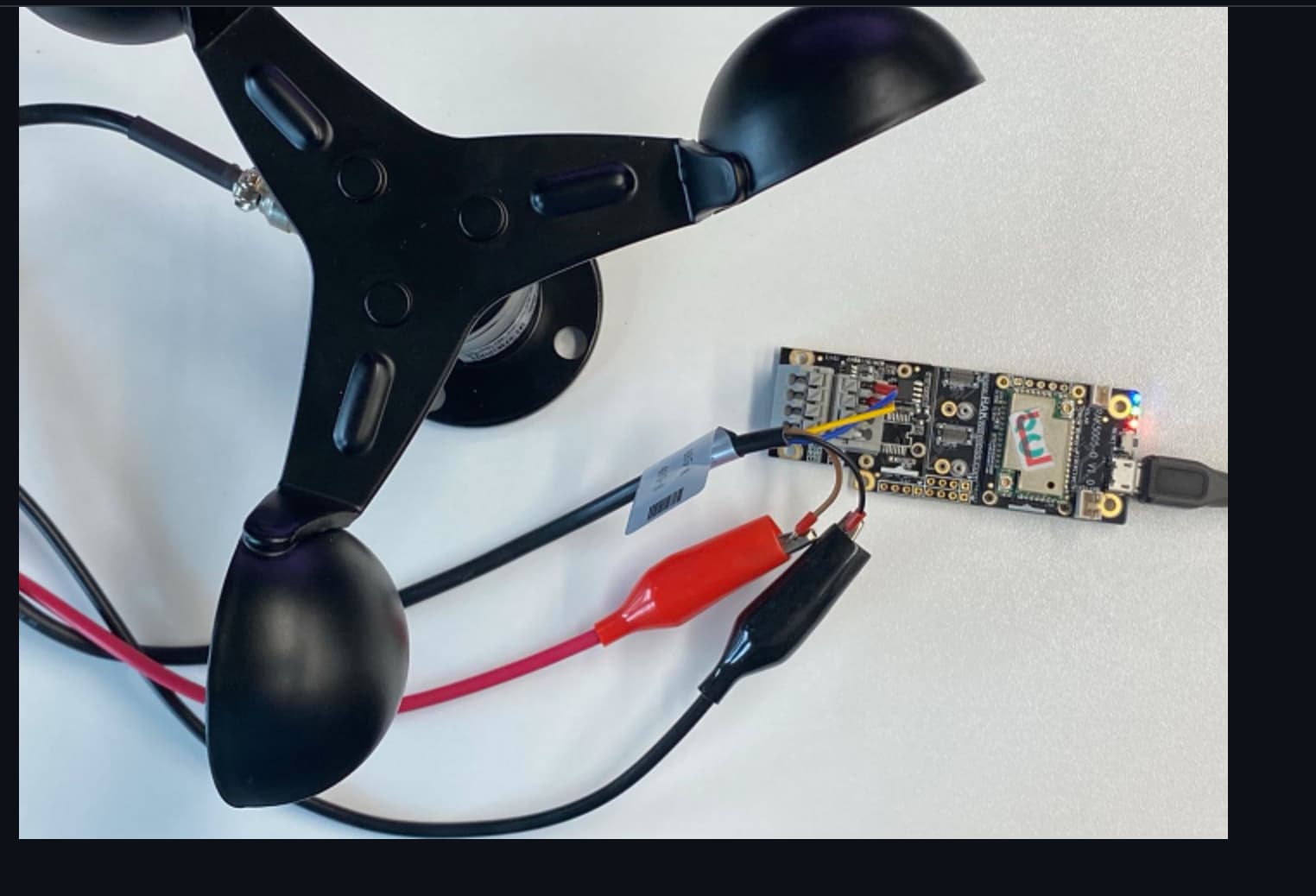
About the Wind monitoring device, I do not know that device and how to connect it.

About merging the two applications, you need

  • read the values from the wind speed device
  • read the values from the BME680
  • create a payload that includes all sensor values

For the payload:
count the bytes, check your region and maximum payload size, check if there is a data rate that allows to send your payload in one packet
If the payload is too large, you have to create two data packets and send them one after the other. Keep in mind, that lmh_send is giving the packet to the LoRaWAN library, but it does not wait for the packet to be sent. You can send the second packet only after the first packet TX has finished. You can use the TX finished callbacks as explained in the SX126x-Arduino documentation.

For the RPi Hat, I have no idea what you want to do with it. The link goes to a LoRa transceiver, I do not understand how this helps with your questions.

I’m sorry beegee, I can be bad about that sometimes. Ok I guess what I’m missing here, is what hardware do I need to setup a gateway to test something on ttn or something like that? I thought you could set one up with a rpi so I bought that hat, but if this is the wrong piece of hardware can you point me in the right direction and I’ll cancel the order. I just want to run tests the way you are showing me

Cheapest option (without the need to build it by yourself) WisGate Developer D0 / D0+

If you want to build it with an existing RPi, then you need one of our HATs, But for this I need @carlrowan here. He knows how to do that.

Hi @a1projects ,

Aside from @beegee 's suggestion on the WisGate Developer.
You can have this hat if you have already an RPi.

You can cancel the one you bought in amazon because that is a LoRa transceiver and not a gateway concentrator.

Ok, I am curious if I could use this hat on ubuntu mate 21.04 that I have installed on my rpi4, or do I have to install a separate os to use it? Also the US ones are sold out. Is there anywhere else I can get it, or get one like it to run tests? Looking into it, the original one beegee showed me seems to have a similar hat. Could I put this hat on my rpi 4 too if I bought this? Gateway

If you will use the WisGate Developer D0/D0+, it has an RPI Zero W so you wont need an extra RPI.

Since the RAK2245 has no stock for US915, you can also use this concentrator and match it with appropriate hat. This one also uses the latest LoRaWAN Baseband Chip processor.

As for the software, the RAK FW is based on Raspbian OS. We have provided an image for that than can be found on the quick start guide.

So Beegee our max payload size is 24 bytes, does a payload of 17 on the helium console for example stand for 17 bytes?

Yes it does. But you should know how many bytes your payload size is, your app creates it.

/**
 * @file Wind_Speed_Monitoring.ino
 * @author rakwireless.com
 * @brief This sketch demonstrate reading a data from a wind speed sensor
 *    and send the data to lora gateway.
 * @version 0.1
 * @date 2020-07-28
 * @copyright Copyright (c) 2020
 */
#include <Arduino.h>
#include <ArduinoModbus.h>   //Click here to get the library: http://librarymanager/All#ArduinoModbus
#include <LoRaWan-RAK4630.h> // Click here to get the library: http://librarymanager/All#SX126x

#include <SPI.h>

// Check if the board has an LED port defined
#ifndef LED_BUILTIN
#define LED_BUILTIN 35
#endif

#ifndef LED_BUILTIN2
#define LED_BUILTIN2 36
#endif

bool doOTAA = true;   // OTAA is used by default.
#define SCHED_MAX_EVENT_DATA_SIZE APP_TIMER_SCHED_EVENT_DATA_SIZE /**< Maximum size of scheduler events. */
#define SCHED_QUEUE_SIZE 60                     /**< Maximum number of events in the scheduler queue. */

#define LORAWAN_DATERATE DR_0
#define LORAWAN_TX_POWER TX_POWER_0
#define JOINREQ_NBTRIALS 3 /**< Number of trials for the join request. */
DeviceClass_t g_CurrentClass = CLASS_A;
LoRaMacRegion_t g_CurrentRegion = LORAMAC_REGION_EU868;    /* Region:EU868*/
lmh_confirm g_CurrentConfirm = LMH_CONFIRMED_MSG;
uint8_t g_AppPort = LORAWAN_APP_PORT;

/**@brief Structure containing LoRaWan parameters, needed for lmh_init()
 */
static lmh_param_t g_lora_param_init = {
  LORAWAN_ADR_ON,
  LORAWAN_DATERATE,
  LORAWAN_PUBLIC_NETWORK,
  JOINREQ_NBTRIALS,
  LORAWAN_TX_POWER,
  LORAWAN_DUTYCYCLE_OFF
};

// Foward declaration
static void lorawan_has_joined_handler(void);
static void lorawan_join_failed_handler(void);
static void lorawan_rx_handler(lmh_app_data_t *app_data);
static void lorawan_confirm_class_handler(DeviceClass_t Class);
static void send_lora_frame(void);

/**@brief Structure containing LoRaWan callback functions, needed for lmh_init()
*/
static lmh_callback_t g_lora_callbacks = {
  BoardGetBatteryLevel,
  BoardGetUniqueId,
  BoardGetRandomSeed,
  lorawan_rx_handler,
  lorawan_has_joined_handler,
  lorawan_confirm_class_handler,
  lorawan_join_failed_handler
};

//OTAA keys !!!! KEYS ARE MSB !!!!
uint8_t nodeDeviceEUI[8] = {0x88, 0x88, 0x88, 0x88, 0x88, 0x88, 0x33, 0x33};
uint8_t nodeAppEUI[8] = {0xB8, 0x27, 0xEB, 0xFF, 0xFE, 0x39, 0x00, 0x00};
uint8_t nodeAppKey[16] = {0x88, 0x88, 0x88, 0x88, 0x88, 0x88, 0x88, 0x88, 0x88, 0x88, 0x88, 0x88, 0x88, 0x88, 0x88, 0x88};

// ABP keys
uint32_t nodeDevAddr = 0x260116F8;
uint8_t nodeNwsKey[16] = {0x7E, 0xAC, 0xE2, 0x55, 0xB8, 0xA5, 0xE2, 0x69, 0x91, 0x51, 0x96, 0x06, 0x47, 0x56, 0x9D, 0x23};
uint8_t nodeAppsKey[16] = {0xFB, 0xAC, 0xB6, 0x47, 0xF3, 0x58, 0x45, 0xC7, 0x50, 0x7D, 0xBF, 0x16, 0x8B, 0xA8, 0xC1, 0x7C};

// Private defination
#define LORAWAN_APP_DATA_BUFF_SIZE 64                     /**< buffer size of the data to be transmitted. */
#define LORAWAN_APP_INTERVAL 20000                        /**< Defines for user timer, the application data transmission interval. 20s, value in [ms]. */
static uint8_t g_m_lora_app_data_buffer[LORAWAN_APP_DATA_BUFF_SIZE];        //< Lora user application data buffer.
static lmh_app_data_t g_m_lora_app_data = {g_m_lora_app_data_buffer, 0, 0, 0, 0}; //< Lora user application data structure.

TimerEvent_t g_appTimer;
static uint32_t timers_init(void);

static uint32_t g_count = 0;
static uint32_t g_count_fail = 0;

void setup()
{
  pinMode(LED_BUILTIN, OUTPUT);
  digitalWrite(LED_BUILTIN, LOW);

  // Initialize LoRa chip.
  lora_rak4630_init();

  // Initialize Serial for debug output
  time_t timeout = millis();
  Serial.begin(115200);
  while (!Serial)
  {
    if ((millis() - timeout) < 5000)
    {
      delay(100);
    }
    else
    {
      break;
    }
  }

  Serial.println("=====================================");
  Serial.println("Welcome to RAK4630 LoRaWan!!!");
  if (doOTAA)
  {
    Serial.println("Type: OTAA");
  }
  else
  {
    Serial.println("Type: ABP");
  }

  switch (g_CurrentRegion)
  {
    case LORAMAC_REGION_AS923:
      Serial.println("Region: AS923");
      break;
    case LORAMAC_REGION_AU915:
      Serial.println("Region: AU915");
      break;
    case LORAMAC_REGION_CN470:
      Serial.println("Region: CN470");
      break;
    case LORAMAC_REGION_EU433:
      Serial.println("Region: EU433");
      break;
    case LORAMAC_REGION_IN865:
      Serial.println("Region: IN865");
      break;
    case LORAMAC_REGION_EU868:
      Serial.println("Region: EU868");
      break;
    case LORAMAC_REGION_KR920:
      Serial.println("Region: KR920");
      break;
    case LORAMAC_REGION_US915:
      Serial.println("Region: US915");
      break;
  }
  Serial.println("=====================================");

  if (!ModbusRTUClient.begin(9600))
  {
    Serial.println("Failed to start Modbus RTU Client!");
    while (1)
      ;
  }

  Scheduler.startLoop(loop2);

  //creat a user timer to send data to server period
  uint32_t err_code;

  err_code = timers_init();
  if (err_code != 0)
  {
    Serial.printf("timers_init failed - %d\n", err_code);
    return;
  }

  // Setup the EUIs and Keys
  if (doOTAA)
  {
    lmh_setDevEui(nodeDeviceEUI);
    lmh_setAppEui(nodeAppEUI);
    lmh_setAppKey(nodeAppKey);
  }
  else
  {
    lmh_setNwkSKey(nodeNwsKey);
    lmh_setAppSKey(nodeAppsKey);
    lmh_setDevAddr(nodeDevAddr);
  }

  // Initialize LoRaWan
  err_code = lmh_init(&g_lora_callbacks, g_lora_param_init, doOTAA, g_CurrentClass, g_CurrentRegion);
  if (err_code != 0)
  {
    Serial.printf("lmh_init failed - %d\n", err_code);
    return;
  }

  // Start Join procedure
  lmh_join();
}

void loop2()
{
  uint32_t i = 0;
  short raw_speed;

  raw_speed = get_speed();

  g_m_lora_app_data.port = g_AppPort;
  g_m_lora_app_data.buffer[i++] = 0x0a;
  g_m_lora_app_data.buffer[i++] = (raw_speed >> 8) & 0xFF;
  g_m_lora_app_data.buffer[i++] = raw_speed & 0x00FF;
  g_m_lora_app_data.buffsize = i;

  delay(10000);
  yield();
}

void loop()
{
  // Put your application tasks here, like reading of sensors,
  // Controlling actuators and/or other functions. 
}

/**@brief LoRa function for handling HasJoined event.
 */
void lorawan_has_joined_handler(void)
{
  Serial.println("OTAA Mode, Network Joined!");

  lmh_error_status ret = lmh_class_request(g_CurrentClass);
  if (ret == LMH_SUCCESS)
  {
    delay(1000);
    TimerSetValue(&g_appTimer, LORAWAN_APP_INTERVAL);
    TimerStart(&g_appTimer);
  }
}
/**@brief LoRa function for handling OTAA join failed
*/
static void lorawan_join_failed_handler(void)
{
  Serial.println("OTAA join failed!");
  Serial.println("Check your EUI's and Keys's!");
  Serial.println("Check if a Gateway is in range!");
}
/**@brief Function for handling LoRaWan received data from Gateway
 *
 * @param[in] app_data  Pointer to rx data
 */
void lorawan_rx_handler(lmh_app_data_t *app_data)
{
  Serial.printf("LoRa Packet received on port %d, size:%d, rssi:%d, snr:%d, data:%s\n",
          app_data->port, app_data->buffsize, app_data->rssi, app_data->snr, app_data->buffer);
}

void lorawan_confirm_class_handler(DeviceClass_t Class)
{
  Serial.printf("switch to class %c done\n", "ABC"[Class]);
  // Informs the server that switch has occurred ASAP
  g_m_lora_app_data.buffsize = 0;
  g_m_lora_app_data.port = g_AppPort;
  lmh_send(&g_m_lora_app_data, g_CurrentConfirm);
}

short get_speed(void)
{
  short rawspeed;
  float speed;

  /* RS485 Power On */
  pinMode(WB_IO2, OUTPUT);
  digitalWrite(WB_IO2, HIGH);
  delay(100);
  /* RS485 Power On */

  if (!ModbusRTUClient.requestFrom(1, HOLDING_REGISTERS, 0x0016, 1))
  {
    Serial.print("failed to read registers! ");
    Serial.println(ModbusRTUClient.lastError());
  }
  else
  {
    // If the request succeeds, the sensor sends the readings, that are
    // stored in the holding registers. The read() method can be used to
    // get the raw pH values.
    rawspeed = ModbusRTUClient.read();

    // To get the ph reading as a percentage, divide the raw value by 10.0.
    speed = rawspeed / 10.0;
    Serial.printf("-------speed------ = %f\n", speed);
  }

  /* RS485 Power Off */
  pinMode(WB_IO2, OUTPUT);
  digitalWrite(WB_IO2, LOW);
  delay(100);
  /* RS485 Power Off */

  return rawspeed;
}

void send_lora_frame(void)
{
  if (lmh_join_status_get() != LMH_SET)
  {
    //Not joined, try again later
    return;
  }

  lmh_error_status error = lmh_send(&g_m_lora_app_data, g_CurrentConfirm);
  if (error == LMH_SUCCESS)
  {
    g_count++;
    Serial.printf("lmh_send ok count %d\n", g_count);
  }
  else
  {
    g_count_fail++;
    Serial.printf("lmh_send fail count %d\n", g_count_fail);
  }
}

/**@brief Function for handling user timerout event.
 */
void tx_lora_periodic_handler(void)
{
  TimerSetValue(&g_appTimer, LORAWAN_APP_INTERVAL);
  TimerStart(&g_appTimer);
  Serial.println("Sending frame now...");
  send_lora_frame();
}

/**@brief Function for the Timer initialization.
 *
 * @details Initializes the timer module. This creates and starts application timers.
 */
uint32_t timers_init(void)
{
  TimerInit(&g_appTimer, tx_lora_periodic_handler);
  return 0;
}

What are the bare minimal parts of this wind speed code that I need to pull out and insert into my environment code to get this project to run correctly? This is my first time merging two parts of Arduino code like this, so I apologize if I am asking a basic question in advanced!


Also the wind speed monitoring device appears to have some cables here in your example that do not seem to come with the link you gave me carlowan https://www.lcsc.com/product-detail/Specialized-Sensors_Ubibot-JXBS-3001-FS_C843317.html It almost looks like an auxiliary or something? I just know it doesn’t look like this example picture. What cables do I need to buy too so that I will have everything I need to make this work?

Hi @a1projects ,

It is likely that it is just the connector. You can strip it to get the 4 wires. If you’ll look at the photo, it is a 4-pin Aviation Connector.
Here is the english translated datasheet. I found it by few searches in google https://www.ubibot.com/wp-content/uploads/dlm_uploads/2020/11/Wind-Speed-Sensor-210225.pdf.

LCSC only has 2 pcs remainging in stock. You can also purchase here RS485 Sensors and Accessories matched with UbiBot Devices. in case LCSC got out of stock.

Carl, I was able to order the LCSC before it went out of stock! It will be here in a week. I also took your team’s advice and purchased this RAK Gateway since I am still having connecting issues on helium! Hopefully that will help me figure out what the issue is. Ok great, I just wanted to be prepared so that by the time it is here I can get straight to work

Beegee or Carl, do either of you have any insight on how to actually put the two examples together?

hi @a1projects ,

I don’t have any exact code and I do not have the wind speed sensor but I’ll share you some general ideas.

First of all, you need to gather all sensor data. This step can be inside a loop function. In windspeed example sketch, it uses Scheduler (check loop2() function) to ensure that the code will continuously run and won’t stuck up in getting the data in the code even it has 10seconds delay. In the Environment Monitor, getting data values is inside the send_lora_frame function because getting that data won’t take really long. It is very important that your sketch is looping continuously, you CAN’T just pause anywhere in the code or put huge delays. If needed delays like the 10seconds delay on the windspeed sensor, you need to use the Scheduler functionality or use RTOS or use simple millis(). But for this, we use Scheduler. More info of that here https://www.arduino.cc/en/Reference/Scheduler

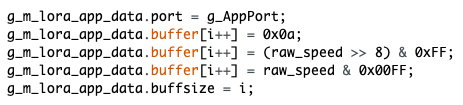
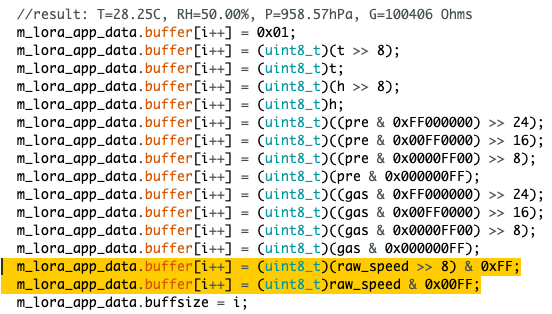
The two examples uses different naming convention in payload buffer so you need to choose 1 what to follow. m_lora_app_data or g_m_lora_app_data is ok but you must only use one.

Environment example:

image

Windspeed example:

image

Let say I chose to use the environmental sensos example as my base code, then I can add the payload for the windsensor and it will look like this.

image

You see that I used m_lora_app.data then removed the port because it is already in the environmental sensor sketch example. Also I removed the initial dummy byte g_m_lora_app_data.buffer[i++] = 0x0a; used for the identity of the windspeed payload because that is not really needed.

But of course, you still need to copy the loop2() and get_speed() as well together with the necessary variables from the windspeed example sketch to the environment sensor sketch. I hope this generic ideas will be helpful.

You’re referring to this part right?

void loop2()
{
  uint32_t i = 0;
  short raw_speed;

  raw_speed = get_speed();

  g_m_lora_app_data.port = g_AppPort;
  g_m_lora_app_data.buffer[i++] = 0x0a;
  g_m_lora_app_data.buffer[i++] = (raw_speed >> 8) & 0xFF;
  g_m_lora_app_data.buffer[i++] = raw_speed & 0x00FF;
  g_m_lora_app_data.buffsize = i;

  delay(10000);
  yield();
}

Do I need to remove this part like you did above? g_m_lora_app_data.buffer[i++] = 0x0a;

also does it matter where this code above goes in the environment code? Can I put it right above the code you just showed me in this example? Is there anything else from the code that needs to be pulled from the windspeed? I followed your format (moving windspeed to the environment example). Thanks for the visual examples, very helpful!

Please get the loop2() and get_speed function as well as the line Scheduler.startLoop(loop2); on the wind speed example.

Then just make raw_speed variable global to make things simple. You can now get the raw_speed value and put it on the m_lora_app_data.buffer section like what I did above.

Also, you need to include modbus library
#include <ArduinoModbus.h>

and SPI header file
#include <SPI.h>

You must have the Modbus initialization as well in void setup.

  if (!ModbusRTUClient.begin(9600))
  {
    Serial.println("Failed to start Modbus RTU Client!");
    while (1)
      ;
  }`

Alright so I have tried piecing all of this together and am having some issues

/**
   @file Environment_Monitoring.ino
   @author rakwireless.com
   @brief This sketch demonstrate how to get environment data from BME680
      and send the data to lora gateway.
   @version 0.1
   @date 2020-07-28
   @copyright Copyright (c) 2020
**/

#include <Arduino.h>
#include <LoRaWan-RAK4630.h> // Click to install library: http://librarymanager/ALL#SX126x-Arduino
#include <SPI.h>
#include <ArduinoModbus.h>
#include <Wire.h>
#include <Adafruit_Sensor.h>
#include <Adafruit_BME680.h> // Click to install library: http://librarymanager/All#Adafruit_BME680
#include <U8g2lib.h>		   // Click to install library: http://librarymanager/ALL#u8g2
U8G2_SSD1306_128X64_NONAME_F_HW_I2C u8g2(U8G2_R0);
Adafruit_BME680 bme;

// RAK4630 supply two LED
#ifndef LED_BUILTIN
#define LED_BUILTIN 35
#endif

#ifndef LED_BUILTIN2
#define LED_BUILTIN2 36
#endif

bool doOTAA = true;   // OTAA is used by default.
#define SCHED_MAX_EVENT_DATA_SIZE APP_TIMER_SCHED_EVENT_DATA_SIZE /**< Maximum size of scheduler events. */
#define SCHED_QUEUE_SIZE 60										  /**< Maximum number of events in the scheduler queue. */
#define LORAWAN_DATERATE DR_3									  /*LoRaMac datarates definition, from DR_0 to DR_5*/
#define LORAWAN_TX_POWER TX_POWER_0								  /*LoRaMac tx power definition, from TX_POWER_0 to TX_POWER_15*/
#define JOINREQ_NBTRIALS 5										  /**< Number of trials for the join request. */
DeviceClass_t g_CurrentClass = CLASS_A;					/* class definition*/
LoRaMacRegion_t g_CurrentRegion = LORAMAC_REGION_EU868;    /* Region:EU868*/
lmh_confirm g_CurrentConfirm = LMH_CONFIRMED_MSG;				  /* confirm/unconfirm packet definition*/
uint8_t gAppPort = LORAWAN_APP_PORT;							  /* data port*/

/**@brief Structure containing LoRaWan parameters, needed for lmh_init()
*/
static lmh_param_t g_lora_param_init = {LORAWAN_ADR_OFF, LORAWAN_DATERATE, LORAWAN_PUBLIC_NETWORK, JOINREQ_NBTRIALS, LORAWAN_TX_POWER, LORAWAN_DUTYCYCLE_OFF};

// Foward declaration
static void lorawan_has_joined_handler(void);
void lorawan_join_fail(void);
static void lorawan_rx_handler(lmh_app_data_t *app_data);
static void lorawan_confirm_class_handler(DeviceClass_t Class);
static void send_lora_frame(void);

/**@brief Structure containing LoRaWan callback functions, needed for lmh_init()
*/
static lmh_callback_t g_lora_callbacks = {BoardGetBatteryLevel, BoardGetUniqueId, BoardGetRandomSeed,
                                        lorawan_rx_handler, lorawan_has_joined_handler, lorawan_confirm_class_handler, lorawan_join_fail
                                       };

//OTAA keys !!!! KEYS ARE MSB !!!!
uint8_t nodeDeviceEUI[8] = {0x88, 0x88, 0x88, 0x88, 0x88, 0x88, 0x33, 0x33};
uint8_t nodeAppEUI[8] = {0xB8, 0x27, 0xEB, 0xFF, 0xFE, 0x39, 0x00, 0x00};
uint8_t nodeAppKey[16] = {0x88, 0x88, 0x88, 0x88, 0x88, 0x88, 0x88, 0x88, 0x88, 0x88, 0x88, 0x88, 0x88, 0x88, 0x88, 0x88};

// ABP keys
uint32_t nodeDevAddr = 0x260116F8;
uint8_t nodeNwsKey[16] = {0x7E, 0xAC, 0xE2, 0x55, 0xB8, 0xA5, 0xE2, 0x69, 0x91, 0x51, 0x96, 0x06, 0x47, 0x56, 0x9D, 0x23};
uint8_t nodeAppsKey[16] = {0xFB, 0xAC, 0xB6, 0x47, 0xF3, 0x58, 0x45, 0xC7, 0x50, 0x7D, 0xBF, 0x16, 0x8B, 0xA8, 0xC1, 0x7C};

// Private defination
#define LORAWAN_APP_DATA_BUFF_SIZE 64										  /**< buffer size of the data to be transmitted. */
#define LORAWAN_APP_INTERVAL 20000											  /**< Defines for user timer, the application data transmission interval. 20s, value in [ms]. */
static uint8_t m_lora_app_data_buffer[LORAWAN_APP_DATA_BUFF_SIZE];			  //< Lora user application data buffer.
static lmh_app_data_t m_lora_app_data = {m_lora_app_data_buffer, 0, 0, 0, 0}; //< Lora user application data structure.

TimerEvent_t appTimer;
static uint32_t timers_init(void);
static uint32_t count = 0;
static uint32_t count_fail = 0;

void setup()
{
  // Initialize the built in LED
  pinMode(LED_BUILTIN, OUTPUT);
  digitalWrite(LED_BUILTIN, LOW);

  // Initialize Serial for debug output
  Serial.begin(115200);

  if (!ModbusRTUClient.begin(9600))
  {
    Serial.println("Failed to start Modbus RTU Client!");
    while (1)
      ;
  }

  time_t serial_timeout = millis();
  // On nRF52840 the USB serial is not available immediately
  while (!Serial)
  {
    if ((millis() - serial_timeout) < 5000)
    {
      delay(100);
      digitalWrite(LED_BUILTIN, !digitalRead(LED_BUILTIN));
    }
    else
    {
      break;
    }
  }

  Serial.println("=====================================");
  Serial.println("Welcome to RAK4630 LoRaWan!!!");
  if (doOTAA)
  {
  Serial.println("Type: OTAA");
  }
  else
  {
    Serial.println("Type: ABP");
  }

  switch (g_CurrentRegion)
  {
    case LORAMAC_REGION_AS923:
  Serial.println("Region: AS923");
      break;
    case LORAMAC_REGION_AU915:
  Serial.println("Region: AU915");
      break;
    case LORAMAC_REGION_CN470:
  Serial.println("Region: CN470");
      break;
    case LORAMAC_REGION_EU433:
  Serial.println("Region: EU433");
      break;
    case LORAMAC_REGION_IN865:
  Serial.println("Region: IN865");
      break;
    case LORAMAC_REGION_EU868:
  Serial.println("Region: EU868");
      break;
    case LORAMAC_REGION_KR920:
  Serial.println("Region: KR920");
      break;
    case LORAMAC_REGION_US915:
  Serial.println("Region: US915");
      break;
  }
  Serial.println("=====================================");

  // Initialize LoRa chip.
  lora_rak4630_init();

  /* bme680 init */
  init_bme680();

  u8g2.begin();

  //creat a user timer to send data to server period
  uint32_t err_code;

  err_code = timers_init();
  if (err_code != 0)
  {
    Serial.printf("timers_init failed - %d\n", err_code);
    return;
  }

  // Setup the EUIs and Keys
  if (doOTAA)
  {
  lmh_setDevEui(nodeDeviceEUI);
  lmh_setAppEui(nodeAppEUI);
  lmh_setAppKey(nodeAppKey);
  }
  else
  {
    lmh_setNwkSKey(nodeNwsKey);
    lmh_setAppSKey(nodeAppsKey);
    lmh_setDevAddr(nodeDevAddr);
  }

  // Initialize LoRaWan
  err_code = lmh_init(&g_lora_callbacks, g_lora_param_init, doOTAA, g_CurrentClass, g_CurrentRegion);
  if (err_code != 0)
  {
    Serial.printf("lmh_init failed - %d\n", err_code);
    return;
  }

  // Start Join procedure
  u8g2.clearBuffer();					// clear the internal memory
  u8g2.setFont(u8g2_font_ncenB10_tr); // choose a suitable font

  u8g2.drawStr(20, 39, "Joining ...");
  u8g2.sendBuffer(); // transfer internal memory to the display
  
  lmh_join();
}

void loop()
{
  // Put your application tasks here, like reading of sensors,
  // Controlling actuators and/or other functions. 
}

/**@brief LoRa function for failed Join event
*/
void lorawan_join_fail(void)
{
  Serial.println("OTAA join failed!");
}

/**@brief LoRa function for handling HasJoined event.
*/
void lorawan_has_joined_handler(void)
{
  Serial.println("OTAA Mode, Network Joined!");
  u8g2.clearBuffer();					// clear the internal memory
  u8g2.setFont(u8g2_font_ncenB10_tr); // choose a suitable font

  u8g2.drawStr(20, 39, "Joined");
  u8g2.sendBuffer(); // transfer internal memory to the display
  //delay(2000);

  lmh_error_status ret = lmh_class_request(g_CurrentClass);
  if (ret == LMH_SUCCESS)
  {
    delay(1000);
    TimerSetValue(&appTimer, LORAWAN_APP_INTERVAL);
    TimerStart(&appTimer);
  }
}

/**@brief Function for handling LoRaWan received data from Gateway
   @param[in] app_data  Pointer to rx data
*/
void lorawan_rx_handler(lmh_app_data_t *app_data)
{
  Serial.printf("LoRa Packet received on port %d, size:%d, rssi:%d, snr:%d, data:%s\n",
                app_data->port, app_data->buffsize, app_data->rssi, app_data->snr, app_data->buffer);
}

void lorawan_confirm_class_handler(DeviceClass_t Class)
{
  Serial.printf("switch to class %c done\n", "ABC"[Class]);
  // Informs the server that switch has occurred ASAP
  m_lora_app_data.buffsize = 0;
  m_lora_app_data.port = gAppPort;
  lmh_send(&m_lora_app_data, g_CurrentConfirm);
}

void send_lora_frame(void)
{
  if (lmh_join_status_get() != LMH_SET)
  {
    //Not joined, try again later
    return;
  }
  if (!bme.performReading()) {
    return;
  }
  bme680_get();

  lmh_error_status error = lmh_send(&m_lora_app_data, g_CurrentConfirm);
  if (error == LMH_SUCCESS)
  {
    count++;
    Serial.printf("lmh_send ok count %d\n", count);
  }
  else
  {
    count_fail++;
    Serial.printf("lmh_send fail count %d\n", count_fail);
  }
}

/**@brief Function for handling user timerout event.
*/
void tx_lora_periodic_handler(void)
{
  TimerSetValue(&appTimer, LORAWAN_APP_INTERVAL);
  TimerStart(&appTimer);
  Serial.println("Sending frame now...");
  send_lora_frame();
}

/**@brief Function for the Timer initialization.
   @details Initializes the timer module. This creates and starts application timers.
*/
uint32_t timers_init(void)
{
  TimerInit(&appTimer, tx_lora_periodic_handler);
  return 0;
}

void init_bme680(void)
{
  Wire.begin();

  if (!bme.begin(0x76)) {
    Serial.println("Could not find a valid BME680 sensor, check wiring!");
    return;
  }

  // Set up oversampling and filter initialization
  bme.setTemperatureOversampling(BME680_OS_8X);
  bme.setHumidityOversampling(BME680_OS_2X);
  bme.setPressureOversampling(BME680_OS_4X);
  bme.setIIRFilterSize(BME680_FILTER_SIZE_3);
  bme.setGasHeater(320, 150); // 320*C for 150 ms
}

String data = "";

void bme680_get()
{
  char oled_data[32] = {0};
  Serial.print("result: ");
  uint32_t i = 0;
  memset(m_lora_app_data.buffer, 0, LORAWAN_APP_DATA_BUFF_SIZE);
  m_lora_app_data.port = gAppPort;

  double temp = bme.temperature;
  double pres = bme.pressure / 100.0;
  double hum = bme.humidity;
  uint32_t gas = bme.gas_resistance;

  data = "Tem:" + String(temp) + "C " + "Hum:" + String(hum) + "% " + "Pres:" + String(pres) + "KPa " + "Gas:" + String(gas) + "Ohms";
  Serial.println(data);

  // display bme680 sensor data on OLED
  u8g2.clearBuffer();					// clear the internal memory
  u8g2.setFont(u8g2_font_ncenB10_tr); // choose a suitable font

  memset(oled_data, 0, sizeof(oled_data));
  sprintf(oled_data, "T=%.2fC", temp);
  u8g2.drawStr(3, 15, oled_data);

  memset(oled_data, 0, sizeof(oled_data));
  snprintf(oled_data, 64, "RH=%.2f%%", hum);
  u8g2.drawStr(3, 30, oled_data);

  memset(oled_data, 0, sizeof(oled_data));
  sprintf(oled_data, "P=%.2fhPa", pres);
  u8g2.drawStr(3, 45, oled_data);

  memset(oled_data, 0, sizeof(oled_data));
  sprintf(oled_data, "G=%dOhms", gas);
  u8g2.drawStr(3, 60, oled_data);

  u8g2.sendBuffer(); // transfer internal memory to the display

  uint16_t t = temp * 100;
  uint16_t h = hum * 100;
  uint32_t pre = pres * 100;


  Scheduler.startLoop(loop2);
void loop2()
{
  uint32_t i = 0;
  short raw_speed;

  raw_speed = get_speed();

  g_m_lora_app_data.port = g_AppPort;
  g_m_lora_app_data.buffer[i++] = 0x0a;
  g_m_lora_app_data.buffer[i++] = (raw_speed >> 8) & 0xFF;
  g_m_lora_app_data.buffer[i++] = raw_speed & 0x00FF;
  g_m_lora_app_data.buffsize = i;

  delay(10000);
  yield();
}

  //result: T=28.25C, RH=50.00%, P=958.57hPa, G=100406 Ohms
  m_lora_app_data.buffer[i++] = 0x01;
  m_lora_app_data.buffer[i++] = (uint8_t)(t >> 8);
  m_lora_app_data.buffer[i++] = (uint8_t)t;
  m_lora_app_data.buffer[i++] = (uint8_t)(h >> 8);
  m_lora_app_data.buffer[i++] = (uint8_t)h;
  m_lora_app_data.buffer[i++] = (uint8_t)((pre & 0xFF000000) >> 24);
  m_lora_app_data.buffer[i++] = (uint8_t)((pre & 0x00FF0000) >> 16);
  m_lora_app_data.buffer[i++] = (uint8_t)((pre & 0x0000FF00) >> 8);
  m_lora_app_data.buffer[i++] = (uint8_t)(pre & 0x000000FF);
  m_lora_app_data.buffer[i++] = (uint8_t)((gas & 0xFF000000) >> 24);
  m_lora_app_data.buffer[i++] = (uint8_t)((gas & 0x00FF0000) >> 16);
  m_lora_app_data.buffer[i++] = (uint8_t)((gas & 0x0000FF00) >> 8);
  m_lora_app_data.buffer[i++] = (uint8_t)(gas & 0x000000FF);
  m_lora_app_data.buffer[i++] = (raw_speed >> 8) & 0xFF;
  m_lora_app_data.buffer[i++] = raw_speed & 0x00FF;
  m_lora_app_data.buffsize = i;
}

Here is the traceback

/var/folders/xb/nmm5r_sx6w91r2484l55308h0000gn/T/arduino_modified_sketch_277892/Environment_Monitoring.ino: In function 'void bme680_get()':
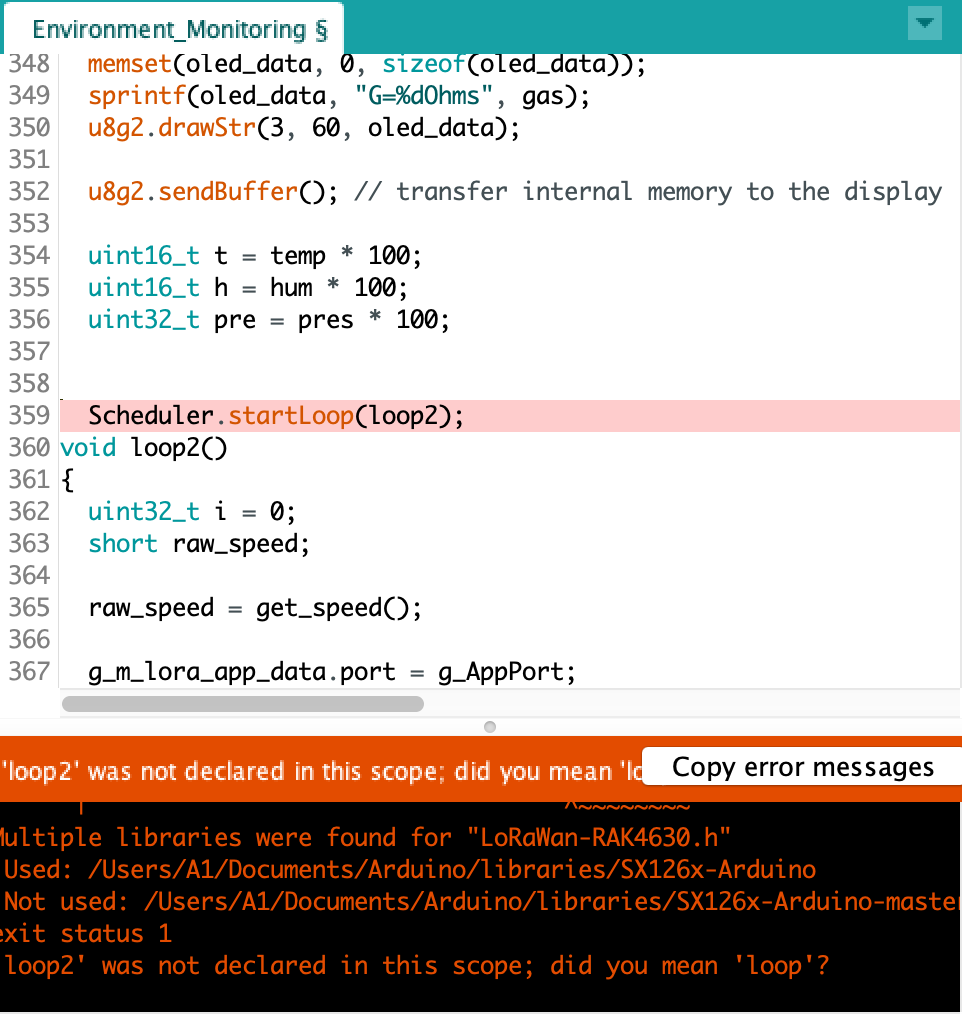
Environment_Monitoring:360:23: error: 'loop2' was not declared in this scope; did you mean 'loop'?
  360 |   Scheduler.startLoop(loop2);
      |                       ^~~~~
      |                       loop
Environment_Monitoring:362:1: error: a function-definition is not allowed here before '{' token
  362 | {
      | ^
Environment_Monitoring:392:34: error: 'raw_speed' was not declared in this scope
  392 |   m_lora_app_data.buffer[i++] = (raw_speed >> 8) & 0xFF;
      |                                  ^~~~~~~~~
Multiple libraries were found for "LoRaWan-RAK4630.h"
 Used: /Users/A1/Documents/Arduino/libraries/SX126x-Arduino
 Not used: /Users/A1/Documents/Arduino/libraries/SX126x-Arduino-master
exit status 1
'loop2' was not declared in this scope; did you mean 'loop'?

It’s saying loop2 isn’t declared, is it in the wrong spot? I mostly have experience in just python, so this is definitely a learning curve for me. Thanks in advance!
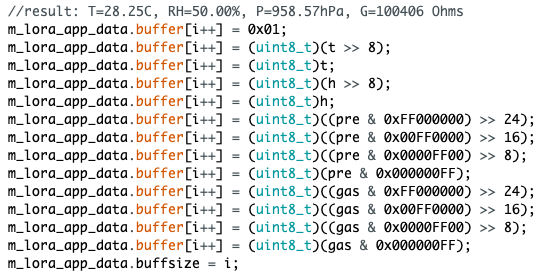
I added this here and this here in that section like you said

And at the top I added the libraries here

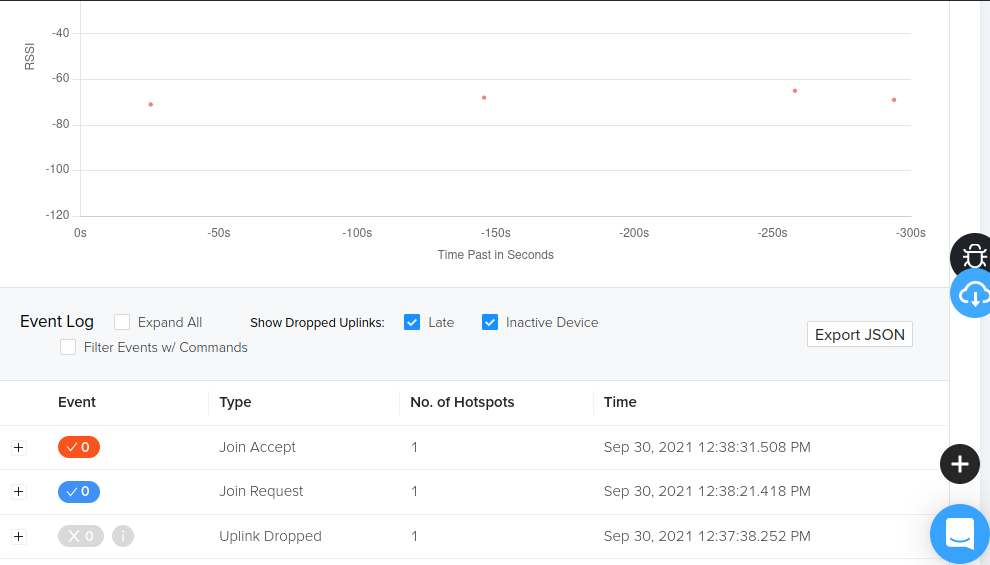
Also on a side note to debugging the connection drops on Helium (my Rak gateway shipped today by the way!) I noticed the uplinks are dropping. When i press the information button it says late packet. Does anyone know what that means? As you can see on the console picture, there are a bunch of requests but no actual packets going through, I keep unplugging it and re plugging it back in and still nothing happens