Hi @ZhuQI, I only managed to build another that night as it was already late. Surprisingly the 915MHz works on OTAA. I have been busy with production work since then but I will assemble all remaining units regardless it is 868 MHz or 915 MHz. Will get back to you. Thanks.
Hi @ZhuQI,
I finally assembled the remaining units. Here’s the result for all units including the ones we tested earlier:
| # | Original Band | US915 | EU868 |
|---|---|---|---|
| 1 | 915 | No | No |
| 2 | 915 | No | No |
| 3 | 868 | Yes | Yes |
| 4 | 868 | Yes | Yes |
| 5 | 915 | No | Yes |
| 6 | 915 | Yes | Yes |
| 7 | 915 | Yes | Yes |
| 8 | 868 | Yes | Yes |
| 9 | 868 | Yes | Yes |
| 10 | 868 | Yes | Yes |
So, it’s weird one of originally 915MHz (unit #5, of the later 6 units) could work on 868MHz band but not on 915MHz. I do believe this is a hardware issue. Probably due to timing on the reception window not accurate enough or shifted. I can’t make a conclusion based on these 10 units. I think need to get more modules and test another batch.
What do you think?
There’s no real difference in timing requirements between the bands, especially not for a join accept
I’m not referring to the differences between bands window timing but the accuracy of the window timing (size, how early or late it open and closes). As far from the logs, the frequency transmitted both on node and gateway are correct. I’m ruling out gateway issues as they are periodically tested with RN2483 and RN2903 nodes, they worked very well.
Having the same problem with AU915, fine with RAK4200 Version 3.2.0.14.beta4.
Will happily join in ABP, returns ERROR 99 when trying to join in OTAA.
Can see it getting to gateway on TTN with a yellow lightning bolt then a green one shortly after. The app shows only a yellow lightning bolt with device details.
1 Like
Tried setting RAK4200, Gateway and TTN to AS923, AS915, US915 and EU868 all with the same results.
I troubleshoot with @ZhuQI remotely on my setup more than a month ago, we tried EU868, US915 and AU915. All didn’t work on these “few modules”. So, I had a feeling something to do with timing either contributed by firmware or hardware or both. Weren’t able to send the units back to RAK as there’s no shipping service currently to Shenzhen unfortunately.
I am using RAK4200 and RAK831 running with AS923 and OTAA. I am also facing the similar OTAA joining problem. The RAK4200 fails to join the gateway easily when I change the class from class C to class B or C. The gateway seems to receive the join, but RAK4200 console show the join fail. Sometimes, it can join after serval join retry with class A or B. In class C, it won’t take Join retry. The testing environment is only 5 meter.
ZhuQi, Why wont RAK4200 work normally on class A or B ? Does I need to change some setting on RAK831.
Hello @patrickcheung
Are you online now?
Can I view it remotely via teamview?
Do you have an instant messaging app account? wechat or telegram?
I havn’t installed teamview. We can discuss over wechat. My wechat is ilogictech.
Hi,
I am having the same issue:
AU915 + OTAA give me Error: 99 when I try to join. I am doing this using the RAK Serial Port Tool.
I have checked all steps (gateway and server) and everything seems fine. The device should be getting the join accept…
Is there any solution to this problem?
Hi,@tealbrains
If you are using a module in your own circuit, I recommend that you try to Join the voltage up.
If this is not possible, send the join request about the time until Error: 99.
Best regards!
Hi @Nicholas
I am using your breakout board and feeding 3.3V directly from the USB to Serial adapter. Is there a list of Error codes?
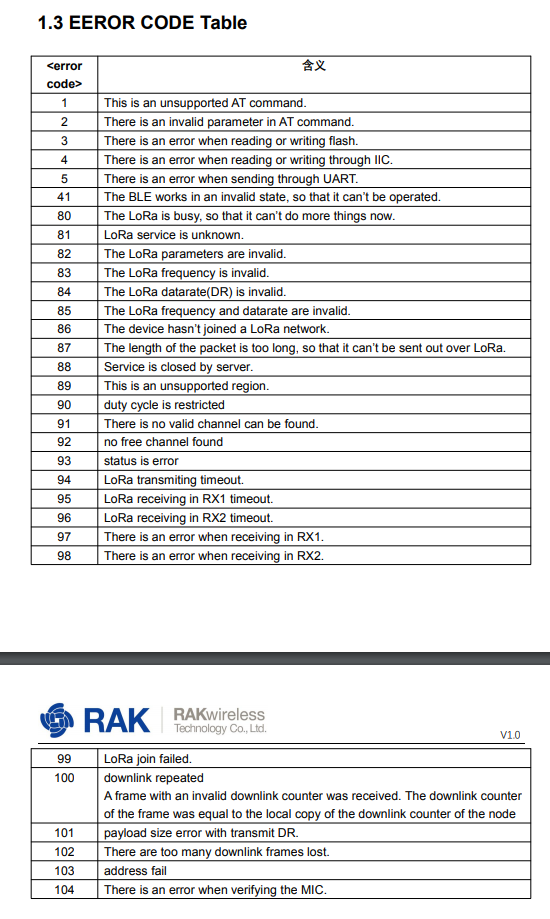
Dear,
Can you see the server receiving and sending data?
By the way!Which gateway and server do you use?
Best regards~!!
As I said, I can see the “Join Request” and “Join Accept” on gateway (Ursalink) and server (LoRaServer/Chirpstack)

