Wisnode shield on Arduino Mega code

I know the answer, but this is definitely in the flogging a dead horse territory and we are in a ‘teach a man to fish’ mood.

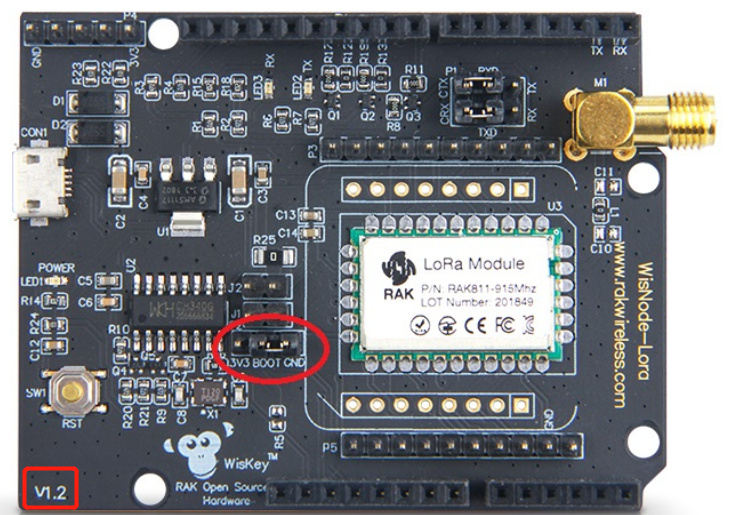
So, what does the document specifically for the v1.3 say - or more importantly, what does it show on the picture?

PS, yes, it’s a bit of an egg hunt as not all the docs are in the same place, but places do absolutely scream V1.3 …

Hi Nick. I’m not sure what your first para means. Most of my professional career was in Software Engineering. I was part of a team ion the UK who developed the world’s first electronic telephone exchange for the British Post Office. Pretty sure I know how to fish. I am keen to learn how to use AT commands, and also to use RUI. I think my biggest challenge is the lack of absolutely clear documentation.

I tried to update the firmware on my Wisnode/RAK811 board. It took a whole day. Had to reload the boot-loader as well. Now AT commands dont work. However, I will persevere and I will get it going.

Hate to say, I have looked at every v1.3 doc I can find, but as yet haven’t found a picture that you refer to.

Rome wasn’t built in a day, but it was built.

Thank you for your assistance to date. Undoubtedly, you have helped me make progress.

Just BTW, if I ordered a new Wisnode … which now appears to be called Wisduo, will I automatically get a v1.3?

Regards.

Dear John,
The V1.3 mentioned by nick is the corresponding hardware model of wisnode. For different reasons, the latest hardware has been upgraded to V1.3, and the arduino connection method corresponding to it has also changed. You must refer to the documentation of the corresponding model. Connect to ensure the normal operation of the program.

Thank you for your reply. Much appreciated.

I think I now have a good understanding of the issues surround interfacing a Mega to a Wisnode RAK811. So before I ventured any further, I thought I’d upgrade the firmware on the Wisnode, I followed the TTN instruction to the letter.

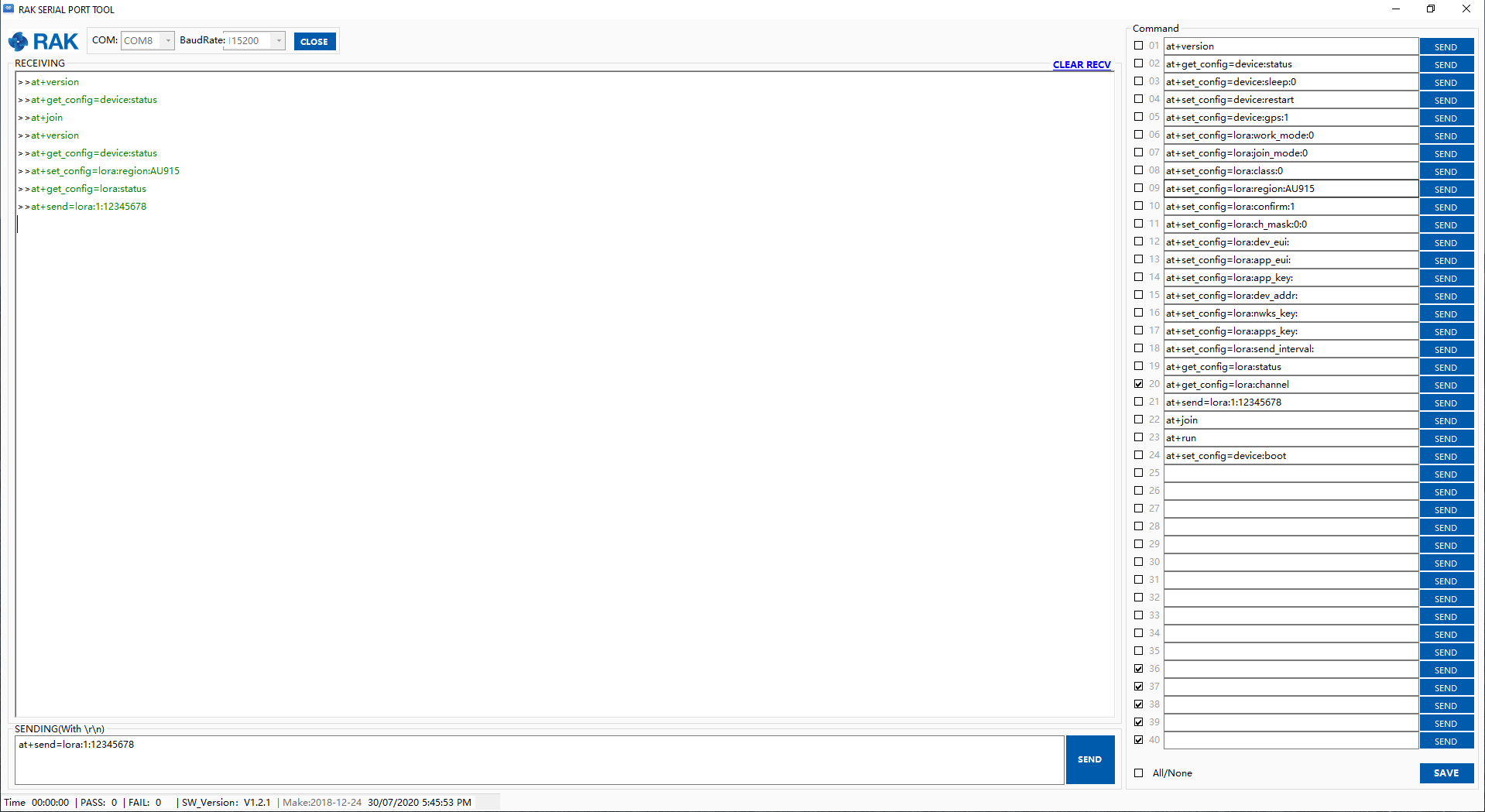
That took some doing. I ended up reloading the boot loader as well as the firmware (to V3.0.0.14T3). However, when I go to RAK Serial Port Tool, i can out in any at command but I don’t get any response as per the screen shot below.

I have 4x Wisnodes v1.2. The first one tried this on has had R11, R12 etc decimated for mounting on the Mega. I got the response as per the screen shot.

So I tried another virgin Wisnode. I got the same screen shot. No response to the AT commands.

I reverted to the third virgin Wisnode just to be sure and it works like a charm as a standalone node.

Can anyone help me with this please

Regards.

Dear,
Can you show your Wisnode connection diagram? I want to find some problems through it. Before this, you must ensure that the firmware is programmed normally.

Very happy to do that. I’ll get onto it. Thanks.

Dear,

Have a question. You must burn firmware on github If you want to using RAK wisnode and Arduino.

Hi again. I think I have mixed up two issues here, so let me separate them and talk about them.

  1. On my v1.2 Wisnode I installed bootloader “RAK811_BOOT_V3.0.2”, and I upgraded the firmware to “RAK811_HF_V3.0.0.13.T3”.

Following that, I used the RAK Serial Port to implement some AT codes on the Wisnode.

There was no response to the AT command on the PC screen.

I reduced the baud rate from 115200 to 9600 and the responses appeared!!

I have that Wisnode working as a standalone node to my gateway and can see it on the TTN console.

I have no idea why it would not work on 115200 when it was working successfully prior to upgrading the firmware.

  1. I am trying to drive a Wisnode v1.2 from an Arduino Mega.

I am about to run jumpers from the Arduino to the Wisnode and send a payload every 10 seconds to test out that hardware interconnection.

I am using the example from Github.

I will report on how that goes, shortly.

Regards.

Dear,

1.I reduced the baud rate from 115200 to 9600 and the responses appeared!!

Sorry, no problem was found, this is set in the firmware, you can modify the baud rate by AT command, 9600 is to adapt to the command sent by the arduino development board.

I am trying to drive a Wisnode v1.2 from an Arduino Mega.

Looking forward you report.

It means that I’m trying to encourage action between messages - I’d linked to the Arduino library with the documentation for v3 that has the picture and mentioned the jumpers and mentioned baud rates and I am only human …

Human you are, and aren’t we all. I do actually appreciate your help, and I thank you for that.

I have 4 WisNodes v1.2

On one of them, I have removed the resistors, R8, R11, R12, etc as per various responses to this forum and RAK documentation. I have mounted it on an Arduino Mega and UNO. I can’t make it go. I have decided not to pursue trying to make it go in the mounted position. I’m not asking for help on this. I’m just stating where I’m at with it.

On a second WisNode, I have updated the firmware to version V3.0.0.13H.T3. I have changed the baud rate back to 115200 following your comment. Thank you. Using RAK serial port tool, I can very easily get the WisNode to talk to the TTN. All of the AT instructions work. I can change the payload, join, send the payload, etc. Its pretty cool.

I noted the GitHub updated WisNode-Arduino-Library approx 24 hours ago. I have imported the updated library into my Arduino IDE library. I am using the example JoinNetworkOTAA.ino runnuing on Arduino Mega and Arduino UNO.

I have jumpers from D10, D11 on the Arduino to the WisNode Tx, Rx, ie not mounted. I have tried Tx-Tx/Rx-Rx and Tx-Rx/Rx-Tx.

On P1, I have RxD to Tx and TxD to Rx jumpered.

I have checked that both of the baud rates “DebugSerial.begin(115200)” and “ATSerial.begin(115200)” work.

I get the message “Set work_mode failed, please reset module.” on the monitor. Nothing else happens. No messages, nothing on the TTN console.

I’m jumpering 5V and Gnd from the Arduino to the WisNode.

I have checked and double checked the DevEui, AppEui, and AppKey. They are correct.

I just can’t get it to work. Any help would be gratefully appreciated. Thank you.
Use something else to monitor the serial connection between the Arduino processor and the wisnode. See which end isn’t doing its part of the job.

I notice earlier you mentioned using 9600 baud and now you are trying to use 115200, that might be part of the issue.

Also since you mention you have an Arduino Mega that would imply you have additional hardware serial ports and no need for software serial, though it is true that leveraging them would require making some changes in the Arduino side code which would take your version further away from examples, putting you more “on your own”

Generally speaking though, attack these problems at the interface that is available to examine, eg, watch the serial traffic and see what is or is not happening there.

From 22 days back so a free pass on:

It’s not just a bug, it’s a show stopper.

Just set it the once when provisioning the node - you don’t need to redo the settings each time, the RAK811 will remember them.

If you run a hardware serial port, then I’d assume the 115200 is fine. But it’s not on SoftSerial, I use Pro Mini’s so only have a couple of Mega’s to try and so much to try / do that it hasn’t been tried.

Thank you for your response. I’ll give that ago. Regards.

Thanks Nick. I have done that reset but I still haven’t got it to go. However, I’ll start over and check the things that you have pointed out.

I have purchased 2 RAK WisNode v1.3. Can you please tell me -

“It’s not just a bug, its a show stopper”. Is that fixed in v1.3?

Can v1.3 be directly mounted on an arduino Mega/UNO without removing resistors? And therefore requiring no additional 5V, God, Tx, Rx jumper leads?

In anticipation, I’ll get back into it tonight.

Again, many thanks.

Yes,
If you are using V1.3, you will no longer need to solder off parameters and power on.

I was referring entirely to the software library - absolutely NOTHING to do with the hardware version.

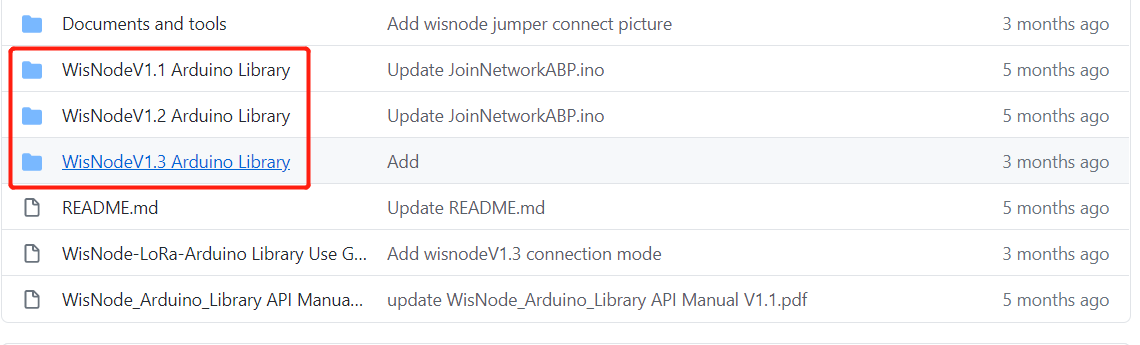
Sorry but not sorry to be an arse again, but you keep asking this question when it’s very clearly in the documentation that you set the jumpers appropriately and RAK themselves have said, as confirmed by @Nicholas above. You’ve even motivated them to implement a wholesale change on the GitHub repository, which now details the connections in the README.MD:

Nick, thank you. I think one of the issues I have is this:- there is documentation v1.1, v1.2, and v1.3. There is software/examples v1.1, v1.2, v1.3. There is hardware v1.1, v1.2, and v1.3.

Do all the v1.3s go together?

If you go through the new RAK repos READ.ME it says “if you’re using hardware v1.1 follow this link. If you’re using hardware v1.2 follow this other link”. There is no mention of what you do if you’re using hardware v1.3.

Thanks.

Very sorry!

We may not have stated it clearly, but we will add this hint that V1.3 applies to the description in Read.me.

You can lead a horse to water …

This is way beyond redonkulous - all the v1.3 information is on the top level of the repro along with the Arduino library. It’s pretty standard to put the latest version on the home/start/top page.

I’ve said before, I’m motivated by action and I’m not seeing anything being made / tried / tested so this volunteer is feeling rather trolled at present.