After loading an IDE sketch, my 11200 appears to be in a boot loop. Red LED is flashing by itself. I have tried everything I can find online. My jumper is off. I have tried RESET button (single, double, long hold), etc. It is not recognized using Meshtastic Web Flasher. I was going to try WisBlock Hardware Tester but I’m unclear how it is flashed. Any help is appreciated!
Welcome to the forum @JonG
The HW tester app is for RAK4631 only. It will not work on a RAK11200.
Only way to get a RAK11200 into bootloader mode is to use the jumper between BOOT0 and GND and a single push of reset or a power cycle.
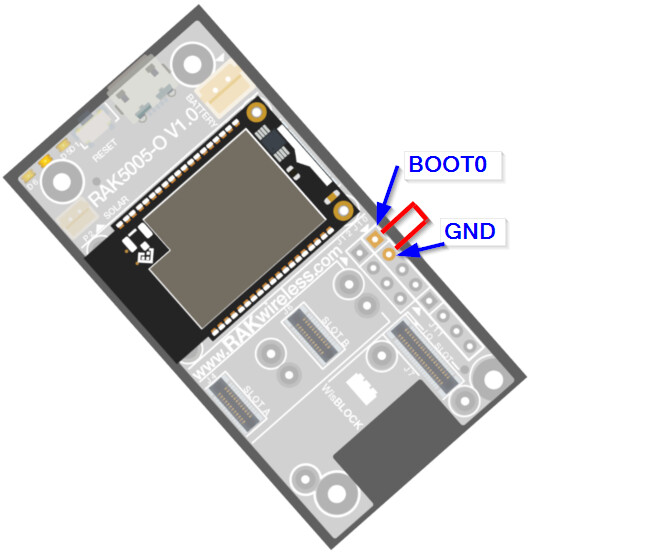
Try if with that the RAK11200 is showing a COM port on your computer.
For problems with the Meshtastic Web Flasher, please ask Meshtastic, we are not developing Meshtastic firmware or Meshtastic tools.
Thanks for replying, Bernd. I got it into bootloader mode with the jumper but I can’t get it out. I’ve seen at least one story that it possibly might be related to 13300? Don’t know if true but I’m grasping a straws a little bit right now.
I don’t think so, but you can just try to remove the RAK13300, flash the Meshtastic firmware, then put back the RAK13300.