RAK3172 + ChirpStack FUOTA: Class-C session confirmed active, but zero radio IRQ activity (no RxDone / RxTimeout / RxError) multicast fragments never received on one of two identical devices

RAK3172 + ChirpStack FUOTA: Class-C session confirmed active, but zero radio IRQ activity (no RxDone / RxTimeout / RxError) — multicast fragments never received on one of two identical devices

Summary

I have two identical devices (same firmware, same hardware BOM) running FUOTA over LoRaWAN using a RAK3172 module (STM32WLE5-based, AT-command slave) driven by an STM32H7 host MCU. One device completes FUOTA perfectly every time. The second device — same code, same ChirpStack FUOTA deployment, same gateway — gets all the way to a confirmed Class-C switch and then receives nothing. No fragments, no radio errors, nothing.

I’ve isolated this down to the radio IRQ level and would like input from anyone who has hit something similar with RAK3172 / STM32WL Class-C behavior.

Setup

  • End device MCU: STM32H7 (host), communicating with RAK3172 over UART using AT commands
  • LoRa modem: RAK3172 (STM32WLE5 based), running STM32CubeWL / LoRaMac-node stack
  • LNS: ChirpStack v4.17.0 (self-hosted)
  • FUOTA: ChirpStack native FUOTA deployment, Class-C multicast group
    • Multicast DR: DR5 (SF7BW125)
    • Multicast frequency: 868.1 MHz
    • Fragmentation redundancy: 0% (also tested at higher values, no change)
    • Fragment size: 128 bytes, ~3501 total fragments (~448 KB firmware image)
  • Region: EU868

What works

  • Both devices join fine (OTAA), send confirmed uplinks normally, RSSI/SNR on unicast is excellent on the failing device too (RSSI -43 dBm, SNR +9, CRC_OK — this is not a weak-link problem)
  • FUOTA deployment on ChirpStack completes all server-side steps successfully: multicast group creation, add devices, add gateways, multicast group setup, fragmentation session setup, multicast session setup, enqueue fragments — all “ok”
  • Device receives and ACKs the setup commands over unicast:
    • FragSessionSetupAns (port 201) received and answered
    • McClassCSessionAns (port 200) received and answered
  • Gateway “LoRaWAN frames” log confirms downlinks are actually being transmitted, on the exact configured frequency/DR (868100000 Hz, SF7, BW125000, CR_4_5), repeating every ~5s, scheduled immediately — so the server and gateway side is confirmed correct
  • On the failing device, LmHandlerRequestClass(CLASS_C) returns success, and the OnClassChange callback fires, confirming the LoRaMac MIB (MIB_DEVICE_CLASS) is actually set to CLASS_C

What doesn’t work

After the Class-C switch is confirmed (MIB set to CLASS_C, callback fired), the device never receives a single multicast fragment. On the working device, +EVT:RX_C_MC events stream in continuously. On the failing device: nothing.

Debugging done so far

  1. Ruled out application-layer race conditions — added return-value checking around LmHandlerRequestClass(), confirmed no BUSY_ERROR/NO_NETWORK_JOINED on this run.
  2. Ruled out debugger interference — initially saw HDR KO (LoRa header CRC failure) printed from the radio driver, but this only appeared while a breakpoint was active during debugging. On a clean run (no breakpoints), HDR KO does not appear at all — and neither does anything else.
  3. Ruled out RF link quality — unicast RSSI/SNR on this exact device is excellent (see above).
  4. Ruled out gateway/server misconfiguration — confirmed via gateway’s live LoRaWAN frames log that downlinks are transmitted on the correct frequency/DR/timing.
  5. Added instrumentation directly in the LoRaMac-node IRQ dispatcher:
static void LoRaMacHandleIrqEvents( void )
{
    LoRaMacRadioEvents_t events;

    CRITICAL_SECTION_BEGIN( );
    events = LoRaMacRadioEvents;
    LoRaMacRadioEvents.Value = 0;
    CRITICAL_SECTION_END( );

    if( events.Value != 0 )
    {
        printf("IRQ: Tx=%d Rx=%d TxTO=%d RxErr=%d RxTO=%d, class=%d\r\n",
            events.Events.TxDone, events.Events.RxDone,
            events.Events.TxTimeout, events.Events.RxError,
            events.Events.RxTimeout, Nvm.MacGroup2.DeviceClass);
        ...
    }
}

Result on the failing device, after the confirmed Class-C switch: this print never fires at all — not RxDone, not RxTimeout, not RxError. Nothing. This is during the exact window where the gateway log confirms it is transmitting fragments every ~5 seconds on 868.1 MHz.

** Non-working device log (for comparison — same firmware, same gateway, same FUOTA deployment)**

Test run 1:

[18:06:11:030] OK␍␊
[18:06:11:457] AT+NJS=1␍␊
[18:06:11:475] OK␍␊
[18:06:11:940] OK␍␊
[18:06:13:105] +EVT:SEND_CONFIRMED␍␊
[18:07:55:680] AT+NJS=1␍␊
[18:07:55:691] OK␍␊
[18:07:56:137] OK␍␊
[18:08:01:278] +EVT:SEND_CONFIRMED␍␊
[18:08:27:492] +Total Fragments:3501␍␊
[18:09:55:670] AT+NJS=1␍␊
[18:09:55:685] OK␍␊
[18:09:56:128] OK␍␊
[18:10:02:014] +EVT:SEND_CONFIRMED␍␊
[18:10:28:900] +Total Fragments:3501␍␊
[18:12:29:824] 1785847368s066:HDR KO␍␊
[18:12:34:552] 1785847372s795:HDR KO␍␊
[18:15:30:711] 1785847548s965:IRQ_CRC_ERROR␍␊

Test run 2 (fresh join):

[13:21:46:446] F06C53D75FB6850EEF0E10B9BD1C4822␍␊
[13:21:46:489] OK␍␊
[13:21:46:672] F06C53D75FB6850EEF0E10B9BD1C4822␍␊
[13:21:46:711] OK␍␊
[13:21:46:963] OK␍␊
[13:21:47:118] F06C53D75FB6850EEF0E10B9BD1C4822␍␊
[13:21:47:160] OK␍␊
[13:21:47:338] OK␍␊
[13:21:47:501] OK␍␊
[13:21:47:849] OK␍␊
[13:21:53:056] +EVT:JOINED␍␊
[13:21:53:243] OK␍␊
[13:21:53:424] AT+NJS=1␍␊
[13:21:53:437] OK␍␊
[13:21:53:950] 324C950B45F76F59350EDD1DD3BBCF66␍␊
[13:21:53:988] OK␍␊
[13:21:54:054] C2F6311FDF45AAB0419818608B0272E9␍␊
[13:21:54:093] OK␍␊
[13:21:54:114] AT+NJS=1␍␊
[13:21:54:127] OK␍␊
[13:21:54:337] OK␍␊
[13:21:55:501] +EVT:SEND_CONFIRMED␍␊
[13:21:55:526] +EVT:SEND_CONFIRMED␍␊
[13:23:38:774] AT+NJS=1␍␊
[13:23:38:788] OK␍␊
[13:23:39:231] OK␍␊
[13:23:40:379] +EVT:SEND_CONFIRMED␍␊
[13:25:38:776] AT+NJS=1␍␊
[13:25:38:793] OK␍␊
[13:25:39:234] OK␍␊
[13:25:40:376] +EVT:SEND_CONFIRMED␍␊
[13:25:47:769] +Total Fragments:3501␍␊
[13:27:38:779] AT+NJS=1␍␊
[13:27:38:798] OK␍␊
[13:27:39:236] OK␍␊
[13:27:40:379] +EVT:SEND_CONFIRMED␍␊
[13:27:47:146] +Total Fragments:3501␍␊

This tells me the radio is never being armed into RX for the Class-C continuous-receive window on this specific unit — even though the MAC-layer device class state itself is correctly set to CLASS_C.

Working device log (for comparison — same firmware, same gateway, same FUOTA deployment)

This is the host-side (STM32H7) log on the device where FUOTA completes successfully. Note that fragments are actually being received, indexed, and their payload dumped — this is the behavior we never see on the failing unit:

[12:37:02:509] --------------------------------------
[12:37:02:554] Received Data from IPC:
[12:37:02:583] +Total Fragments:3501
[12:37:02:669] Total Fragments Count Received is: 3501

[12:37:49:909] ----------- DEVICE_SEND STATE-------
[12:37:50:095] AT+NJS=?
[12:37:50:208] AT+NJS=1
[12:37:50:219] OK
[12:37:50:271] Join Status : 1
[12:37:50:392] AT+SEND=99:1:24080200679bc9a6
[12:37:50:535] OK
[12:37:50:588] Data binary send on port = 99 → OK
[12:37:51:138] ----------- LORA_DEVICE_SEND_CONFIRM STATE-------
[12:37:51:655] +EVT:SEND_CONFIRMED
[12:37:51:725] Msg confirm successfully

[12:38:03:751] Received Data from IPC:
[12:38:03:775] +Total Fragments:3501
[12:38:03:858] Total Fragments Count Received is: 3501

[12:40:33:841] Current Index: 0
[12:40:33:855] Current Frame: 0
[12:40:33:884] Payload:
08 01 00 00 00 08 24 85 06 04 08 7D 01 04 08 85 01 04 08 B5 02 04 08 BD 02 04 08 C5 02 04 08 00 00 00 00 00 00 00 00 00 00 00 00 00 00 00 00 B1 91 05 08 CD 02 04 08 00 00 00 00 01 94 05 08 69 94 05 08 D5 06 04 08 …

[12:40:41:860] Current Index: 1
[12:40:41:872] Current Frame: 1
[12:40:41:904] Payload:
08 02 00 D5 06 04 08 D5 06 04 08 D5 06 04 08 …

[12:40:42:862] Current Index: 2
[12:40:42:878] Current Frame: 2
[12:40:42:897] Payload:
08 03 00 D5 06 04 08 D5 06 04 08 D5 06 04 08 …

[12:40:47:883] Current Index: 3
[12:40:47:894] Current Frame: 3
[12:40:47:925] Payload:
08 04 00 D5 06 04 08 D5 06 04 08 41 03 04 08 …

[12:40:52:898] Current Index: 4
[12:40:52:911] Current Frame: 4
[12:40:52:942] Payload:
08 05 00 D5 06 04 08 D5 06 04 08 D5 06 04 08 …

[12:40:57:914] Current Index: 5
[12:40:57:928] Current Frame: 5
[12:40:57:962] Payload:
08 06 00 D5 06 04 08 D5 06 04 08 D5 06 04 08 …

[12:41:02:928] Current Index: 6
…(fragments continue incrementing steadily, roughly every 5s, until all 3501 are received)

Questions

  1. Has anyone seen a case where Nvm.MacGroup2.DeviceClass / MIB reports CLASS_C correctly, but the radio is never actually re-armed for continuous RX (no Radio.Rx() call happening at the SX126x driver level)?
  2. Is there a known hardware/silicon revision difference between RAK3172 units that could cause this — e.g., a batch with different internal RAK AT-firmware that mishandles Class-B/C continuous RX re-arming?
  3. Any known issue where the STM32WL internal SUBGHZ SPI/IRQ line can silently stop generating interrupts after a class switch (something that would explain zero IRQ activity, not even timeouts)?
  4. Is there a recommended way to directly verify (from AT commands, without custom firmware) whether the RAK3172 radio is actually in continuous RX vs just reporting Class C at the LoRaMac state level?

Additional notes

  • Two devices are physically/electrically identical (same PCB revision, same firmware binary flashed via the same build)
  • Planning to physically swap the RAK3172 module between the two boards next to isolate whether the fault follows the module or stays with the board — will update this thread with results
  • Happy to share full AT firmware version / build config if useful

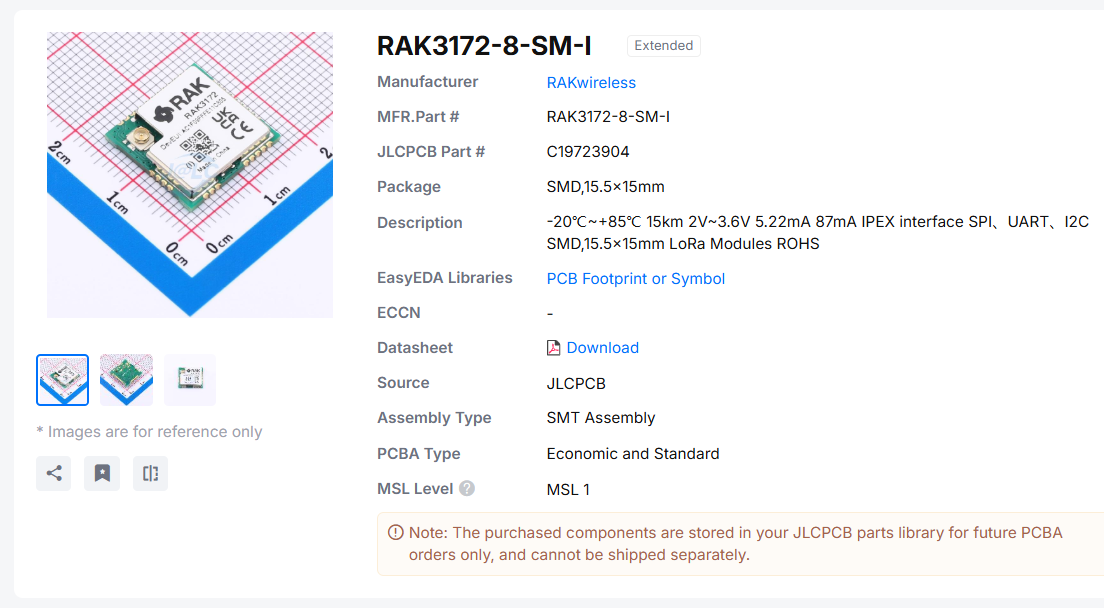
Photos of RAK3172 modules
1 Like

Welcome to the forum @rahul_baraiya002

As you are using STM32CubeWL with their LoRaMac node stack we cannot help much here. You should ask this in a STMicroelectronics support or forum.

What I can say is that we have an unpublished RUI3 firmware version that supports FUOTA and it is working. But we are still working on more tests and a comprehensive documentation how to setup FUOTA.

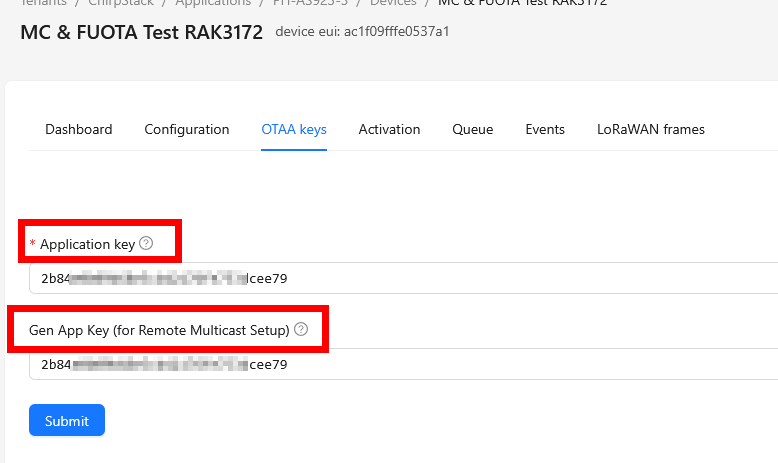
Regarding Chirpstack and FUOTA, what we found is that in Chirpstack the “Application Key” and the “Gen App Key” MUST be the same for the FUOTA multicast to work.

1 Like

Thanks for confirming

I actually found the exact same thing while debugging on my end just now.

Turned out the issue was that the “Gen App Key (for Remote Multicast Setup)” field on the failing device was left at all-zeros (00000000000000000000000000000000) instead of matching the actual Application key. I confirmed this by dumping the derived MCAppSKey/MCNwkSKey on the device side and comparing them against what ChirpStack had generated for the multicast group they didn’t match, which explained why the device would join fine, receive the multicast setup commands fine, but silently fail on every actual fragment (MIC verification failing on decrypt).

Setting Application key = Gen App Key on the device profile and regenerating the FUOTA deployment fixed it. Appreciate you confirming this is a known ChirpStack requirement —
it’s working now, FUOTA completed successfully on the previously failing device. Thanks for the help!

1 Like

Heja Rahul,

I dont know how else I am supposed to get in touch with you, so I create an account for this.
We have a similiar setup and Im currently on different boards, also STM32WL5 based and I would like to know more about the way you have established a working FUOTA on the device.
Currently im struggling on the way ChirpStack works with the ongoing FUOTA deployment, because it just pushes all through acknowledging it as “ok” but I fail to get actually the packets it should send after doing the setup.
I see my device sending the Ans messages (Code: 200) so I expect it to be working, but when ChirpStack should Enqueue the fragments, so sending them, nothing reaches the device.
I used a HackRF One to have some evidence that it is sending some - and it does but I dont understand why no IRQ or any handler of the LmhpPackage_t-equivalents (the registered packages for Multicast-Setup, Fragmentation, Compliance, Firmware and Multipackage) is doing nothing with it.
Are you willed to share some of your process you have been working through to get the device doing what you want?
I expect it to be something little detail, but maybe you have some help to offer.

Some quick questions ahead →

  • Are you starting the device with LORAWAN_DEFAULT_CLASS as CLASS_C or as CLASS_A and let ChirpStack do the the temporary change?
  • Any specific reason why you chose your frequency?
  • Are you sending periodically uplinks, like health checks (to get piggy banked downlinks from the gateway) or arent you?

Thank you in advance,
have a great day, all!

PS: Because the information about this topic → FUOTA (Full Image Updates with external flash as download slot to be concrete ) are so little I plan to post a big StackOverFlow or else post to help others out whom get ghosted all the time in these forums, so your help will be greatly appreciated AND will help other is the second turn.

Hi there,

Thanks for reaching out happy to share what worked for us, and I think your symptom description actually matches something very specific we ran into.

Answering your questions first:

  1. Default class: We start the device in CLASS_A at boot, and let ChirpStack drive the temporary switch to CLASS_C via the standard remote multicast setup (McClassCSessionReq). We don’t hardcode CLASS_C as the boot default.
  2. Frequency choice: No special reason — we just used the default EU868 multicast frequency (868.1 MHz) that ChirpStack’s FUOTA deployment UI proposes. Nothing deliberate there.
  3. Periodic uplinks: Yes — we send periodic confirmed uplinks (a status/heartbeat message) while in Class A, mainly to make sure the multicast setup unicast downlinks (group setup, fragmentation session setup, session setup) get delivered promptly in the RX1/RX2 window. Once the device switches to Class C, that’s no longer needed since it’s listening continuously — the periodic uplink is only there to keep the setup handshake moving.

Now, about your actual symptom — “Ans messages get through fine, ChirpStack shows everything as OK, HackRF confirms it’s transmitting, but the device-side IRQ/package handlers never see anything”:

This is exactly what we hit, and it turned out to be a silent MIC verification failure, not a radio/IRQ problem at all. Here’s why it looks like “nothing is happening” even though packets are clearly on air:

  • The radio does receive the packet — SPI/IRQ level, RxDone does fire
  • But the multicast session keys (McAppSKey/McNwkSKey) derived on the device don’t match what the server generated for the multicast group
  • Since the payload fails MIC verification, LoRaMac-node’s ProcessRadioRxDone() silently drops it (PrepareRxDoneAbort()) — it never reaches your registered package handlers, so from the application’s point of view it looks like nothing arrived at all, even though the radio genuinely received something

The specific thing to check in ChirpStack: go to your device’s OTAA keys page and look for a field called “Gen App Key (for Remote Multicast Setup)”. This is a separate field from the regular Application key — and if it’s left at its default (all zeros) instead of being set equal to your Application key, ChirpStack encrypts the multicast root key (McKeyE) using the wrong key. The device then derives session keys from a key it doesn’t actually have, and every fragment fails MIC silently.

In our case: Application key ≠ Gen App Key on the failing device (Gen App Key was all zeros), while on our working device both fields matched. Setting them equal and regenerating the FUOTA deployment fixed it completely.

1 Like

Heja Rahul,

first of thanks a lot for actually responding. =)
At the time of the first message of mine I already saw that your problem was the Gen_App_Key missmatch with the ApplicationKey, so I did it as well… Didnt solve the problem for me though. But I’ve come with another set of questions, if you dont mind…
Maybe thinking this through willl lead me to the solution of mine.
(If some of the mods in here is about to interfere, Im using the Edge Pro Gateway so this isnt 100% unrelated to RAKWireless :D)

  • If you start the device as a Class A device → How do you initiate the FUOTA process other than hitting the start deployment button on Chirpstack? Do you need to setup anything first on the device in beforehand? Do you sync the Clocks multiple times maybe with LmhpClockSyncAppTimeReq() + DummyPayload to send it via LmHandlerSend(),
    Do you initiate the Setup via a Customdownlink which leads the device to change to Class_C or does this ALL start with you hitting “start deployment” on ChirpStack?

I am kinda worried that Im doing something fundamentally wrong, because of all the different debugging steps ive took so far. Sometimes the Chirpstack FUOTA status doesnt even run through with “ok” → Sometimes I get McGroupSetupReq timeout sometimes FragSetupReq timeout … But I didnt really get why this is happening. The ChirpStack logs arent helpful either so are the Network Logs from the Gateway.
The starting point of the process is the thing Im worries the most right now.

  • Are you doing something special with the keys on the device side other than setting them throught STM32CubeMX → So the se-identity.h file gets updated correctly, or are you using some other commissioning steps for the keys to be updated?
    Maybe there is something I am missing there too.

  • Are you handling any other “special” message besides the ones on fPort 200 and 201? So like the packages you registered in order to be LoRaWAN conform are doing their stuff by their own, or are you doing something there?

  • What CubeWL are you using? Probably 1.3.1 right? → So you are on the Version 2 of the Packages you are using (refering to the Compliance, Fragmentation, MulticastSetup, CLockSync stuff)

Anyway, thanks a lot and I hope you find the time to answer me.
Already very grateful, thanks.

Best,
Yoo

Hi Yoo,

No worries, happy to keep digging with you and appreciate the patience given the lack of documentation on this. Let me go through your questions in order.

How we initiate FUOTA / the class sequencing:

This is actually the detail I think is most likely relevant to your issue. We don’t start in Class A and wait for ChirpStack to switch us we start the device in Class C from boot. The flow looks like this:

  1. Device boots and joins in Class C (continuously listening from the start)
  2. We hit “Start deployment” on ChirpStack no other manual trigger needed on our side beyond that
  3. Device receives McGroupSetupReq and FragSessionSetupReq normally (these come as regular downlinks, delivered fine since the device is already listening)
  4. When the Multicast session setup downlink (McClassCSessionReq) arrives, we briefly switch the device to Class A
  5. Right after that, ChirpStack sends the actual Class-C session change command — the device processes it and switches back to Class C
  6. Fragments start arriving immediately after that switch

We don’t do any manual LmhpClockSyncAppTimeReq() + dummy uplink cycling beyond what’s needed to keep the setup unicast downlinks flowing (a periodic confirmed uplink) — no extra clock-sync dance beyond that.

If you’re starting in Class A and relying entirely on ChirpStack’s automatic class switch, and you’re seeing intermittent McGroupSetupReq/FragSetupReq timeouts, I’d suspect the uplink interval / RX1-RX2 timing is the bottleneck there rather than anything with the packages themselves — worth checking how long your device waits between uplinks relative to how ChirpStack schedules the retries for those setup commands.

Keys / commissioning:

We use the default generated se-identity.h from STM32CubeMX as-is — we haven’t modified the key provisioning mechanism itself, just filled in the DevEUI/AppEUI/AppKey fields through CubeMX’s normal config. No custom commissioning step beyond that.

One more relevant detail: our LORAMAC_SPECIFICATION_VERSION is set to 0x01000300 (LoRaWAN 1.0.3 + Regional Parameters 1.0.3), not 1.0.4 or 1.1. Worth checking what version you’re on too — this affects how McKeyE gets encrypted/decrypted (1.0.x uses the AppKey directly, 1.1 uses NwkKey), and a mismatch there between what the device firmware expects and what ChirpStack’s device profile has configured is exactly the kind of thing that would produce “everything looks OK but nothing decodes” — similar in spirit to the Gen App Key issue, just one layer up.

Special message handling beyond FPort 200/201:

We don’t do any custom handling for those — the registered LmhpPackages (Multicast Setup, Fragmentation) handle FPort 200/201 automatically per spec, exactly as intended. Our application code only intercepts a separate custom command port (unrelated to FUOTA — used for our own device commands), and that’s routed away from FUOTA entirely. So no, nothing special is layered on top of the standard package handlers for the FUOTA-related ports.

CubeWL version:

We’re on STM32Cube FW_WL V1.3.1 (project set up with STM32CubeMX V6.14.0), so yes — Version 2 of the packages (Compliance, Fragmentation, Multicast Setup, Clock Sync).

1 Like

Heja rahul,

thanks again. If you arent already in the weekend:

  • Why are you starting as Class C? Isnt this pretty much impractical? (in terms of batterylife → imagining the device being in the woods and you want to update it)
    Also when manually changing it to class A just so the LNS can make it change back to Class C is something I cannot quiet understand.

Anyway, im changing it back to LoRaWAN 1.0.3 and look how far it goes.
I keep on investigating and will you update when I know something new.

Until then,
have a good one. =)

Hi Yoo,

Good questions, and fair pushback — let me be straightforward about both.

Why Class C from boot: You’re right that this is impractical for battery-powered field devices, and I should have flagged that caveat earlier. Our devices are mains-powered ,so continuous Class-C listening has essentially zero cost for us — it’s not a general recommendation, just what made sense for our specific hardware. For a battery device in the field, starting in Class A and only switching to Class C for the duration of the FUOTA session (as the spec intends) is absolutely the right call, not what we’re doing.

Why the brief switch back to Class A: This isn’t really “manually flip-flopping for no reason” — it comes from a constraint in the LoRaMac-node stack itself. Looking at LmHandlerRequestClass():

c

case CLASS_C:
    if( currentClass != CLASS_A )
    {
        errorStatus = LORAMAC_HANDLER_ERROR;
    }

The library only allows a transition into Class C from Class A — it explicitly rejects the request otherwise. So even though our device is nominally sitting in a continuous-listen state, when the actual McClassCSessionReq downlink triggers the internal class-change request, we make sure the device is in Class A at that exact moment so the library’s own state machine accepts the transition cleanly, rather than fighting it. It’s less “why would you do this” and more “the stack requires A as the only valid starting point for a C switch” — so if you’re doing anything other than a clean A→C transition, you may hit the same LORAMAC_HANDLER_ERROR we did early on (which, if unchecked, fails completely silently — that was actually one of our early debugging dead-ends).

If you’re starting cleanly in Class A already (as you should be, given your battery constraints), you likely don’t need to do anything special here — the library’s automatic switch should just work, since you’re already sitting in the class it requires.

1 Like

Heja Rahul,

hope you had a great weekend plus thank you for your time.

I tangled around a bit with the stuff I’ve learned from you so far, but some things are still off. Maybe you have some thought about it you are willing to share.

Currently I am testing with different tx-dutycycles because my device started not getting some of the messages I’ve been sending to it via the enqueue-feature of Chirpstack. For the past months of developing the firmware besides the FUOTA feature, I tried to implement some feature-rich Custom-Downlink behavior on the device (controlling GPIOs, restarting, working with custom payloads and so on… you know it) and while doing this I exactly had 0 issues with reaching the devices from the gateway. Was using Class A back then and some Tx-Dutycycle of different values between 15 and 60 seconds, depending on the stuff I was working with.
My healthcheck (confirmed uplink) is logically structured like “Every x-Times you Tx, send one healthcheck which I can check against, to make sure that the gateway is still reachable”) and this was working fine and still is.
Quick question, are you also doing it this way, or are you using UTIL_TIMER which you schedule in which lead into a confirmed uplink?

Anyway → Now I noticed that I that I need to set the dutycycle deliberatly low (5secs for example) in order to make sure that the device almost gets those custom-downlinks I use for testing and also for the FUOTA deployment, which is kinda weird. I dont remember having that much of a hustle back then with this, even tho I can set a timeout value, which I have set moderatly to span the time I assume to be needed, twice, to send via the Chirpstack GUI.
I added lots of printf’s to see when the radio-driver is reacting and also when it should hand the payload to the corresponding package-callbacks and also the OnRx-functionality of the LmHandler / LoRaMac. I noticed that almost every two or three-messages are not delivered even to the radio driver even though I have a very good rssi and positive SNR. I also turned on ADR and let the device “work” a bit and groove itself into a good SF and so on DR so I can be sure that this wont be interferring. (Currently im back into SF12 and DR0 because I am testing with a small binary in which I dont have the need of high datarate)
But no avail. It keeps dropping the packages which seemingly get sent by the gateway. → HackRF confirmes that something is going along my desk, so it SHOULD be doing some…
So the low Tx-Dutycycle given and so on getting the piggybanked messages from the LNS more often helps me to atleast start the FUOTA-deployment and see that it is altleast trying to finish the setup.
The LNS is acknowledging the setup packages and so is the device → Answering with 200.
So far so good → When setup’ing the fragments and session it has to negotiate some timings so everyone knows when the fragments will get send, but I noticed that something inside this calculation might goes of because ‘TSessionStart’ is getting some big negative value (probably integer overflow) and so on is never able to start because the timer gets negative values. But I dont understand why this is happening → When you look into ‘LmhpRemoteMcastSetup.c’ you have inside ‘LmhpRemoteMcastSetupOnMcpsIndication’ under the case ‘REMOTE_MCAST_SETUP_MC_GROUP_CLASS_C_SESSION_REQ’ which will have this inside:

                        if( LoRaMacMcChannelSetupRxParams( ( AddressIdentifier_t )id, &McSessionData[id].RxParams,
                                                           &status ) == LORAMAC_STATUS_OK )
                        {
                            printf("[1] If THIS message comes before the LoRaMacMcChannelSetipRxParams is LORAMAC_STATUS_OK\r\n");
                            SysTime_t curTime = { .Seconds = 0, .SubSeconds = 0 };
                            curTime = SysTimeGet( );

                            printf("McSessionData.SessionTime: %u - curTime.Seconds: %u\r\n", McSessionData[id].SessionTime, curTime.Seconds);
                            timeToSessionStart = McSessionData[id].SessionTime - curTime.Seconds;
                            if( timeToSessionStart > 0 )
                            {
                                /* Start session start timer */
                                TimerSetValue( &SessionStartTimer[id], timeToSessionStart * 1000 );
                                TimerStart( &SessionStartTimer[id] );

                                isTimerSet = true;

                                MW_LOG( TS_OFF, VLEVEL_M, "Time2SessionStart: %d ms\r\n", timeToSessionStart * 1000 );
                            }
                            else
                            {
                                printf("Else triggered in calculating the session time!@@@@@@@@@@@@@@@@@@@\r\n");
                                /* Session start time before current device time */
                                status |= 0x10; /* McGroupUndefined bit set */
                            }
                        }
                        printf("[2] THIS must be AFTER the Setup... if it comes before it fails setting up the SetupRxParams\r\n");
                    }
                    else
                    {
                        status |= 0x10; /* McGroupUndefined bit set */
                    }

and I wonder what could wrong in this, when the ClockSync package is getting registered correctly and even though it links to the correct DeviceTimeGetReq-Function which should sync the time it just … dont do it.
When I think about it, it even returned some trash value when the LNS is telling me via the GUI in that every phase for FUOTA went “ok” → So this is kinda weird. I dont know how I should evaluate the importance of this timing thingy, when at least on party of this communication/process is agreeing on whats being sent and when.
I also noticed that it still wont change the class, which I think is also suspicious because it SHOULD do this, when agreeing on the setup packages the LNS and the device agreed on. At least temporarily. It just tries to do this as Class A.

I also tried to measure the effects of returing to LoRaWAN 1.0.3 but this changed nothing. After reading in the LoRa Alliance docs it shouldnt have an affect on this anyway as long the keys are getting derived correctly, which they already do - otherwise I wouldnt be able to Join via OTAA anyway. So I changed back to 1.0.4. also using RP002-1.0.3 as regional parameter, you also? (This shouldnt have much of an impact as well, but a nice to know. :D)

Im kinda frustrated how to go one with this, because seemingly nothing I gather on information really matter, because the Semtech-STM-automatism doesnt react like I think it should be and I dont know how to work around with this.
I am also worried about the fact that its kinda “working” with this extremely low dutycycle, because later on it wont be having that much of traffic - maybe once a day or twice.

I dont ask for “heja, please fix my firmware Im not competent enough (yet) to fix it” but maybe you have some more insights for me, or some guided advice what you would do.
Anyway, thanks already for this rich conversation,

Cheers,
Yoo

Hi Yoo,

Good to hear from you again, and thanks for the detailed writeup — there’s a lot here, but I think two of these things are actually the same root cause, so let me try to untangle it.

Quick answer on the healthcheck: we’re doing the same thing conceptually — a periodic confirmed uplink tied to our normal uplink cycle (every N regular transmissions), not a separate UTIL_TIMER scheduled independently just for that purpose. So no meaningful difference there.

Now, the TSessionStart negative value — I think this is your actual root cause, and it also explains the class-switch problem.

Look at what happens when timeToSessionStart comes out ≤ 0:

c

else
{
    /* Session start time before current device time */
    status |= 0x10; /* McGroupUndefined bit set */
}

That sets an error bit in the McClassCSessionAns response. From the LNS’s point of view, the device answered — so it shows “ok” in the GUI — but the answer itself is reporting failure internally. And critically: the class switch to C is gated on this succeeding. That’s exactly why you’re seeing “it still won’t change class, just tries to do this as Class A” — it’s not that the class-switch logic is broken, it’s that the session-start calculation is failing before it ever gets to attempt the switch.

So the real question is: why is curTime.Seconds wrong relative to McSessionData[id].SessionTime?

SessionTime from the server is a real absolute Unix epoch timestamp (right now, ~1.786 billion). If curTime.Seconds from SysTimeGet() is not actually synced to real time — i.e. it’s still sitting near whatever your device’s clock was at boot, or some other unsynced baseline — the subtraction will produce garbage. Depending on which value ends up larger, and depending on how timeToSessionStart is typed (int32_t vs uint32_t) and where the overflow actually happens (the subtraction itself, or the * 1000 conversion to milliseconds right after), you can get either a huge positive value that overflows on the *1000 multiply, or an outright negative result. Both point to the same underlying issue: the device’s system clock isn’t actually synced when this calculation runs.

Here’s the thing about the ClockSync package specifically: just having it registered doesn’t mean sync is happening automatically. In most STM32CubeWL setups, the application still has to explicitly trigger LmHandlerDeviceTimeReq() (a DeviceTimeReq MAC command uplink) — and even then, the response updates SysTime asynchronously via the package’s callback, not instantly. If your application never calls that request, or calls it but doesn’t wait for/confirm the sync completed before the FUOTA session setup happens, SysTimeGet() will keep returning whatever default/unsynced value it had.

What I’d check specifically:

  1. Add a print of curTime.Seconds right at boot, and again right before your FUOTA deployment starts. If it’s synced, it should look like a real 2026 Unix timestamp (~1.78–1.79 billion). If it’s small (seconds-since-boot-ish, like a few hundred or thousand), sync never happened.
  2. Confirm LmHandlerDeviceTimeReq() (or whatever your CubeWL version calls it) is actually being invoked somewhere in your app — not just that the package callback table has an entry for ClockSync.
  3. If it is being called, confirm the corresponding DeviceTimeAns downlink is actually arriving and that SysTimeSet() (or equivalent) gets called with a sane value — instrument that specific point directly, don’t infer it from “the package is registered.”

On the packet-loss / duty-cycle issue — I’d actually treat this as a separate investigation from the timing bug above, but I suspect your low-duty-cycle workaround is currently masking the real problem rather than fixing it (which matches your own instinct — you’re worried about what happens with real 1-2x/day traffic, and you’re right to be).

Since you’ve already confirmed strong RSSI/SNR and HackRF shows the gateway transmitting, but your radio driver sometimes never even sees it — this is the same category of symptom we hit with the multicast issue, and the same debugging approach applies: instrument at the lowest radio level you can (RxDone/RxTimeout/RxError, whatever your SX126x driver exposes) rather than trusting the application-layer callbacks. That tells you definitively whether the radio was ever armed for RX at the moment the gateway transmitted, versus armed-but-nothing-decoded, versus something arriving but getting dropped above the radio layer.

One thing worth checking specifically since you mentioned you’re currently on SF12/DR0 for testing: SF12 symbol time is long, and RX1/RX2 window timing margins that are comfortable at SF7 can become tight at SF12 if there’s any clock drift between device and gateway — worth checking whether your dropped packets correlate with SF12 specifically vs. what you saw at higher DR during your earlier custom-downlink testing.

I’d genuinely tackle the clock-sync issue first, though — if SessionTime math is failing that badly, it’s very plausible it’s also affecting other things you haven’t traced yet, and it’s a clean, isolated thing to verify independent of the RF-level packet loss.

1 Like

Heja Rahul,

thanks for your great input (as always :D).
I managed to track down 2 different problems and want to update on whats going on.

  1. The TSessionTime problem:
    After spamming time checking printf() in all my code, I indeed noticed that there is something off, because sometimes the calculated values which are the unix-timestamp - the SysTime in Seconds of the device is kinda “okayish” sometimes its off by 10 minutes, by 40+ minutes or by idk 25days.
    I decided to use LmHandlerDeviceTimeReq() right after I finished joining and this seems to be it. This function should synchronise the RTC of the device with the time given of the gateway and it works as expected.
    Im still wondering why the timestamps are mixing up so much anyway. The original timestamp is also coming from the gateway, so why should it be not entirely correct in the first place?
                        McSessionData[id].RxParams.Class = CLASS_C;
                        McSessionData[id].SessionTime = ( mcpsIndication->Buffer[cmdIndex++] << 0 ) & 0x000000FF;
                        McSessionData[id].SessionTime += ( mcpsIndication->Buffer[cmdIndex++] << 8 ) & 0x0000FF00;
                        McSessionData[id].SessionTime += ( mcpsIndication->Buffer[cmdIndex++] << 16 ) & 0x00FF0000;
                        McSessionData[id].SessionTime += ( mcpsIndication->Buffer[cmdIndex++] << 24 ) & 0xFF000000;

But this is for another day, there is something more important to understand, which I will tell you about shortly.

  1. The Shouts-Never-Listen Problem:

I wondered why I got sooooo many problems with getting the actual fragments out of the given FUOTA deployment when the setup is going through seemingly perfectly everytime. Right after I finished the setup and the device now changes to class C it SHOULD be able to get all the fragments which are about to be enqueued by the LNS - but it never comes that far.
And this is for a very simple reason, maybe someone else in here also stumbled upon - its because the Class C device always listens, when its not sending… thinking noises
If you test with those little APP_TX_DUTYCYCLE values like I do currently (every 5 seconds I do some Tx) I kinda ruin all my Rx-Windows for the Class C, because it so busy with sending that it just overhears the stuff the gateway sends.
It was so simple - but I just didnt catch it right.
The solution was to detect when the class changes, e.g. in:
OnClassChange(DeviceClass_t deviceClass) in lora_app.c what class I am currently and disable the ongoing TxTimer for the time being Class C. (This is done by: UTIL_TIMER_Stop(&TxTimer); So on you have to restart it via UTIL_TIMER_Start(&TxTimer); when you are switching back into Class A.
If you forgot to start the timer when being back in Class A the device kinda bricks until you restart, because it wont get any new input from the gateway. Even downlinks wont come through because the way Class A is defined permit this by design. If it doesnt send anything it wont be opening its two Rx windows after so… yeah.
BUT right after doing this - it worked like a charm and the fragments could be received and the basic logic in frag_decoder_if.c/.h started doing stuff.
So the next thing I could do is to set up everything with my external flash and the given binary, so the hardened STM32 bootloader, crypto stuff can work its way and do the actual full image update.

PS: It also helped to turn on ADR in the process of finding out and see if this changes something.


BUT now I got another “anomaly” if you say so which I couldnt fix so far:
I am still only able to come this far when using this low dutycycle - if I use something slower the device swallows the messages of the gateway.
I some tests it at least started to setup after receiving one single message on fPort 200 but in the end it pretty much never do finish the setup for FUOTA.
There must be something off with the timing, or with something else.

In a real world scenario you would expect a device being in the woods or somewhere else where you dont want to go to - its sending once a day some data, so there is a waaaaaay bigger timespan to cover than 5 seconds between the Tx as Class A. If it fails to get the piggybanked messages from the gateway like that its unuseable.

I will text again when I am also solving this kind of an issue.

Thank you for your attention.
Best,
Yoo

Updates! HEUREKA!

Heja,

I found the problem behind the absence of my wanted fragments.
It was inside the device-profile in chirpstack for my device.
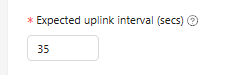
Given a TX_APPDUTY_CYCLE of 25000 (25 Secs)
You cannot use a value of 25 seconds as well → it will go into a timeout by the time the chirps are flying through the air.
Depending on the bytes you send and DR it airtime might be in the range of 0.3 up to 3 secs (in my cases) which means I might be slightly over the top of the time window I had to use.
image

I tested it with higher values like 60 secs and now with 35 secs and it worked like a charm.
Now I can go on with the bootloader stuff, which should use the data I’ve just received.

Great weekend y’all and if you need any more information…

Cheers,
Yoo

Hi Yoo,

That’s a great find, congrats on tracking it down! Makes sense in hindsight: if the device profile’s expected uplink interval is too tight relative to the actual TX airtime + processing overhead, the network server’s scheduling assumptions for downlinks (including your Class-C/multicast setup commands) would drift out of sync with reality, which lines up with the symptoms you were describing (setup requests timing out inconsistently).

Good to know 35s worked reliably for you that’s a useful data point if I ever see similar setup-timeout flakiness on our end.

Good luck with the bootloader work that’s the fun part now that the data’s actually landing where it should. Feel free to reach out if anything else comes up.

Cheers,
Rahul

1 Like