Hello RAKwireless team and community,
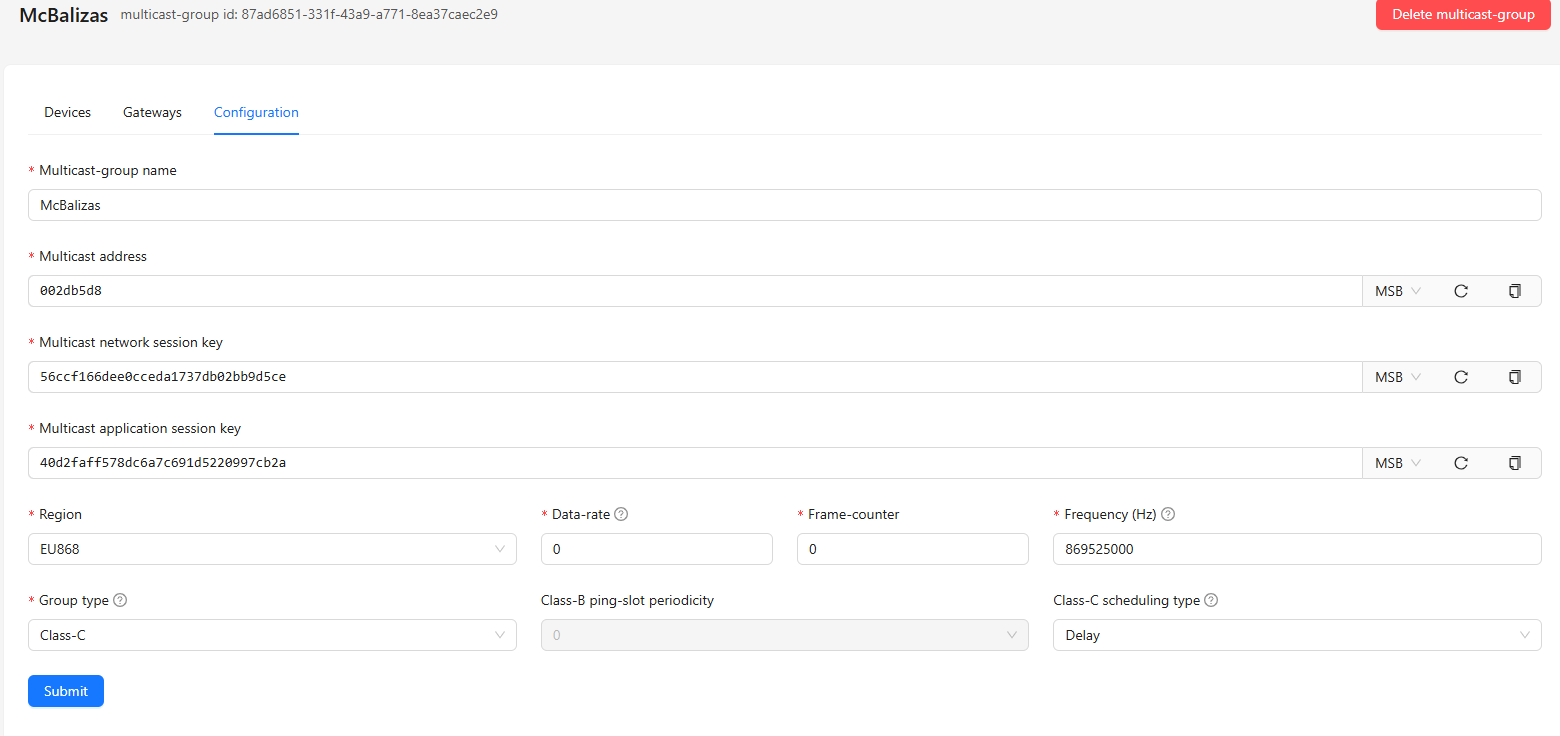
I’m currently developing with the RAK3172-T module using the RUI3 API in the Arduino environment, and I’m trying to connect the device to a LoRaWAN multicast group configured in ChirpStack (v4). The device successfully joins the LoRaWAN network via OTAA, but the call to api.lorawan.addmulc() always fails.
Please, if anyone has encountered this error, could you help me? Thank you very much.
Debug output
15:46:42:934 -> ------------------------------------------------------
15:46:42:936 -> RAKwireless LoRaWan Multicast Example
15:46:42:936 -> RAK api ver: 3.2.9
15:46:42:936 -> RAK fwr ver: DEV_VER
15:46:42:936 -> RAK model: rak3172T
15:46:42:936 -> ------------------------------------------------------
15:46:42:942 -> Waiting for Lorawan join...+EVT:JOINED
15:46:54:135 -> join OK
15:46:54:135 -> Device Address: 01DE689F
15:46:54:139 ->
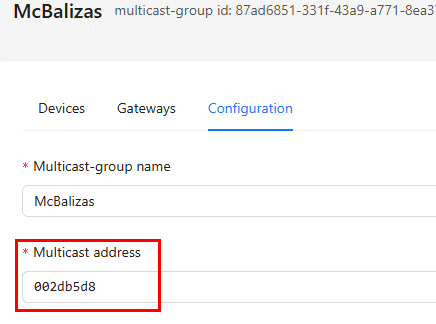
15:46:54:139 -> Multi cast Session McAddress is 01DE689F
15:46:54:139 -> Multi cast AppSKey: 40D2FAFF578DC6A7C691D5220997CB2A
15:46:54:139 -> Multi cast NwkSKey: 56CCF166DEE0CCEDA1737DB02BB9D5CE
15:46:54:139 ->
15:46:54:139 -> Add Multicast Fail
15:46:54:139 -> Current Work Mode: LoRaWAN.
Example code:
/***
 *  This example shows LoRaWan protocol joining the network in OTAA mode, class C, region EU868 and set multicast group.
***/
bool ret;

/*************************************

 *************************************/
void printArray(const uint8_t* key, size_t len) {
  for (size_t i = 0; i < len; i++) {
    Serial.printf("%02X", key[i]);
  }
  Serial.println();
}

void setup()
{
    Serial.begin(115200);
    delay(2000);

    Serial.println("------------------------------------------------------");
    Serial.println("RAKwireless LoRaWan Multicast Example");
    Serial.print("RAK api ver: ");
    Serial.println(api.system.apiVersion.get().c_str());
    Serial.print("RAK fwr ver: ");
    Serial.println(api.system.firmwareVersion.get().c_str());
    Serial.print("RAK model: ");
    Serial.println(api.system.modelId.get().c_str());
    Serial.println("------------------------------------------------------");

    if(api.lorawan.nwm.get() != 1)
    {
        Serial.printf("Set Node device work mode %s\r\n",
            api.lorawan.nwm.set() ? "Success" : "Fail");
        api.system.reboot();
    }

    // OTAA Device EUI MSB
    uint8_t node_device_eui[8] =
        { 0x00, 0x80, 0xe1, 0x15, 0x06, 0x3e, 0xf5, 0x99 };
    // OTAA Application EUI MSB
    uint8_t node_app_eui[8] =
        { 0x00, 0x00, 0x00, 0x00, 0x00, 0x00, 0x00, 0x00 };
    // OTAA Application Key MSB
    uint8_t node_app_key[16] =
        { 0xd5, 0x61, 0x2b, 0x08, 0xd7, 0x6a, 0x42, 0xc4, 0x83, 0x3b, 0x5e, 0x93, 0x47, 0x03, 0x91, 0xfc };

    /**LoRaWan Multicast Session*/

    uint8_t node_mc_address[4] = { 0x00, 0x2d, 0xb5, 0xd8};
    uint8_t node_mc_AppSKey[16] =
        { 0x40, 0xd2, 0xfa, 0xff, 0x57, 0x8d, 0xc6, 0xa7, 0xc6, 0x91, 0xd5, 0x22, 0x09, 0x97, 0xcb, 0x2a };
    uint8_t node_mc_NwkSKey[16] =
        { 0x56, 0xcc, 0xf1, 0x66, 0xde, 0xe0, 0xcc, 0xed, 0xa1, 0x73, 0x7d, 0xb0, 0x2b, 0xb9, 0xd5, 0xce };

    RAK_LORA_McSession session = {
        .McDevclass = CLASS_C,
        .McAddress =
  	        node_mc_address[0] << 24 | node_mc_address[1] << 16 |
  	        node_mc_address[2] << 8 | node_mc_address[3],
        .McFrequency = 869525000,
        .McDatarate = 0,
        .McPeriodicity = 0,
        .McGroupID = 2,
        .entry = 0,
    };
    memcpy(session.McAppSKey, node_mc_AppSKey, 16);
    memcpy(session.McNwkSKey, node_mc_NwkSKey, 16);

    if (!(ret = api.lorawan.appeui.set(node_app_eui, 8))) {
        Serial.printf("LoRaWan Multicast - set device EUI is incorrect! \r\n");
        return;
    }
    if (!(ret = api.lorawan.appkey.set(node_app_key, 16))) {
        Serial.printf("LoRaWan Multicast - set application EUI is incorrect! \r\n");
        return;
    }
    if (!(ret = api.lorawan.deui.set(node_device_eui, 8))) {
        Serial.printf("LoRaWan Multicast - set application key is incorrect! \r\n");
        return;
    }
    /*************************************
     *
     * LoRaWAN band setting:
     *   EU433: 0
     *   CN470: 1
     *   RU864: 2
     *   IN865: 3
     *   EU868: 4
     *   US915: 5
     *   AU915: 6
     *   KR920: 7
     *   AS923: 8
     *
     * ************************************/

    if (!(ret = api.lorawan.band.set(RAK_REGION_EU868))) {
        Serial.printf("LoRaWan Multicast - set band is incorrect! \r\n");
        return;
    }
    if (!(ret = api.lorawan.njm.set(RAK_LORA_OTAA))) {
        Serial.printf("LoRaWan Multicast - set network join mode is incorrect! \r\n");
        return;
    }
    if (!(ret = api.lorawan.deviceClass.set(RAK_LORA_CLASS_C))) {
        Serial.printf("LoRaWan Multicast - set device class is incorrect! \r\n");
        return;
    }

    if (!(ret = api.lorawan.join())) {
        Serial.printf("LoRaWan Multicast - join fail! \r\n");
        return;
    }

    /**Wait for Join success */
    while (api.lorawan.njs.get() == 0) {
        Serial.print("Waiting for Lorawan join...");
        api.lorawan.join();
        delay(10000);
    }

    Serial.println("join OK");
    // Get device address
	api.lorawan.daddr.get(node_mc_address, 4);
    session.McAddress = node_mc_address[0] << 24 | node_mc_address[1] << 16 | node_mc_address[2] << 8 | node_mc_address[3];
    //
    Serial.print("Device Address: ");  // Check Device Address
    printArray(node_mc_address, 4);
    Serial.println();

    api.lorawan.adr.set(true);
    api.lorawan.rety.set(1);
    api.lorawan.cfm.set(1);

    Serial.printf("Multi cast Session McAddress is %08X\r\n", session.McAddress);  // Check Device Address
    Serial.print("Multi cast AppSKey: ");
    printArray(node_mc_AppSKey, 16);
    Serial.print("Multi cast NwkSKey: ");
    printArray(node_mc_NwkSKey, 16);
    //
    Serial.println();
    delay(1000);

    /**LoRaWAN Multicast Setting*/
    if (api.lorawan.addmulc(session) == true) {
        Serial.println("Add Multicast Success");
    } else {
        Serial.println("Add Multicast Fail");
    }
}

void loop()
{
}
ChirpStack Configuration MulticastGroup