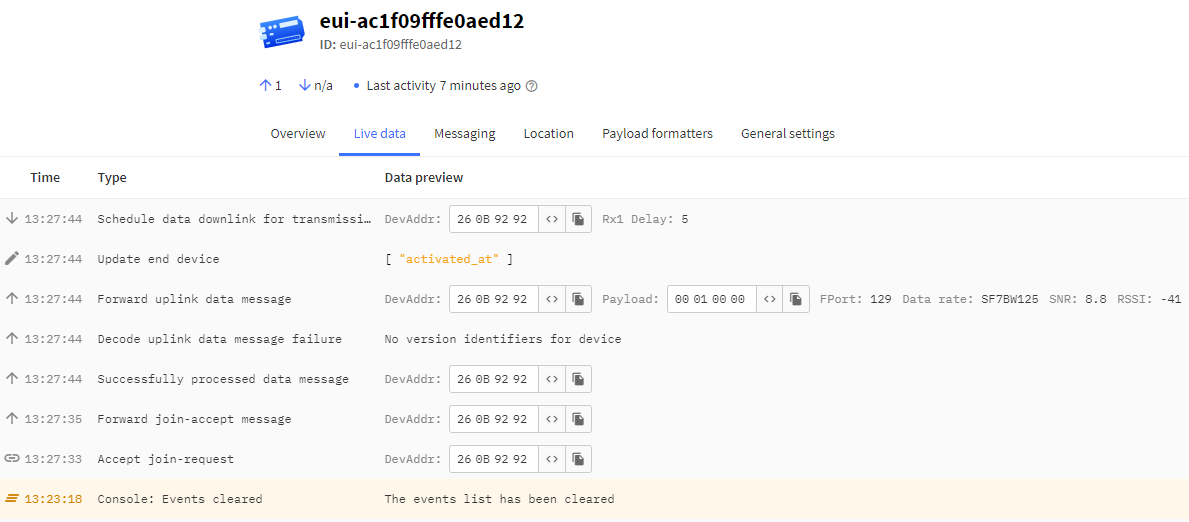
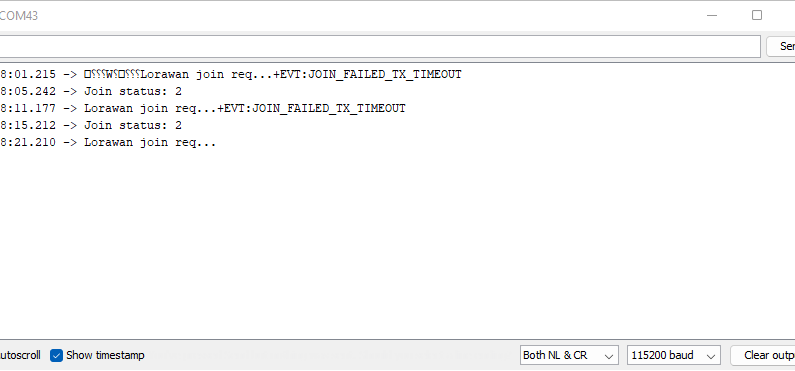
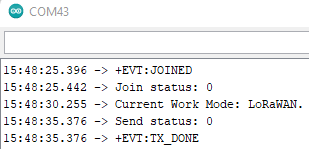
and now, after power cycle the RAK3172-T module, I am getting the error message +EVT:JOIN_FAILED_TX_TIMEOUT. refer to snapshot below and this keeps on repeating despite several retries, at first i thought it might be a Gateway issue, but not!! my gateway is up and running, as I can see live traces for other devices except for this RAK3172-T module.
I did a test with another RAK3172-T module and this issue keeps on repeating, that is the device first connect to TTN and after power cycling getting +EVT:JOIN_FAILED_TX_TIMEOUT
Can someone please advise what is the issue please?.
I have checked the DevEUI, AppEUI & AppKey for the RAK3172-T Modules having this issue, they are still the same, even the LoRaWAN region is set to AT+BAND=4, which is EU868 and is correct.
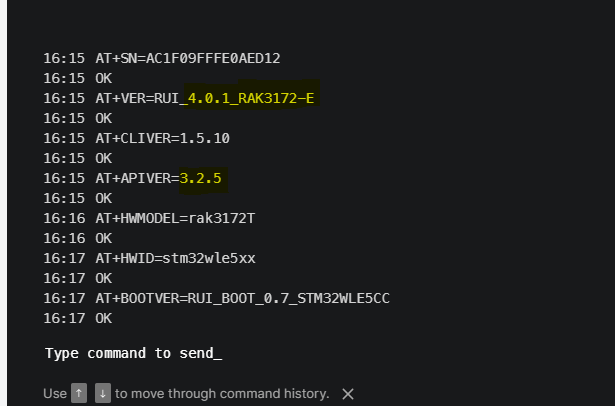
the only change I can see is highlighted in the snapshot below.
Before:
After:
I have attached the part of my code that is the setup part.
void setup(){
    Serial.begin(115200);while(!Serial){}

//MCP23017 I2C setup
  Wire.begin();delay(500);
  Wire.beginTransmission(0x20);
  mcp23017_activeStatus = Wire.endTransmission();

  write_SingleRegister(IODIRA,  0xFF);  //pinA configured as input
  write_SingleRegister(IODIRB,  0xFF);  //pinB configured as input
  write_SingleRegister(IPOLA,  0xFF);   //pinA opposite state of input
  write_SingleRegister(IPOLB,  0xFF);   //pinB opposite state of input

  write_SingleRegister(GPINTENA,  0xFF);  //enable pinA for interrupt on change event
  write_SingleRegister(GPINTENB,  0xFF);  //enable pinB for interrupt on change event
  write_SingleRegister(DEFVALA,   0xFF);  //default value set to 1 pull-up configured
  write_SingleRegister(DEFVALB,   0xFF);  //default value set to 1 pull-up configured
  write_SingleRegister(INTCONA,   0x00);  //pin value is compared against the previous value
  write_SingleRegister(INTCONB,   0x00);  //pin value is compared against the previous value

  byte temp=read_SingleRegister(IOCON);
  write_SingleRegister(IOCON,temp|=0x42); //INT pin combines INTA+INTB, set polarity of INT pin to Active-High
  write_SingleRegister(GPPUA,   0xFF);  //pull-up enabled for PINA
  write_SingleRegister(GPPUB,   0xFF);  //pull-up enabled for PINB

//Led Indication
//  pinMode(RAK3172_LEDPIN, OUTPUT);
//  digitalWrite(RAK3172_LEDPIN, LOW);

//Interrupt
  pinMode(RAK3172_INTPIN, INPUT);
  attachInterrupt(RAK3172_INTPIN, interruptEvent, RISING);

//LoRaWAN Setup
  api.lorawan.deviceClass.set(RAK_LORA_CLASS_A);  //set to class A mode.
  api.lorawan.njm.set(RAK_LORA_OTAA);       //network join mode-OTAA
  api.lorawan.cfm.set(false);           //confirm msg disabled
  api.lorawan.band.set(4);            //EU868
  api.lorawan.dr.set(5);
  api.lorawan.registerRecvCallback(recv_cb);
  api.lorawan.registerJoinCallback(join_cb);
  api.lorawan.registerSendCallback(send_cb);

  api.lorawan.join();
  while(api.lorawan.njs.get()==0){Serial.print("Lorawan join req...");api.lorawan.join();delay(10000);}
  api.lorawan.adr.set(true);            //adaptive data rate enabled

  construct_lora_pkt(0x01);
  mcp23017_pinAB_prev=mcp23017_pinAB;
  api.lorawan.send(sizeof(lora_payload), lora_payload, 129);

    if(api.system.timer.create(RAK_TIMER_0, (RAK_TIMER_HANDLER)heartBeat, RAK_TIMER_PERIODIC) != true){Serial.printf("LoRaWan- Creating timer failed.\r\n");return;}
    if(api.system.timer.start(RAK_TIMER_0, TIME_INTERVAL, NULL) != true){Serial.printf("LoRaWan- Starting timer failed.\r\n");return;}

  //startTime=millis();
}
Thanks for your swift response and your usual support.
Yes exactly, I used the same code that is available on the RUI3 API available in RAK Documentation Center.
I did apply the AT+JOIN=0:0 like you mentioned before. Still no change notice.
Another thing to note here is that I cannot see the Join Request Packets on TTN sent from the RAK3172-T to my Gateways in total I have 3 Gateways.
Note: earlier I used the RAK3172 Breakout Board ( SKU: 316043) to carry on all my tests with success. I am now using the same arduino code on this RAK3172-T and I have having this issue and this happened with the 3rd RAK3172-T module that I have tested this morning.
Can you please help, as we have a custom PCB already implemented with the RAK3172-T module.