the network server and gateway is our own implemented version. In this stage I’m not interested in the network server at all to unmarshall and decrypt any packet according to the keys and device address for any high-level application.
The issue here is a very low-level one in the network stack: Our own custom gateway receives LoRa packets and prints out the bytes received (even if not decrypt using NwksKey and forward to an Application Server, we really don’t care about that right now) from other trackers (SEMTECH SX1272 for instance) but not from the RAK7200 tracker. By sharing the same RF parameters shouldn’t I be receiving any LoRa packet in any way in our gateway’s LoRA transceiver or am I missing something here ?
Hi @Ricardo
In that case you should confirm the frequency list of RAK7200 with “at+get_config=lora:channel”,
then see if the supported frequency points of the gateway match the frequency points that 7200 has turned on.
Do you know how to get the additional two digits of GPS data into The Things Network with the decoder? The decoder only shows 4 decimal places but the raw data in the serial port tool shows 6 decimal places.
I’m really sorry for late reply, especially your last post because i just see it…
About the new firmware for RAK7200 based one RUI, i’m afraid it will not be released soon.
Recently, my team are working on RAK modules linke RAK811, RAK4200, RAK4270, RAK4600, …
We want to focus on imporving these modules firstly (the first step), then improving RAK products like RAK7200 based on these modules’s new firmware (the second step). This is a re-optimized work.
Now, we are at the end of the first step, and the second step will start at the beginnig of the next month.
Hi Jeroen,
Waiting to buy a lot of trackers 7200 for my job. Seems to be a lot of bugs in the firmware. You have test it since a few months I have seen that. Could you please contact me at jazbond at gmail to discuss if you agree and give me your advice in private
Best
Jason
@Fomi - I have been following this thread since Aug 2019. I would like to use this tracker if the internal antenna issue has been resolved. Have you an ETA of the new updated antenna being made available for sale? Thanks!
I’ve got a 7200 tracker with the new internal antenna and works fine.
Of course is my 7200 with a tweaked external anttenna performing a little bit better, but that’s logical.
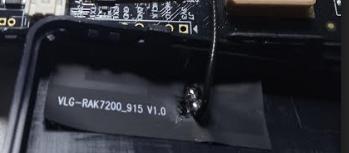
Hi there, anyway to visually detect the problematic antenna?
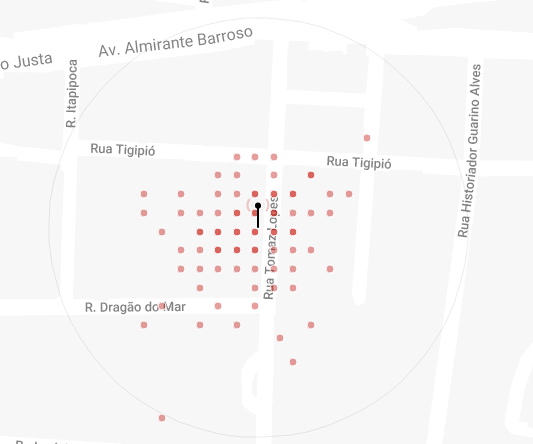
Just received the tracker, with latest firmware, only able to talk to GW if its around 40 meters!
Any help please!?
Board Core:  S76G_B
MCU:  STM32L073RZ
LoRa chip:  SX1276
----
Please Configurate parameters within 30 seconds ...
at+get_config=lora:status
OK Work Mode: LoRaWAN
Region: AU915
Send_interval: 180s
Auto send status: true.
Send_interval work at sleep
Join_mode: OTAA
DevEui: AC1F09FFFE003XXX
AppEui: 70B3D57ED0036XXX
AppKey: AC1F09FFFE00375AAC1F09FFFXXXXXX
Class: A
Joined Network:false
IsConfirm: unconfirm
AdrEnable: false
EnableRepeaterSupport: false
RX2_CHANNEL_FREQUENCY: 0, RX2_CHANNEL_DR:0
RX_WINDOW_DURATION: 0ms
RECEIVE_DELAY_1: 0ms
RECEIVE_DELAY_2: 0ms
JOIN_ACCEPT_DELAY_1: 0ms
JOIN_ACCEPT_DELAY_2: 0ms
Current Datarate: 0
Primeval Datarate: 5
ChannelsTxPower: 0
UpLinkCounter: 0
DownLinkCounter: 0
lorasend_interval: 180s
MPU9250 Init OK
GPS Init OK
Initialization OK,Current work_mode:LoRaWAN, join_mode:OTAA, Class: A
gps_timeout: 100s
Configuration OK!
OTAA Join Start...
[LoRa]:Joined Successed!
Start Search Satellite(about 100 seconds) ...
in picture, circle radius is around 150 meters
and the antenna version/picture
 ?
?