Is your device RAK7201 or RAK7201V2?
Based on what happened, the firmware that you have flashed is actually for V2 and I suppose that the button is RAK7201(not V2).
If so use the following guide to reflash it (the guide is for 7201 and not 7201V2): Firmware Upgrade Guide | RAKwireless Documentation Center
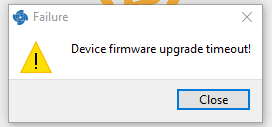
I would like to I can’t put it in configuration mode, whatever I do. I tried without and I get this
As I said, when I power it up the blue led from the button 4 is lighted up faintly, when using the micro usb, the red led from the button 2 is lighted up strongly, supposedly indicating a charge.
Also with wistool, the device doesn’t respond to AT command.
The button is bricked from the wrong firmware uploaded. You can fix it using Jlink. The problem now is that you need to enter the device into boot mode the V2 firmware doesn’t implement holding button 1 for configuration mode. If you are based in Europe you can send it to me and I can reflash it for you and send it back to you, but we can not replace the device as you bricked it yourself.
Sorry, same here.
Ordered recently a RAK7201 from a shop but it seems it was not V2.
Somehow I landed through a link to the setup page which was apparently for V2…and I wasn’t aware that there are several versions.
I have access to a JLink. Can you provide some instructions how to reflash the device?
Thank you, it worked. I even didn’t had to solder the reset pin.
What me confuses is, that the PCB is marked with “RAK7201 V2.0” but it seems to be just a “RAK7201”…so the PCB marking is a little bit confusing/misleading.
Probably you can update the manual with an update, how to identify the correct version and point out, that there are two versions.
Hello Nikola,
there is also unbrick7201v2_pack ?
I just bricked the RAK7201V2 using firmware for RAK7201.
There is something wrong in documentation links for RAK7201v2 and I download
wrong firmware.
Carl shared the steps for recovery above.
The firmware on the link in the documentation downloads the .bin for RAK7201V2.
Can you share the problematic link that led you to download the wrong firmware?