RAK7201V2: First press of a different button sends previous button’s data (stale TX buffer)
Summary
[!Note]
I have examined RAK7201 always sends button one payload and this is not the same issue.
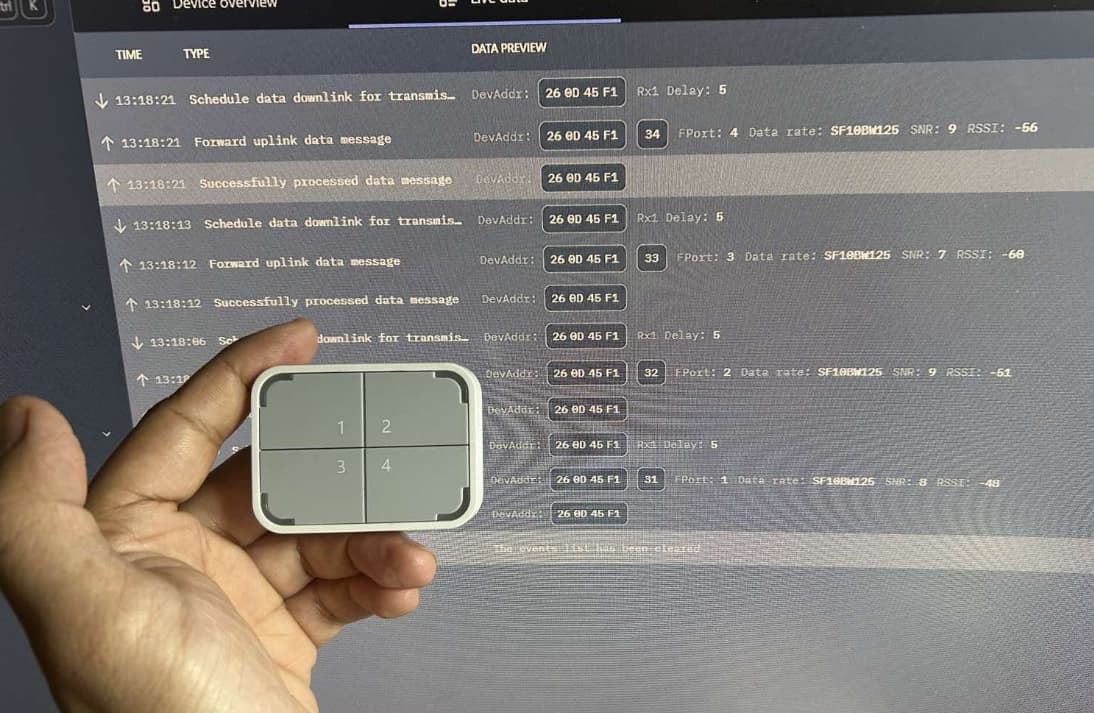
The RAK7201V2 WisNode Button 4K sends the previous button’s fPort and payload data when a different button is pressed for the first time. Pressing the same button a second time sends the correct data. The device’s serial console (minicom) correctly identifies which button was physically pressed — the issue is in the LoRaWAN uplink that gets transmitted.
This makes it impossible to reliably determine which button was pressed from the network server side, effectively rendering the 4-button functionality unusable.
Firmware and Environment
| Component | Version / Detail |
|---|---|
| Device | RAK7201V2 WisNode Button 4K |
| Firmware | AT+VER=RUI_3.5.2+user (latest from RAK download server) |
| Network Server | ChirpStack v4.16.2 |
| Gateway | RAK7289CV2 |
| Region | US915 (channels 0-7 + 64), sub-band 1 |
| MAC Version | LoRaWAN 1.0.3 |
| Regional Parameters | RP002-1.0.3 |
How to Reproduce
Step 1: Configure buttons with distinct fPorts and data
AT+BUTTON=1:1:1
AT+BUTTON=2:2:2
AT+BUTTON=3:3:3
AT+BUTTON=4:4:4
ATZ
After rejoin, verify config:
AT+BUTTON=?
buton1:1,1
buton2:2,2
buton3:3,3
buton4:4,4
(Note: firmware returns “buton” with one T despite accepting “BUTTON” with two.)
Step 2: Press buttons in sequence, waiting 10+ seconds between presses
| Action | Minicom Output | ChirpStack Event (fPort / data) | Correct? |
|---|---|---|---|
| Press Button 1 | shortPress! BUTTON_1_PIN |
fPort=1, data=0x31 (“1”) | Yes |
| Wait 10 seconds | |||
| Press Button 2 | shortPress! BUTTON_2_PIN |
fPort=1, data=0x31 (“1”) | No — stale |
| Press Button 2 again | shortPress! BUTTON_2_PIN |
fPort=2, data=0x32 (“2”) | Yes |
| Wait 10 seconds | |||
| Press Button 3 | shortPress! BUTTON_3_PIN |
fPort=2, data=0x32 (“2”) | No — stale |
| Press Button 3 again | shortPress! BUTTON_3_PIN |
fPort=3, data=0x33 (“3”) | Yes |
The pattern is 100% reproducible: the first press of a different button always transmits the previous button’s complete LoRaWAN frame (fPort + payload). The second press of the same button transmits correctly.
Step 3: Verify with raw LoRaWAN frames
Inspecting the raw uplink event JSON in ChirpStack confirms both fPort and data (base64-decoded FRMPayload) are stale. This is not a codec/decoder issue — the wrong bytes are on the wire.
What I Have Tried
| Attempt | Result |
|---|---|
AT+CFM=0 (unconfirmed uplinks) |
Same stale behavior |
AT+CFM=1 (confirmed uplinks) |
Same stale behavior |
Factory reset (ATR) — done multiple times |
Same stale behavior after reconfiguration |
Reflashed latest firmware (RAK7201_V2.0.6_APP.bin) |
Same stale behavior (was already on latest) |
All buttons on same fPort, different data (AT+BUTTON=1:1:A, AT+BUTTON=2:1:B, etc.) |
Stale data persists (also, ChirpStack template codec expects bytes 49-52 not 65-68) |
All buttons with same data, different fPort (AT+BUTTON=1:1:1234, AT+BUTTON=2:2:1234, etc.) |
fPort is also stale — confirmed by switching codec to fPort-based identification |
| Waited 10+ seconds between presses to rule out Class A busy window | Same stale behavior — not timing-related |
fPort-based codec (ignoring payload, using only input.fPort for button ID) |
fPort is stale too, confirming entire TX frame is wrong |
Analysis
The device’s serial output correctly identifies which physical button was pressed (BUTTON_1_PIN, BUTTON_2_PIN, etc.) and reports +EVT:SEND_CONFIRMED_OK for each press. The button interrupt and local detection are working correctly.
The problem is in the LoRaWAN TX path. Both fPort and FRMPayload contain the previous button’s values, indicating the LoRaWAN send function is called with stale parameters before the application firmware updates them with the new button’s data. Since fPort is set in the MAC frame header (not the payload), this rules out any payload-encoding issue — the entire frame is prepared from stale state.
This appears to be a race condition or incorrect ordering in the firmware’s button press handler: the TX is triggered before the button-specific parameters (port and data) are updated.
Expected Behavior
Pressing any button should immediately transmit that button’s configured fPort and data, regardless of which button was pressed previously.
Request
Could the RAK firmware team investigate and provide a fix? This bug makes the 4-button functionality unreliable for any automation or alerting use case.
Thank you.