If you want to use RAK pre-compiled firmware image directly, there is the source code on Github, and you can use the source code to install manually by yourself.
Hi @velev I have already tried running that before.
It allows the RAK2013 module to turn on with all 3 LED’s showing, but it does not provide any cellular connectivity.
I have a clean install of Raspian Stretch updated to the latest version. Would I be required to install anything else to have internet connectivity through the RAK2013?
Does the USB have to be connected as well?
I have cloned and installed the repo onto the latest clean version of Raspbian, but when I run minicom command "sudo minicom -D /dev/ttyAMA0 -b 115200” there are no inputs or response on the terminal, even after turning echo on for minicom, any AT commands I enter don’t return anything.
Hi @jack
Maybe you need to install minicom tool firstly.
You can use RAK github project for RAK7243 with LTE to install on your pure Rasobian Stretch OS, and it will install minicom automatically:
Hi @Fomi
I already have the minicom tool installed.
I will try using the github project and see if it gets me any further.
Please also kindly check your messages as I have sent you one.
Kind Regards
1.Download this file “https://github.com/RAKWireless/rak_docker_for_gateway/blob/master/rak/rak/bin/active_lte_module.sh” in your new system and run the script “sudo ./active_lte_module.sh”, which activates the LTE module.
2.Then, run minicom again and see if the at command has responded.
Hi @ZhuQI
I have downloaded and run the script, but I get the following error
sh: echo: I/O error
sh: echo: I/O error
sh: echo: I/O error
sh: echo: I/O error
sh: echo: I/O error
sh: echo: I/O error
sh: echo: I/O error
Any ideas what the issue could be? The GPIO outputs match the script values and if I manually change the value of GPIO 18 I can manually reboot the module, but the minicom commands still does not return any values when accessed, even after turning on echo.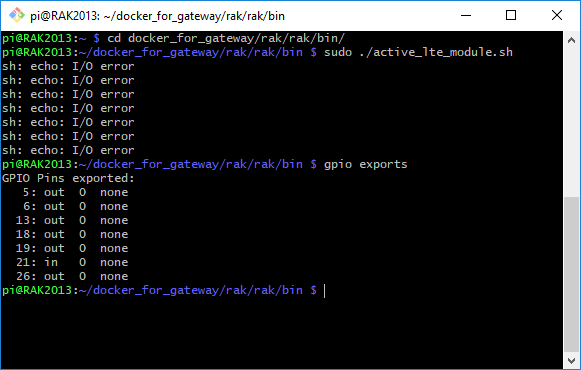
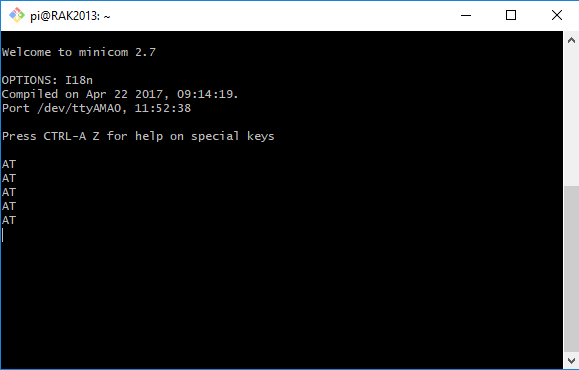
Kind Regards
Sorry, it is my negligence.
In new OS:
1.Add a line “dtoverlay=pi3-disable-bt” to the end of the file /boot/config.txt
2.run “sudo systemctl disable hciuart”
3 run “systemctl disable [email protected]”
4.reboot ,then execute the “sudo ./active_lte_module.sh” command, Are all three LED lights on?
The link isn’t working.
@simplice
Can you describe in detail the problem you are experiencing and the hardware you are using?
Rak2013 which was part of my RAK7243C kit is not recognizing the SIM when using AT+CCID command. I have tried a few different
solutions. I thought my SIM card was inserted wrong but i did flip it over and it did not change the response. The Rak2013 drivers are installed from what I can tell.
Any ideas on the issue? I could not find anything in the community to help with my problem.
Jeff
I purchased the 7243C kit and installed the RAK gateway for LTE software.
I followed the instructions on the website to set up the gateway including LTE.
On the LTE setup instructions.
I am able to connect to the modem -
AT command responds with OK
I entered AT+COPS=? and received a list of carriers and APN’s in my area. None of them are connecting to my gateway.
I entered AT+CCID to make sure the SIM is inserted properly. Received +CME ERROR: 13.
I checked the SIM card and flipped over(in case it was in upside down) and entered AT+CCID and got +CME ERROR: 13.
This is as far as i can get. Is there something I need installed or turned on to make it work?
"CME ERROR: 13" means "(U) SIM failue".

Can you be sure that the sim card will work on other devices?
Which country are you from? What is the operator of the sim card?
I live in the US.
I am using the Hologram SIM card. I was able to insert it into an old iPhone 4S and it does find a carrier and is recognized with Hologram via their dashboard.
Yes. I used the SIM in the old IPhone 4S in the RAK2013 and it’s still showing the errror13.
Any thoughts about further testing or is the board defective?
I have been suffered similar issue , pls check with below checkpoints
1, hot-plug was disable by default , it means need to put SIM card in before power on unit .
2, Hot-plug was enable ? then pls check AT+QSIMDET? if it is 1
3, or SIM holder SMT is not good . You could monitor the SIM_VDD pin of module via scope , then power on the unit and observe if there is waveform from SIM_VDD . Usually it will come out after power on in hundreds mile seconds .
4, what is the module in your hand ? pls check ATI and AT+CPIN? after powe on .
one left -
5, RF may make inteference caused this issue . Pls send command AT+CFUN=4 and then AT+CPIN? check few times . Or move antenna far away from SIM .
I now get an CME Error:10
?
CME Error means “SIM not inserted” . Coud u give the answers for above item 3 ?