English isn’t my native language so please forgive me for any errors in my sentences.
I have integrated the RAK3172 module on my custom board with a PIC controller and developed my own driver for it.
I am using TTN to manage the gateway and devices. The system worked with another prototype, but initially, I used WisToolbox with the RAK device. Now, I am trying to fully configure it using AT serial commands.
I
Everything seems correct until I try to join the network. The AT+JOIN command always returns AT_ERROR.
AT_ERROR is described as a generic error so I have no clue what could be wrong.
I am using an external antenna but I don’t think it is the issue here.
Here are the steps I followed:
Get AT response

Set device to Class A with AT+CLASS=A

Set data rate to 6 with AT+DR=6

Set OTAA mode with AT+NJM=1

Set frequency band to Europe 863–870 MHz with AT+BAND=4

Set AppKey, AppEui, and DevEui

Attempt to join the network
The FW version you have is old so I will recommend to update it. Perform flash erase first before updating. Also, when you send AT+JOIN does it automatically send AT_ERROR reply? How about trying to add parameters to it like AT+JOIN=1:1:8:10? Is it still error?
I will take a look at the firmware update.
It automatically returns AT_ERROR, even with parameters like AT+JOIN=1:1:8:10.
I tried using my previous prototype again, but I now also get the same AT_ERROR. This makes me wonder if the issue might be related to something else, maybe my gateway rather than the hardware itself.
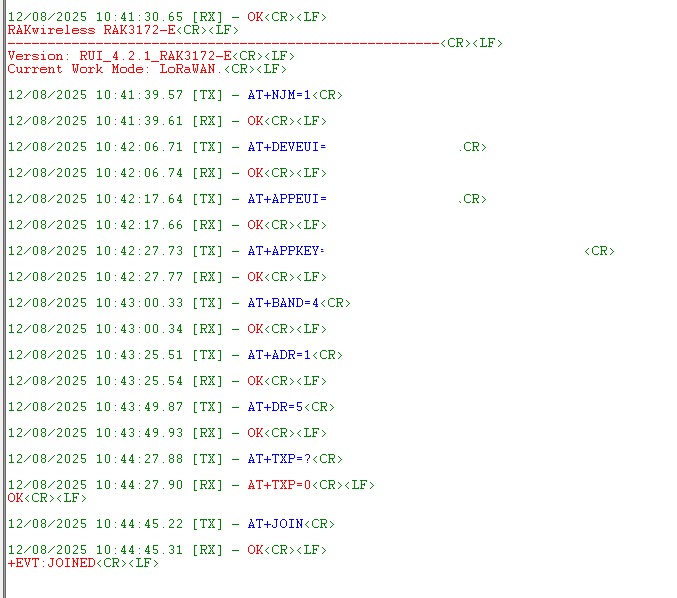
I have managed to resolve the issue, I’m not sure what did the trick but here is what I did :
I moved my gateway further as it was on the same desk than my end device (found here).
I set my DR to 5 instead of the default value and repushed my whole setup.