Welcome @lysander to the RAK forum.
What exactly happens when you connect the WisBlock to your PC? In Windows you should get a notification that a USB device has been plugged in.
Welcome @lysander to the RAK forum.
What exactly happens when you connect the WisBlock to your PC? In Windows you should get a notification that a USB device has been plugged in.
Nothing noticeable happens whatsoever on either Linux or Windows. Other USB devices launch and drives are created automatically for them on both machines as expected.
Nothing for either of the 4630s.
A few things to try and check:
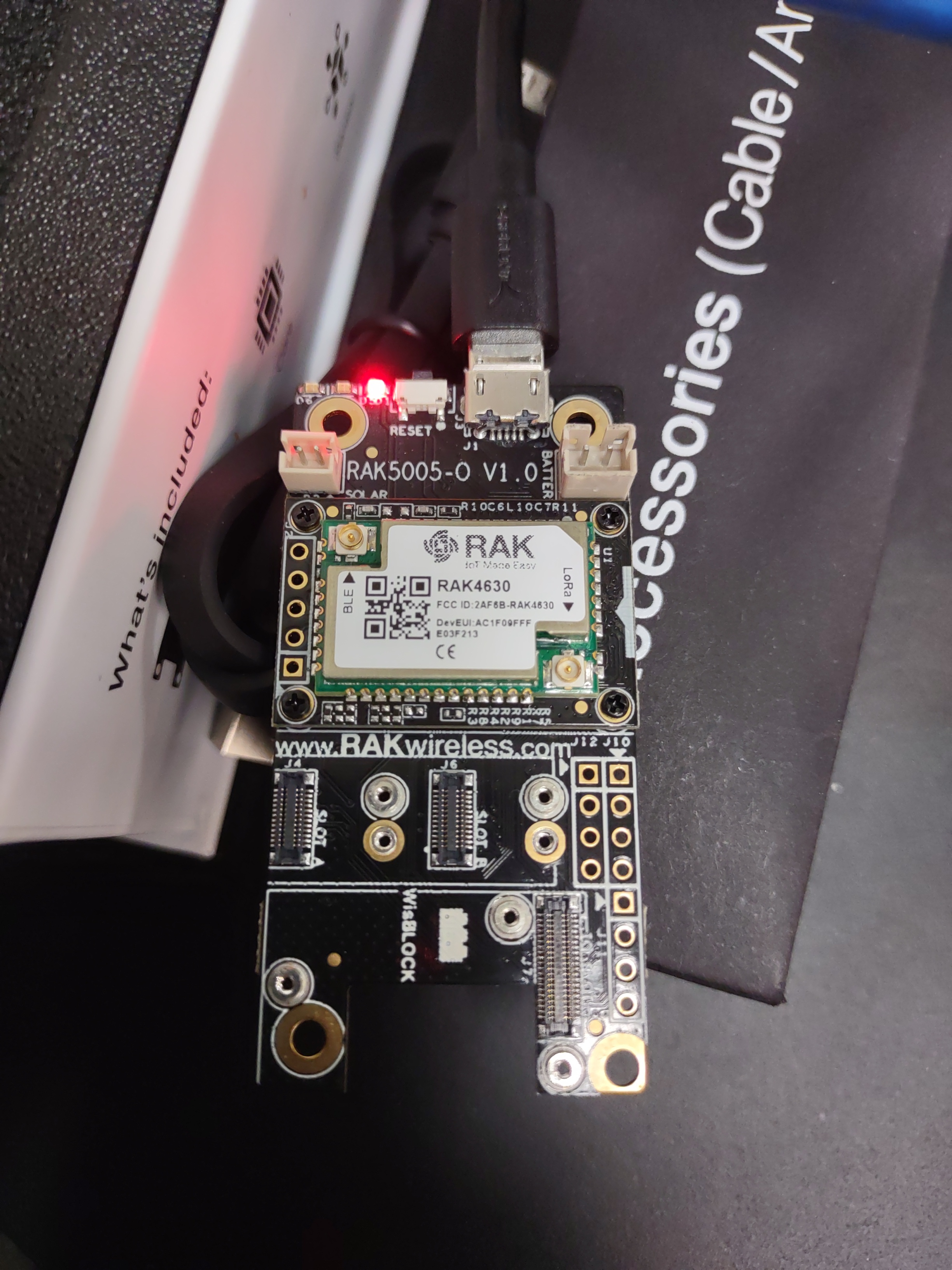
Can you send a picture of the WisBlock unit with the RAK4630 mounted.
There seem to be many many power-only USB cables in the world now, mostly lurking under the desks of innocent engineers - so a silly as it seems, trying different cables is definitely on my troubleshooting list and I have marked all my power-only cables so I notice the problem sooner rather than later.
Thanks, Nick. That is indeed solid advice. I know that firsthand from much previous head banging against wall efforts. Unfortunately it is not the source of my problem as I used both the cable that came in the kit as well as one from I have from Sabrent with similar results.
My Windows machine is recognizing it now. I suspect it was an issue with the COM port malfunctioning but not positive. I still can’t get any joy with the Linux machine but at least there is progress.
Attached is a photo with the 4630 mounted.
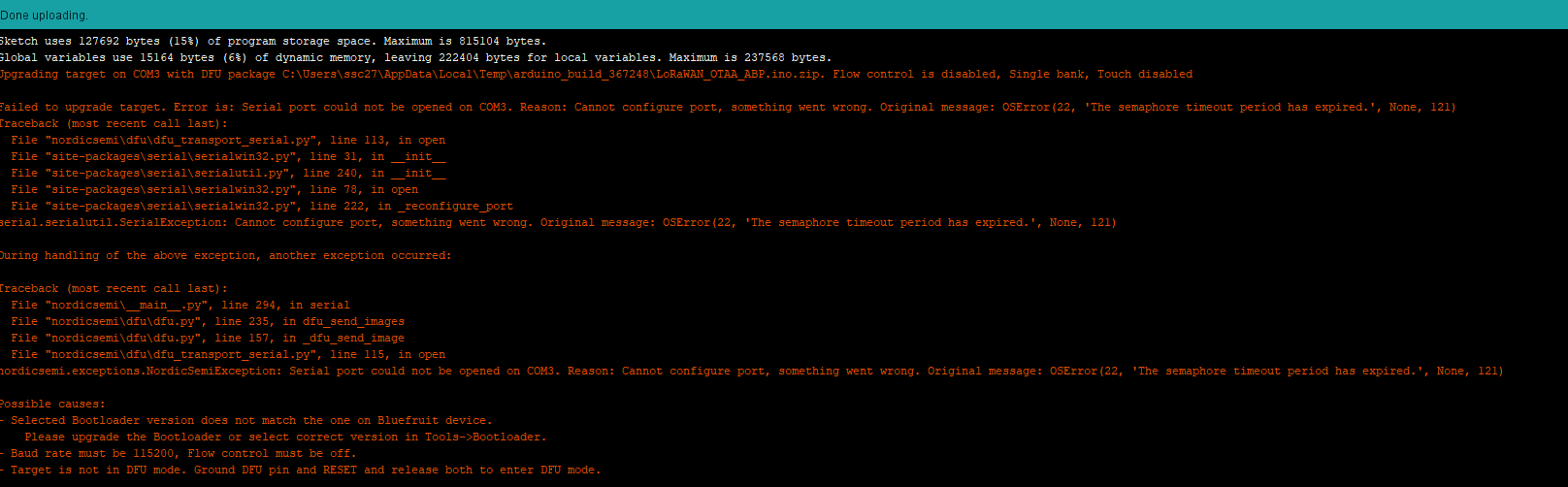
This is a screenshot of the error produced from attempting the upload:
I tried numerous things to update the bootloader and driver (there is a ton of information online about Adafruit, Bluefruit, nRF52840, etc. although it is not evident how accurate/applicable any of it is) but still no joy.
The next step is to find someone else’s machine - particularly with Windows which can end up in an “interesting” state and the various flavours of Linux can have their own foibles.
As for me, I’m golden, I have an iMac!
But seriously, I do get some really messes with various machines so running a virtual machine with a totally virgin copy of Windows 10 is a good test.
@lysander
Ok, at least we got the device recognized now in Windows.
Mounting of the RAK4631 is correct.
Red LED shows that at least power of USB is connected (does not mean the USB D+ and D- are connected as well).
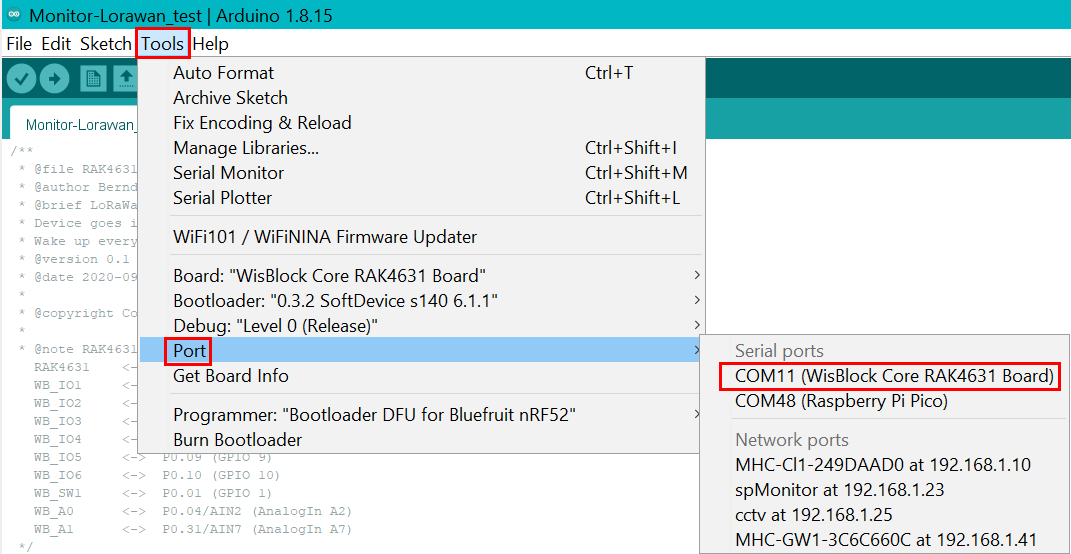
Can you show me what ports you see in ArduinoIDE. The error message from the attempted upload is just saying that it didn’t find the COM port.
Can you make a screenshot like this:
Comparing your screenshot to mine, mine is missing the description of the device (ie, “WisBlock Core RAK4631 Board”) which comports with the message I get when I click “Get Board Info.”

Ok, so he gets the correct VID and PID, so it is a Windows driver problem.
There are two options that you can try:
You can run the driver installation app from Adafruit that installs a bunch of drivers including the one for nRF52 USB.
Or you can try to manually install the default Windows usb_ser driver.
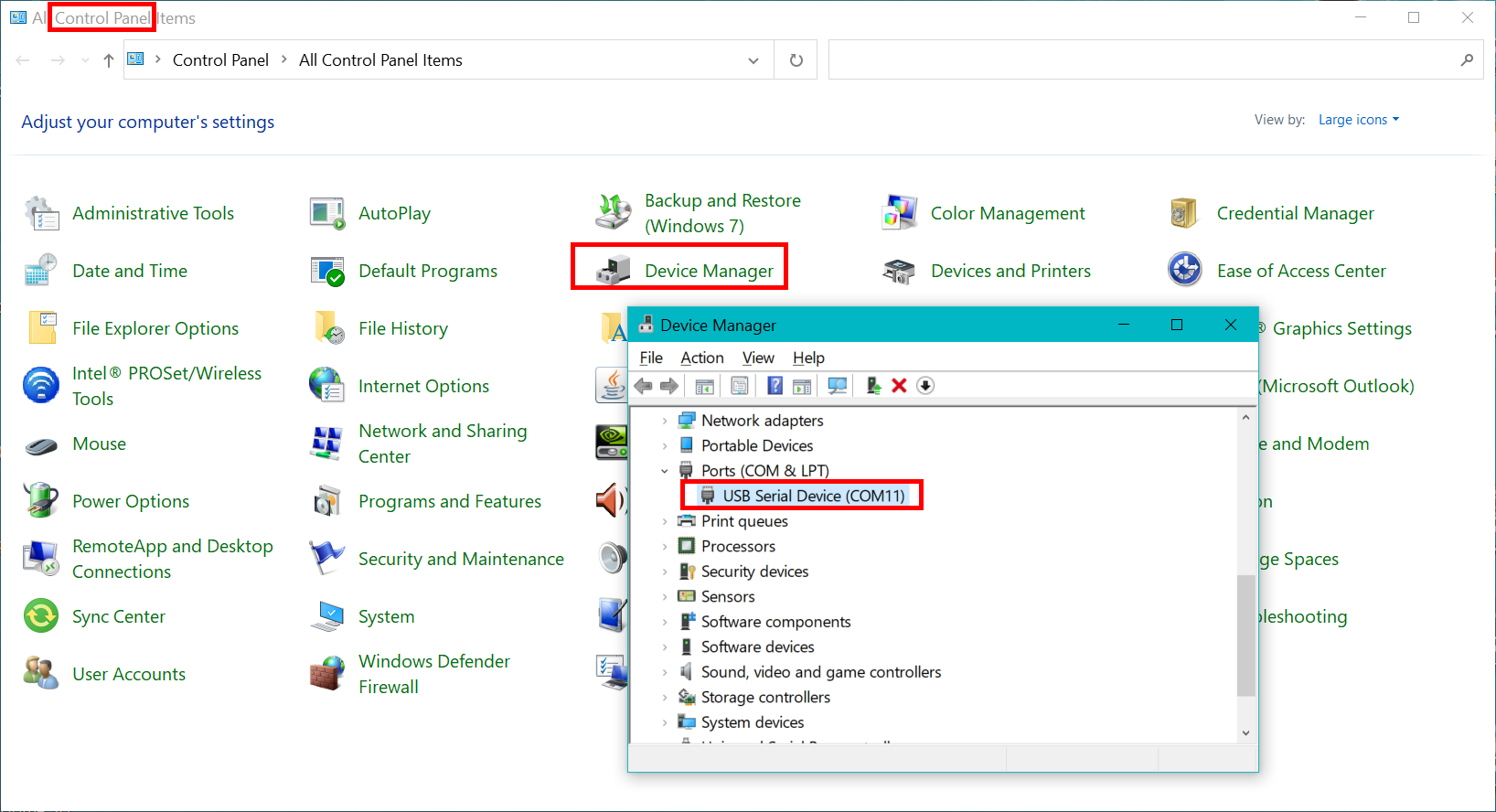
First open the Control Panel then open Device Manager and look for Ports (COM & LPT).
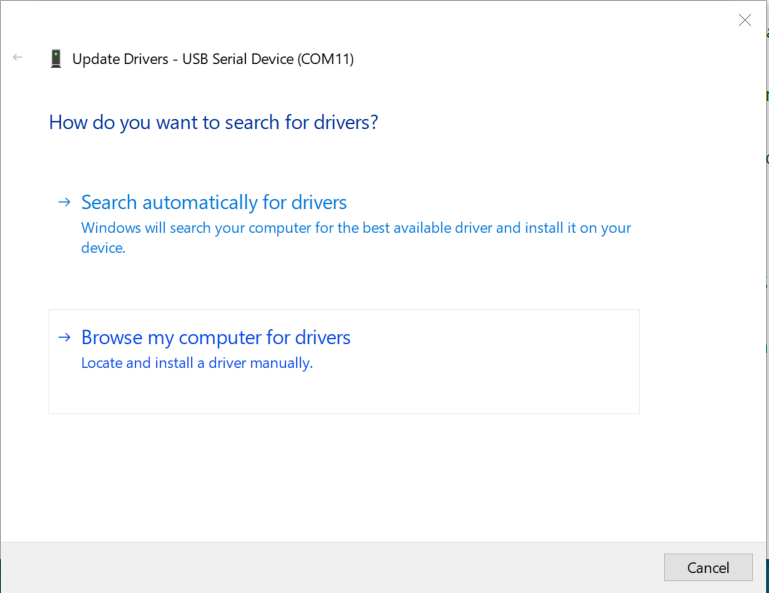
Update driver
In the next window select Browse my computer for drivers
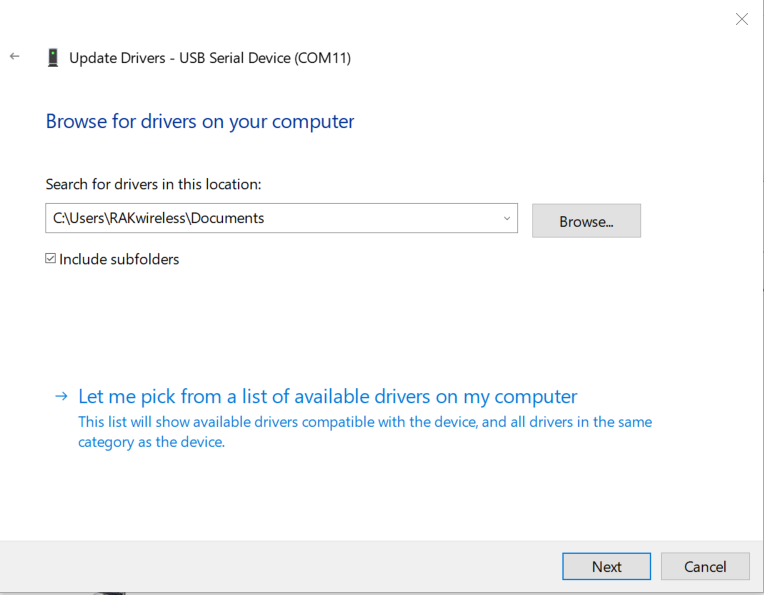
Then select Let me pick from a list of available drivers on my computer
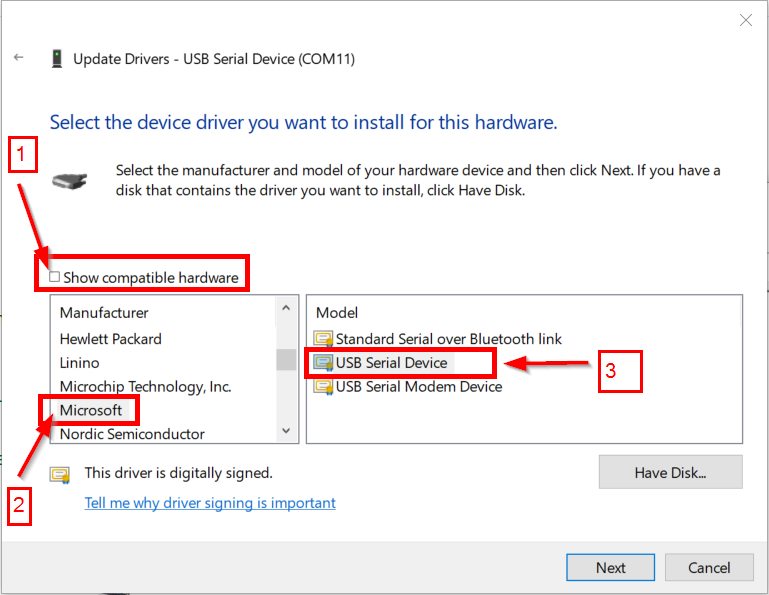
In the next window uncheck Show compatible hardware [1], then scroll down in the list to Microsoft [2] and select USB Serial Device [3], then push [Next] button to install the driver.
After the second option to manually install the driver did not result in any apparent change, I tried the first option to install the bundle from Adafruit. Neither appeared to change anything.
It is most peculiar that the issues appear to be the same on both Windows and Ubuntu even though I did fresh installs of Arduino on both machines. And it is particularly frustrating as I have ordered a number of additional WisBlock modules for the project anticipating that I would be able to resolve the interface problem fairly quickly/before receipt.
The two machines you mention, the Windows & Linux machines, are they the same model of computer or if self-build, same mother board.
The acid test for me is to go in to the computer museum (or as the wife calls it, the spare bedroom) and grab a machine - is there a totally different machine around you can try - or take beer to a friends house.
Also worth trying Windows 7 if you can. Or a Mac.
I know this seems like a monstrous pain but it’s incredible how something so simple can get so bizarre and then suddenly the pieces fall in to place.
FWIW, my modules are mostly programmed via Arduino on my iMac but has also been on my Windows 10 machine plus at least a couple of times on Windows 7 as a virtual machine on the iMac (so routing the USB via VMware). I do Arduino on Raspberry Pi, I can give that a try in the morning.
@lysander
I am sorry, but beside of Nick’s proposals I have no more ideas. Obviously Windows gets the right USB VID and PID, so it detects the device. Why it does not accept the drivers is strange, but I have no solution for that.
For Linux, I do not have much experience, I am using it only on RPi, but as headless systems, so I access it only over SSH.
Dear Beegee,
I have ordered a Wisblock Helium Developer Kit and after uploading the OTAA sample both my boards with the supplied original USB cables stopped being recognized by Windows 10 when I plug in the board. What I experience as a first symptom in PlatformIO IDE is that Serial Monitor stopped working and COM port of Wisblock is not available, cannot be selected for serial monitoring and also further uploads are not possible. When USB plugged in there is no sound meaning board is not recognized by Windows 10.
I see the board joining and sending packages in Helium Console however. Also LEDs are working on it properly.
(I don’t consider myself a newbie, I have been using Arduino IDE and ESP32 in the recent years a lot. I made a lot of googling on possible solutions. My job is being a softwaretester full time in international projects since 2016 June so I am even not unfamiliar with IT in general and have learned programming since age 8).
Can you please suggest what can I do in this situation?
Welcome to the forum @gaborgluck
Which of the OTAA examples are you using? Is it the one from our WisBlock repo?
In the code, did you setup the DevEUI, AppEUI, AppKey and region?
When the RAK4631 gets unresponsive on USB after power-up or reset but works in UF2 mode, it is mostlikely a software problem. The nRF52 crashes and hangs.
Hi Beegee,
I have tried both ones, one you reference and other from Helium documentation. Also true that once I made the mistake not filling the DevEUI, AppEUI, AppKey, but in other case I did and experienced same symptom in both cases. Packets are already being over sent to Helium console, but new upload is not possible. What can I do to solve nRF52 crashing and hanging? I am new to nRF52, sorry.
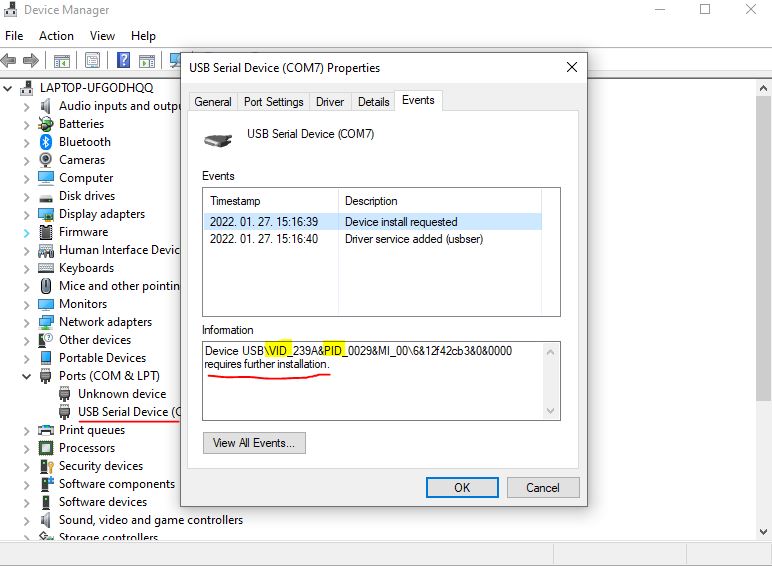
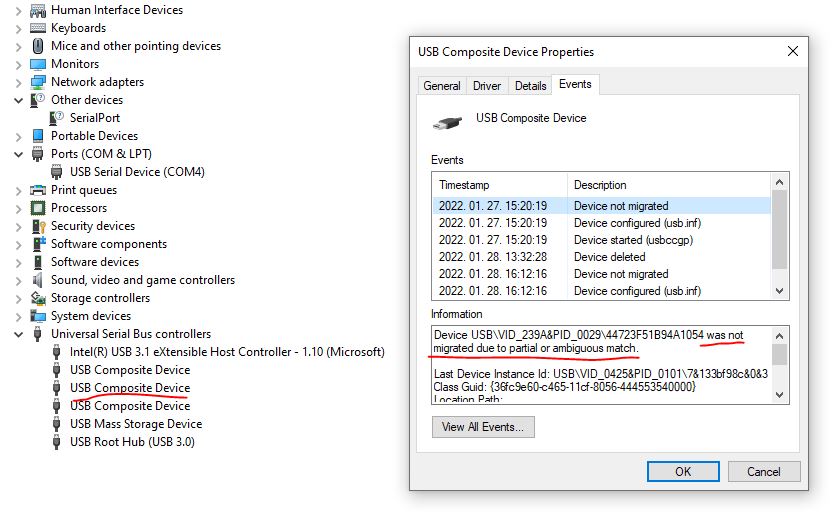
By the way this is what I see in DFU mode at driver:
At least the WisBlock is working. Only Windows has a problems to install the drivers.
This requires further installation is pointing to an incomplete installation of the driver.
Can you try
If not, you can try to the above shown method to manually install/update the driver manually
Unfortunately as soon as I unplug WisBlock from USB USB Serial Device driver (COM7) disappears only to appear again when I plug in the board and click the microswitch twice. I figured that I have deleted the driver when the board was plugged in, then pulled out, plugged back, nothing changed, again when I clicked microswitch twice the same USB USB Serial Device driver (COM7) appeared. So I tried to manually update it, but I have no idea to what I should update it. I have googled extensively what *.inf file to use here, but could not find anything that could make it work.
This might also be interesting, thank you in advance for checking it out: